github.com/erebe/wstunnel @v666.6.6
Chat with this repoWhat it actually does AI analysis from the code graph — generated when you open this
README


Summary
Description
Most of the time when you are using a public network, you are behind some kind of firewall or proxy. One of their purpose is to constrain you to only use certain kind of protocols and consult only a subset of the web. Nowadays, the most widespread protocol is http and is de facto allowed by third party equipment.
Wstunnel uses the websocket protocol which is compatible with http in order to bypass firewalls and proxies. Wstunnel allows you to tunnel whatever traffic you want and access whatever resources/site you need.
My inspiration came from this project but as I don't want to install npm and nodejs to use this tool, I remade it in ~~Haskell~~ Rust and improved it.
What to expect:
- Good error messages and debug information
- Static forward and reverse tunneling (TCP, UDP, Unix socket)
- Dynamic tunneling (Socks5 proxy and Transparent Proxy)
- Support for http proxy (when behind one)
- Support for tls/https server with certificates auto-reload (with embedded self-signed certificate, or your own)
- Support IPv6
- Standalone binaries (so just cp it where you want) here
Note
v7.0.0 is a complete rewrite of wstunnel in Rust and is not compatible with previous version. Previous code in Haskell can be found on branch https://github.com/erebe/wstunnel/tree/haskell
What to expect from previous version: * More throughput and less jitter due to Haskell GC. Most of you will not care, as it was performant enough already. But you can now saturate a gigabit ethernet card with a single connection * Command line is more homogeneous/has better UX. All tunnel can be specified multiple times * Tunnel protocol tries to look like normal traffic, to avoid being flagged * Support of reverse tunneling * New bug, it is a rewrite (╯'□')╯︵ ┻━┻ ¯\(ツ)/¯ * Mainly for me to ease the maintenance of the project. I don't do a lot of haskell nowadays and it was harder for me to keep maintening the project over time, as I get lost in touch of the Haskell ecosystem and new release. * Armv7 build (aka raspberry pi), as new version of GHC (Haskell compiler) dropped its support
Command line
Use the websockets protocol to tunnel {TCP,UDP} traffic
wsTunnelClient <---> wsTunnelServer <---> RemoteHost
Use secure connection (wss://) to bypass proxies

Client:
Usage: wstunnel client [OPTIONS] <ws[s]://wstunnel.server.com[:port]>

Arguments:
  <ws[s]://wstunnel.server.com[:port]>  Address of the wstunnel server
                                        Example: With TLS wss://wstunnel.example.com or without ws://wstunnel.example.com

Options:
  -L, --local-to-remote <{tcp,udp,socks5,stdio,unix}://[BIND:]PORT:HOST:PORT>
          Listen on local and forwards traffic from remote. Can be specified multiple times
          examples:
          'tcp://1212:google.com:443'      =>       listen locally on tcp on port 1212 and forward to google.com on port 443

          'udp://1212:1.1.1.1:53'          =>       listen locally on udp on port 1212 and forward to cloudflare dns 1.1.1.1 on port 53
          'udp://1212:1.1.1.1:53?timeout_sec=10'    timeout_sec on udp force close the tunnel after 10sec. Set it to 0 to disable the timeout [default: 30]

          'socks5://[::1]:1212'            =>       listen locally with socks5 on port 1212 and forward dynamically requested tunnel

          'tproxy+tcp://[::1]:1212'        =>       listen locally on tcp on port 1212 as a *transparent proxy* and forward dynamically requested tunnel
          'tproxy+udp://[::1]:1212?timeout_sec=10'  listen locally on udp on port 1212 as a *transparent proxy* and forward dynamically requested tunnel
                                                    linux only and requires sudo/CAP_NET_ADMIN

          'stdio://google.com:443'         =>       listen for data from stdio, mainly for `ssh -o ProxyCommand="wstunnel client -L stdio://%h:%p

          'unix:///tmp/wstunnel.sock:g.com:443' =>  listen for data from unix socket of path /tmp/wstunnel.sock and forward to g.com:443
ws://localhost:8080" my-server`
  -R, --remote-to-local <{tcp,udp,socks5,unix}://[BIND:]PORT:HOST:PORT>
          Listen on remote and forwards traffic from local. Can be specified multiple times.
          examples:
          'tcp://1212:google.com:443'      =>     listen on server for incoming tcp cnx on port 1212 and forward to google.com on port 443 from local machine
          'udp://1212:1.1.1.1:53'          =>     listen on server for incoming udp on port 1212 and forward to cloudflare dns 1.1.1.1 on port 53 from local machine
          'socks5://[::1]:1212'            =>     listen on server for incoming socks5 request on port 1212 and forward dynamically request from local machine
          'unix://wstunnel.sock:g.com:443' =>     listen on server for incoming data from unix socket of path wstunnel.sock and forward to g.com:443 from local machine
      --socket-so-mark <INT>
          (linux only) Mark network packet with SO_MARK sockoption with the specified value.
          You need to use {root, sudo, capabilities} to run wstunnel when using this option
  -c, --connection-min-idle <INT>
          Client will maintain a pool of open connection to the server, in order to speed up the connection process.
          This option set the maximum number of connection that will be kept open.
          This is useful if you plan to create/destroy a lot of tunnel (i.e: with socks5 to navigate with a browser)
          It will avoid the latency of doing tcp + tls handshake with the server [default: 0]
      --tls-sni-override <DOMAIN_NAME>
          Domain name that will be use as SNI during TLS handshake
          Warning: If you are behind a CDN (i.e: Cloudflare) you must set this domain also in the http HOST header.
                   or it will be flagged as fishy and your request rejected
      --tls-verify-certificate
          Enable TLS certificate verification.
          Disabled by default. The client will happily connect to any server with self signed certificate.
  -p, --http-proxy <http://USER:PASS@HOST:PORT>
          If set, will use this http proxy to connect to the server
      --http-upgrade-path-prefix <HTTP_UPGRADE_PATH_PREFIX>
          Use a specific prefix that will show up in the http path during the upgrade request.
          Useful if you need to route requests server side but don't have vhosts [default: morille]
      --http-upgrade-credentials <USER[:PASS]>
          Pass authorization header with basic auth credentials during the upgrade request.
          If you need more customization, you can use the http_headers option.
      --websocket-ping-frequency-sec <seconds>
          Frequency at which the client will send websocket ping to the server. [default: 30]
      --websocket-mask-frame
          Enable the masking of websocket frames. Default is false
          Enable this option only if you use unsecure (non TLS) websocket server and you see some issues. Otherwise, it is just overhead.
  -H, --http-headers <HEADER_NAME: HEADER_VALUE>
          Send custom headers in the upgrade request
          Can be specified multiple time
  -h, --help
          Print help

Server:
Usage: wstunnel server [OPTIONS] <ws[s]://0.0.0.0[:port]>

Arguments:
  <ws[s]://0.0.0.0[:port]>  Address of the wstunnel server to bind to
                            Example: With TLS wss://0.0.0.0:8080 or without ws://[::]:8080

Options:
      --socket-so-mark <INT>
          (linux only) Mark network packet with SO_MARK sockoption with the specified value.
          You need to use {root, sudo, capabilities} to run wstunnel when using this option
      --websocket-ping-frequency-sec <seconds>
          Frequency at which the server will send websocket ping to client.
      --websocket-mask-frame
          Enable the masking of websocket frames. Default is false
          Enable this option only if you use unsecure (non TLS) websocket server and you see some issues. Otherwise, it is just overhead.
      --restrict-to <DEST:PORT>
          Server will only accept connection from the specified tunnel information.
          Can be specified multiple time
          Example: --restrict-to "google.com:443" --restrict-to "localhost:22"
      --dns-resolver <DNS_RESOLVER>
          Dns resolver to use to lookup ips of domain name
          This option is not going to work if you use transparent proxy
          Can be specified multiple time
          Example:
           dns://1.1.1.1 for using udp
           dns+https://1.1.1.1 for using dns over HTTPS
           dns+tls://8.8.8.8 for using dns over TLS
          To use libc resolver, use
           system://0.0.0.0
  -r, --restrict-http-upgrade-path-prefix <RESTRICT_HTTP_UPGRADE_PATH_PREFIX>
          Server will only accept connection from if this specific path prefix is used during websocket upgrade.
          Useful if you specify in the client a custom path prefix and you want the server to only allow this one.
          The path prefix act as a secret to authenticate clients
          Disabled by default. Accept all path prefix. Can be specified multiple time
      --tls-certificate <FILE_PATH>
          [Optional] Use custom certificate (pem) instead of the default embedded self signed certificate.
          The certificate will be automatically reloaded if it changes
      --tls-private-key <FILE_PATH>
          [Optional] Use a custom tls key (pem, ec, rsa) that the server will use instead of the default embedded one
          The private key will be automatically reloaded if it changes
  -h, --help
          Print help
Release
Static binaries are available in release section
docker image are available at https://github.com/erebe/wstunnel/pkgs/container/wstunnel
docker pull ghcr.io/erebe/wstunnel:latest
Examples
- Understand command line syntax
- Simplest one with socks5 - Good for browsing internet
- Proxy SSH
- Bypass a corporate proxy
- Proxy Wireguard traffic
- Proxy easily any traffic with transparent proxy (linux only)
- Reverse tunneling
- How to secure access of your wstunnel server
- Maximize your stealthiness/Make your traffic discrete
Understand command line syntax
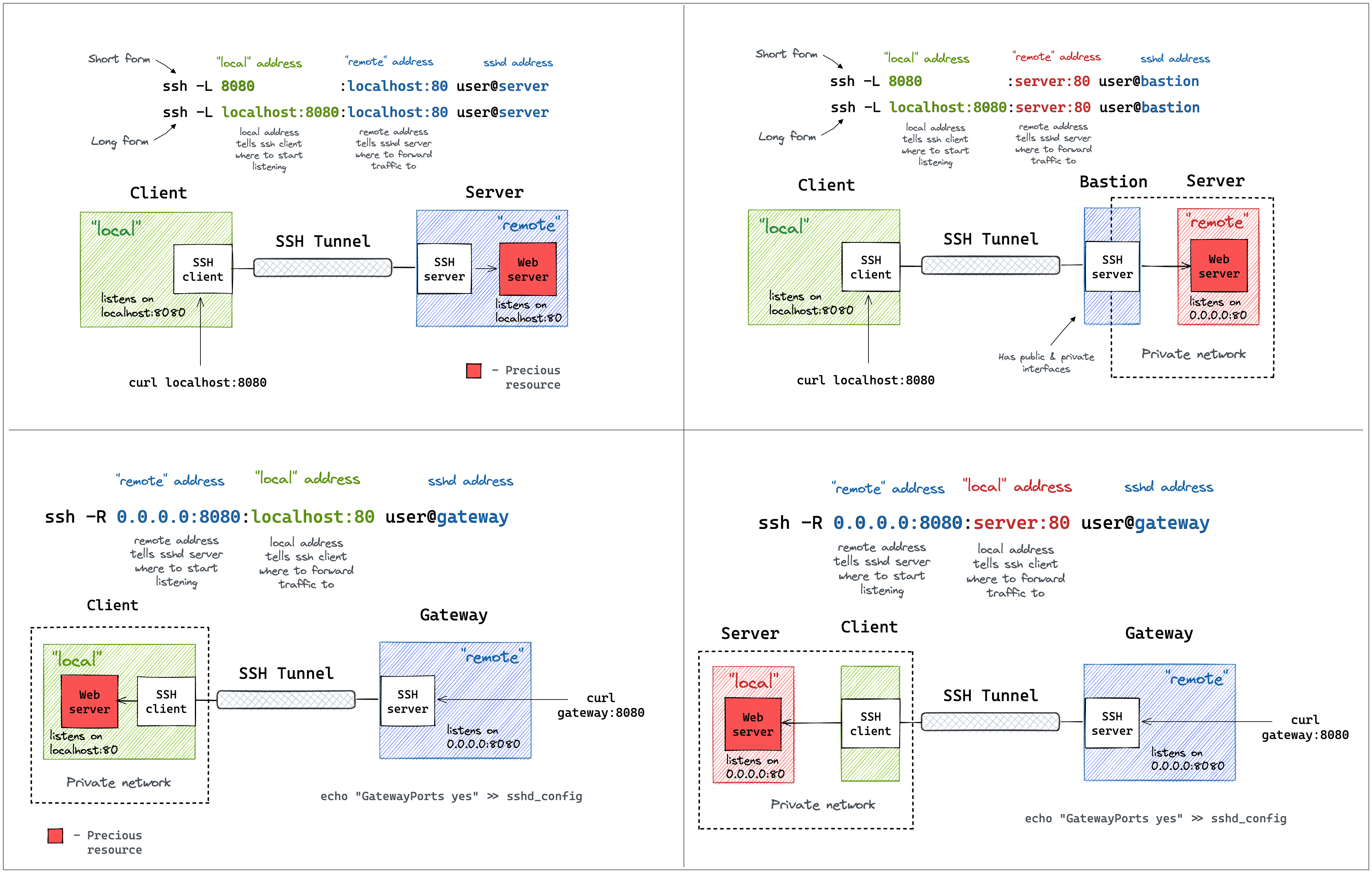
Wstunnel command line mimic ssh tunnel syntax.
You can take reference to this article, or this diagram to understand
Simplest one
On your remote host, start the wstunnel's server by typing this command in your terminal
wstunnel server wss://[::]:8080
This will create a websocket server listening on any interface on port 8080. On the client side use this command to forward traffic through the websocket tunnel
wstunnel client -L socks5://127.0.0.1:8888 --connection-min-idle 5 wss://myRemoteHost:8080
This command will create a socks5 server listening on port 8888 of the loopback interface and will forward traffic dynamically.
connection-min-idle 10 is going an optimization to create a pool of 10 connection connected to the server, to speed-up the establishement of new tunnels.
With firefox you can setup a proxy using this tunnel, by setting in networking preferences 127.0.0.1:8888 and selecting socks5 proxy.
Be sure to check the option Proxy DNS when using SOCKS v5 for the server to resolve DNS name and not your local machine.
or with curl
curl -x socks5h://127.0.0.1:8888 http://google.com/
#Please note h after the 5, it is to avoid curl resolving DNS name locally
As proxy command for SSH
You can specify stdio as source port on the client side if you wish to use wstunnel as part of a proxy command for ssh
ssh -o ProxyCommand="wstunnel client -L stdio://%h:%p ws://myRemoteHost:8080" my-server
When behind a corporate proxy
An other useful example is when you want to bypass an http proxy (a corporate proxy for example) The most reliable way to do it is to use wstunnel as described below
Start your wstunnel server with tls activated
wstunnel server wss://[::]:443 --restrict-to 127.0.0.1:22
The server will listen on any interface using port 443 (https) and restrict traffic to be forwarded only to the ssh daemon.
Be aware that the server will use self signed certificate with weak cryptographic algorithm. It was made in order to add the least possible overhead while still being compliant with tls.
Do not rely on wstunnel to protect your privacy, if it is one of your concerns, you should only forwards traffic that is already secure by design (ie: https or vpn traffic)
Now on the client side start the client with
wstunnel client -L tcp://9999:127.0.0.1:22 -p http://mycorporateproxy:8080 wss://myRemoteHost:443
It will start a tcp server on port 9999 that will contact the corporate proxy, negotiate a tls connection with the remote host and forward traffic to the ssh daemon on the remote host.
You may now access your server from your local machine on ssh by using
ssh -p 9999 login@127.0.0.1
Wireguard and wstunnel
You have
Extension points exported contracts — how you extend this code
Core symbols most depended-on inside this repo
Shape
Languages
Modules by API surface
For agents
$ claude mcp add wstunnel \
  -- python -m otcore.mcp_server <graph>