github.com/enricozb/intuitive @v0.6.1
Chat with this repoWhat it actually does AI analysis from the code graph — generated when you open this
README
Intuitive
docs.rs Documentation
Intuitive is a component-based library for creating text-based user interfaces (TUIs) easily.
It is heavily inspired by React and SwiftUI, containing features that resemble functional components, hooks, and a (mostly) declarative DSL.
Refer to the Getting Started documentation for a detailed guide on how to get started with Intuitive. Alternatively, head over to the examples directory to see some demo applications.
Design
The main focus of Intuitive is to simplify the implementation of section-based TUIs, such as lazygit's, even at the slight expense of performance. Intuitive attempts to make it easy to write reusable TUI components that - encapsulate logic around handling state and key events - have complex layouts - are easy to read
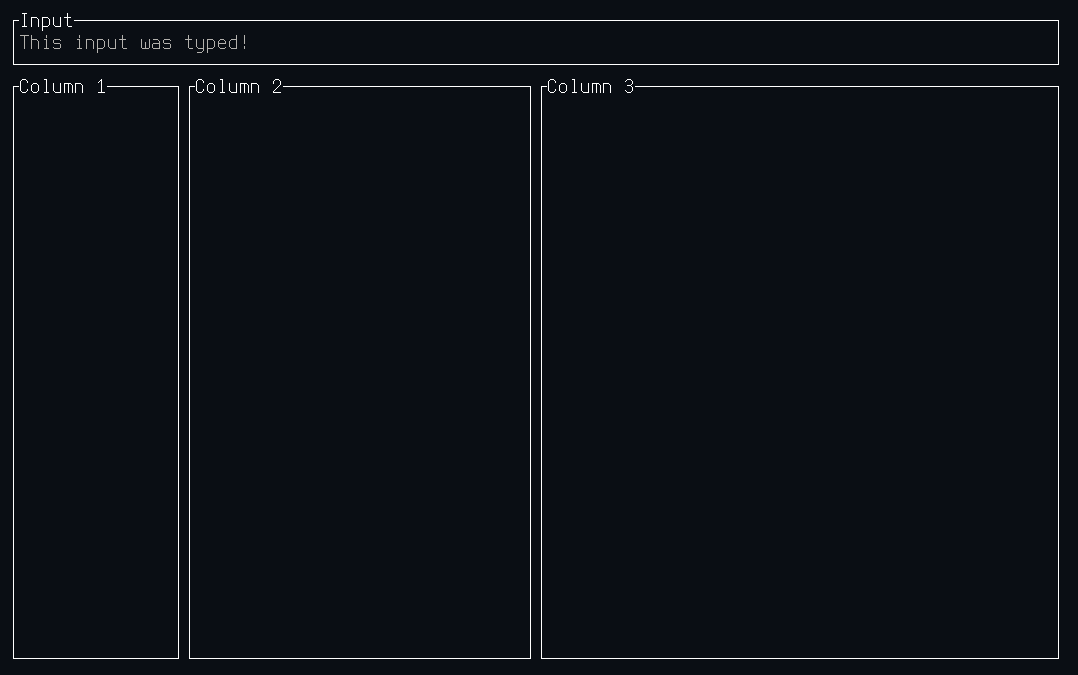
For example, a complex layout with an input box:
use intuitive::{
  component,
  components::{stack::Flex::*, HStack, Section, Text, VStack},
  error::Result,
  on_key, render,
  state::use_state,
  terminal::Terminal,
};

#[component(Root)]
fn render() {
  let text = use_state(|| String::new());

  let on_key = on_key! { [text]
    KeyEvent { code: Char(c), .. } => text.mutate(|text| text.push(c)),
    KeyEvent { code: Backspace, .. } => text.mutate(|text| text.pop()),
    KeyEvent { code: Esc, .. } => event::quit(),
  };

  render! {
    VStack(flex: [Block(3), Grow(1)], on_key) {
      Section(title: "Input") {
        Text(text: text.get())
      }

      HStack(flex: [1, 2, 3]) {
        Section(title: "Column 1")
        Section(title: "Column 2")
        Section(title: "Column 3")
      }
    }
  }
}

fn main() -> Result<()> {
  Terminal::new(Root::new())?.run()
}
And the output would look like this:
Disclaimer
Intuitive is closer to a proof-of-concept than to a crate that's ready for prime-time use. There may also be some bugs in the library of components, please raise an issue if you find any. Furthermore, since a large and complex application has yet to be built using Intuitive, it is not a guarantee that it does not have some major flaw making such development difficult.
Extension points exported contracts — how you extend this code
Element (Interface)Core symbols most depended-on inside this repo
cloneShape
Languages
Modules by API surface
For agents
$ claude mcp add intuitive \
  -- python -m otcore.mcp_server <graph>