github.com/elesiuta/picosnitch @v2.1.2
Chat with this repoWhat it actually does AI analysis from the code graph — generated when you open this
README
Picosnitch
- 🔔 Receive notifications whenever a new program connects to the network, or when it's modified
- 📈 Monitors your bandwidth, breaking down traffic by executable, hash, parent, domain, port, or user over time
- 🌍 Web and terminal interfaces with GeoIP lookups for each connection (IP Geolocation by DB-IP)
- 🛡️ Can optionally check hashes or executables using VirusTotal
- 🚀 Executable hashes are cached based on device + inode for improved performance
- 🐳 Detects applications running inside containers, multiple versions of the same app are differentiated based on their hash
- 🕵️ Uses BPF for accurate, low overhead bandwidth monitoring and fanotify to watch executables for modification
- 👨👦 Since applications can call others to send/receive data for them, the parent and grandparent executables (with hashes) are also logged for each connection
- 🧰 Pragmatic and minimalist design focusing on accurate detection with clear and reliable error reporting when it isn't possible
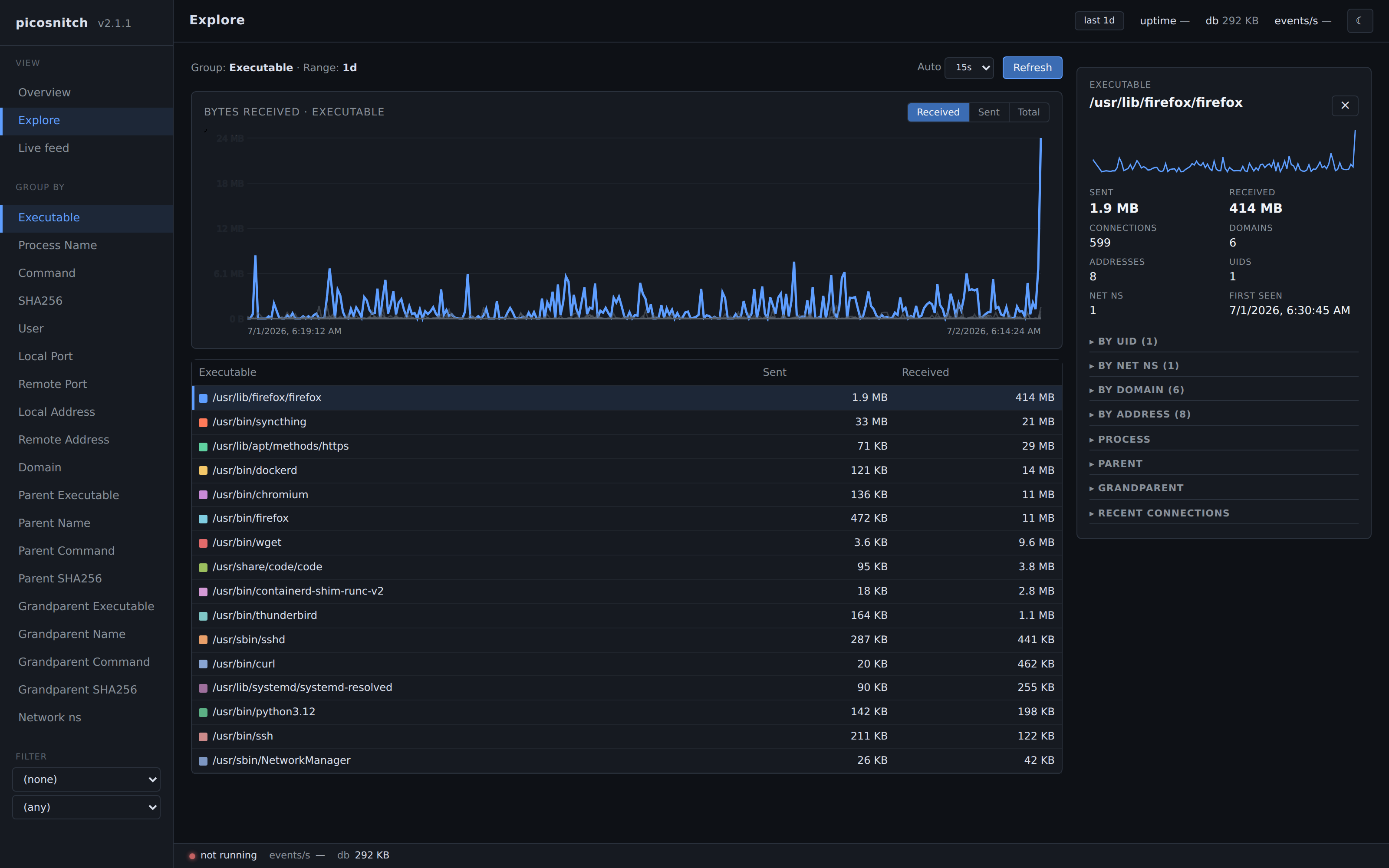 picosnitch webui
browse and chart past connections
picosnitch webui
browse and chart past connections
|
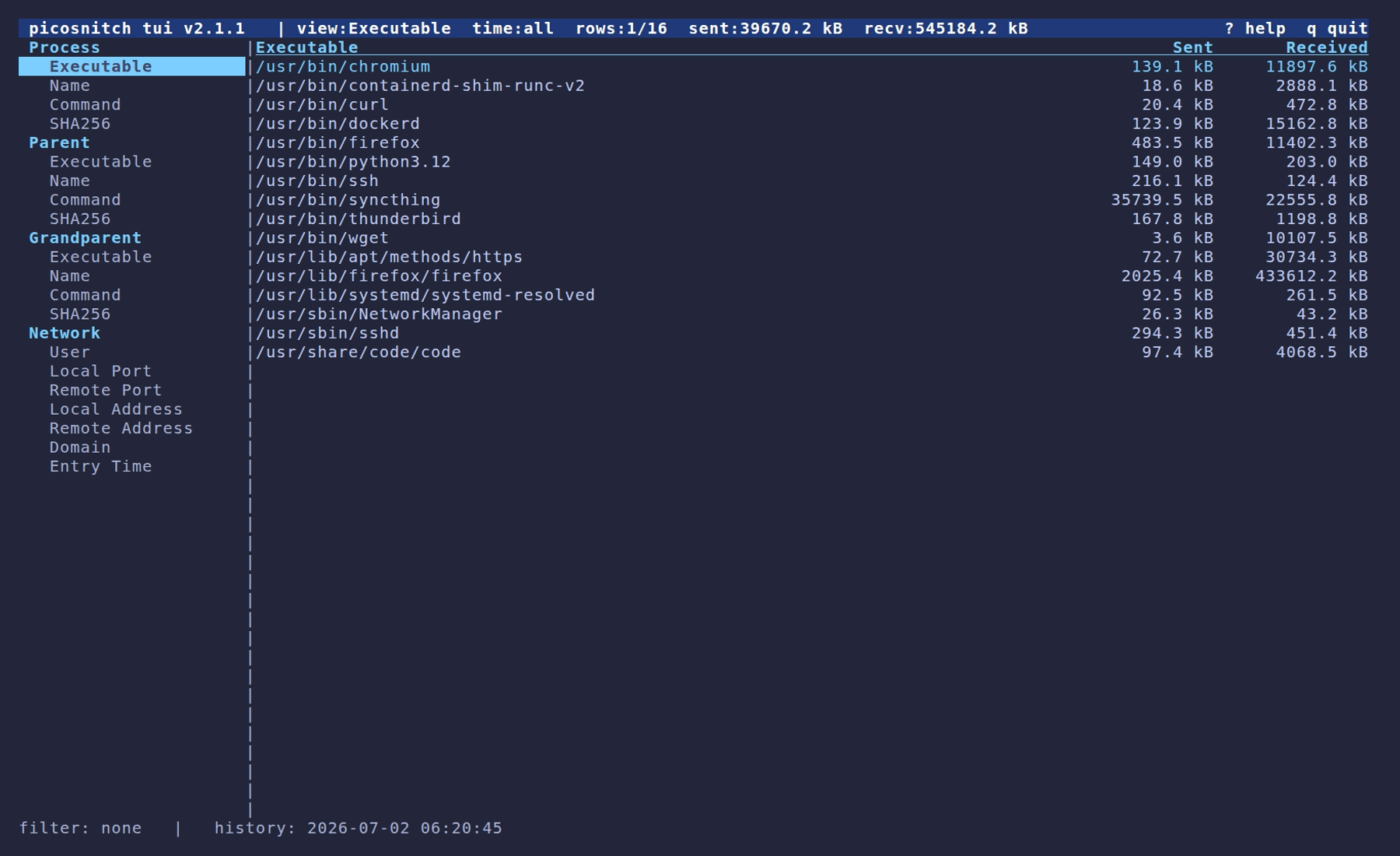 picosnitch tui
browse past connections in a terminal
picosnitch tui
browse past connections in a terminal
|
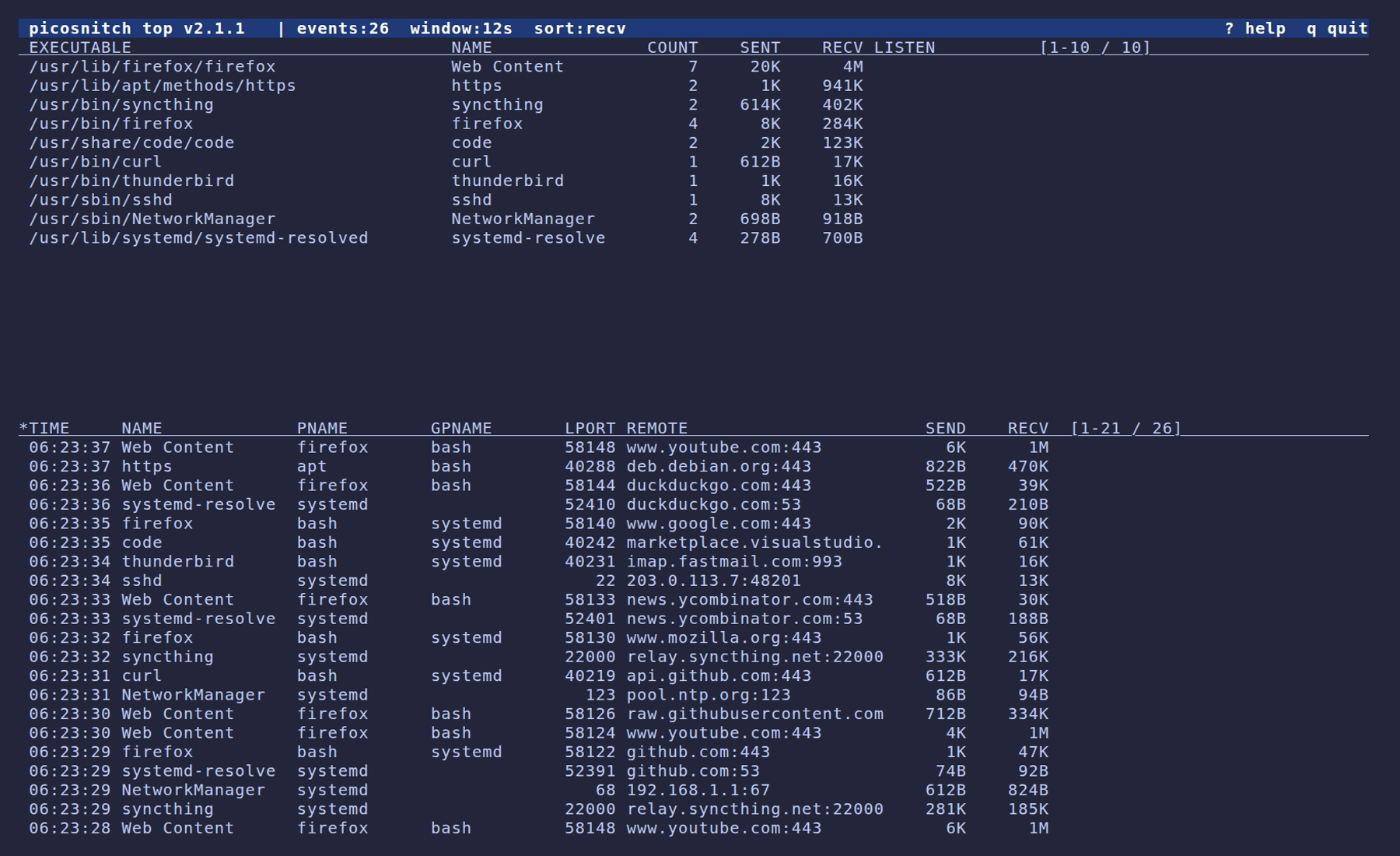 picosnitch top
live event feed
picosnitch top
live event feed
|
More screenshots and short demo videos in the picosnitch screenshots gallery.
Installation

The recommended install is a system-wide pipx install. It works on every Linux distribution with Python >= 3.12 and a kernel new enough to run modern libbpf CO-RE programs.
sudo pipx install picosnitch --global
sudo picosnitch systemd
sudo systemctl enable --now picosnitch
- requires
pipx>= 1.5.0 (this is when the--globalflag was added); see pipx installation if you don't already have it sudo picosnitch systemdwrites/usr/lib/systemd/system/picosnitch.service- install with
sudo pipx install 'picosnitch[sql]' --globalfor optional MariaDB / MySQL / PostgreSQL drivers for remote logging
Usage
- Run/enable the daemon
sudo systemctl enable|disable picosnitch: autostart on rebootsudo systemctl start|stop|restart picosnitch: daemon lifecycle- or without systemd:
sudo picosnitch start|stop|restart - or to keep it in the foreground:
sudo picosnitch start-no-daemon picosnitch webui: web UI for browsing past connections- visit http://localhost:5100; override with the
PICOSNITCH_HOST/PICOSNITCH_PORTenvironment variables picosnitch tui: terminal UI for browsing past connectionssudo picosnitch top: live event feed (requires root to read the daemon's event socket; starts and stops its own daemon if one isn't running)picosnitch status: show daemon pid and systemd service statepicosnitch help: full usage
Configuration
Config is stored at /etc/picosnitch/config.toml and is created with defaults on first run.
[database]
enabled = true                # write connection logs to /var/lib/picosnitch/picosnitch.db (SQLite)
retention_days = 30           # how many days to keep connection logs in the local database
                              # (the remote database is append-only; see [database.remote])
write_limit_seconds = 10      # minimum time between connection log entries
                              # increasing it groups traffic into larger time windows, decreasing
                              # disk writes, time precision, and database size
text_log = false              # also write a CSV connection log to /var/log/picosnitch/conn.log

[database.remote]             # optional: also write connection logs to an external SQL server
                              # used for off-system / tamper-evident logs (see Logging below).
                              # mirrors the local SQLite schema (connections, executables,
                              # domains, addresses).
                              # set `client` to "mariadb", "psycopg", "psycopg2", or "pymysql";
                              # add the rest of the connection parameters as key/value pairs and
                              # optionally `connections_table` to override the default; this lets
                              # multiple hosts share one server with a `connections` table each
                              # while reusing the shared `executables`/`domains`/`addresses`

[data]
owner = "root"                # owner for files in /etc/picosnitch, /var/lib/picosnitch,
group = "root"                # /var/log/picosnitch, and /var/cache/picosnitch
mode = "0644"                 # mode applied to those files (directories add execute bits)

[log]
addresses = true              # log remote addresses for each connection
commands = true               # log command line args for each executable
ports = true                  # log local and remote ports for each connection
ignore_ports = []             # list of ints; matching connections are omitted from the log
ignore_domains = []           # list of strings in reverse-dns notation (matches all subdomains)
ignore_ips = []               # list of IPs/CIDRs (e.g. "192.168.0.0/16")
ignore_sha256 = []            # list of executable sha256 hashes
                              # the process name, executable, and hash are still recorded

[desktop]
user = ""                     # username to send notifications to; defaults to $SUDO_UID
notifications = true          # show desktop notifications via notify-send (libnotify)
geoip_lookup = true           # annotate remote addresses with a country code in the TUI/webui
                              # uses the DB-IP Country Lite CSV cached under /var/cache/picosnitch

[monitoring]
every_exe = false             # check every running executable, not just ones that open sockets
                              # these are treated as "connections" with a port of -1
                              # experimental; expect occasional errors for short-lived processes
                              # if you only want process logs (no hashes), see execsnoop / forkstat
perf_ring_buffer_pages = 256  # power of two pages for the exec and dns perf buffers
                              # network traffic is aggregated in-kernel, it does not use these
                              # only change this if you are seeing missed-event errors
conn_map_max_entries = 65536  # size of the in-kernel per-connection aggregation map
                              # only raise this if you see near-capacity eviction warnings
# rlimit_nofile = 65536       # optional int; raises RLIMIT_NOFILE for the daemon
                              # picosnitch caches one file descriptor per (device, inode);
                              # set this if you see "Too many open files" errors
# st_dev_mask = 0             # optional int; masks the device number reported for opened fds
                              # auto-detected at startup; only set this to override the default
                              # for filesystems that reuse inodes across subvolumes (e.g. btrfs)

[virustotal]
api_key = ""                  # VirusTotal API key, leave blank to disable
file_upload = false           # upload the executable when its hash isn't already known
                              # leave false to only submit hashes
request_limit_seconds = 15    # seconds between requests (free-tier quota)
Restart picosnitch for any configuration changes to take effect.
Logging
Picosnitch splits its on-disk state across the FHS directories. All defaults assume the systemd unit (the unit also creates these on first start).
| Path | Contents |
|---|---|
/etc/picosnitch/config.toml |
configuration |
/var/lib/picosnitch/picosnitch.db |
SQLite connection log (read by picosnitch tui and picosnitch webui) |
/var/lib/picosnitch/state.json |
known executables + sha256 hashes, used to decide when to notify |
/var/log/picosnitch/exe.log |
history of new-executable notifications |
/var/log/picosnitch/error.log |
errors (also surfaced as desktop notifications) |
/var/log/picosnitch/conn.log |
optional CSV connection log (enable with [database].text_log = true) |
/var/cache/picosnitch/ |
DB-IP Country Lite database, refreshed monthly |
/run/picosnitch/picosnitch.pid |
pid file (world-readable, used by picosnitch status) |
/run/picosnitch/events.sock |
live event socket consumed by picosnitch top |
[database.remote] can be used to additionally ship every connection to a MariaDB, MySQL, or PostgreSQL server. It mirrors the local SQLite schema (connections, executables, domains, addresses); only the connections table name can be overridden (via connections_table), which lets multiple hosts share one server with a connections table each while reusing the shared reference tables. Picosnitch only ever issues INSERT against the remote (no retention, no garbage collection), so it is intended for keeping an off-system copy of your logs; grant INSERT only to prevent an adversary on the monitored host from deleting picosnitch's off-system logs.
conn.log is a CSV with these fields (commas, newlines, and NUL characters are stripped from values): entry time, sent bytes, received bytes, event count, executable path, process name, cmdline, sha256, parent executable, parent name, parent cmdline, parent sha256, grandparent executable, grandparent name, grandparent cmdline, grandparent sha256, user id, address family, protocol, local port, remote port, local address, remote address, domain, network namespace.
Entries in error.log are usually triggered by an unusually large burst of new processes or connections, by extremely short-lived processes that exit before picosnitch can open a file descriptor to them, or by suspending the system while a new executable is being hashed. Unexpected entries are worth investigating, since picosnitch is designed to surface an error whenever a process slips past its normal observation path.
Limitations
- Picosnitch is a userspace daemon. A program with sufficient privileges can alter picosnitch or its logs, or fall back to communication channels invisible to the kernel. Use
[database.remote]for an off-system copy of the connection log, and consider corroborating with a separate router/firewall. - Detecting open sockets and the originating process is reliable via BPF, but the executable path and name could be ambiguous or spoofed. As a countermeasure picosnitch hashes the executable itself; only the process executable is hashed, so shared libraries, scripts, and runtime extensions are not covered by the hash.
- The device and inode of the opened file descriptor are checked against what the BPF program reported to detect runtime replacement of the executable. Filesystems that reuse inodes across subvolumes (e.g. btrfs) defeat this check and are auto-detected at startup (
st_dev_mask = 0). - For extremely short-lived processes, picosnitch may not be able to open a file descriptor in time to hash the executable. The connection is still logged with everything else picosnitch has, along with an entry in
error.log. - A large influx of new processes can cause missed log entries, since picosnitch preserves system traffic latency rather than blocking to catch up. Such incidents are detected, logged, and notified, and can be mitigated by raising
[monitoring].perf_ring_buffer_pages. A burst of new connections instead fills the in-kernel aggregation map, mitigated by raising[monitoring].conn_map_max_entries.
Core symbols most depended-on inside this repo
$Shape
Languages
Modules by API surface
For agents
$ claude mcp add picosnitch \
  -- python -m otcore.mcp_server <graph>