github.com/e2ebridge/bpmn @v0.2.2
Chat with this repoWhat it actually does AI analysis from the code graph — generated when you open this
README
bpmn
This module executes BPMN 2.0 processes.
BPMN execution is deemed to be a good way to describe process oriented business logic. This is especially true if we have to describe the orchestration and collaboration of service- and UI-interactions. Many of these interactions are asynchronous and event driven making Node.js an ideal candidate for implementing a BPMN engine.
To draw the BPMN file to be executed each BPMN 2.0 compliant tool can be used.
We are working on a simple browser based BPMN 2.0 editor also utilizing Node.js as backend. You may learn more about our efforts and other Node.js packages on http://e2ebridge.com.
The e2e-transaction-logger package can be used optionally. The generated transaction log files enable the E2E Dashboards to provide graphical views of your processes.
Installation
The easiest way to install it is via NPM:
npm install bpmn
If you don't have a compiler on your platform the restify dtrace dependency won't be installed. Just ignore it.
Assumptions
- This package assumes each BPMN 2.0 file is accompanied by an equal named JS file. For example, the directory containing
myprocess.bpmnmust contain alsomyprocess.jsholding the BPMN event handlers. - Each BPMN element name is unique per process. This simplifies live considerably because we can use names instead of IDs simplifying the world for users and developers alike. If this is not the case, an error is thrown while creating the process.
Remarks
Process can be managed or unmanaged. Unmanaged processes are not stored in any way, the developer is responsible of storing the returned process objects to be able to use them later. Process manager allow to create multiple processes and store them during their execution. The managers have functions to retrieve existing processes by id, filter by property or state. Managers will also persist the managed processes if persistency options are set.
Basic Example
These following samples assume that you installed bpmn via npm.
Assume myProcess.bpmn describes the following process
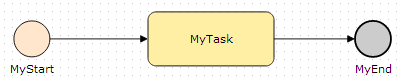
then this process can be created by
var bpmn = require("bpmn");
// We assume there is a myProcess.js besides myProcess.bpmn that contains the handlers
bpmn.createUnmanagedProcess("path/to/myProcess.bpmn", function(err, myProcess){

    // we start the process
    myProcess.triggerEvent("MyStart");

});
The handler file looks like:
exports.MyStart = function(data, done) {
    // called after the start event arrived at MyStart
    done(data);
};

exports.MyTask = function(data, done) {
    // called at the beginning of MyTask
    done(data);
};

exports.MyTaskDone = function(data, done) {
    // Called after the process has been notified that the task has been finished
    // by invoking myProcess.taskDone("MyTask").
    // Note: <task name> + "Done" handler are only called for
    // user tasks, manual task, and unspecified tasks
    done(data);
};

exports.MyEnd = function(data, done) {
    // Called after MyEnd has been reached
    done(data);
};
Processes can also be created from an xml string instead of file. In this case the handler can be an object or a javascript string that would be parsed.
bpmn.createUnmanagedProcessFromXML("<definitions ... </definitions>", "exports.MyStart = ...", function(err, myProcess){

    // we start the process
    myProcess.triggerEvent("MyStart");

});
If no handler is defined, the default handler is being called. This handler can also be specified in the handler file by:
/**
 * @param {String} eventType Possible types are: "activityFinishedEvent", "callHandler"
 * @param {String?} currentFlowObjectName The current activity or event
 * @param {String} handlerName
 * @param {String} reason Possible reasons:
 *                          - no handler given
 *                          - process is not in a state to handle the incoming event
 *                          - the event is not defined in the process
 *                          - the current state cannot be left because there are no outgoing flows
 */
exports.defaultEventHandler = function(eventType, currentFlowObjectName, handlerName, reason, done) {
    // Called, if no handler could be invoked.
    done(data);
};
If the default handler is not specified the default default event handler is being called which just logs a message to stdout.
Besides the default event handler, it is also possible to specify a default error handler:
exports.defaultErrorHandler = function(error, done) {
    // Called if errors are thrown in the event handlers
    done();
};
Sometimes it is useful to call handlers before or after each activity, task, or catch event. To do this specify
exports.onBeginHandler = function(currentFlowObjectName, data, done) {
    // do something
    done(data);
};
exports.onEndHandler = function(currentFlowObjectName, data, done) {
    // do something
    done(data);
};
Handler Context (this)
Each handler is called in the context of the current process. More formally: this is bound to BPMNProcessClient. This object offers the following interface to the current process instance:
taskDone(taskName, data): notify the process that a task has been done. This triggers calling the event handler:taskName+ "Done"triggerEvent(eventName, data): send an event to the processgetState(): get the state of the current process. The state object isBPMNProcessState.getHistory(): get the history of the current process. Basically a list of all visited activities and events encapsulated inBPMNProcessHistorysetProperty(name, value): set a process property. This property is also persisted together with the process. The value is a valid JS data object. That is, we do not persist functions.getProperty(name): get property.getParentProcess(): if this process has been called by acallActivityactivity, this call returns aBPMNProcessClientinstance of the calling process. Otherwise it returnsnull.getParticipantByName(participantName): if this process collaborates with other processes (see section Collaboration Processes), this call returns aBPMNProcessClientinstance of a participating process instance having the nameparticipantName. This allows to send for example an event to a participating process by this.getParticipantName("Another process").triggerEvent("my event");
Handler Names
The handler names are derived by replacing all not allowed JS characters by '_'. For example, "My decision?" becomes My_decision_. The bpmn module exports mapName2HandlerName(bpmnName) that can be invoked to get the handler name for a given BPMN name.
Exclusive Gateways (Decisions)
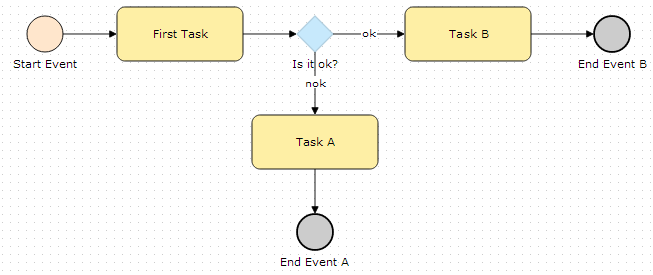
If the following process has to be implemented, we have to provide three handlers for the exclusive gateway:
exports.Is_it_ok_ = function(data, done) {
    // called after arriving at "Is it ok?"
    done(data);
};

exports.Is_it_ok_$ok = function(data) {
    // has to return true or false
    // the name of the sequence flow follows after "$".
    // if there is no name, an error is thrown
    return true;
};

exports.Is_it_ok_$nok = function(data) {
    // has to return true or false
    // the name of the sequence flow follows after "$".
    // if there is no name, an error is thrown
    return false;
};
Note:
For each outgoing transition we have a condition handler that hast to evaluate synchronously. So if backend data are required, fetch them in the gateway callback.
Furthermore, BPMN does not specify the order of evaluating the flow conditions, so the implementer has to make sure, that only one operation returns true. Additionally, we ignore the condition expression. We consider this as part of the implementation.
Timer Events
Boundary Timer Events
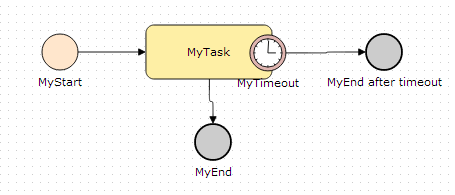
Boundary timer events are timeouts on the activity they are attached to. To implement timeouts use two handlers:
exports.MyTimeout$getTimeout = function(data, done) {
    // called when arriving on "MyTask"
    // should return timeout in ms.
    return 1000;
};

exports.MyTimeout = function(data, done) {
    // called if the timeout triggers
    done(data);
};
Intermediate Timer Events
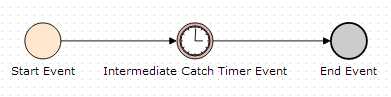
Intermediate catch timer events are used to stop the process for a given time. If the timer event occurs, the process proceeds. The implementation is very similar to boundary timer events:
exports.MyTimeout$getTimeout = function(data, done) {
    // called when arriving on "Intermediate Catch Timer Event"
    // should return wait time in ms.
    return 10000;
};

exports.Intermediate_Catch_Timer_Event = function(data, done) {
    // called if the timeout triggers
    done(data);
};
Collaborations
BPMN also supports collaborating processes as depicted below.
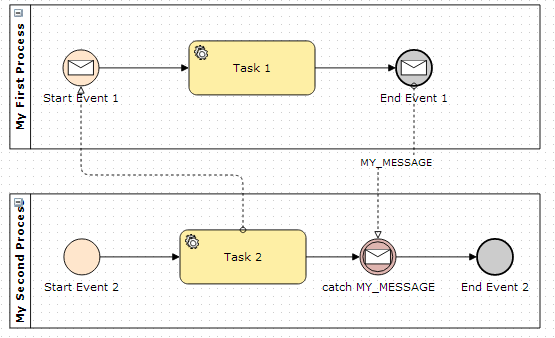
These processes must be created together:
// create collaborating processes
bpmn.createUnmanagedCollaboratingProcesses("my/collaboration/example.bpmn", function(err, collaboratingProcesses){

    // start the second process
    var secondProcess = collaboratingProcesses[1];
    secondProcess.triggerEvent("Start Event 2");

});
The collaboration of the processes is then implemented in the handlers. For example, it is possible to get a partner process by name and then send an event to this process. This is frequently done to start the partner process:
exports.Task_2 = function(data, done) {
    // after arriving ot "Task 2" we start process 1
    var partnerProcess = this.getParticipantByName("My First Process");
    partnerProcess.triggerEvent("Start Event 1");
    done(data);
};
However, another option is to get all outgoing message flows and send a message along these flows. In the current example we have exactly one flow, so sending the message is done by:
exports.End_Event_1 = function(data, done) {
    // after reaching the end of process 1, we send a message
    var messageFlows = this.getOutgoingMessageFlows("End Event 1");
    this.sendMessage(messageFlows[0], {gugus: "blah"});
    done(data);
};
Collaborating processes can also be created from strings using createUnmanagedCollaboratingProcessesFromXML(bpmnXML, handler, callback).
Note: all task and event names must be unique
Logging
By default, only errors are logged. However, it is easy to change the log level:
var logLevels = require('bpmn').logLevels;

myProcess.setLogLevel(logLevels.debug);
It is also possible to use log level strings instead of the log level enumeration:
myProcess.setLogLevel("debug");
Or within a handler:
this.setLogLevel("trace");
By default, logs are written to the console and ./process.log. Of course, this can be changed. For details see the section Log Transports.
The supported log levels are:
- none: switches logging off
- error (default): Errors, error handler calls, and default event handler calls are logged
- trace: process actions are logged: sendMessage, triggerEvent, callHandler, callHandlerDone, taskDone, catchBoundaryEvent
- debug: internal process actions are logged, such as putTokenAt, tokenArrivedAt, doneSaving, etc.
- silly, verbose, info, warn: these levels are reserved for further use but not yet implemented:
Log Transports
We use winston as log library. This allows as to define different ways of storing our logs by defining so called winston transports (for details see here). The default transports used by this library are
transports: [
        new (winston.transports.Console)({
            colorize: true
        }),
        new (winston.transports.File)({
            level: 'verbose',
            filename: './process.log',
            maxsize: 64 * 1024 * 1024,
            maxFiles: 100,
            timestamp: function() {
                return Date.now();
            }
        })
    ]
However, these transports can be overridden or completely new transports can be added. For example, the following code snippet adds a file transport used for errors, max size of one megabyte, and not writing timestamps:
var winston = require('winston');
myProcess.addLogTransport(winston.transports.File,
    {
        level: 'error',
        filename: "my/log/file.log",
        maxsize: 1024 * 1024,
        timestamp: false
    }
);
Note: the directory containing the log file must exist, otherwise an error is thrown.
Of course, transports can be removed as well, e.g.:
bpmnProcess.removeLogTransport(winston.transports.File);
Managing processes
Process managers are used to create multiple processes using the same definitions and find them back later.
var manager = new bpmn.ProcessManager();

manager.addBpmnFilePath("path/to/myProcess.bpmn");

manager.createProcess("myId", function(err, myProcess){

    // we start the process
    myProcess.triggerEvent("MyStart");

});
If the process id is already used an error is returned.
If the manager have multiple bpmn definitions a descriptor object must be passed to the create function.
manager.createProcess({id: "myId", name: "MyPro