github.com/dschep/ntfy @v2.7.1 sqlite
README
About ntfy


ntfy brings notification to your shell. It can automatically provide
desktop notifications when long running commands finish or it can send
push notifications to your phone when a specific command finishes.
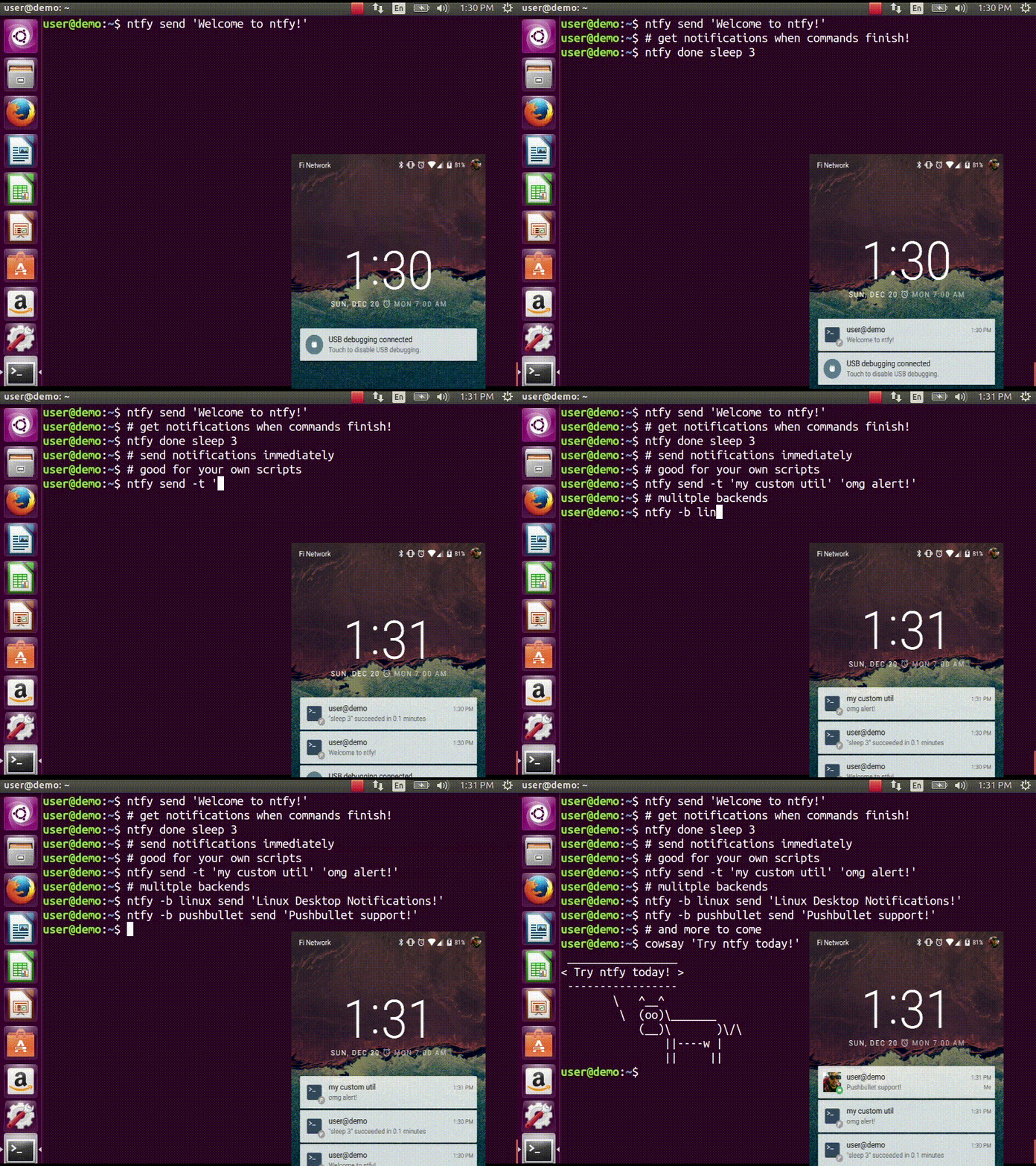
Confused? This video demonstrates some of this functionality:
Quickstart
$ sudo pip install ntfy
$ ntfy send test
# send a notification when the command `sleep 10` finishes
# this sends the message '"sleep 10" succeeded in 0:10 minutes'
$ ntfy done sleep 10
$ ntfy -b pushover -o user_key t0k3n send 'Pushover test!'
$ ntfy -t 'ntfy' send "Here's a custom notification title!"
$ echo -e 'backends: ["pushover"]\npushover: {"user_key": "t0k3n"}' > ~/.ntfy.yml
$ ntfy send "Pushover via config file!"
$ ntfy done --pid 6379  # pid extra
$ ntfy send ":tada: ntfy supports emoji! :100:"  # emoji extra
# Enable shell integration
$ echo 'eval "$(ntfy shell-integration)"' >> ~/.bashrc
Install
The install technique in the quickstart is the suggested method of
installation. It can be installed in a virtualenv, but with some
caveats: Linux notifications require --system-site-packages for the
virtualenv and OS X notifications don\'t work at all.
:penguin: NOTE: Linux Desktop Notifications require Python DBUS bindings. See here for more info.
Shell integration
ntfy has support for automatically sending notifications when long
running commands finish in bash and zsh. In bash it emulates zsh\'s
preexec and precmd functionality with
rcaloras/bash-preexec. To
enable it add the following to your .bashrc or .zshrc:
eval "$(ntfy shell-integration)"
By default it will only send notifications for commands lasting longer
than 10 seconds and if the terminal is focused. Terminal focus works on
X11(Linux) and with Terminal.app and iTerm2 on MacOS. Both options can
be configured via the --longer-than and --foreground-too options.
To avoid unnecessary notifications when running interactive programs,
programs listed in AUTO_NTFY_DONE_IGNORE don\'t generate
notifications. For example:
export AUTO_NTFY_DONE_IGNORE="vim screen meld"
Extras
ntfy has a few features that require extra dependencies.
: - ntfy done -p $PID requires installing as
pip install ntfy[pid]
- emoji support requires
installing as pip install ntfy[emoji]
- XMPP support requires installing as
pip install ntfy[xmpp]
- Telegram support requires installing as
pip install ntfy[telegram]
- Instapush support requires installing
as pip install ntfy[instapush]
- Slack support requires installing as
pip install ntfy[slack]
- Slack Incoming webhook - simpler slack
implementation that doesn\'t have additional dependencies
- Rocket.Chat support requires installing
as pip install ntfy[rocketchat]
To install multiple extras, separate with commas: e.g.,
pip install ntfy[pid,emoji].
Configuring ntfy
ntfy is configured with a YAML file stored at ~/.ntfy.yml or in
standard platform specific locations:
- Linux -
~/.config/ntfy/ntfy.yml - macOS -
~/Library/Application Support/ntfy/ntfy.yml - Windows -
C:\Users\<User>\AppData\Local\dschep\ntfy.yml
Backends
The backends key specifies what backends to use by default. Each backend has its own configuration, stored in a key of its own name. For example:
---
backends:
    - pushover
pushover:
    user_key: hunter2
pushbullet:
    access_token: hunter2
simplepush:
    key: hunter2
slack:
    token: slacktoken
    recipient: "#slackchannel"
xmpp:
     jid: "user@gmail.com"
     password: "xxxx"
     mtype: "chat"
     recipient: "me@jit.si"
If you want mulitple configs for the same backend type, you can specify any name and then specify the backend with a backend key. For example:
---
pushover:
    user_key: hunter2
cellphone:
    backend: pushover
    user_key: hunter2
See the backends below for available backends and options. As of v2.6.0
ntfy also supports 3rd party backends
Pushover - pushover
Required parameters:
: - user_key
Optional parameters:
: - sound
- priority
- expire
- retry
- callback
- api_token - use your own application token
- device - target a device, if omitted, notification is sent to
all devices
- url
- url_title
- html
Pushbullet - pushbullet
Required parameter:
: - access_token - Your Pushbullet access token, created at
https://www.pushbullet.com/#settings/account
Optional parameters:
: - device_iden - a device identifier, if omited, notification is
sent to all devices
- email - send notification to pushbullet user with the
specified email or send an email if they aren\'t a pushullet
user
Simplepush - simplepush
Required parameter:
: - key - Your Simplepush key, created by installing the Android
App (no registration required) at https://simplepush.io
Optional parameters:
: - event - sets ringtone and vibration pattern for incoming
notifications (can be defined in the simplepush app)
XMPP - xmpp
Requires parameters:
: - jid
- password
- recipient
Optional parameters
: - hostname (if not from jid)
- port
- path_to_certs
- mtype
Requires extras, install like this: pip install ntfy[xmpp].
To verify the SSL certificates offered by a server: path_to_certs = \"path/to/ca/cert\"
Without dnspython library installed, you will need to specify the server hostname if it doesn\'t match the jid.
Specify port if other than 5222. NOTE: Ignored without specified hostname
NOTE: Google Hangouts doesn\'t support XMPP since 2017
Telegram - telegram
Requires extras, install like this: pip install ntfy[telegram].
Requires ntfy to be installed as ntfy[telegram]. This backend is
configured the first time you will try to use it:
ntfy -b telegram send "Telegram configured for ntfy".
Pushjet - pushjet
Required parameter:
: - secret - The Pushjet service secret token, created with
http://docs.pushjet.io/docs/creating-a-new-service
Optional parameters:
: -
    `endpoint` - custom Pushjet API endpoint

    :   (defaults to <https://api.pushjet.io>)

-   `level` - The importance level from 1(low) to 5(high)

-   `link`
Notifico - notifico
Required parameter:
: -
    `webhook` - The webhook link, created at <https://n.tkte.ch/>

    :   (choose `Plain Text` service when creating the webhook)
Slack - slack
Requires extras, install like this: pip install ntfy[slack].
Required parameter:
: - token - The Slack service secret token, either a legacy user
token created at
https://api.slack.com/custom-integrations/legacy-tokens or a
token obtained by creating an app at
https://api.slack.com/apps?new_app=1 with chat:write:bot
scope and linking it to a workspace.
- recipient - The Slack channel or user to send notifications
to. If you use the # symbol the message is send to a Slack
channel and if you use the @ symbol the message is send to a
Slack user.
Slack Incoming Webhook - slack_webhook
\~\~\~\~\~\~\~\~\~\~\~\~\~\~\~\~\~\~\~\~\~\~\~\~\~\~\~\~\~\~\~\~\~\~\~\~\~\~\~\~\~\~\~\~\~\~\~\~\~
Required parameter: * url - the URL of the incoming webhook *
user - The Slack channel or user to send notifications to
Instapush - insta
Requires extras, install like this pip install ntfy[instapush].
Instapush does not support notification title. It sends template-driven notifications, so you have to setup you events on the dashboard first. The backend is called insta due to homonymy with the instapush python wrapper
Required parameters:
: - appid - The application id
- secret - The application secret
- event_name - The instapush event to be used
- trackers - The array of trakers to use
Note on trackers: Trackers are placeholders for events (a sort of notification template). If you defined more than one tracker in your event you\'ll have to provide more messages. At the moment, the only way to do so is to separate each message with a colon (:) character. You can also escape the separator character: Example:
ntfy -b insta send "message1:message2"
ntfy -b insta send "message1:message2\:with\:colons"
Prowl - prowl
Optional parameters:
: - api_key
- provider_key
- priority
- url
Linux Desktop Notifications - linux
Works via [dbus]{.title-ref}, works with most DEs like Gnome, KDE, XFCE and with libnotify.
The following dependecies should be installed.
$ sudo apt install python-dbus # on ubuntu/debian
You will need to install some font that supports emojis (in Debian [fonts-symbola]{.title-ref} or Gentoo [media-fonts/symbola]{.title-ref}).
Optional parameters:
: - icon - Specifies path to the notification icon, empty string
for no icon.
- urgency - Specifies the urgency level (low, normal, critical).
- transient - Skip the history (exp: the Gnome message tray)
(true, false).
- soundfile - Specifies the notification sound file (e.g.
/usr/share/sounds/notif.wav).
- timeout - Specifies notification expiration time level (-1 -
system default, 0 - never expire).
Windows Desktop Notifications - win32
Uses pywin32.
Mac OS X Notification Center - darwin
Requires ntfy to be installed globally (not in a virtualenv).
System log - systemlog
Uses the syslog core Python module, which is not available on Windows
platforms.
Optional parameters:
: - prio - Syslog priority level. Default is ALERT. Possible
values are:
    -   EMERG
    -   ALERT
    -   CRIT
    -   ERR
    -   WARNING
    -   NOTICE
    -   INFO
    -   DEBUG

-   `facility` - Syslog facility. Default is `LOCAL5`. Possible
    values are:

    -   KERN
    -   USER
    -   MAIL
    -   DAEMON
    -   AUTH
    -   LPR
    -   NEWS
    -   UUCP
    -   CRON
    -   SYSLOG
    -   LOCAL0
    -   LOCAL1
    -   LOCAL2
    -   LOCAL3
    -   LOCAL4
    -   LOCAL5
    -   LOCAL6
    -   LOCAL7

-   `fmt` - Format of the message to be sent to the system logger.
    The title and the message are specified using the following
    placeholders:

    -   `{title}`
    -   `{message}`

    Default is `[{title}] {message}`.
Termux:API - termux
Requires the app to be install from the Play store and the CLI utility
be installed with apt install termux-api.
Pushalot - pushalot
Required parameter:
: - auth_token - Your private Pushalot auth token, found here
https://pushalot.com/manager/authorizations
Optional parameters:
: - source - source of the notification
- ttl - message expire time in minutes (time to live)
- url - URL to include in the notifications
- url_title - visible URL title (ignored if no url specified)
- image - URL of image included in the notifications
- important - mark notifications as important
- silent - mark notifications as silent
Rocket.Chat - rocketchat
Requires extras, install like this: pip install ntfy[rocketchat].
Required parameters:
: - url - URL of your Rocket.Chat i