hub / github.com/drtrang/maven-archetype-springboot
github.com/drtrang/maven-archetype-springboot @v1.0.0
Chat with this repo
117 symbols
215 edges
20 files
49 documented · 42%
● updated 4y agov1.0.0 · 2017-08-10★ 622 open issues
What it actually does AI analysis from the code graph — generated when you open this
loading…
README
Spring Boot Archetype




Spring Boot Archetype 将帮助你快速生成 Spring Boot 项目。
前置条件
特点
- Spring Boot 1.5.6.RELEASE & Jetty
- MyBatis & MyBatis Generator & Mapper & PageHelper
- Druid
- Redisson
- Copiers
- Swagger2
- Lombok
运行
创建项目
mvn archetype:generate -DarchetypeGroupId=com.github.drtrang -DarchetypeArtifactId=maven-archetype-springboot -DarchetypeVersion=1.0.0 -DinteractiveMode=false -DgroupId=$groupId -DartifactId=$artifactId -Dversion=$version -Dpackage=$package
其中 $groupId、$artifactId、$version、$package 为占位符,根据实际情况替换即可。
启动项目
在项目的根路径下执行以下脚本:
mvn spring-boot:run
启动后即可通过浏览器访问该项目,默认端口号为 8080:
http://localhost:8080
项目自带 Swagger2,便于查看文档和调试:
http://localhost:8080/swagger-ui.html

集成 Intellij IDEA
- 新建项目
File > New > Project - 选择 Maven 并勾选
Create from archetype - 点击
Add Archetype按钮 - 填写
GroupId:com.github.drtrang - 填写
ArtifactId:maven-archetype-springboot - 填写
Version:1.0.0 - 点击
OK按钮 - 选择
maven-archetype-springboot:1.0.0并点击Next按钮 - 填写项目属性,创建项目
Note:Add Archetype 步骤只需执行一次,以后可直接选择 maven-archetype-springboot:1.0.0
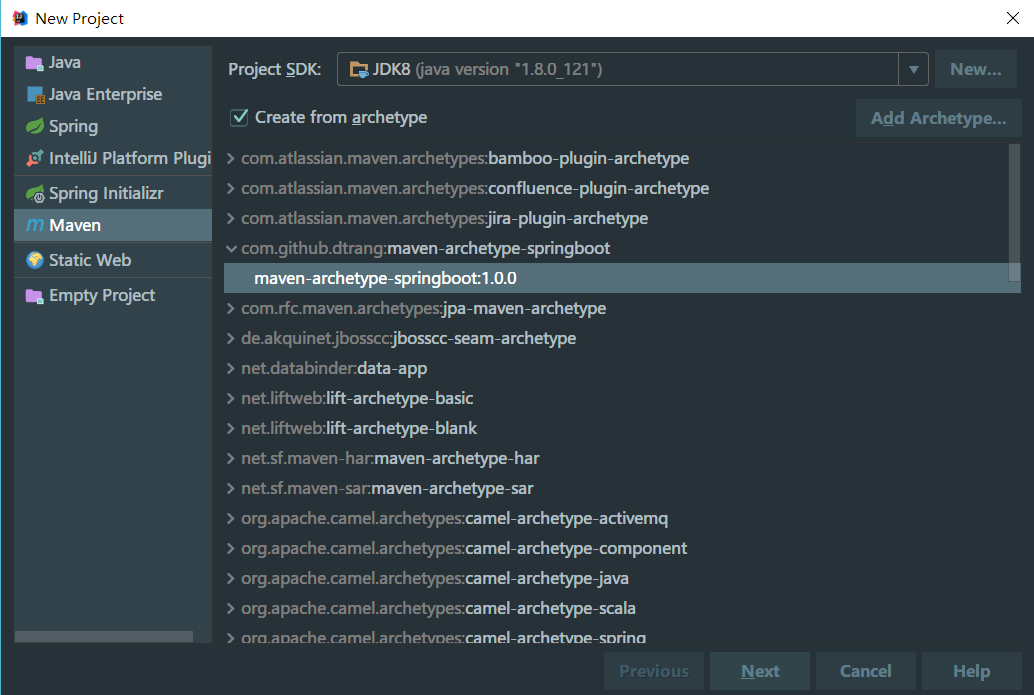
更新记录
TODO
任何意见和建议可以提 Issue,我会酌情加到 Todo List,一般情况一周内迭代完毕。
作者信息
QQ:349096849
Email:donghao.l@hotmail.com
Blog:blog.trang.space
Extension points exported contracts — how you extend this code
BaseService (Interface)
BaseService @author trang [1 implementers]
src/main/resources/archetype-resources/src/main/java/service/BaseService.java
BaseMapper (Interface)
自定义通用 Mapper @param @author trang
src/main/resources/archetype-resources/src/main/java/util/BaseMapper.java
CityService (Interface)
(no doc) [1 implementers]
src/main/resources/archetype-resources/src/main/java/service/CityService.java
CityMapper (Interface)
(no doc)
src/main/resources/archetype-resources/src/main/java/mapper/CityMapper.java
Core symbols most depended-on inside this repo
newMsId
called by 10
src/main/resources/archetype-resources/src/main/java/plugin/SqlMapper.java
hasMappedStatement
called by 10
src/main/resources/archetype-resources/src/main/java/plugin/SqlMapper.java
newUpdateMappedStatement
called by 6
src/main/resources/archetype-resources/src/main/java/plugin/SqlMapper.java
select
called by 6
src/main/resources/archetype-resources/src/main/java/service/BaseService.java
getOne
called by 4
src/main/resources/archetype-resources/src/main/java/plugin/SqlMapper.java
selectList
called by 4
src/main/resources/archetype-resources/src/main/java/plugin/SqlMapper.java
newSelectMappedStatement
called by 4
src/main/resources/archetype-resources/src/main/java/plugin/SqlMapper.java
insert
called by 4
src/main/resources/archetype-resources/src/main/java/service/BaseService.java
Shape
Languages
Java100%
Modules by API surface
src/main/resources/archetype-resources/src/main/java/plugin/SqlMapper.java22 symbols
src/main/resources/archetype-resources/src/main/java/service/impl/BaseServiceImpl.java16 symbols
src/main/resources/archetype-resources/src/main/java/service/BaseService.java16 symbols
src/main/resources/archetype-resources/src/main/java/plugin/SpringContextHolder.java14 symbols
src/main/resources/archetype-resources/src/main/java/util/DateUtils.java8 symbols
src/main/resources/archetype-resources/src/main/java/util/JsonUtils.java7 symbols
src/main/resources/archetype-resources/src/main/java/Application.java5 symbols
src/main/resources/archetype-resources/src/main/java/plugin/GlobalExceptionHandler.java4 symbols
src/main/resources/archetype-resources/src/main/java/config/SpringMvcConfig.java4 symbols
src/main/resources/archetype-resources/src/main/java/util/CsvUtils.java3 symbols
src/main/resources/archetype-resources/src/main/java/controller/CityController.java3 symbols
src/main/resources/archetype-resources/src/main/java/config/Swagger2Config.java3 symbols
For agents
$ claude mcp add maven-archetype-springboot \
  -- python -m otcore.mcp_server <graph>