github.com/drminnaar/react-starter @v3.0.0
Chat with this repoWhat it actually does AI analysis from the code graph — generated when you open this
README

React Starter
A basic template that consists of the essential elements that are required to start building a React (v16.3) application using Webpack (v4).
The template consists of:
- a typcial project layout structure
- babel setup and configuration
- webpack setup and configuration
- eslint setup and configuration
- SCSS setup and configuration
- the main React components to get started
Additionaly, the template provides a development and production webpack configuration.
The template also allows one to include specific plugins as part of build. Please see here for more detail
Developed With
- Node.js 8.11 - Javascript runtime
- React 16.3 - A javascript library for building user interfaces
- Babel 6.26 - A transpiler for javascript
- Webpack 4.x - A module bundler
- SCSS - A css metalanguage
Related Projects
A basic template that consists of the essential elements that are required to start building a Single Page Application using React, React Router, Redux, Bootstrap 4, Sass, and Webpack.
A basic React app that allows one to increase, decrease, or reset a counter
A basic clock that displays the current date and time
A basic timer that will start a countdown based on an input of time in seconds
A basic countdown timer that offers an advanced UI experience
A basic game of guessing a number with varying degrees of difficulty
A basic application that displays a list of movies as a list of cards
A calculator that provides the essential arithmetic operations, an expression builder, and a complete history of all expressions
An app that monitors changes in the Bitcoin Price Index (BPI)
A weather application that displays the current weather, daily forecasts, and hourly forecasts based on your current geolocation
A quote browser and manager that allows one to search famous quotes and save them to a data store.
Getting Started
These instructions will get you a copy of the project up and running on your local machine for development and testing purposes.
Prerequisites
The following software is required to be installed on your system:
- Node 8.x
- Npm 3.x
Type the following commands in the terminal to verify your node and npm versions
bash
  node -v
  npm -v
Install
Follow the following steps to get development environment running.
- Clone 'react-starter' repository from GitHub
bash
  git clone https://github.com/drminnaar/react-starter.git
OR USING SSH
bash
  git clone git@github.com:drminnaar/react-starter.git
- Install node modules
bash
   cd react-starter
   npm install
Build
Build Application
| dev | prod |
|---|---|
| npm run build:dev | npm run build:prod |
Build Application And Watch For Changes
| dev | prod |
|---|---|
| npm run build:dev:watch | npm run build:prod:watch |
Build Application With BundleAnalayzer Plugin Included
| dev | prod |
|---|---|
| npm run build:dev:bundleanalyze | npm run build:prod:bundleanalyze |
After running the above command, a browser window will open displaying an interactive graph resembling the following image:

Run ESlint
Lint Project Using ESLint
bash
  npm run lint
Lint Project Using ESLint, and autofix
bash
  npm run lint:fix
Run
Run Start
This will run the 'serve:dev' npm task
npm start
Run Dev Server
npm run serve:dev
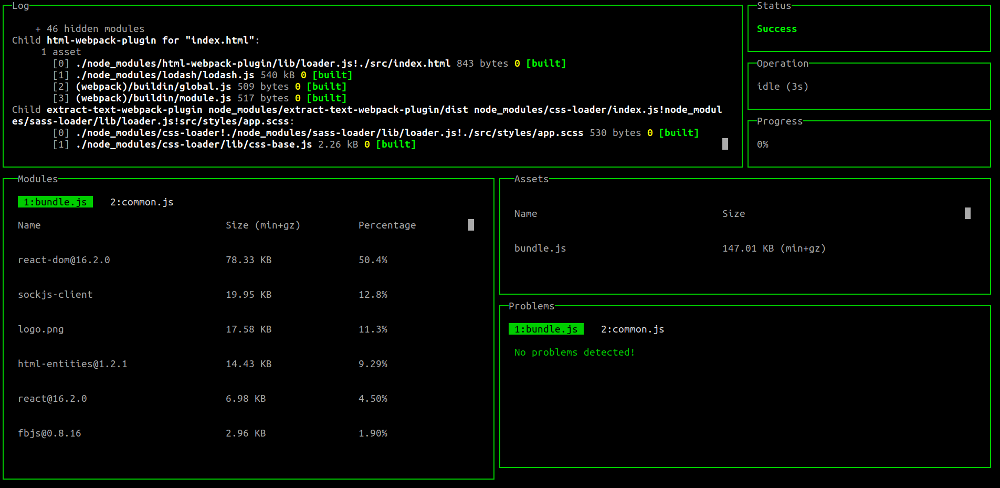
Run Dev Server With Dashboard
npm run serve:dev:dashboard
The above command will display a dashboard view in your console resembling the following image:
Run Prod Server
This command will build application using production settings and start the application using live-server
npm run serve:prod
Versioning
I use SemVer for versioning. For the versions available, see the tags on this repository.
Authors
- Douglas Minnaar - Initial work - drminnaar
Core symbols most depended-on inside this repo
determineAddonsShape
Languages
Modules by API surface
For agents
$ claude mcp add react-starter \
  -- python -m otcore.mcp_server <graph>