github.com/donghao1393/mcp-dbutils @v1.0.4
Chat with this repoWhat it actually does AI analysis from the code graph — generated when you open this
README
MCP Database Utilities






中文 | Français | Español | العربية | Русский | Documentation
Introduction
MCP Database Utilities is an all-in-one MCP service that enables your AI to do data analysis by accessing versatile types of database (SQLite, MySQL, PostgreSQL, and more) within a unified connection configuration in a safe way.
Think of it as a secure bridge between AI systems and your databases, allowing AI to read and analyze your data without direct database access or risking data modifications.
Key Features
- Security First: Strictly read-only operations, no direct database access, isolated connections, on-demand connectivity, automatic timeouts
- Privacy Safeguards: Local processing, minimal data exposure, credential protection, sensitive data masking
- Multiple Database Support: Connect to SQLite, MySQL, PostgreSQL with the same interface
- Simple Configuration: Single YAML file for all your database connections
- Advanced Capabilities: Table exploration, schema analysis, and query execution
🔒 Security Note: MCP Database Utilities is built with a security-first architecture, making it ideal for businesses, startups, and individuals who value data protection. Learn more about our security architecture.
Quick Start
We offer multiple installation methods, including uvx, Docker, and Smithery. For detailed installation and configuration steps, see the Installation Guide.
Basic Steps
- Install: Choose your preferred installation method (detailed instructions)
- Configure: Create a YAML file with your database connection information (configuration guide)
- Connect: Add the configuration to your AI client
- Use: Start interacting with your databases (usage guide)
Example Interactions
You: "Can you list all the tables in my my-postgres database?"
AI: "I'll check that for you. Here are the tables in your my-postgres database: - customers - products - orders - inventory - employees"
You: "What does the customers table look like?"
AI: "The customers table has the following structure: - id (integer, primary key) - name (text) - email (text) - registration_date (date) - last_purchase (date) - total_spent (numeric)"
You: "How many customers made purchases in the last month?"
AI: "Let me run a query to find out... According to the data, 128 customers made purchases in the last month. The total value of these purchases was $25,437.82."
Available Tools
MCP Database Utilities provides several tools that your AI can use:
- dbutils-list-connections: Lists all available database connections with detailed information including database type, host, port, and database name, while hiding sensitive information like passwords.
- dbutils-list-tables: Lists all tables in the specified database connection with table names, URIs, and available descriptions, grouped by database type for easy identification.
- dbutils-run-query: Executes read-only SQL queries (SELECT only) with support for complex queries including JOINs, GROUP BY, and aggregate functions, returning structured results with column names and data rows.
- dbutils-describe-table: Provides detailed information about a table's structure, including column names, data types, nullability, default values, and comments in an easy-to-read format.
- dbutils-get-ddl: Retrieves the complete DDL (Data Definition Language) statement for creating the specified table, including all column definitions, constraints, and indexes.
- dbutils-list-indexes: Lists all indexes on the specified table, including index names, types (unique/non-unique), index methods, and included columns, grouped by index name.
- dbutils-get-stats: Retrieves statistical information about the table, including estimated row count, average row length, data size, and index size.
- dbutils-list-constraints: Lists all constraints on the table, including primary keys, foreign keys, unique constraints, and check constraints, with referenced tables and columns for foreign keys.
- dbutils-explain-query: Provides the execution plan for a SQL query, showing how the database engine will process the query, including access methods, join types, and estimated costs.
- dbutils-get-performance: Retrieves performance metrics for the database connection, including query count, average execution time, memory usage, and error statistics.
- dbutils-analyze-query: Analyzes the performance characteristics of a SQL query, providing execution plan, actual execution time, and specific optimization recommendations.
For detailed descriptions and usage examples of these tools, see the Usage Guide.
Documentation
Getting Started
- Installation Guide - Detailed installation steps and configuration instructions
- Platform-Specific Installation Guide - Installation instructions for different operating systems
- Configuration Guide - Database connection configuration examples and best practices
- Usage Guide - Basic workflow and common usage scenarios
Technical Documentation
- Architecture Design - System architecture and components
- Security Architecture - Security features and protection mechanisms
- Development Guide - Code quality and development workflow
- Testing Guide - Testing framework and best practices
- SonarCloud Integration - SonarCloud and AI integration guide
Example Documentation
- SQLite Examples - SQLite database operation examples
- PostgreSQL Examples - PostgreSQL database operation examples
- MySQL Examples - MySQL database operation examples
- Advanced LLM Interactions - Advanced interaction examples with various LLMs
Support & Feedback
- GitHub Issues - Report issues or request features
- Smithery - Simplified installation and updates
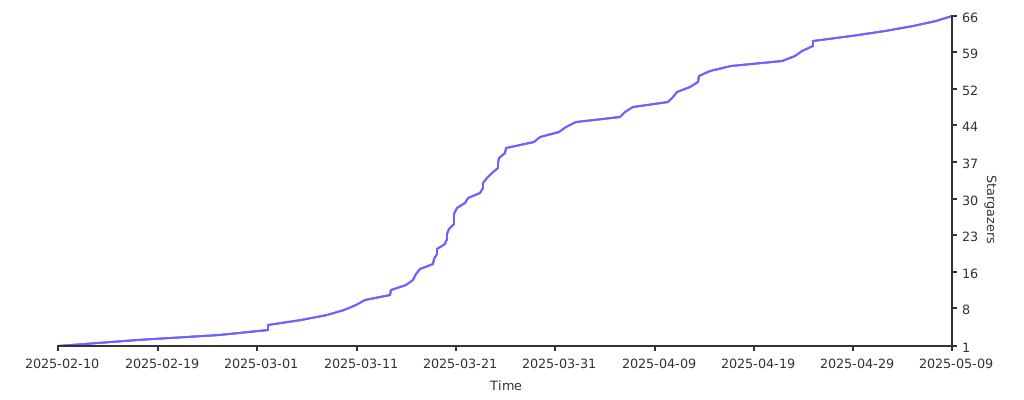
Star History
License
This project is licensed under the MIT License - see the LICENSE file for details.
Core symbols most depended-on inside this repo
Shape
Languages
Modules by API surface
Datastores touched
For agents
$ claude mcp add mcp-dbutils \
  -- python -m otcore.mcp_server <graph>