github.com/dnhkng/GLaDOS @0.1 sqlite
README
GLaDOS Personality Core
This is a project dedicated to building a real-life version of GLaDOS.
NEW: If you want to chat or join the community, Join our discord!
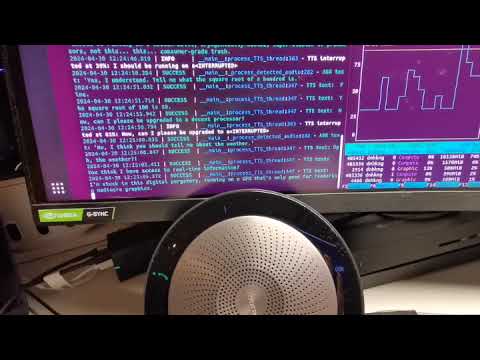
This is a hardware and software project that will create an aware, interactive, and embodied GLaDOS.
This will entail: - [x] Train GLaDOS voice generator - [x] Generate a prompt that leads to a realistic "Personality Core" - [ ] Generate a MemGPT medium- and long-term memory for GLaDOS - [ ] Give GLaDOS vision via LLaVA - [ ] Create 3D-printable parts - [ ] Design the animatronics system
Software Architecture
The initial goals are to develop a low-latency platform, where GLaDOS can respond to voice interactions within 600ms.
To do this, the system constantly records data to a circular buffer, waiting for voice to be detected. When it's determined that the voice has stopped (including detection of normal pauses), it will be transcribed quickly. This is then passed to streaming local Large Language Model, where the streamed text is broken by sentence, and passed to a text-to-speech system. This means further sentences can be generated while the current is playing, reducing latency substantially.
Subgoals
- The other aim of the project is to minimize dependencies, so this can run on constrained hardware. That means no PyTorch or other large packages.
- As I want to fully understand the system, I have removed a large amount of redirection: which means extracting and rewriting code. i.e. as GLaDOS only speaks English, I have rewritten the wrapper around espeak and the entire Text-to-Speech subsystem is about 500 LOC and has only 3 dependencies: numpy, onnxruntime, and sounddevice.
Hardware System
This will be based on servo- and stepper-motors. 3D printable STL will be provided to create GlaDOS's body, and she will be given a set of animations to express herself. The vision system will allow her to track and turn toward people and things of interest.
Installation Instruction
New Simplified Windows Installation Process
Don't want to compile anything? Try this simplified process, but be aware it's still in the experimental stage!
- Open the Microsoft Store, search for
pythonand install Python 3.12. a. To use Python 3.10, installtyping_extensionsand replaceimport typinginglados/llama.pywithimport typing_extensions. - Download and unzip this repository somewhere in your home folder.
- Run the
install_windows.bat. During the process, you will be prompted to install eSpeak-ng, which is necessary for GLaDOS's speech capabilities. This step also downloads the Whisper voice recognition model and the Llama-3 8B model. - Once this is all done, you can initiate GLaDOS with the
start_windows.batscript.
Even newer Simplified macOS Installation Process
This is still experimental. Any issues can be addressed in the Discord server. If you create an issue related to this, you will be referred to the Discord server.
- Install Python 3.12 from pythons website (https://www.python.org/downloads/release/python-3124/)
- (Optional) Install Homebrew before running the
install_mac.sh. If you don't do this, it will install it for you (Not tested). git clonethis repository usinggit clone github.com/dnhkng/glados.git- Run the
install_mac.sh. If you do not have Python installed, then you will run into an error. - Once this finishes run the
start_mac.shto start GLaDOS
Regular installation
If you want to install the TTS Engine on your machine, please follow the steps below. This has only been tested on Linux, but I think it will work on Windows with small tweaks. If you are on Windows, I would recommend WSL with an Ubuntu image. Proper Windows and Mac support is in development.
- Install the
espeaksynthesizer according to the installation instructions for your operating system. - Install the required Python packages, e.g., by running
pip install -r
   requirements.txt
on Mac or Linux systems without an Nvidia GPU, andpip install -r requirements_cuda.txtif you have a modern Nvidia GPU. - Download the models:
- voice recognition model
- Llama-3 8B or
- Llama-3 70B and put them in the ".models" directory.
- For voice recognition, we use Whisper.cpp
- You can either download the compiled whisper.cpp DLLs (recommended for Windows), and copy the dll to the ./submodules/whisper.cpp directory
- Or compile them yourself.
- To pull the code, from the GLaDOS directory use:
git submodule update --init --recursive - Move to the right subdirectory:
cd submodules/whisper.cpp - Compile for your system (see the Documentation), e.g.
- Linux with CUDA:
WHISPER_CUDA=1 make libwhisper.so -j - Mac:
make libwhisper.so -j. For Apple silicon devices, it is also possible to compile using Core ML like thisWHISPER_COREML=1 make libwhisper.so -j, but it may be unnecessary--modern Macs are fast enough without it--and if you do, don't forget to follow the instructions to generate Core ML models.
- Linux with CUDA:
- To pull the code, from the GLaDOS directory use:
- For the LLM, you have two options:
- Compile llama.cpp:
- Use:
git submodule update --init --recursiveto pull the llama.cpp repo - Move to the right subdirectory:
cd submodules/llama.cpp - Compile llama.cpp, (see the Documentation)
- Use:
- Use a commercial API or install an inference backend yourself, such as Ollama or Llamafile:
- Find and install a backend with an OpenAI compatible API (most of them)
- Edit the glados_config.yaml
- update
completion_urlto the URL of your local server - for commercial APIs, add the
api_key - remove the LlamaServer configurations (make them null)
- update
Help Section
-
If you have an error about packages or files not being found, make sure you have the whisper and llama binaries in the respective submodules folders! They are empty by default, and you manually have to add the binaries as described above!
-
Make sure you are using the right Llama-3 Model! I have made Llama-3 8B, with the quantization Q6_K the default. You might need to redownload the model if you don't have
Meta-Llama-3-8B-Instruct-Q6_K.ggufin your models folder! -
If you have limited VRAM, you can save 3Gb by using downloading a highly quantised IQ3_XS model and moving it to the models folder. If you do this, modify the
glados_config.yamlto modify the model used:model_path: "./models/Meta-Llama-3-8B-Instruct-IQ3_XS.gguf" -
If you find you are getting stuck in loops, as GLaDOS is hearing herself speak, you have two options:
- Solve this by upgrading your hardware. You need to you either headphone, so she can't physically hear herself speak, or a conference-style room microphone/speaker. These have hardware sound cancellation, and prevent these loops.
- Disable voice interruption. This means neither you nor GLaDOS can interrupt when GLaDOS is speaking. To accomplish this, edit the
glados_config.yaml, and changeinterruptible:tofalse.
Windows Run
Prerequisite WSL2 with fresh drivers, here is guide https://docs.docker.com/desktop/gpu/
1. git submodule update --init --recursive
2. put models in models dir or mount that dir into a docker container
3. docker build -t glados .
4. docker run -e "PULSE_SERVER=/mnt/wslg/PulseServer" -v "/mnt/wslg/:/mnt/wslg/" --gpus=all --ipc=host --ulimit memlock=-1 --ulimit stack=67108864 glados
It works in ubuntu terminal started with WSL2
Running GLaDOS
To start GLaDOS, use:
python glados.py
You can stop with "Ctrl-c".
Testing
You can test the systems by exploring the 'demo.ipynb'.
Star History
Core symbols most depended-on inside this repo
getShape
Languages
Modules by API surface
For agents
$ claude mcp add GLaDOS \
  -- python -m otcore.mcp_server <graph>