github.com/dlesbre/bibtex-autocomplete @v1.4.3
Chat with this repoWhat it actually does AI analysis from the code graph — generated when you open this
README
Bibtex Autocomplete











bibtex-autocomplete or btac is a simple script to autocomplete BibTeX bibliographies. It reads a BibTeX file and looks online for any additional data to add to each entry. It can quickly generate entries from minimal data (a lone title is often sufficient to generate a full entry). You can also use it to only add specific fields (like DOIs, or ISSN) to a manually curated bib file.
It is designed to be as simple to use as possible: just give it a bib file and let btac work its magic! It combines multiple sources and runs consistency and normalization checks on the added fields (only adds URLs that lead to a valid webpage, DOIs that exist at https://dx.doi.org/, ISSN/ISBN with valid check digits...).
It attempts to complete a BibTeX file by querying the following domains: - openalex.org: ~240 million entries - www.crossref.org: ~150 million entries - arxiv.org: open access archive, ~2.4 million entries - semanticscholar.org: ~215 million entries - unpaywall.org: database of open access articles, ~48 million entries - dblp.org: computer science, ~7 million entries - researchr.org: computer science - inspirehep.net: high-energy physics, ~1.5 million entries
Big thanks to all of them for allowing open, easy and well-documented access to their databases. This project wouldn't be possible without them. You can easily narrow down the list of sources if some aren't relevant using command line options.
Contents
- Demo
- Quick overview
- Installation
- Shell tab completion
- Dependencies
- Usage
- Command line arguments
- Specifying output
- Query filtering
- New field formatting
- Global output formatting
- Optional flags
- Running from python
- Credit and license
Demo
Quick overview
How does it find matches?
btac queries the websites using the entry DOI (if known) or its title. So
entries that don't have one of those two fields will not be completed.
- DOIs are only used if they can be recognized, so the doi field should
contain "10.xxxx/yyyy" or an URL ending with it.
- Titles should be the full title. They are compared excluding case and
punctuation, but titles with missing words will not match.
- If one or more authors are present, entries with no common authors will not
match. Authors are compared using lower case last names only. Be sure to use
one of the correct BibTeX formats for the author field:
bibtex
  author = {First Last and Last, First and First von Last}
(see
https://www.bibtex.com/f/author-field/
for full details)
- If the year is known, entries with different years will also not match.
Disclaimers:
-
There is no guarantee that the script will find matches for your entries, or that the websites will have any data to add to your entries, (or even that the website data is correct).
-
The script is designed to minimize the chance of false positives - that is adding data from another similar-ish entry to your entry. If you find any such false positive please report them using the issue tracker.
How are entries completed?
Once responses from all websites have been found, the script will add fields
by performing a majority vote among the sources. To do so it uses smart
normalization and merging tactics for each field:
- Authors (and editors) match if they have same last names and, if both first
names present, the first name of one is equal/an abbreviation of the other.
Author lists match they have at least one author in common.
- ISSN and ISBN are normalized and have their check digits verified. ISBN are converted
to their 13 digit representation.
- URL and DOI are checked for valid format, and further validated by querying
them online to ensure they exist. DOI are normalized to strip any leading URL
and converted to lowercase.
- Many fields match with abbreviation detection (journal, institution, booktitle,
organization, publisher, school and series). So ACM will match
Association for Computer Machinery.
- Pages are normalized to use -- as separator.
- All other fields are compared excluding case and punctuation.
The script will not overwrite any user given non-empty fields, unless the
-f/--force-overwrite flag is given. If you want to check what fields are
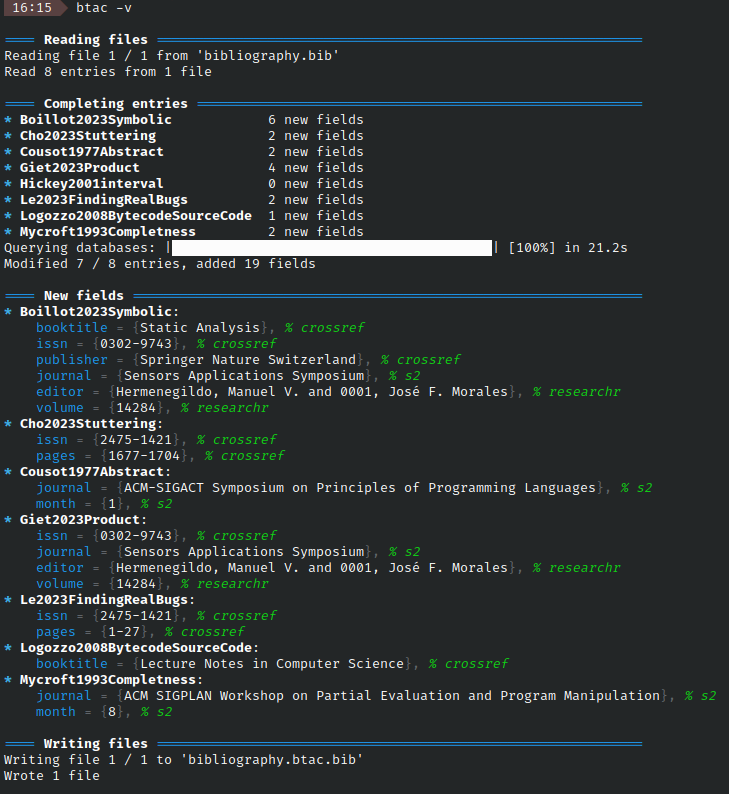
added, you can use -v/--verbose to have them printed to standard output (with
source information), or -p/--prefix to have the new fields be prefixed with
BTAC in the output file.
Installation
Can be installed with pip :
pip install bibtexautocomplete
You should now be able to run the script using either command:
btac --version
python3 -m bibtexautocomplete --version
Note: pip no longer allows installing scripts globally in systems with other
package managers (like most Linux distros). You can install the script locally in
a virtual environment or globally
using pipx:
sudo apt install pipx
pipx install bibtexautocomplete
Shell tab completion
If you want tab based completion for btac in your shell, you must install
the optional argcomplete dependency.
# Either install the package separately
pip install argcomplete
# Or as a btac optional dependency
pip install bibtexautocomplete[tab]
You then need to register the tab auto-completer. On bash/zsh:
- You can activate completion just for this script with
bash
  eval "$(register-python-argcomplete btac)"
For repeated use, I recommend adding this line to your .bashrc or .bash_profile.
- Alternatively, you can activate completion for all python scripts
using argcomplete by running
bash
  activate-global-python-argcomplete
and then restarting your shell
If using another shell than bash/zsh on Linux or MacOS, support is not guaranteed. See github.com/kislyuk/argcomplete/contrib for instructions on getting it working on other shells.
Dependencies
This package has two dependencies (automatically installed by pip) :
- bibtexparser (<2.0.0)
- alive_progress (>= 3.0.0) for the fancy progress bar
It also has an optional dependency, argcomplete for tab based completion. It is installed if you pip install bibtexautocomplete[tab].
Usage
The command line tool can be used as follows:
btac [--flags] <input_files>
Examples :
btac my/db.bib: reads from./my/db.bib, writes to./my/db.btac.bib. A different output file can be specified with-o.btac -i db.bib: reads fromdb.biband overwrites it (inplace flag). Avoid on non backed-up/version-controlled files, I'd hate it if my script corrupted your data.btac folder: reads from all files ending with.bibin folder. Excludes.btac.bibfiles unless they are the only.bibfiles present. Writes tofolder/file.btac.bibunless inplace flag is set.btacwith no inputs is same asbtac ., reads file from current working directorybtac -c doi ...only completes DOI fields, leave others unchangedbtac -v ...verbose mode, pretty prints all new fields when done. See this image for a preview of verbose output.
Note: the parser doesn't preserve format information, so this script will reformat your files. Some formatting options are provided to control output format.
Slow responses: Sometimes due to server traffic, a source DB may take significantly longer
to respond and slow btac.
- You can increase timeout with btac ... -t 60 (60s) or btac ... -t -1 (no timeout)
- You can disable queries to the offender btac ... -Q <website>
- You can try again at another time
Command line arguments
As btac has a lot of option I'd recommend setting up an alias if you use a lot
regularly.
Specifying output
-o --output <file.bib>
Write output to given file. Can be used multiple times when also giving
multiple inputs. Maps inputs to outputs in order. If there are extra inputs,
uses default name (old_name.btac.bib). Ignored in inplace (-i) mode.
For example btac db1.bib db2.bib db3.bib -o out1.bib -o out2.bib reads db1.bib,
db2.bib and db3.bib, and write their outputs to out1.bib, out2.bib
and db3.btac.bib respectively.
-
-i --inplaceModify input files inplace, ignores any specified output files. Avoid on non backed-up/version-controlled files, I'd hate it if my script corrupted your data. -
-O --no-outputdon't write any output files (except the one specified by--dump-data) can be used with-v/--verbosemode to only print a list of changes to the terminal
Query filtering
-q --only-query <site>or-Q --dont-query <site>
Restrict which websites to query from. <site> must be one of: openalex,
crossref, arxiv, s2, unpaywall, dblp, researchr, hep. These arguments
can be used multiple times, for example to only query Crossref and DBLP use
-q crossref -q dblp or
-Q openalex -Q researchr -Q unpaywall -Q arxiv -Q s2 -Q hep
-e --only-entry <id>or-E --exclude-entry <id>
Restrict which entries should be autocompleted. <id> is the entry ID used in
your BibTeX file (e.g. @inproceedings{<id> ... }). These arguments can also
be used multiple times to select only/exclude multiple entries
--sf --start-from <id>
Only complete the entries that come after the given id (inclusive). This is useful when resuming a previously interrupted auto-completion on the same file.
-c --only-complete <field>or-C --dont-complete <field>
Restrict which fields you wish to autocomplete. Field is a BibTeX field (e.g.
author, doi,...). So if you only wish to add missing DOIs use -c doi.
-
-b --filter-fields-by-entrytype <required|optional|all>only add fields that correspond to the given entry type in bibtex's data model. Disabled by default.requiredonly adds required fields,optionaladds required and optional fields, andalladds required, optional and non-standard fields (doi, issn and isbn). A list of required/optional fields by entry type can be found on the tex stackexchange -
-w --overwrite <field>or-W --dont-overwrite <field>
Force overwriting of the selected fields. If using -W author -W journal
your force overwrite of all fields except author and journal. The
default is to override nothing (only complete absent and blank fields).
For a more complex example btac -C doi -w author means complete all fields
save DOI, and only overwrite author fields.
You can also use the -f flag to overwrite everything or the -p flag to add
a prefix to new fields, thus avoiding overwrites.
-m --markand-M --ignore-mark
This is useful to avoid repeated queries if you want to run btac many times
on the same (large) file.
By def
Core symbols most depended-on inside this repo
Shape
Languages
Modules by API surface
For agents
$ claude mcp add bibtex-autocomplete \
  -- python -m otcore.mcp_server <graph>