github.com/devmobasa/wayscriber @v0.9.21
Chat with this repoWhat it actually does AI analysis from the code graph — generated when you open this
README
wayscriber


A ZoomIt-like real-time screen annotation tool for Linux/Wayland, written in Rust.
Docs: https://wayscriber.com/docs/
Screenshots
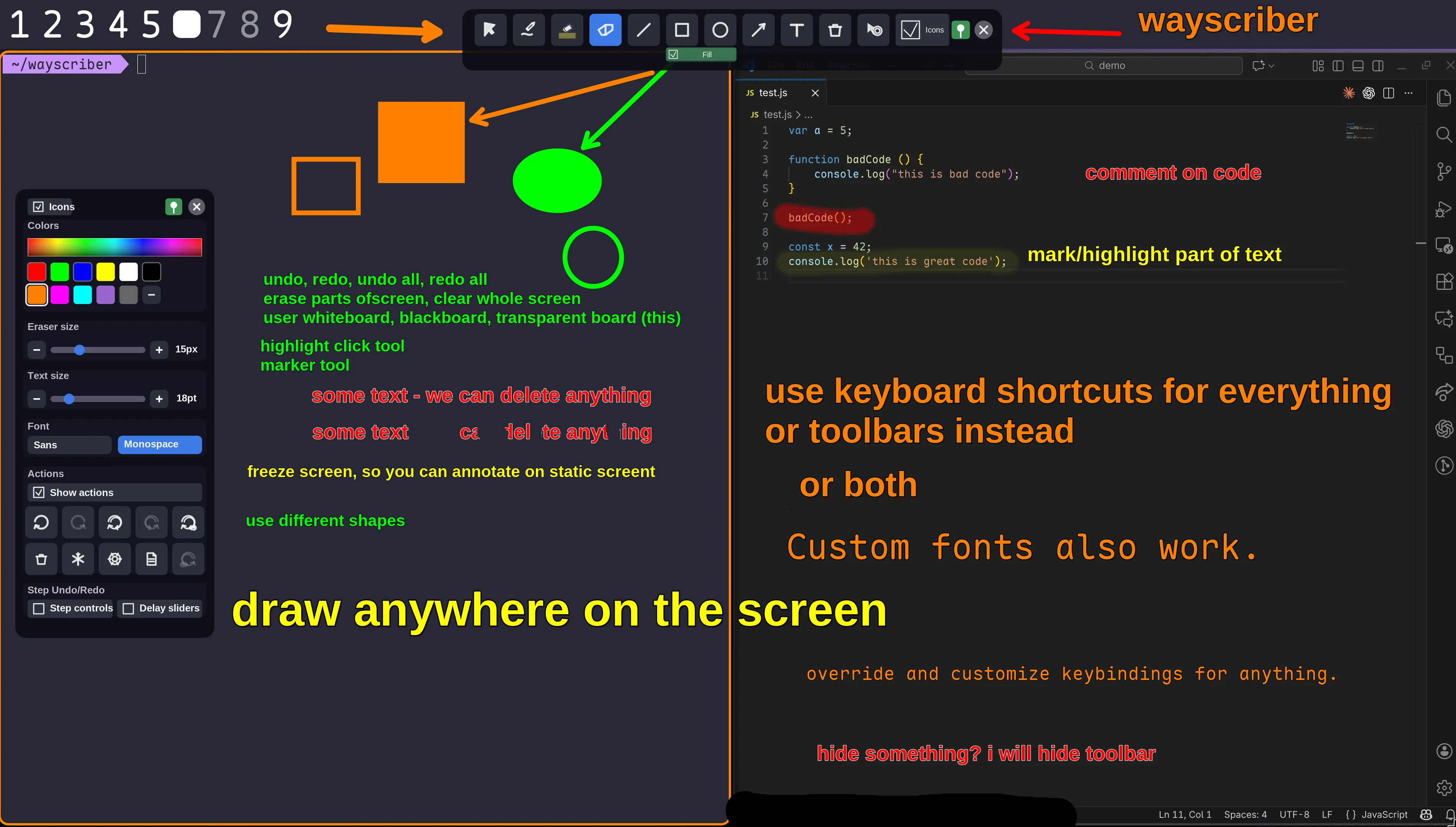
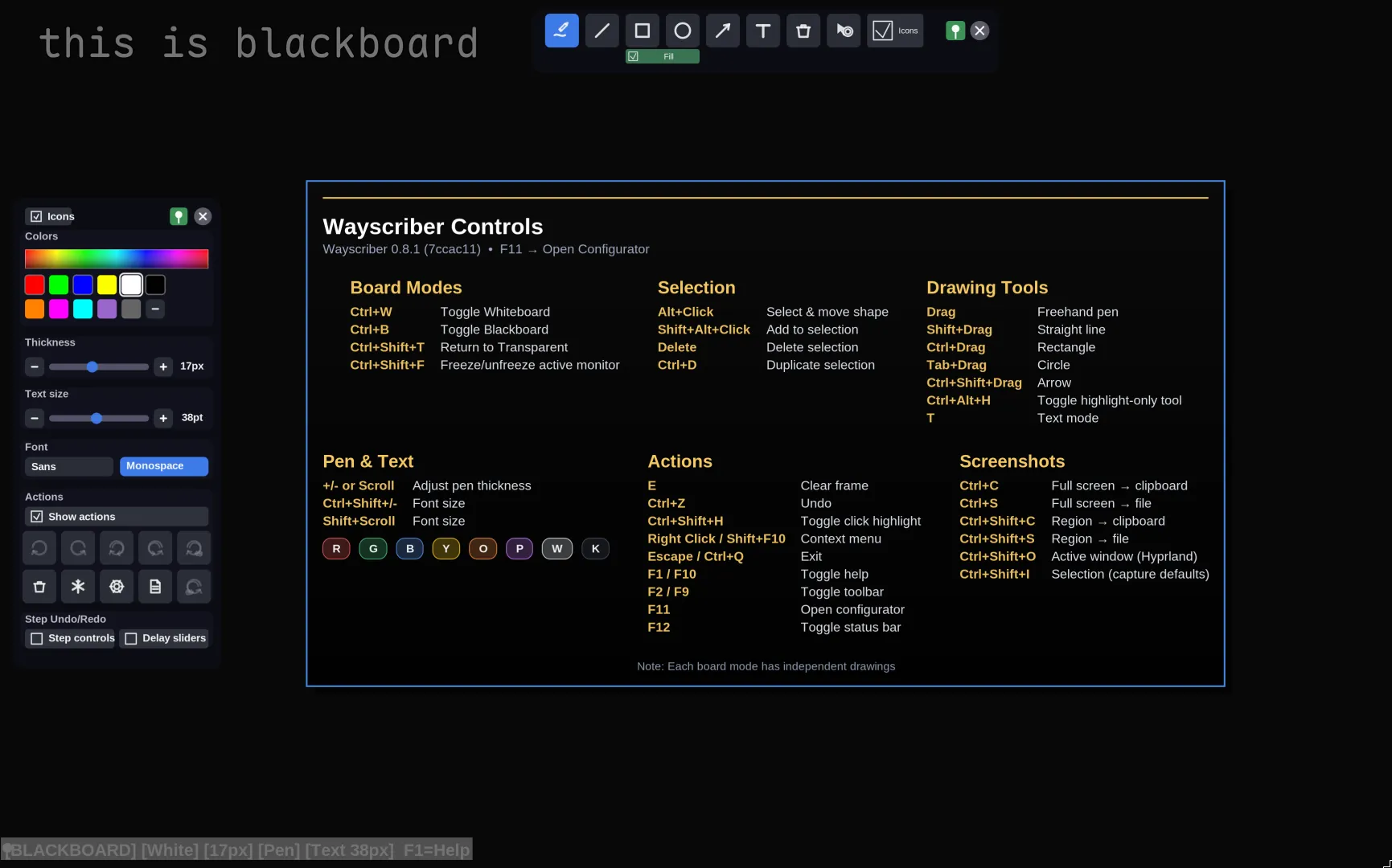
Demo Video
https://github.com/user-attachments/assets/4b5ed159-8d1c-44cb-8fe4-e0f2ea41d818
Table of Contents
- Quick Start
- CLI quick install
- First launch
- Daily daemon setup
- Why wayscriber?
- Features
- Installation
- Pick an install path
- No terminal install (GitHub Releases)
- Debian / Ubuntu (repo - recommended)
- Fedora / RHEL (repo - recommended)
- Arch Linux (AUR)
- NixOS / Nix
- From Source
- Screenshot Tools
- Usage
- Getting Help
- Controls Reference
- Configuration
- Troubleshooting
- Contributing
- Roadmap
- Additional Information
- License & Credits
Quick Start
CLI quick install
Pick the block for your distro. Repo, AUR, and Nix installs are the best default for CLI users because they use the normal system update flow. GitHub .deb/.rpm downloads are one-off installs; use them only when you do not want to add a repo.
Debian and Ubuntu
Also use this path for Linux Mint, Pop!_OS, and other Debian-based distros.
sudo apt update
sudo apt install curl gpg
sudo install -d -m 0755 /usr/share/keyrings
curl -fsSL https://wayscriber.com/apt/WAYSCRIBER-GPG-KEY.asc | gpg --dearmor | sudo tee /usr/share/keyrings/wayscriber.gpg > /dev/null
echo "deb [signed-by=/usr/share/keyrings/wayscriber.gpg] https://wayscriber.com/apt stable main" | sudo tee /etc/apt/sources.list.d/wayscriber.list
sudo apt update
sudo apt install wayscriber
# Optional GUI configurator:
sudo apt install wayscriber-configurator
Fedora and RHEL
Also use this path for Rocky Linux, AlmaLinux, Nobara, and other RPM-based distros.
cat <<'EOF' | sudo tee /etc/yum.repos.d/wayscriber.repo
[wayscriber]
name=Wayscriber Repo
baseurl=https://wayscriber.com/rpm
enabled=1
gpgcheck=1
repo_gpgcheck=1
gpgkey=https://wayscriber.com/rpm/RPM-GPG-KEY-wayscriber.asc
EOF
sudo dnf clean all
sudo dnf install wayscriber
# Optional GUI configurator:
sudo dnf install wayscriber-configurator
Arch Linux
Also use this path for Manjaro, CachyOS, and other Arch-based distros.
yay -S wayscriber-bin    # prebuilt binary
# or:
yay -S wayscriber        # build from source
# Optional GUI configurator:
yay -S wayscriber-configurator
Use your preferred AUR helper if you do not use yay.
Nix and NixOS
nix run github:devmobasa/wayscriber -- --active
# or install to your profile:
nix profile install github:devmobasa/wayscriber
wayscriber --active
# Optional GUI configurator:
nix profile install github:devmobasa/wayscriber#wayscriber-configurator
Unpinned GitHub flake URLs follow the default branch. To run or install a specific release, pin the tag, for example:
nix run 'github:devmobasa/wayscriber?ref=v0.9.19' -- --active
nix profile install 'github:devmobasa/wayscriber?ref=v0.9.19'
nix profile install 'github:devmobasa/wayscriber?ref=v0.9.19#wayscriber-configurator'
For browser downloads, see No terminal install. For source builds, see From Source.
First launch
After a package-manager install:
wayscriber --version
wayscriber --active
If you used the nix run command above, it already launches the app without installing it to PATH.
Press F1 or F10 for help, Shift+F1 for quick reference, Ctrl+K for the command palette, and Escape to hide or exit.
Daily daemon setup
Daemon mode is preferred for daily use because toggles are faster and session state survives between activations.
systemctl --user enable --now wayscriber.service
wayscriber --daemon-toggle
Bind wayscriber --daemon-toggle to a global shortcut in your compositor or desktop environment. Ubuntu GNOME users: Super+G is a good default because Super+D is often reserved.
For distro-specific package details, see Installation. For keybinding examples and daemon behavior, see Usage.
Why wayscriber?
- Annotate live over any app without disrupting your workflow
- Professional presentation tools — presenter mode, numbered callouts, click highlights, screen freeze, zoom
- Persistent sessions that survive restarts
- Native Wayland performance with ZoomIt-like controls
- Lightweight daemon with instant toggle via keybind
Platform Support
| Platform | Status | Notes |
|---|---|---|
| Wayland (layer-shell) | ✅ Supported | Hyprland, Sway, River, Wayfire, Niri/Cosmic, Plasma/KWin |
| GNOME | ⚠️ Partial | Normal overlay and Freeze via portal when available; Light Mode passthrough unavailable |
| X11 | ❌ | Not supported |
Tested environments
- Ubuntu 25.10 GNOME (xdg fallback)
- Fedora 43 KDE (Plasma, layer-shell)
- Fedora 43 GNOME (xdg fallback)
- Debian 13.2 KDE (Plasma, layer-shell)
- Debian 13.2 GNOME (xdg fallback)
- CachyOS 2025-August KDE (Plasma, layer-shell)
- Hyprland on Arch (layer-shell)
- Niri on Arch (layer-shell)
Features
Drawing & Editing
- Freehand pen, highlighter, eraser (circle/rect)
- Shapes: lines, rectangles, ellipses, polygons (with fill toggle)
- Arrows with optional auto-numbered labels
- Step markers for walkthroughs
- Multiline text & sticky notes with smoothing
- Selection: Alt-drag, V tool, properties panel
- Duplicate (Ctrl+D), delete (Delete), undo/redo
- Color picker, palettes, size via hotkeys or scroll
- Render color profiles for print/projector/light-theme preview
- Radial menu at cursor (Middle-click): quick tool/color selection + scroll size adjust
Boards
- Named boards with transparent overlay or custom backgrounds
- Isolated pages per board with auto-contrast pens
- Pan solid boards with Space + left-drag; reset from the context menu
- Jump slots: Ctrl+Shift+1..9
- Toggle whiteboard/blackboard
- Board picker: Ctrl+Shift+B
Capture & Screenshots
- Full-screen saves, active-window grabs, region capture
- Copy to clipboard or save to file
- Uses
grim,slurp,wl-clipboard(installed automatically by deb/rpm/AUR packages; fallback: xdg-desktop-portal)
Session Manager & Persistence
- Session persistence is enabled by default for boards, undo/redo history, and tool state
- Per-output default sessions, plus named session files with
--session-file - Overlay Session panel: Open, Save As, Info, Clear, recent sessions, and Manager
- Configurator Session tab: rename/reveal/forget catalog entries, plus duplicate/move/clear inactive session files
- CLI overrides:
--resume-session,--no-resume-session,--session-info, and--clear-session - Tray checkmark flips config on disk
Toolbars & UI
- Floating toolbars (pin/unpin: F2/F9)
- Preset slots, icon or text modes
- Color picker with extended palettes
- Status bar, board/page controls
- Help overlay (F1), quick reference (Shift+F1)
- Command palette (Ctrl+K)
Multi-Monitor
- Move overlay focus between monitors: Ctrl+Alt+Shift+←/Ctrl+Alt+Shift+→
- Toolbars and status bar follow the active output when output focus changes
- Optional active output badge in status bar (
ui.active_output_badge) - Output-scoped session restore when
session.per_output = true - GNOME fallback output pinning via
ui.preferred_outputorWAYSCRIBER_XDG_OUTPUT
Presets
- Save tool + color + size (plus fill/opacity/text) into 3-5 slots
- Apply: 1-5
- Save: Shift+1-Shift+5
Presenter Helpers
- Click highlights with configurable colors/radius/duration
- Persistent ring while click highlight tool is active
- Presenter mode (Ctrl+Shift+M): hides UI, forces click highlights
- Light passthrough mode (layer-shell): F6 enters from the focused overlay; compositor/global shortcuts such as
wayscriber --light-togglekeep control reliable while input is passed through. Stock GNOME Wayland does not expose the overlay behavior this mode needs. - Screen freeze (Ctrl+Shift+F): pause display while apps run. On GNOME, this uses the screenshot portal when available.
Callouts & Zoom
- Numbered callouts: auto-numbered arrow labels, step markers
- Reset shortcuts (Ctrl+Shift+R for arrow labels): see Controls Reference
- Zoom: spotlight details with ZoomIt-style controls
- Zoom in/out: Ctrl+Alt + scroll or Ctrl+Alt++/Ctrl+Alt+-
- Reset: Ctrl+Alt+0
- Lock view: Ctrl+Alt+L
- Pan: middle drag or arrow keys
- Right-click menu: Zoom → Zoom In / Zoom Out / Reset Zoom
Installation
Pick an install path
| You want | Use |
|---|---|
| Fast CLI install with auto-updates on Debian/Ubuntu/Mint/Pop!_OS | Debian / Ubuntu repo |
| Fast CLI install with auto-updates on Fedora/RHEL/Rocky/Alma/Nobara | Fedora / RHEL repo |
| Arch, Manjaro, CachyOS, or another Arch-based distro | AUR, preferably wayscriber-bin for the prebuilt package |
Nix profile, nix run, or NixOS flake setup |
NixOS / Nix |
| Browser-based install without adding a repo | GitHub Releases |
| Hacking on wayscriber or building a local binary | From Source |
Install the main wayscriber package first. wayscriber-configurator is optional and does not include the wayscriber binary.
No terminal install (GitHub Releases)
If you prefer downloading files in a browser instead of using package-manager commands:
- Open latest release.
- Install the main app package that matches your distro:
- wayscriber-amd64.deb (Ubuntu, Debian, Linux Mint, Pop!_OS, and other Debian-based distros)
- wayscriber-x86_64.rpm (Fedora, RHEL, Rocky Linux, AlmaLinux, Nobara, and other RPM-based distros)
- Optional: install the configurator package (
wayscriber-configurator) after wayscriber: - wayscriber-configurator-amd64.deb
- wayscriber-configurator-x86_64.rpm
- Note:
wayscriber-configuratoris a separate app and does not installwayscriber. - Launch Wayscriber from your application menu/launcher.
- Optional later: switch to daemon mode (preferred) using the steps in Usage.
Release packages are one-off installs (no auto-updates). Use repo installs below for automatic updates.
Debian / Ubuntu (repo – recommended)
sudo apt update
sudo apt install curl gpg
sudo install -d -m 0755 /usr/share/keyrings
curl -fsSL https://wayscriber.com/apt/WAYSCRIBER-GPG-KEY.asc | gpg --dearmor | sudo tee /usr/share/keyrings/wayscriber.gpg > /dev/null
echo "deb [signed-by=/usr/share/keyrings/wayscriber.gpg] https://wayscriber.com/apt stable main" | sudo tee /etc/apt/sources.list.d/wayscriber.list
sudo apt update
sudo apt install wayscriber
# Optional GUI configurator:
sudo apt install wayscriber-configurator
One-off .deb (no auto-updates):
wget -O wayscriber-amd64.deb https://github.com/devmobasa/wayscriber/releases/latest/download/wayscriber-amd64.deb
sudo apt install ./wayscriber-amd64.deb
Configurator .deb (optional):
wget -O wayscriber-configurator-amd64.deb https://github.com/devmobasa/wayscriber/releases/latest/download/wayscriber-configurator-amd64.deb
sudo apt install ./wayscriber-configurator-amd64.deb
Fedora / RHEL (repo – recommended)
cat <<'EOF' | sudo tee /etc/yum.repos.d/wayscriber.repo
[wayscriber]
name=Wayscriber Repo
baseurl=https://wayscriber.com/rpm
enabled=1
gpgcheck=1
repo_gpgcheck=1
gpgkey=https://wayscriber.com/rpm/RPM-GPG-KEY-wayscriber.asc
EOF
sudo dnf clean all
sudo dnf install wayscriber
# Optional GUI configurator:
sudo dnf install wayscriber-configurator
One-off .rpm (no auto-updates):
wget -O wayscriber-x86_64.rpm https://github.com/devmobasa/wayscriber/releases/latest/download/wayscriber-x86_64.rpm
sudo dnf install ./wayscriber-x86_64.rpm
Configurator .rpm (optional): ```bash wget -O wayscriber-configurator-x86_64.rpm https://github.com/devmobasa/wayscriber/releases/latest/download/wayscriber-conf
Extension points exported contracts — how you extend this code
CaptureFileSaver (Interface)Core symbols most depended-on inside this repo
cloneShape
Languages
Modules by API surface
For agents
$ claude mcp add wayscriber \
  -- python -m otcore.mcp_server <graph>