github.com/demike/TsUML2 @v0.17.1
Chat with this repoBrowse by type
What it actually does AI analysis from the code graph — generated when you open this
README

TsUML2 

Generate UML diagram for your TypeScript applications powered by nomnoml.
TsUML2 works offline, so no third party servers are involved. It supports - classes - interfaces - enums - type literals
Installation
npm install -g tsuml2
Usage
tsuml2 --glob "./src/**/*.ts"
By default tsuml2 assumes that the required tsconfig.json file resides in the current directoy
if this is not the case use the tsconfig parameter:
--tsconfig "./somewhere/tsconfig.alt.json"
To avoid getting unwanted interfaces / classes you might want to exclude d.ts and spec.ts files:
tsuml2 --glob "./src/**/!(*.d|*.spec).ts"
Options
      --help                Show help                                  [boolean]
      --version             Show version number                        [boolean]
  -g, --glob                pattern to match the source files (i.e.:
                            ./src/**/*.ts)                   [string] [required]
      --tsconfig            the path to tsconfig.json file
  -o, --outFile             the path to the output file     [default: "out.svg"]
      --propertyTypes       show property types and method return types
                                                       [boolean] [default: true]
      --modifiers           show modifiers like public,protected,private,static
                                                       [boolean] [default: true]
      --typeLinks           add links for classes, interface, enums that point
                            to the source files        [boolean] [default: true]
      --nomnoml             nomnoml layouting and styling options (an array of
                            strings, each representing a nomnoml line), i.e.:
                            --nomnoml "#arrowSize: 1" "#.interface: fill=#8f8
                            dashed"                                      [array]
      --outDsl              the path to the output DSL file (nomnoml)   [string]
      --mermaid             mermaid layouting and styling options (an array of
                            strings, each representing a mermaid line), i.e.:
                            --mermaid "direction LR"                     [array]
      --outMermaidDsl       the path to the output mermaid DSL file     [string]
  -m, --memberAssociations  show associations between classes, interfaces, types
                            and their member types    [boolean] [default: false]
      --exportedTypesOnly   show only exported types, classes, interfaces, enums
                                                      [boolean] [default: false]
      --config              path to a json config file (command line options can
                            be provided as keys in it)                  [string]
an example config.json could look like:
{
  "glob": "./src/**/!(*.d|*.spec).ts",
  "modifiers": false,
  "nomnoml": ["#arrowSize: 1.5","#.interface: fill=#8f8 dashed"]
}
NOTE: command line arguments override those provided in config.json
Direct output of nomnoml and mermaid code
You can output the diagram not only as svg but also as nomnoml and mermaid code.
Generate nomnoml DSL output
tsuml2 --glob "./src/demo/**/*.ts" --outDsl "./assets/nomnoml_diagram.dsl"
results in the following nomnoml code stored in nomnoml_diagram.dsl:
#.interface: fill=lightblue
#.enumeration: fill=lightgreen
#.type: fill=lightgray
[<interface>Weapon||+tryHit(): boolean]
[<interface>Named|+name: string|]
[<interface>Magic|+kind: string|]
[<interface>BlackMagic||+paintItBlack(): boolean]
[<interface>MagicWeapon<MT>|+magic: MT|+tryMagicHit(): boolean]
[<interface>BlackMagicWeapon||]
[<enumeration>Gender|Male;Female;Else]
[<type>MagicDurability|+fire: number;+water: number|]
[<type>Durable|+durability: number;+magicDurability: MagicDurability|+refresh(): void]
[Magic]<:--[BlackMagic]
[Weapon]<:--[MagicWeapon<MT>]
[MagicWeapon<MT>]<:--[BlackMagicWeapon]
[BaseWeapon|#damage: number;+durability: number;+magicDurability: MagicDurability;+attributes: string\[\]|+refresh(): void]
[Katana|+name: string|+tryHit(): boolean;+doIt(): void]
[MagicKatana<MT>|+magic: MT|+tryMagicHit(): boolean]
[BlackMagicKatana||+tryBlackMagicHit(): boolean]
[Durable]<:--[BaseWeapon]
[BaseWeapon]<:-[Katana]
[Weapon]<:--[Katana]
[Named]<:--[Katana]
[Katana]<:-[MagicKatana<MT>]
[MagicWeapon<MT>]<:--[MagicKatana<MT>]
[MagicKatana<MT>]<:-[BlackMagicKatana]
[MagicWeapon<MT>]<:--[BlackMagicKatana]
[Ninja|+gender: Gender;+static IdCnt: number;-_weapon: Weapon;+id: number|+fight(): boolean]
[Viking<WT>|+gender: Gender;+weapon: WT|+fight(): boolean]
[UberViking<WT>||]
[VikingWithKatana||]
[Viking<WT>]<:-[UberViking<WT>]
[Viking<WT>]<:-[VikingWithKatana]
Generate mermaid DSL output
tsuml2 --glob "./src/demo/**/*.ts" --outMermaidDsl "./assets/mermaid_diagram.dsl"
stores the mermaid code to mermaid_diagram.dsl.
Note: You can use it directly in github markdown!
classDiagram
class EquipmentPart~T~{
            +id: string
+name?: string
+content?: T
            +mount() void
+unmount() void
        }
Mountable~T~<|..EquipmentPart~T~
class Weapon {
            <<interface>>

            +tryHit() boolean
        }
class Named {
            <<interface>>
            +name: string

        }
class Magic {
            <<interface>>
            +kind: string

        }
class BlackMagic {
            <<interface>>

            +paintItBlack() boolean
        }
class MagicWeapon~MT~ {
            <<interface>>
            +magic: MT
            +tryMagicHit() boolean
        }
class BlackMagicWeapon {
            <<interface>>


        }
class Attribute~T~ {
            <<interface>>
            +id: string
+value: T
+description?: string

        }
class Mountable~T~ {
            <<interface>>

            +mount() void
+unmount() void
        }
class Gender {
        <<enumeration>>
        Male
Female
Else
      }
class MagicDurability {
            <<type>>
            +fire: number
+water: number

        }
class Durable {
            <<type>>
            +durability: number
+magicDurability: MagicDurability
            +refresh() void
        }
Magic<|..BlackMagic
Weapon<|..MagicWeapon~MT~
MagicWeapon~MT~<|..BlackMagicWeapon
Durable  --  MagicDurability
class BaseWeapon{
            #damage: number
+durability: number
+magicDurability: MagicDurability
+attributes: Attribute~any~[]
            +refresh() void
        }
class Katana{
            +name: string
            +tryHit() boolean
+doIt() void
        }
class MagicKatana~MT~{
            +magic: MT
            +tryMagicHit() boolean
        }
class BlackMagicKatana{

            +tryBlackMagicHit() boolean
        }
class AttributeWithDefault~T~ {
            <<interface>>
            +default: T

        }
EquipmentPart~T~<|--BaseWeapon
Durable<|..BaseWeapon
BaseWeapon<|--Katana
Weapon<|..Katana
Named<|..Katana
Katana<|--MagicKatana~MT~
MagicWeapon~MT~<|..MagicKatana~MT~
MagicKatana~MT~<|--BlackMagicKatana
MagicWeapon~MT~<|..BlackMagicKatana
Attribute~T~<|..AttributeWithDefault~T~
class Ninja{
            +gender: Gender
+IdCnt: number$
-_weapon: Weapon
#secondaryWeapon?: Weapon
-blockade?: Blockade
+id: number
            +fight() boolean
        }
class Blockade {
            <<interface>>
            +magic: number
+physical: number

        }
Ninja  --  Gender
Ninja  --  Weapon
Ninja  --  Weapon
class Viking~WT~{
            +age: (10 | 20)[]
+gender: Gender
+weapon: WT
+secondaryWeapon?: WT
+bag: EquipmentPart~any~[]
            +fight() boolean
        }
class UberViking~WT~{
            +belt?: EquipmentPart~any~

        }
class VikingWithKatana{


        }
class MagicViking{
            +secondaryWeapon?: MagicKatana~BlackMagic~

        }
Viking~WT~<|--UberViking~WT~
Viking~WT~<|--VikingWithKatana
Viking~WT~<|--MagicViking
Viking~WT~  --  Gender
Usage in Node Applications:
 const {createDiagram, TsUML2Settings} = require('tsuml2')

 const settings = new TsUML2Settings();
 settings.glob = `./src/app/**/!(*.d|*.spec).ts`;
 settings.outFile = 'd:/apps/src/demo.svg'
 createDiagram(settings);
Examples
Demo Diagram
tsuml2 --glob "./src/demo/**/*.ts" -o "./assets/uml_diagram.svg"
The diagram generated for the code under the demo folder looks as follows:

A complex command line parameter example:
./tsuml2 --glob=./src/demo/**/*.ts --nomnoml "#arrowSize: 1.5" "#.interface: fill=#8f8 dashed" --modifiers false --propertyTypes false

With type links enabled: live example
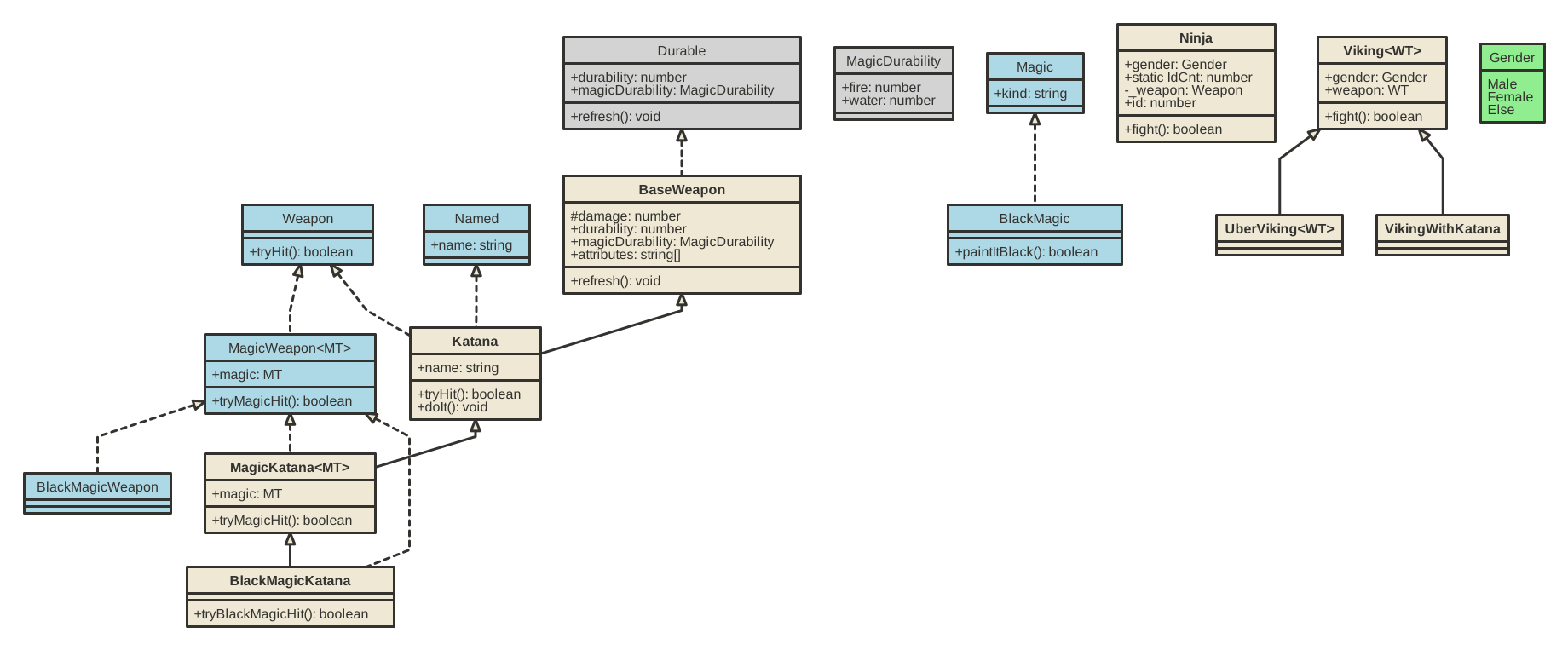

With member associations enabled:
Associations between class / interfaces / types and their members are represented by lines without arrows. The associations also include multiplicity ("0..*").
Use the -m parameter to enable output of member associations.
tsuml2 --glob "./src/demo/**/*.ts" -m -o "./assets/uml_diagram.svg"

Extension points exported contracts — how you extend this code
Core symbols most depended-on inside this repo
Shape
Languages
Modules by API surface
For agents
$ claude mcp add TsUML2 \
  -- python -m otcore.mcp_server <graph>