github.com/deanrad/rxfx @main
Chat with this repoBrowse by type
What it actually does AI analysis from the code graph — generated when you open this
README
𝗥𝘅𝑓𝑥

𝗥𝘅𝑓𝑥 is effect and state management made simple, safe, and framework-independent. It helps you write less framework-specific code, escaping useEffect mazes, and AbortController complexities - basically making async user interfaces simple and air-tight.
Background
30 years after setTimeout introduced the world to the asynchronous nature of JavaScript, effect execution is still clumsy at best, and broken in many cases. And none of the popular front-end solutions (Angular, React, RxJS) present a complete solution that deals with all the concerns of async effects in a framework-independent way.
- Error handling that is predictable, and does not compromise the integrity of the app the more effects you add.
- Automatic
loading/activestate tracking. - Automatic tracability of all lifecycle events of effects (
started,next,complete,error,canceled, etc.) - Simple effect cancelation from anywhere inside or outside the component tree.
- Seamless interopation with Promises, Observables, Iterables and generators.
- Easily reduced or adjustable concurrency (immediate, queueing, throttling, etc) without introducing complication or additional variables. Read the fine docs at: https://rxfx.gitbook.io/docs/, or in the READMEs of the libraries below.
Installation
npm install -S rxfx # or yarn or pnpm...
Usage (in React, for example)
// Enhance an ordinary function by passing it to the createEffect HOF

//////////////// File: effects/userEffect.ts  ////////////////
import { createImmediateEffect as createEffect } from 'rxfx'

async function fetchUser(userId: Number): User {
  return await fetch(`/user/{userId}`).then(r => r.json())
}
const userLoadFx = createEffect<Number, User, Error, User>(fetchUser, null);

//////////////// File: routes/UserRoute.tsx  ////////////////
import { useFx } from '@rxfx/react'
import { userLoadFx } from '@effects/userEffect'

function UserRoute({ userId }) {
  const { isLoading, state: user } = useFx(userLoadFx);
  useWhileMounted(() => {
    userLoader(userId) // call it like an ordinary function
  });
  { isLoading || !user
      ? <Spinner />  <Cancel onClick={() => userLoader.cancelCurrent()}/>
      : <User user={user} />
  }
}
Sub-Libraries
Though rxfx is tree-shakable, you may choose to import only the sub-libraries. It has no front-end dependencies, so to use with React - the most common case - you'll need @rxfx/react in addition to rxfx. The rest of the sub-libraries are exported individually:
-
@rxfx/effect- UI Framework-independent effect execution, progress notification and cancelation - a subset of@rxfx/servicefocused on effects, not state. -
@rxfx/bus- A Low-level effect execution and event observation with ordering, concurrency, and error isolation. -
@rxfx/reactHooks for using bus or listeners, or general RxJs Observables inside of React Components. -
@rxfx/afterA utility for introducing delays, or creating scripts of delays. -
@rxfx/perception- Constants and functions related to human response times and perception thresholds of our various senses. -
@rxfx/animation- A TypeScript/Observable version of TweenJS. -
@rxfx/fsa- A re-publish of https://github.com/aikoven/typescript-fsa -
@rxfx/operatorsA collection of supplemental RxJS operators. -
@rxfx/ajaxfetchMany- gives you a Streaming Observable of a plural endpoint (e.g.users/) instead of the all-at-the-end delivery of Promises. (Is Cancelable too). -
@rxfx/peer- Can help a mesh of peers coordinate a single LEAD, even as peers come and go. -
@rxfx/service- An earlier version of@rxfx/effect- see if that, orrxfxmeets your needs best.
When is it time to introduce 𝗥𝘅𝑓𝑥?
- You are needing to handle streaming (like for building a Chat interface for LLMs), but are most comfortable with Promise-based APIs.
- You notice you are introducing
loadingstate fields which must be set and unset manually - You are manually outputting logging messages, and there is no standard convention between them.
- You are using framework-specific constructs (
useEffect, async pipe) to manage asynchrony. - You want a better separation of the View Layer from the async layer.
- You are troubled with race conditions.
- You are using RxJS, but want fewer imports and operators, and you're feeling it clumsy to manage subscriptions in addition to Observables.
- You are using React, and want to heed the warnings in their docs about
useEffectbeing used often in the wrong ways. - You are tired of async errors breaking the view layer, or the app as a whole, as more effects get added to your app.
- You find tests take too long to run when they have to be called through the view layer, and you want something that is testable independent of the view.
- You want a type-safe event bus for federated front-ends.
In short - if you believe there is a more concise, more airtight, race-condition-proof way to do async, you may have found it right here in an 𝗥𝘅𝑓𝑥 effect.
Concurrency Modes
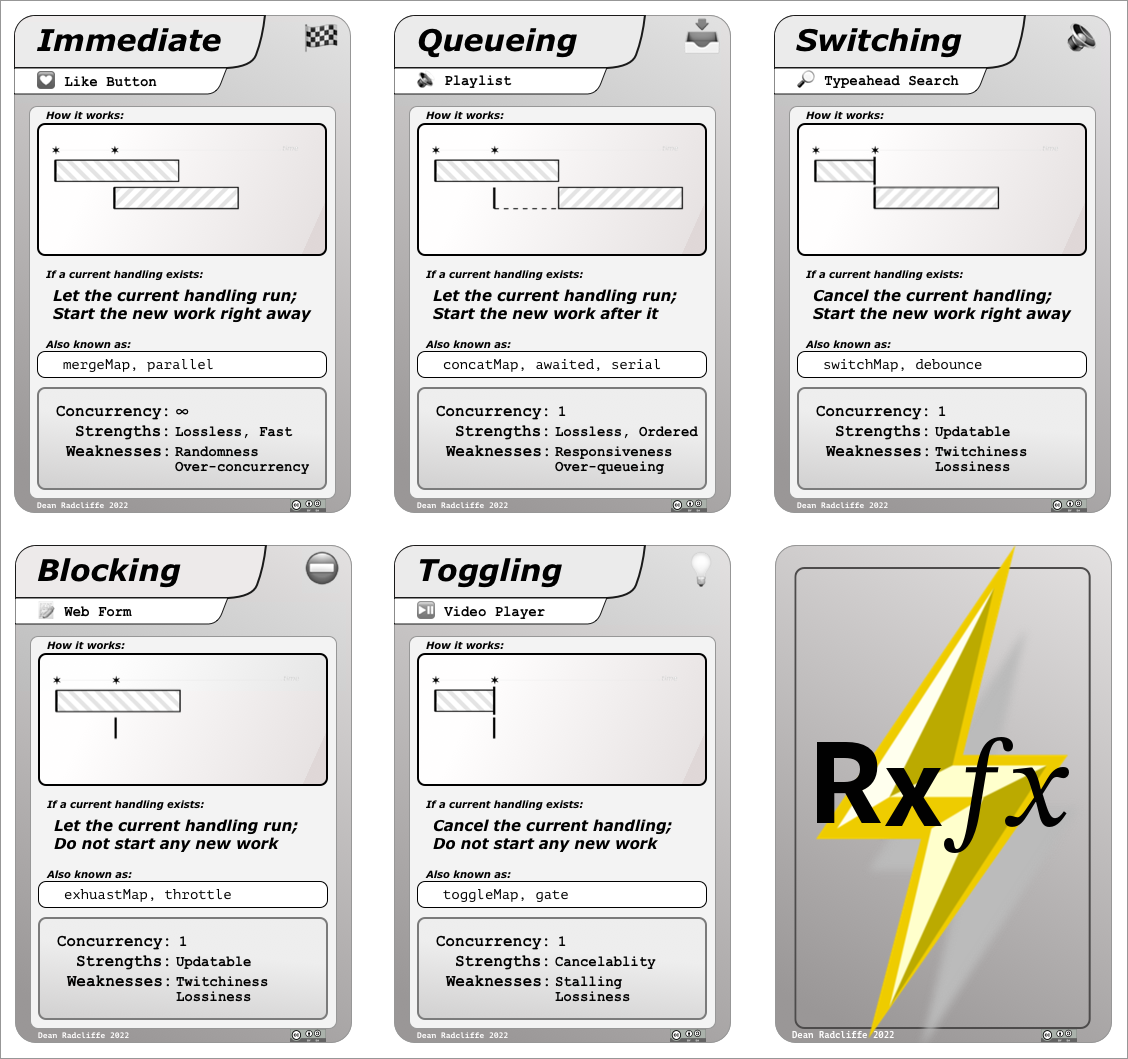
Race conditions are easily prevented when code is set to run in the correct Concurrency Mode for its use case. With 𝗥𝘅𝑓𝑥, its easily named and tested modes (which use RxJS operators underneath) allow you to keep your code readable, and you can eliminate race conditions in a 1-line code diff.
Choose your mode by answering this question:
If the effect is running, and a new request arrives, should we:
- Begin the new effect at once, allowing both to finish in any order. (Immediate mode, ala
createImmediateEffect) - Begin the new effect only after any currently running effects, preserving order. (Queueing mode, ala
createQueueingEffect) - Prevent/throttle the new effect from beginning. (Blocking mode,
createBlockingEffect) - Cancel the currently running effect and begin the new effect at once. (Switching mode,
createSwitchingEffect)
And one final mode, included for completion:
- Cancel the currently running effect, and don't begin a new effect. (Toggling mode,
createTogglingEffect)
These cards are representations of each mode:
With the ability to squash race conditions, your code will be more air-tight, as well as consume less resources on the user's device.
Extension points exported contracts — how you extend this code
browse all types & interfaces →