github.com/datahub-project/datahub @v1.6.0
Chat with this repoWhat it actually does AI analysis from the code graph — generated when you open this
README

The #1 Open Source AI Data Catalog
Enterprise-grade metadata platform enabling discovery, governance, and observability across your entire data ecosystem










Free Cloud Trial • Quick Start • Live Demo • Documentation • Slack Community • YouTube
Built with ❤️ by DataHub and LinkedIn
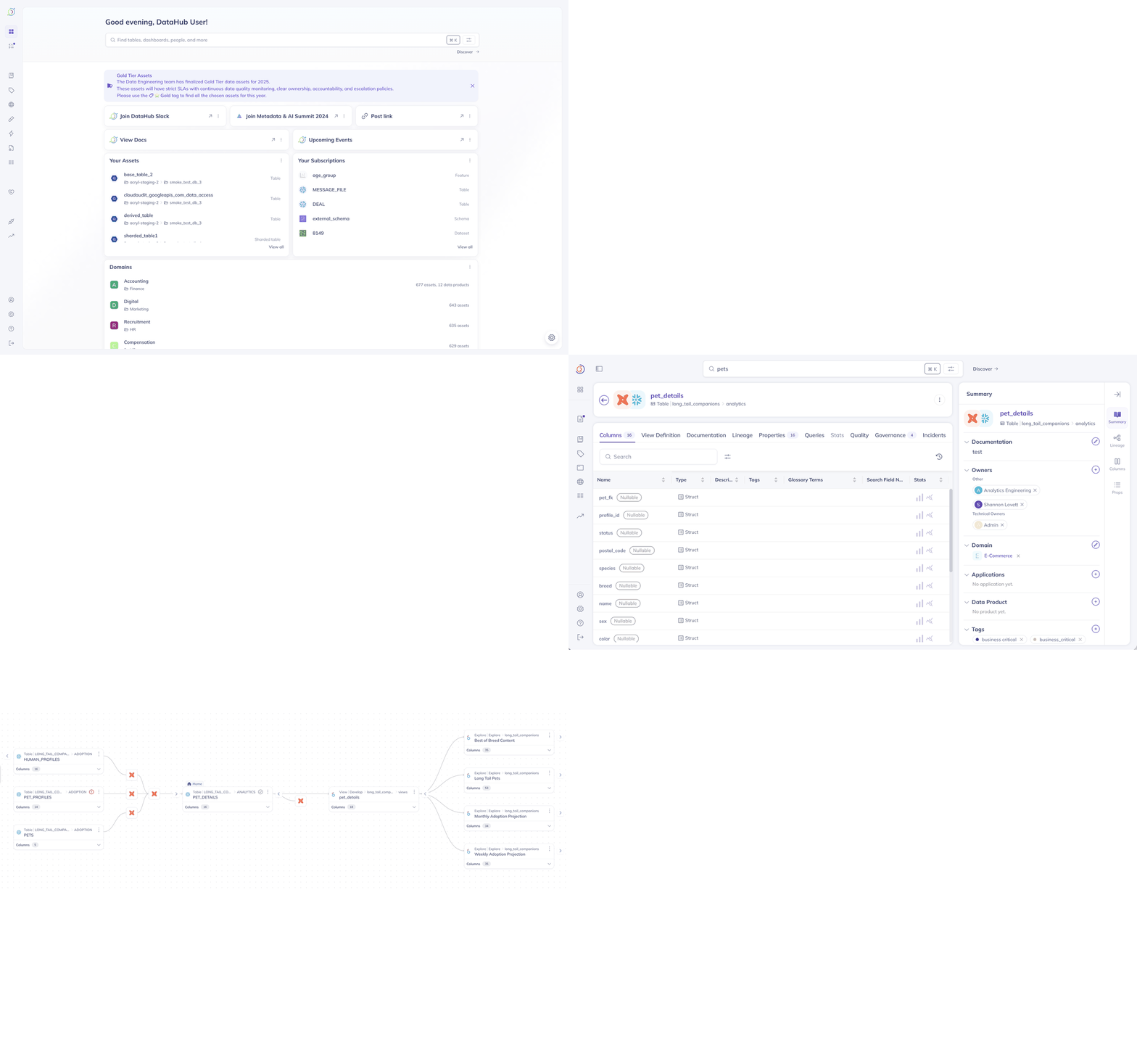
Search, discover, and understand your data with DataHub's unified metadata platform
📊 NEW: Open Source Analytics Agent
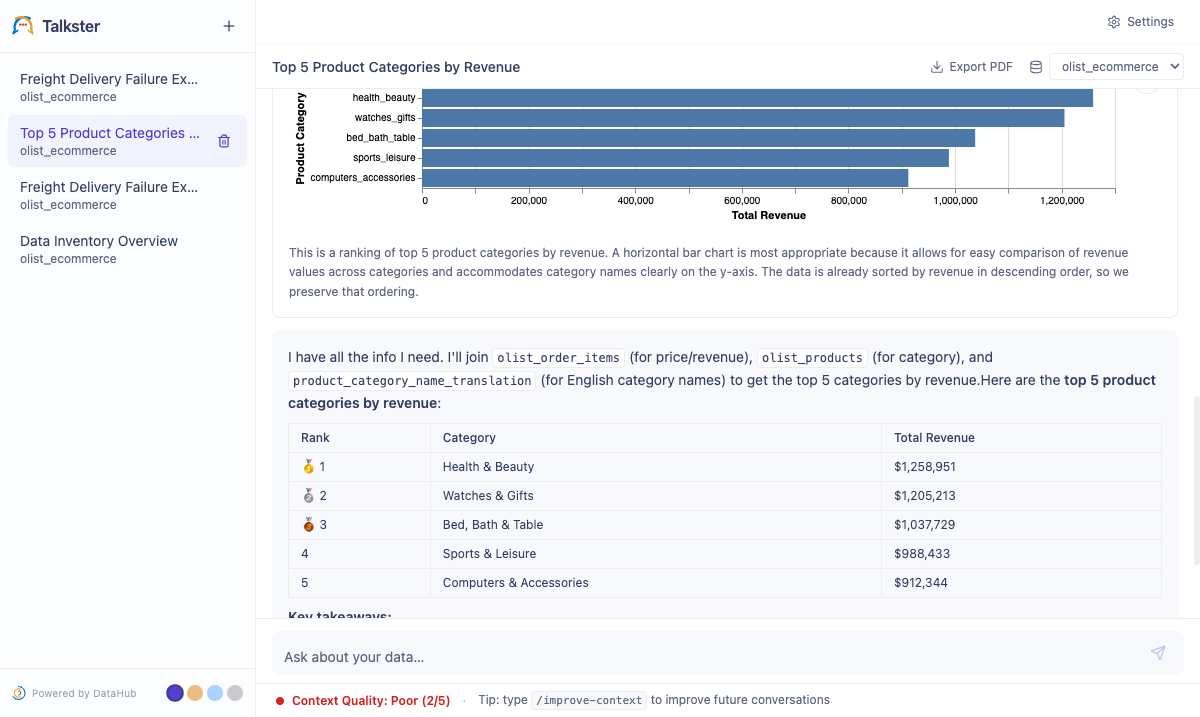
Ask data questions in plain English — get SQL, results, and charts back
Open-source agent grounded in your DataHub catalog. Apache 2.0. Bring your own LLM.
Quick start:
git clone https://github.com/datahub-project/analytics-agent.git
cd analytics-agent && bash quickstart.sh
Read the announcement → · Docs → · Repo →
Using AI coding assistants? Connect Cursor, Claude Desktop, or Cline directly to DataHub via the Model Context Protocol:
npx -y @acryldata/mcp-server-datahub init
What is DataHub?
🔍 Finding the right DataHub? This is the open-source metadata platform at datahub.com (GitHub: datahub-project/datahub). It was previously hosted at
datahubproject.io, which now redirects to datahub.com. This project is not related to datahub.io, which is a separate public dataset hosting service. See the FAQ below.
DataHub is the #1 open-source AI data catalog that enables discovery, governance, and observability across your entire data ecosystem. Originally built at LinkedIn, DataHub now powers data discovery at thousands of organizations worldwide, managing millions of data assets.
The Challenge: Modern data stacks are fragmented across dozens of tools—warehouses, lakes, BI platforms, ML systems, AI agents, orchestration engines. Finding the right data, understanding its lineage, and ensuring governance is like searching through a maze blindfolded.
The DataHub Solution: DataHub acts as the central nervous system for your data stack—connecting all your tools through real-time streaming or batch ingestion to create a unified metadata graph. Unlike static catalogs, DataHub keeps your metadata fresh and actionable—powering both human teams and AI agents.
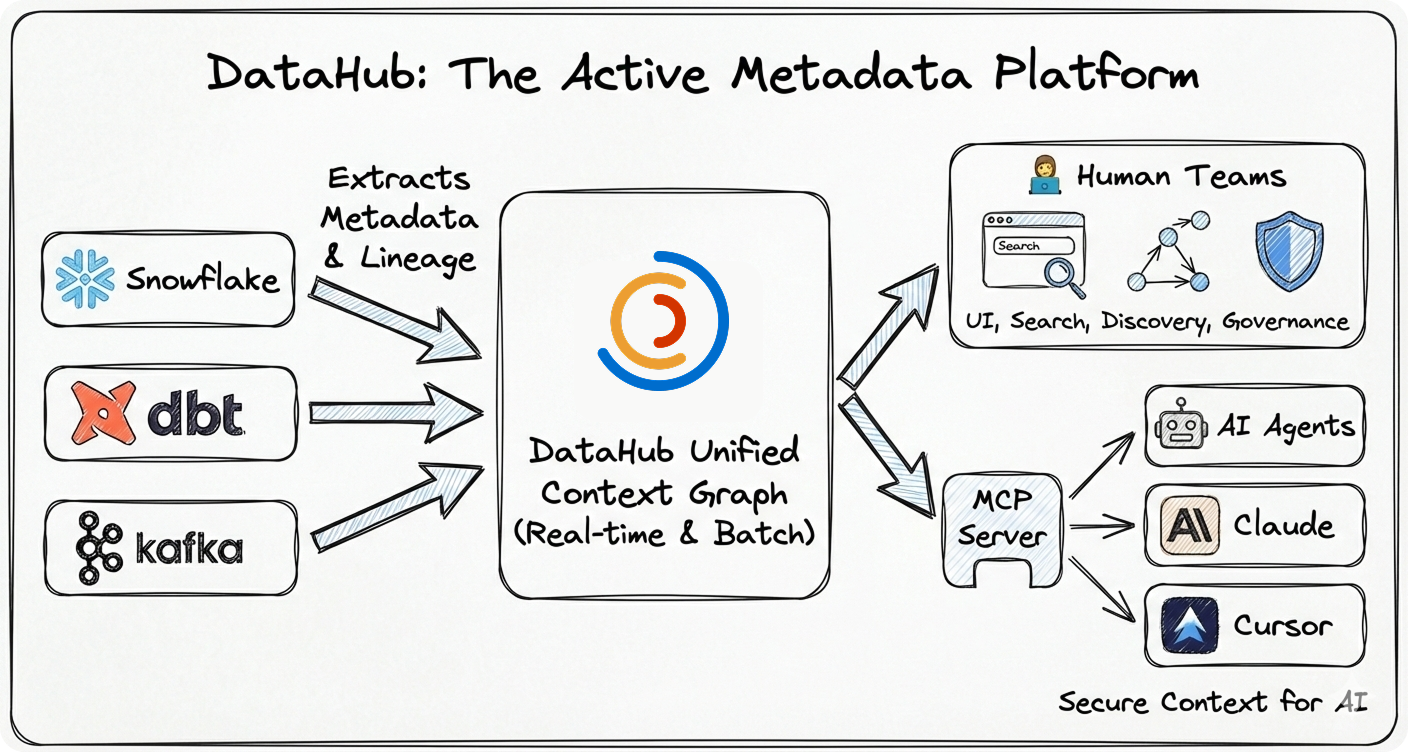
Why DataHub?
- 🚀 Battle-Tested at Scale: Born at LinkedIn to handle hyperscale data, now proven at thousands of organizations worldwide managing millions of data assets
- ⚡ Real-Time Streaming: Metadata updates in seconds, not hours or days
- 🤖 AI-Ready: Native support for AI agents via MCP, LLM integrations, and context management
- 🔌 Pioneering Ingestion Architecture: Flexible push/pull framework (widely adopted by other catalogs) with 80+ production-grade connectors extracting deep metadata—column lineage, usage stats, profiling, and quality metrics
- 👨💻 Developer-First: Rich APIs (GraphQL, OpenAPI), Python + Java SDKs, CLI tools
- 🏢 Enterprise Ready: Battle-tested security, authentication, authorization, and audit trails
- 🌍 Open Source: Apache 2.0 licensed, vendor-neutral, community-driven
🧠 The Context Foundation
Essential for modern data teams and reliable AI agents:
- Context Management Is the Missing Piece in the Agentic AI Puzzle - Why context management is essential for deploying reliable AI agents at scale
- Data Lineage: What It Is and Why It Matters - Understanding the map of how data flows through your organization
- What is Metadata Management? - A comprehensive guide for enterprise data leaders
📑 Table of Contents
- FAQ
- See DataHub in Action
- Quick Start
- Installation Options
- Architecture
- Use Cases & Examples
- Trusted By
- Ecosystem
- Community
- Contributing
- Resources
- License
❓ Frequently Asked Questions
Is this the same project as datahub.io?
No. datahub.io is a completely separate project — a public dataset hosting service with no affiliation to this project. DataHub (this project) is an open-source metadata platform for data discovery, governance, and observability, hosted at datahub.com and developed at github.com/datahub-project/datahub.
What happened to datahubproject.io?
DataHub was previously hosted at datahubproject.io. That domain now redirects to datahub.com. All documentation has moved to docs.datahub.com. If you find references to datahubproject.io in blog posts or tutorials, they refer to this same project — just under its former domain.
Is DataHub related to LinkedIn's internal DataHub?
Yes. DataHub was originally built at LinkedIn to manage metadata at scale across their data ecosystem. LinkedIn open-sourced DataHub in 2020. It has since grown into an independent community project under the datahub-project GitHub organization, now hosted at datahub.com.
How do I install the DataHub metadata platform?
pip install acryl-datahub
datahub docker quickstart
See the Quick Start section below for full instructions. The PyPI package is acryl-datahub.
🎨 See DataHub in Action
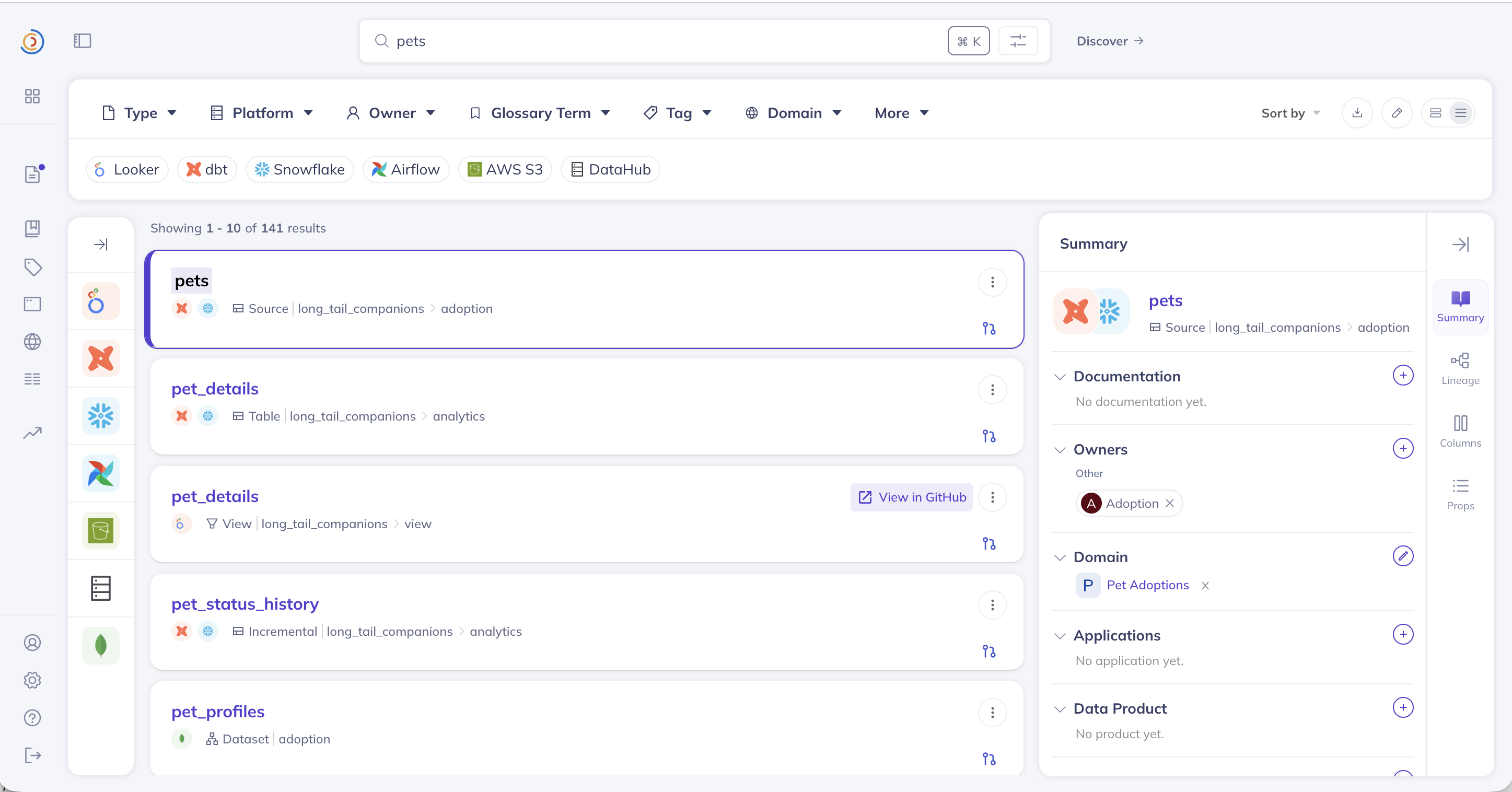 🔍 Universal Search
Find any data asset instantly across your entire stack
🔍 Universal Search
Find any data asset instantly across your entire stack
|
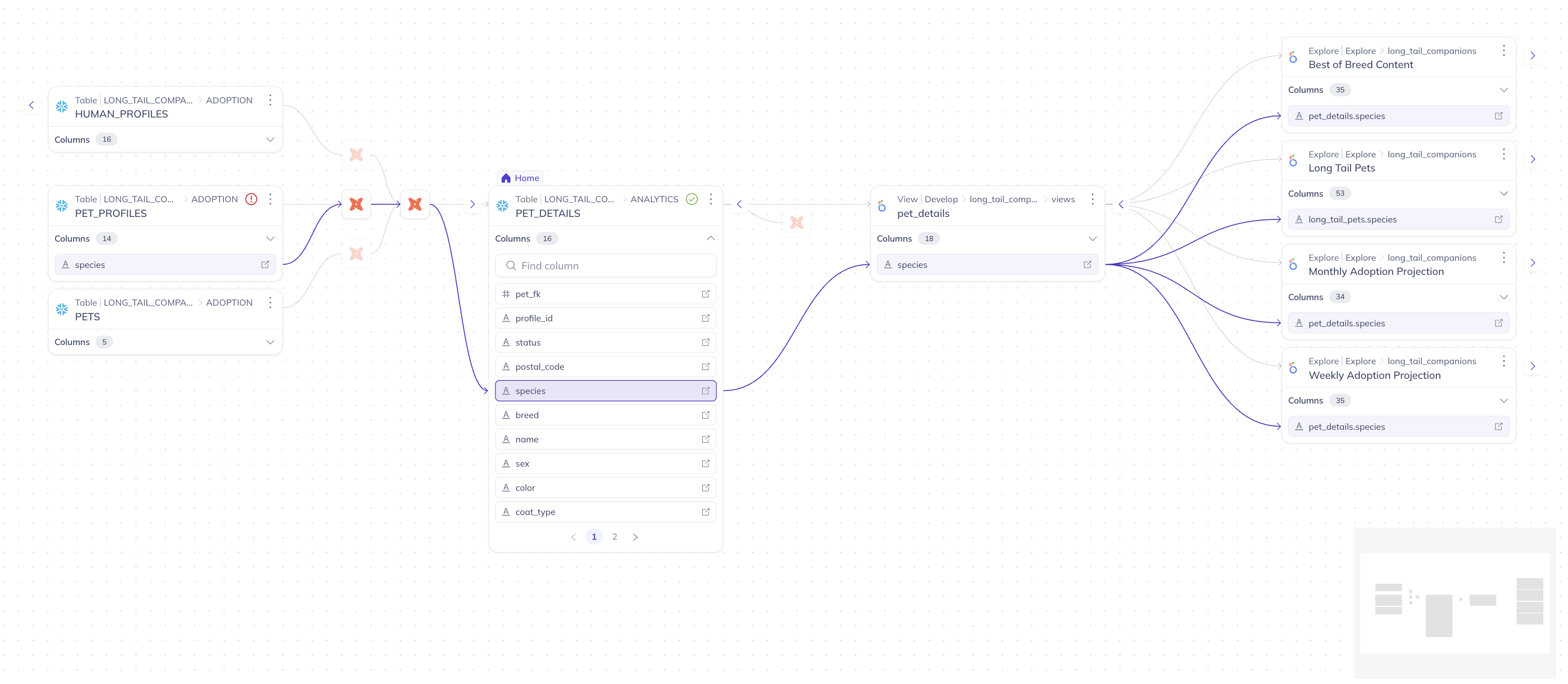 📊 Column-Level Lineage
Trace data flow from source to consumption
📊 Column-Level Lineage
Trace data flow from source to consumption
|
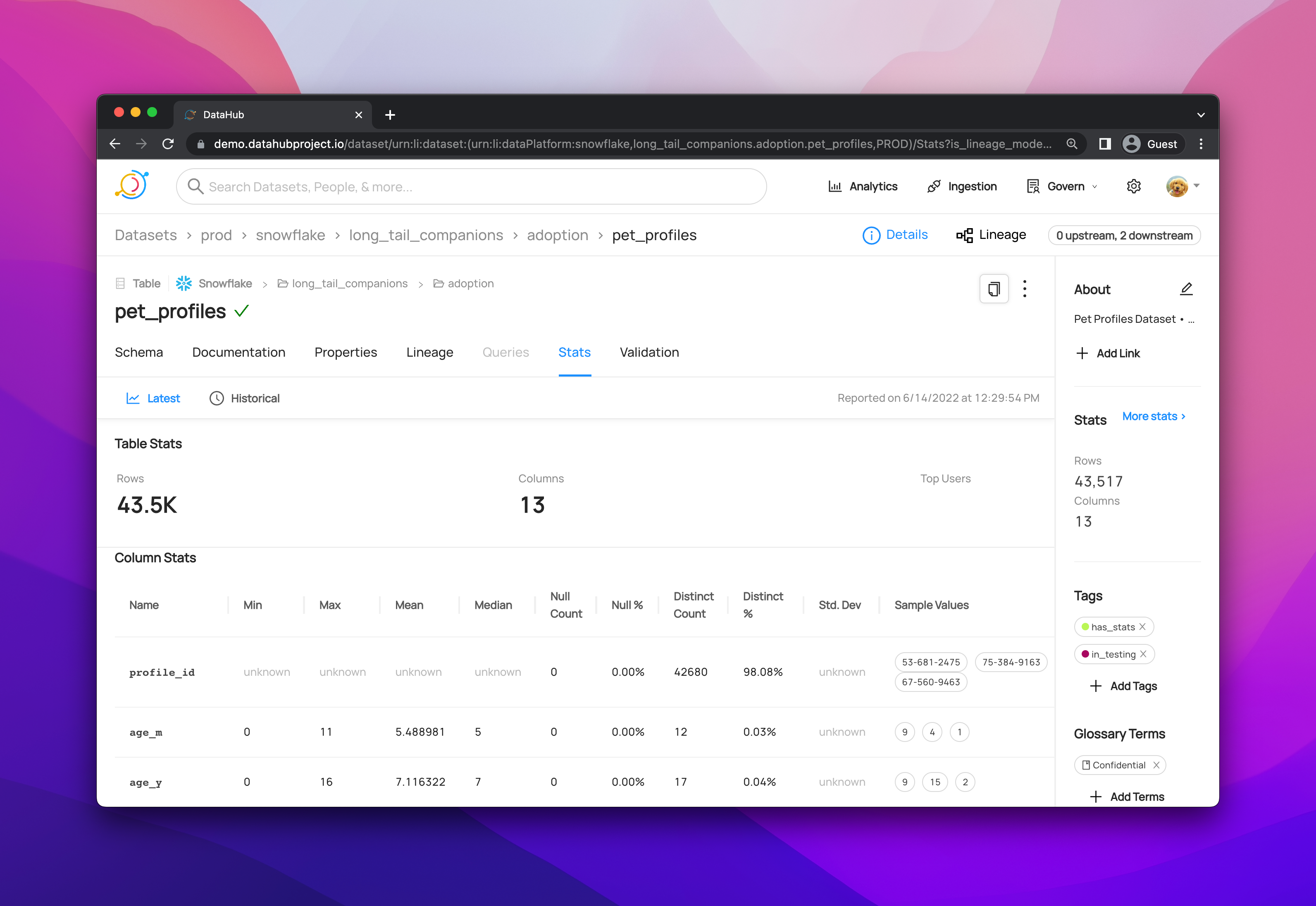 📋 Rich Dataset Profiles
Schema, statistics, documentation, and ownership
📋 Rich Dataset Profiles
Schema, statistics, documentation, and ownership
|
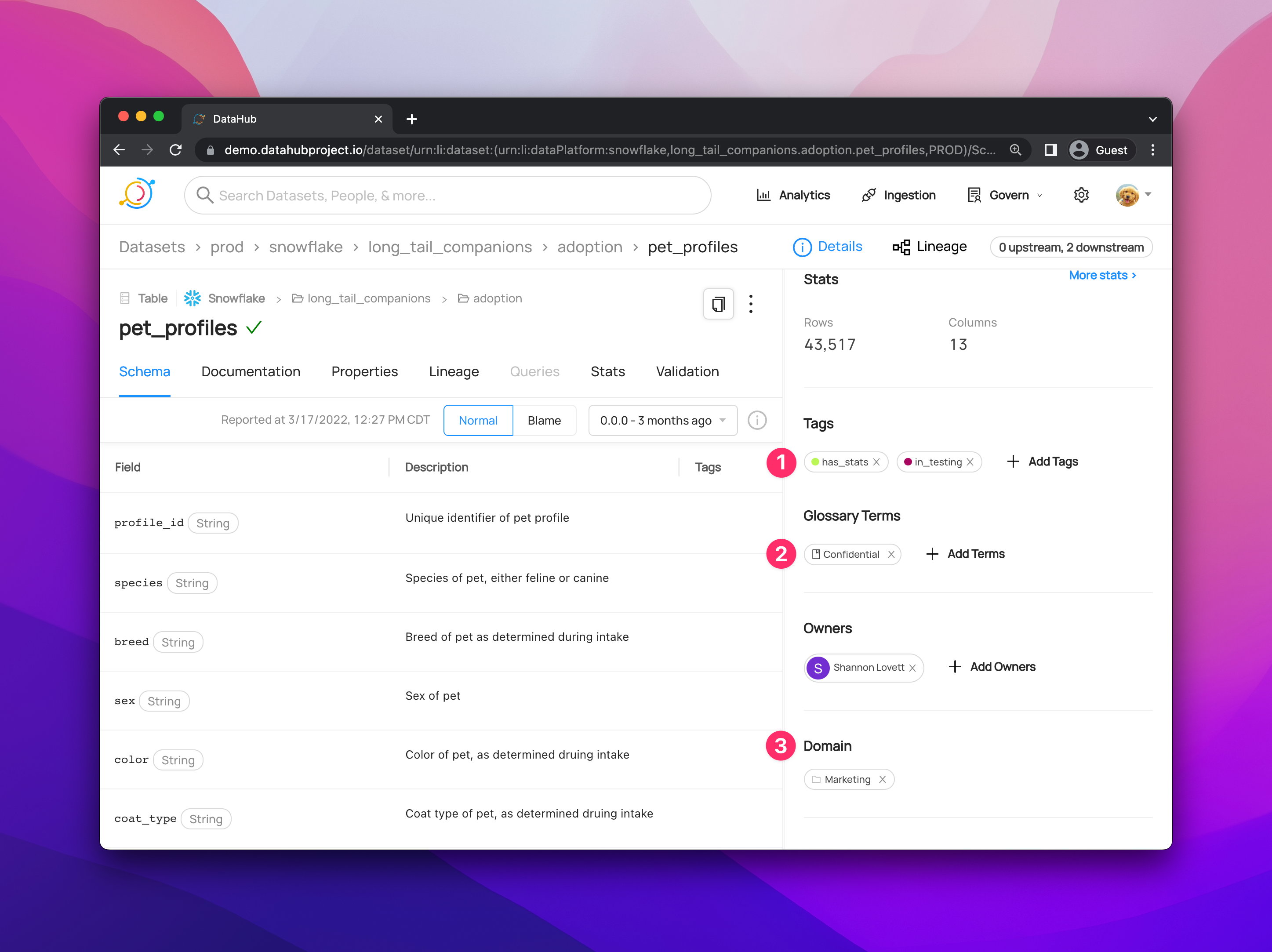 🏛️ Governance Dashboard
Manage policies, tags, and compliance
🏛️ Governance Dashboard
Manage policies, tags, and compliance
|
▶️ Watch DataHub in Action:
- 5-Minute Product Tour (YouTube)
- Try Live Demo (No installation required)
🚀 Quick Start
Option 1: Try the Hosted Demo (Fastest)
No installation required. Explore a fully-loaded DataHub instance with sample data instantly:
🌐 Launch Live Demo: demo.datahub.com
Option 2: Run Locally with Python (Recommended)
Get DataHub running on your machine in under 2 minutes:
# Prerequisites: Docker Desktop with 8GB+ RAM allocated

# Upgrade pip and install DataHub CLI
python3 -m pip install --upgrade pip wheel setuptools
python3 -m pip install --upgrade acryl-datahub

# Launch DataHub locally via Docker
datahub docker quickstart

# Access DataHub at http://localhost:9002
# Default credentials: datahub / datahub
Note: You can also use uv or other Python package managers instead of pip.
What's included:
- ✅ Full Stack: GMS backend, React UI, Elasticsearch, MySQL, and Kafka.
- ✅ Sample Data: Pre-loaded datasets, lineage, and owners for exploration.
- ✅ Ingestion Ready: Fully prepared to connect your own local or cloud data sources.
Option 3: Run from Source (For Contributors)
Best for advanced users who want to modify the core codebase or run directly from the repository:
# Clone the repository
git clone https://github.com/datahub-project/datahub.git
cd datahub

# Start all services with docker-compose
./docker/quickstart.sh

# Access DataHub at http://localhost:9002
# Default credentials: datahub / datahub
Next Steps
- 🔌 Connect Your Data: Explore our Ingestion Guides for Snowflake, BigQuery, dbt, and more.
- 📚 Learn the Basics: Walk through the Getting Started Guide
- 🎓 DataHub Academy: Deep dive with our Advanced Tutorials
📦 Installation Options
DataHub supports three deployment models:
- Managed SaaS (DataHub Cloud) — zero infrastructure, SLA-backed, enterprise-ready
- Self-hosted via Docker — ideal for development and small teams
- Kubernetes (Helm) — recommended for production self-hosted deployments
→ See all deployment guides (AWS, Azure, GCP, environment variables)
🏗️ Architecture Overview
- ✅ Streaming-First: Real-time metadata updates via Kafka
- ✅ **API-First:
Extension points exported contracts — how you extend this code
CustomPropertiesPatchBuilderSupport (Interface)Core symbols most depended-on inside this repo
buildShape
Languages
Modules by API surface
Datastores touched
For agents
$ claude mcp add datahub \
  -- python -m otcore.mcp_server <graph>