github.com/danvk/source-map-explorer @v2.5.3 sqlite
README



source-map-explorer
Analyze and debug JavaScript (or Sass or LESS) code bloat through source maps.
The source map explorer determines which file each byte in your minified code came from. It shows you a [treemap][] visualization to help you debug where all the code is coming from. Check out this [Chrome Developer video][video] (3:25) for a demo of the tool in action.
Install:
npm install -g source-map-explorer
Use (you can specify filenames or use glob pattern):
source-map-explorer bundle.min.js
source-map-explorer bundle.min.js bundle.min.js.map
source-map-explorer bundle.min.js*
source-map-explorer *.js
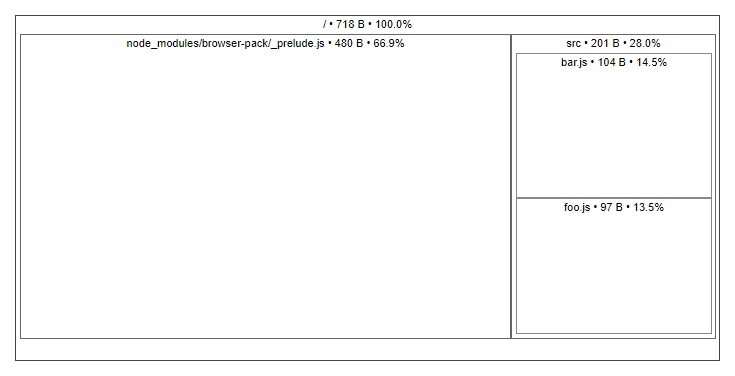
This will open up a visualization of how the space is used in your minified bundle:

Here's a [demo][] with a more complex bundle.
Here's [another demo][] where you can see a bug: there are two copies of React in the bundle (perhaps because of out-of-date dependencies).
Requirements
- Node 10 or later
Options
Default behavior - write HTML to a temp file and open it in your browser
source-map-explorer foo.min.js
Write output in specific formats to stdout
source-map-explorer foo.min.js --html
source-map-explorer foo.min.js --json
source-map-explorer foo.min.js --tsv
Write output in specific formats to a file
source-map-explorer foo.min.js --html result.html
source-map-explorer foo.min.js --json result.json
source-map-explorer foo.min.js --tsv result.tsv
-
--json: output JSON instead of displaying a visualization:source-map-explorer foo.min.js --json { "results": [ { "bundleName": "tests/data/foo.min.js", "totalBytes": 718, "mappedBytes": 681, "unmappedBytes": 1, "eolBytes": 1, "sourceMapCommentBytes": 35, "files": { "node_modules/browser-pack/_prelude.js": { "size": 480 }, "src/bar.js": { "size": 104 }, "src/foo.js": { "size": 97 }, "[sourceMappingURL]": { "size": 35 }, "[unmapped]": { "size": 1 }, "[EOLs]": { "size": 1 } } } ] } -
--tsv: output tab-delimited values instead of displaying a visualization:source-map-explorer foo.min.js --tsv Source Size node_modules/browser-pack/_prelude.js 480 src/bar.js 104 src/foo.js 97 [sourceMappingURL] 35 [unmapped] 1 [EOLs] 1If you just want a list of files, you can do
source-map-explorer foo.min.js --tsv | sed 1d | cut -f1. -
--html: output HTML to stdout. If you want to save the output (e.g. to share), specify filename after--html:source-map-explorer foo.min.js --html tree.html -
-m,--only-mapped: exclude "unmapped" bytes from the output. This will result in total counts less than the file size. -
--exclude-source-map: exclude source map comment size from output. This will result in total counts less than the file size. -
--replace,--with: The paths in source maps sometimes have artifacts that are difficult to get rid of. These flags let you do simple find & replaces on the paths. For example:source-map-explorer foo.min.js --replace 'dist/' --with ''You can specify these flags multiple times. Be aware that the find/replace is done after eliminating shared prefixes between paths.
These are regular expressions.
-
--no-root: By default,source-map-explorerfinds common prefixes between all source files and eliminates them, since they add complexity to the visualization with no real benefit. But if you want to disable this behavior, set the--no-rootflag. -
--no-border-checks: Disable invalid mapping column/line checks. By default, when a source map references column/line with bigger index than available in the sourcesource-map-explorersthrows an error indicating that specified source map might be wrong for the source. -
--coverage: If the path to a valid a chrome code coverage JSON export is supplied, the tree map will be colorized according to which percentage of the modules code was executed -
--gzip: Calculate gzip size. It also setsonlyMappedflag -
--sort: Sort filenames
Examples
Get help
source-map-explorer -h
Analyze and debug space usage through source maps.
Usage:
source-map-explorer script.js [script.js.map] [--json [result.json] | --html [result.html] | --tsv [result.csv]] [-m | --only-mapped] [--exclude-source-map] [--no-border-checks] [--gzip] [--sort] [--replace=BEFORE_1 BEFORE_2 --with=AFTER_1 AFTER_2] [--no-root] [--coverage coverage.json] [--version] [--help | -h]

Output:
  --json  If filename specified save output as JSON to specified file otherwise output to stdout.  [string]
  --tsv   If filename specified save output as TSV to specified file otherwise output to stdout.  [string]
  --html  If filename specified save output as HTML to specified file otherwise output to stdout rather than opening a browser.  [string]

Replace:
  --replace  Apply a simple find/replace on source file names. This can be used to fix some oddities with paths that appear in the source map generation process. Accepts regular expressions.
  [array]
  --with     See --replace.  [array]

Options:
  --version             Show version number  [boolean]
  --only-mapped, -m     Exclude "unmapped" bytes from the output. This will result in total counts less than the file size  [boolean]
  --exclude-source-map  Exclude source map comment size from output  [boolean]
  --no-root             To simplify the visualization, source-map-explorer will remove any prefix shared by all sources. If you wish to disable this behavior, set --no-root.  [boolean]
  --no-border-checks    Disable invalid mapping column/line checks.  [boolean]
  --coverage            If the path to a valid a chrome code coverage JSON export is supplied, the tree map will be colorized according to which percentage of the modules code was executed
[string]
  --gzip                Calculate gzip size. It also sets onlyMapped flag  [boolean]
  --sort                Sort filenames  [boolean]
  -h, --help            Show help  [boolean]

Examples:
  source-map-explorer script.js script.js.map       Explore bundle
  source-map-explorer script.js                     Explore bundle with inline source map
  source-map-explorer dist/js/*.*                   Explore all bundles inside dist/js folder
  source-map-explorer script.js --tsv               Explore and output result as TSV to stdout
  source-map-explorer script.js --json result.json  Explore and save result as JSON to the file
Explore bundle and view result as an interactive map
source-map-explorer script.js script.js.map
Will open an HTML file containing explore result as a tree data map
Explore and output result as JSON
source-map-explorer script.js script.js.map --json
{
  "results": [
    {
      "bundleName": "script.js",
      "totalBytes": 718,
      "unmappedBytes": 1,
      "eolBytes": 1,
      "sourceMapCommentBytes": 35,
      "files": {
        "node_modules/browser-pack/_prelude.js": {
          "size": 480
        }
        "src/bar.js": {
          "size": 104
        }
        "src/foo.js": {
          "size": 97
        },
        "[sourceMappingURL]": {
          "size": 35
        }
        "[unmapped]": {
          "size": 1
        }
      }
    }
  ]
}
Explore and output result as TSV
source-map-explorer script1.js script2.js --tsv
Source  Size
node_modules/browser-pack/_prelude.js   480
src/bar.js      104
src/foo.js      97
[sourceMappingURL]      35
[unmapped]      1

[sourceMappingURL]      2308
node_modules/browser-pack/_prelude.js   480
src/bar.js      104
src/foo.js      97
[unmapped]      1
Explore and output result as HTML
source-map-explorer script.js --html
<!doctype html>
<html lang="en">
<head>
...
  selectBundle(selectedBundle);
</script>
<html>
Explore and save result as HTML file
source-map-explorer script.js --html ./sme/result.html
Replace substring in filenames
source-map-explorer script.js --tsv --replace dist node_modules --with gist modules
Source  Size
gist/bar.js     2854
modules/browserify/modules/browser-pack/_prelude.js     463
gist/foo.js     137
[unmapped]      0
Remove [unmapped] from result files
source-map-explorer script.js --tsv --only-mapped
Source  Size
[sourceMappingURL]      2308
node_modules/browser-pack/_prelude.js   480
src/bar.js      104
src/foo.js      97
Remove [sourceMappingURL] from result files
source-map-explorer script.js --tsv --exclude-source-map
Source  Size
node_modules/browser-pack/_prelude.js   480
src/bar.js      104
src/foo.js      97
[unmapped]      1
Do not remove common path prefix
source-map-explorer script.js --tsv --no-root
On error
Errors will be displayed only if no output flags specified
source-map-explore with-unmapped.js no-map-comment.js
no-map-comment.js
  Unable to find a source map.
  See https://github.com/danvk/source-map-explorer/blob/master/README.md#generating-source-maps
with-unmapped.js
  Unable to map 274/1335 bytes (20.52%)
API
explore(bundlesAndFileTokens, [options])
bundlesAndFileTokens:
* Glob: dist/js/*.*
* Filename: dist/js/chunk.1.js
* Bundle: { code: 'dist/js/chunk.1.js', map: 'dist/js/chunk.1.js.map' } or { code: fs.readFileSync('dist/js/chunk.2.js') }
* Array of globs, filenames and bundles:
[
     'dist/js/chunk.2.*',
     'dist/js/chunk.1.js', 'dist/js/chunk.1.js.map',
     { code: 'dist/js/chunk.3.js', map: 'dist/js/chunk.3.js.map' }
   ]
options:
* onlyMapped: [boolean] (default false) - Exclude "unmapped" bytes from the output. This will result in total counts less than the file size
* excludeSourceMapComment: [boolean] (default false) - Exclude source map comment size from output. This will result in total counts less than the file size.
* output: [Object] - Output options
* format: [string] - 'json', 'tsv' or 'html'
* filename: [string] - Filename to save output to
* noRoot: [boolean] (default false) - See --no-root option above for details
* noBorderChecks: [boolean] - Disable invalid mapping column/line checks. See --no-border-checks above.
* replaceMap: <[Object]<{ [from: [string]]: [string] }>> - Mapping for replacement, see --replace, --with options above for details.
* coverage: [string] - If the path to a valid a chrome code coverage JSON export is supplied, the tree map will be colorized according to which percentage of the modules code was executed
* gzip: [boolean] - Calculate gzip size. It also sets onlyMapped flag
Example:
import { explore } from 'source-map-explorer'
// or import explore from 'source-map-explorer'

explore('tests/data/foo.min.js', { output: { format: 'html' } }).then()

// Returns
{
  bundles: [{
    bundleName: 'tests/data/foo.min.js',
    totalBytes: 718,
    unmappedBytes: 1,
    mappedBytes: 681,
    eolBytes: 1,
    sourceMapCommentBytes: 35,
    files: {
      'node_modules/browserify/node_modules/browser-pack/_prelude.js': { size: 480 },
      'dist/bar.js': { size: 104 },
      'dist/foo.js': { size: 97 },
      '[sourceMappingURL]': { size: 35 },
      '[unmapped]': { size: 1 },
      '[EOLs]': { size: 1 }
    }
  }],
  output: '<!doctype html>...',
  errors: []
}
See more at [wiki page][api wiki]
More details
explore(bundlesAndFileTokens, [options])
Returns Promise that is resolved to an object with properties:
* bundles: array - List of bundle explore result objects
* bundleName: string - Path associated with the bundle
* totalBytes: number - Size of the provided file
* unmappedBytes: number | undefined
* eolBytes: number - Bytes taken by end of line characters
* sourceMapCommentBytes: number - sourceMappingURL comment bytes
* files: { [sourceFile: string]: number }[] - Map containing filenames from the source map and size in bytes they take inside of provided file. Additional key <unmapped> is included if options.onlyMapped is false.
* output: string - Result as a string if output.format options specified. If output='html' it contains self-packed HTML that can be opened in the browser
* errors: array - List of bundle explore error objects
* bundleName: string - Path associated with the bundle
* code: string - Error code
* message: string - User friendly message
* error: Error
* isWarning: boolean - Whether error isn't fatal
The promise is rejected when there is a fatal error or all bundles explore failed. Reject reason is either explore result objec
Extension points exported contracts — how you extend this code
Arguments (Interface)Core symbols most depended-on inside this repo
iShape
Languages
Modules by API surface
Used by 8 indexed graphs manifest dependencies, hub-wide
Dependencies from manifests, versioned
For agents
$ claude mcp add source-map-explorer \
  -- python -m otcore.mcp_server <graph>