github.com/dankamongmen/notcurses @v3.0.17
Chat with this repoWhat it actually does AI analysis from the code graph — generated when you open this
README
Notcurses: blingful TUIs and character graphics
What it is: a library facilitating complex TUIs on modern terminal emulators, supporting vivid colors, multimedia, threads, and Unicode to the maximum degree possible. Things can be done with Notcurses that simply can't be done with NCURSES. It is furthermore fast as shit. What it is not: a source-compatible X/Open Curses implementation, nor a replacement for NCURSES on existing systems.
for more information, see dankwiki and the man pages. in addition, there is Doxygen output. i wrote a coherent guidebook, which is available for free download (or paperback purchase).
i've not yet added many documented examples, but src/poc/
and src/pocpp/
contain many small C and C++ programs respectively. notcurses-demo covers
most of the functionality of Notcurses.
If you're running Notcurses applications in a Docker, please consult "Environment notes" below.









Introduction
Notcurses abandons the X/Open Curses API bundled as part of the Single UNIX Specification. For some necessary background, consult Thomas E. Dickey's superb and authoritative NCURSES FAQ. As such, Notcurses is not a drop-in Curses replacement.
Wherever possible, Notcurses makes use of the Terminfo library shipped with NCURSES, benefiting greatly from its portability and thoroughness.
Notcurses opens up advanced functionality for the interactive user on workstations, phones, laptops, and tablets, possibly at the expense of e.g. some industrial and retail terminals. Fundamentally, Curses assumes the minimum and allows you (with effort) to step up, whereas Notcurses assumes the maximum and steps down (by itself) when necessary. The latter approach probably breaks on some older hardware, but the former approach results in new software looking like old hardware.
Why use this non-standard library?
-
Thread safety, and efficient use in parallel programs, has been a design consideration from the beginning.
-
A more orderly surface than that codified by X/Open: Exported identifiers are prefixed to avoid common namespace collisions. Where reasonable,
static inlineheader-only code is used. This facilitates compiler optimizations, and reduces loader time. Notcurses can be built without its multimedia functionality, requiring a significantly lesser set of dependencies. -
All APIs natively support the Universal Character Set (Unicode). The
nccellAPI is based around Unicode's Extended Grapheme Cluster concept. -
Visual features including images, fonts, video, high-contrast text, sprites, and transparent regions. All APIs natively support 24-bit color, quantized down as necessary for the terminal.
-
Portable support for bitmapped graphics, using Sixel, Kitty, and even the Linux framebuffer console.
-
Support for unambiguous keyboard protocols.
-
"TUI mode" facilitates high-performance, non-scrolling, full-screen applications. "CLI mode" supports scrolling output for shell utilities, but with the full power of Notcurses.
-
It's Apache2-licensed in its entirety, as opposed to the drama in several acts that is the NCURSES license (the latter is summarized as "a restatement of MIT-X11").
Much of the above can be had with NCURSES, but they're not what NCURSES was designed for. On the other hand, if you're targeting industrial or critical applications, or wish to benefit from time-tested reliability and portability, you should by all means use that fine library.
Requirements
Minimum versions generally indicate the oldest version I've tested with; it may well be possible to use still older versions. Let me know of any successes!
- (build) CMake 3.21.0+ and a C17 compiler
- (OPTIONAL) (OpenImageIO, testing, C++ bindings): A C++17 compiler
- (build+runtime) From NCURSES: terminfo 6.1+
- (build+runtime) GNU libunistring 0.9.10+
- (OPTIONAL) (build+runtime) libgpm 1.20+
- (OPTIONAL) (build+runtime) From QR-Code-generator: libqrcodegen 1.5.0+
- (OPTIONAL) (build+runtime) From FFmpeg: libswscale 5.0+, libavformat 57.0+, libavutil 56.0+, libavdevice 57.0+
- (OPTIONAL) (build+runtime) OpenImageIO 2.15.0+, requires C++
- (OPTIONAL) (testing) Doctest 2.3.5+
- (OPTIONAL) (documentation) pandoc 1.19.2+
- (OPTIONAL) (python bindings): Python 3.7+, CFFI 1.13.2+, pypandoc 1.5+
- (runtime) Linux 2.6+, FreeBSD 11+, DragonFly BSD 5.9+, Windows 10 v1093+, or macOS 11.4+
More information on building and installation is available in INSTALL.md.
Wrappers
If you wish to use a language other than C to work with Notcurses, numerous wrappers are available. Several are included in this repository, while others are external.
| Language | Lead(s) | Repository |
|---|---|---|
| Ada | Jeremy Grosser | JeremyGrosser/notcursesada |
| C++ | Marek Habersack, nick black | internal |
| Dart | Nelson Fernandez | kascote/dart_notcurses |
| Julia | Dheepak Krishnamurthy | kdheepak/Notcurses.jl |
| Nim | Michael S. Bradley, Jr. | michaelsbradleyjr/nim-notcurses |
| Python | nick black | internal |
| Python | igo95862 | internal |
| Rust | José Luis Cruz | dankamongmen/libnotcurses-sys |
| Zig | Jakub Dundalek | dundalek/notcurses-zig-example |
Included tools
Nine executables are installed as part of Notcurses:
* ncls: an ls that displays multimedia in the terminal
* ncneofetch: a neofetch ripoff
* ncplayer: renders visual media (images/videos)
* nctetris: a tetris clone
* notcurses-demo: some demonstration code
* notcurses-info: detect and print terminal capabilities/diagnostics
* notcurses-input: decode and print keypresses
* notcurses-tester: unit testing
* tfman: a swank manual browser
To run notcurses-demo from a checkout, provide the data directory via
the -p argument. Demos requiring data files will otherwise abort. The base
delay used in notcurses-demo can be changed with -d, accepting a
floating-point multiplier. Values less than 1 will speed up the demo, while
values greater than 1 will slow it down.
notcurses-tester likewise requires that data, populated with the necessary
data files, be specified with -p. It can be run by itself, or via make test.
Documentation
With -DUSE_PANDOC=on (the default), a full set of man pages and XHTML
will be built from doc/man. The following Markdown documentation is included
directly:
- Per-release News for packagers, developers, and users.
- The
TERMenvironment variable and various terminal emulators. - Notes on contributing and hacking.
- There's a semi-complete reference guide.
- A list of other TUI libraries.
- Abbreviated history and thanks.
- Differences from Curses and adapting Curses programs.
If you (understandably) want to avoid the large Pandoc stack, but still enjoy manual pages, I publish a tarball with generated man/XHTML along with each release. Download it, and install the contents as you deem fit.
Environment notes
-
If your
TERMvariable is wrong, or that terminfo definition is out-of-date, you're going to have a very bad time. Use onlyTERMvalues appropriate for your terminal. If this variable is undefined, or Notcurses can't load the specified Terminfo entry, it will refuse to start, and you will not be going to space today. -
Notcurses queries the terminal on startup, enabling some advanced features based on the determined terminal (and even version). Basic capabilities, however, are taken from Terminfo. So if you have, say, Kitty, but
TERM=vt100, you're going to be able to draw RGBA bitmap graphics (despite such things being but a dream for a VT100), but unable to use the alternate screen (despite it being supported by every Kitty version). SoTERMand an up-to-date Terminfo database remain important. -
Ensure your
LANGenvironment variable is set to a UTF8-encoded locale, and that this locale has been generated. This usually means"[language]_[Countrycode].UTF-8", i.e.en_US.UTF-8. The first part (en_US) ought exist as a directory or symlink in/usr/share/locales. This usually requires editing/etc/locale.genand runninglocale-gen. On Debian systems, this can be accomplished withdpkg-reconfigure locales, and enabling the desired locale. The default locale is stored somewhere like/etc/default/locale. -
If your terminal has an option about default interpretation of "ambiguous-width characters" (this is actually a technical term from Unicode), ensure it is set to Wide, not narrow (if that doesn't work, ensure it is set to Narrow, heh).
-
If your terminal supports 3x8bit RGB color via
setafandsetbf(most modern terminals), but exports neither theRGBnorTcterminfo capability, you can export theCOLORTERMenvironment variable astruecoloror24bit. Note that some terminals accept a 24-bit specification, but map it down to fewer colors. RGB is unconditionally enabled whenever most modern terminals are identified.
Fonts
Glyph width, and indeed whether a glyph can be displayed at all, is dependent
in part on the font configuration. Ideally, your font configuration has a
glyph for every Unicode EGC, and each glyph's width matches up with the POSIX
function's wcswidth() result for the EGC. If this is not the case, you'll
likely get blanks or � (U+FFFD, REPLACEMENT CHARACTER) for missing characters,
and subsequent characters on the line may be misplaced.
It is worth knowing that several terminals draw the block characters directly,
rather than loading them from a font. This is generally desirable. Quadrants,
sextants, and octants are not the place to demonstrate your design virtuosity.
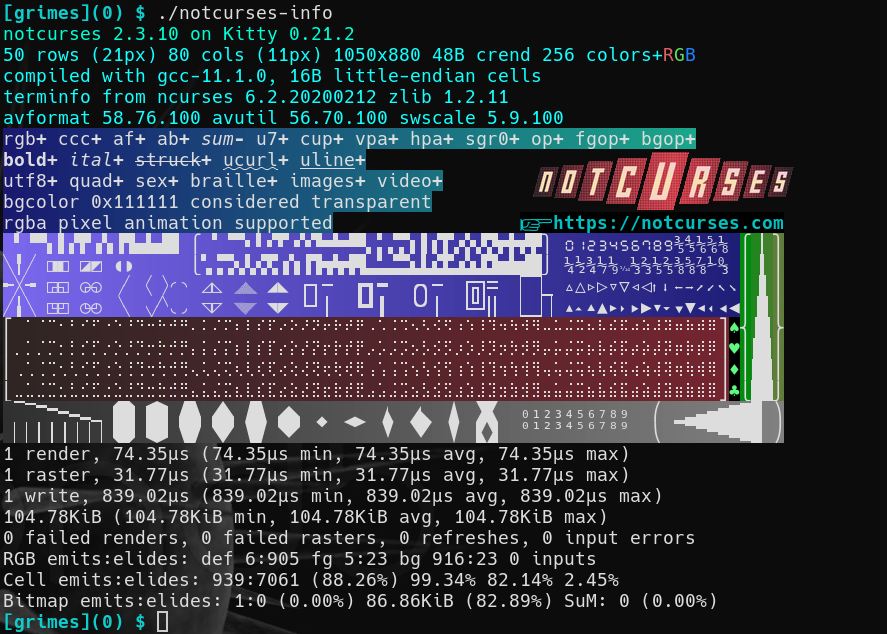
To inspect your environment's rendering of drawing characters, run
notcurses-info. The desired output ought look something like this:
FAQs
If things break or seem otherwise lackluster, please consult the
Environment Notes section! You need correct
TERM and LANG definitions, and might want COLORTERM.
Can I use Notcurses in my closed-source program?
Notcurses is licensed under Apache2, a demonstration that I have transcended your petty world of mater
Core symbols most depended-on inside this repo
notcurses_renderShape
Languages
Modules by API surface
For agents
$ claude mcp add notcurses \
  -- python -m otcore.mcp_server <graph>