github.com/danielgtaylor/shorthand @v2.4.0
Chat with this repoWhat it actually does AI analysis from the code graph — generated when you open this
README
Structured Data Shorthand Syntax



Shorthand is a superset and friendlier variant of JSON designed with several use-cases in mind:
| Use Case | Example |
|---|---|
| CLI arguments/input | my-cli post 'foo.bar[0]{baz: 1, hello: world}' |
| Patch operations | name: undefined, item.tags[]: appended |
| Query language | items[created before 2022-01-01].{id, tags} |
| Configuration format | {json.save.autoFormat: true} |
The shorthand syntax supports the following features, described in more detail with examples below:
- Superset of JSON (valid JSON is valid shorthand)
- Optional commas, quotes, and sometimes colons
- Support for comments & trailing commas
- Automatic type coercion
- Support for bytes, datetimes, and maps with non-string keys
- Nested object & array creation
- Loading values from files
- Editing existing data
- Appending & inserting to arrays
- Unsetting properties
- Moving properties & items
- Querying, array filtering, and field selection
The following are all completely valid shorthand and result in the same output:
foo.bar[]{baz: 1, hello: world}
{
  // This is a comment
  foo.bar[]{
    baz: 1
    hello: world
  }
}
{
  "foo": {
    "bar": [
      {
        "baz": 1,
        "hello": "world"
      }
    ]
  }
}
This library has excellent test coverage to ensure correctness and is additionally fuzz tested to prevent panics.
Alternatives & Inspiration
The CLI shorthand syntax is not the only one you can use to generate data for CLI commands. Here are some alternatives:
For example, the shorthand example given above could be rewritten as:
$ jo -p foo=$(jo -p bar=$(jo -a $(jo -p baz=1 hello=world)))
The shorthand syntax implementation described herein uses those and the following for inspiration:
It seems reasonable to ask, why create a new syntax?
- Built-in. No extra executables required. Your tool ships ready-to-go.
- No need to use sub-shells to build complex structured data.
- Syntax is closer to YAML & JSON and mimics how you do queries using tools like
jqandjmespath. - It's optional, so you can use your favorite tool/language instead, while at the same time it provides a minimum feature set everyone will have in common.
Features in Depth
You can use the included j executable to try out the shorthand format examples below. Examples are shown in JSON, but the shorthand parses into structured data that can be marshalled as other formats, like YAML or TOML if you prefer.
go install github.com/danielgtaylor/shorthand/cmd/j@latest
Also feel free to use this tool to generate structured data for input to other commands.
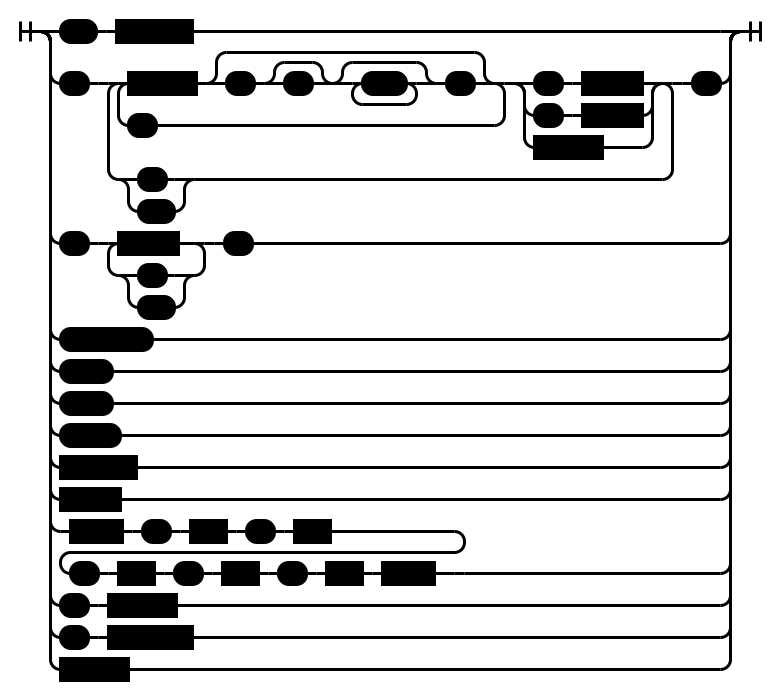
Here is a diagram overview of the language syntax, which is similar to JSON's syntax but adds a few things:
Note:
stringcan be quoted (with") or unquoted.- The
querysyntax in the diagram above is described below in the Querying section.
Keys & Values
At its most basic, a structure is built out of key & value pairs. They are separated by commas:
$ j hello: world, question: how are you?
{
  "hello": "world",
  "question": "how are you?"
}
Types
Shorthand supports the standard JSON types, but adds some of its own as well to better support binary formats and its query features.
| Type | Description |
|---|---|
null |
JSON null |
boolean |
Either true or false |
number |
JSON number, e.g. 1, 2.5, or 1.4e5 |
string |
Quoted or unquoted strings, e.g. hello or "hello" |
bytes |
%-prefixed, unquoted, base64-encoded binary data, e.g. %wg== |
time |
RFC3339 date/time, e.g. 2022-01-01T12:00:00Z |
array |
JSON array, e.g. [1, 2, 3] |
object |
JSON object, e.g. {"hello": "world"} |
Type Coercion
Well-known values like null, true, and false get converted to their respective types automatically. Numbers, bytes, and times also get converted. Similar to YAML, anything that doesn't fit one of those is treated as a string. This automatic coercion can be disabled by just wrapping your value in quotes.
# With coercion
$ j empty: null, bool: true, num: 1.5, string: hello
{
  "bool": true,
  "empty": null,
  "num": 1.5,
  "string": "hello"
}

# As strings
$ j empty: "null", bool: "true", num: "1.5", string: "hello"
{
  "bool": "true",
  "empty": "null",
  "num": "1.5",
  "string": "hello"
}

# Passing the empty string
$ j blank1: , blank2: ""
{
  "blank1": "",
  "blank2": ""
}
Objects
Nested objects use a . separator when specifying the key.
$ j foo.bar.baz: 1
{
  "foo": {
    "bar": {
      "baz": 1
    }
  }
}
Properties of nested objects can be grouped by placing them inside { and }. The : becomes optional for nested objects, so foo.bar: {...} is equivalent to foo.bar{...}.
$ j foo.bar{id: 1, count.clicks: 5}
{
  "foo": {
    "bar": {
      "count": {
        "clicks": 5
      },
      "id": 1
    }
  }
}
Arrays
Arrays are surrounded by square brackets like in JSON:
# Simple array
$ j [1, 2, 3]
[
  1,
  2,
  3
]
Array indexes use square brackets [ and ] to specify the zero-based index to set an item. If the index is out of bounds then null values are added as necessary to fill the array. Use an empty index [] to append to the an existing array. If the item is not an array, then a new one will be created.
# Nested arrays
$ j [0][2][0]: 1
[
  [
    null,
    null,
    [
      1
    ]
  ]
]

# Appending arrays
$ j a[]: 1, a[]: 2, a[]: 3
{
  "a": [
    1,
    2,
    3
  ]
}
Loading from Files
Sometimes a field makes more sense to load from a file than to be specified on the commandline. The @ preprocessor lets you load structured data, text, and bytes depending on the file extension and whether all bytes are valid UTF-8:
# Load a file's value as a parameter
$ j foo: @hello.txt
{
  "foo": "hello, world"
}

# Load structured data
$ j foo: @hello.json
{
  "foo": {
    "hello": "world"
  }
}
Remember, it's possible to disable this behavior with quotes:
$ j 'twitter: "@user"'
{
  "twitter": "@user"
}
Patch (Partial Update)
Partial updates are supported on existing data, which can be used to implement HTTP PATCH, templating, and other similar features. The suggested content type for HTTP PATCH is application/shorthand-patch. This feature combines the best of both:
Partial updates support:
- Appending arrays via
[] - Inserting before via
[^index] - Removing fields or array items via
undefined - Moving/swapping fields or array items via
^ - The right hand side is a path to the value to swap. See Querying below for the path syntax.
Note: When sending shorthand patches file loading via @ should be disabled as the files will not exist on the server.
Some examples:
# First, let's create some data we'll modify later
$ j id: 1, tags: [a, b, c] >data.json

# Now let's append to the tags array
$ j <data.json 'tags[]: d'
{
  "id": 1,
  "tags": [
    "a",
    "b",
    "c",
    "d"
  ]
}

# Array item insertion (prepend the array)
$ j <data.json 'tags[^0]: z'
{
  "id": 1,
  "tags": [
    "z",
    "a",
    "b",
    "c"
  ]
}

# Remove stuff
$ j <data.json 'id: undefined, tags[1]: undefined'
{
  "tags": [
    "a",
    "c"
  ]
}

# Rename the ID property, and swap the first/last array items
$ j <data.json 'id ^ name, tags[0] ^ tags[-1]'
{
  "name": 1,
  "tags": [
    "c",
    "b",
    "a"
  ]
}
Querying
A data query language is included, which allows you to query, filter, and select fields to return. This functionality is used by the patch move operations described above and is similar to tools like:
The query language supports:
- Paths for objects & arrays
foo.items.name - Wildcards for unknown props
foo.*.name - Array indexing & slicing
foo.items[1:2].name(both ends inclusive:[1:2]returns items at indexes 1 and 2) - Including negative indexes
foo.items[-1].name - Array filtering via mexpr
foo.items[name.lower startsWith d] - Array construction
[foo.id, foo.name] - Object property selection
foo.{created, names: items.name} - Recursive search
foo..name - Stopping processing with a pipe
| - Flattening nested arrays
[]
Square brackets are context-sensitive in queries. At the beginning of a query or
object field value, a [ expression constructs an array only when it contains a
top-level comma, so [id, name] returns a two-item array with those query
results. Single-element and empty array construction are not supported. A [
after an existing path indexes, slices, or filters that value, as in items[0],
items[:2], or items[status == active]. An empty bracket expression, [],
keeps its existing meaning and flattens nested arrays one level.
The query syntax is recursive and looks like this:
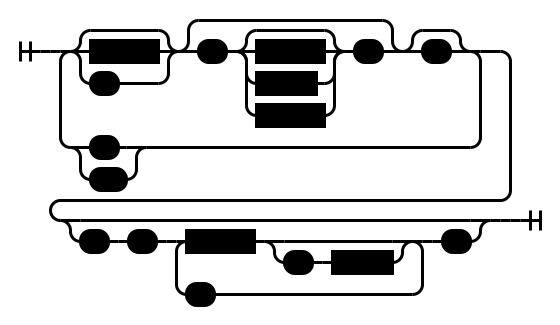
The filter syntax is described in the documentation for mexpr.
Examples:
# First, let's make a complex file to query
$ j 'users: [{id: 1, age: 5, friends: [a, b]}, {id: 2, age: 6, friends: [b, c]}, {id: 3, age: 5, friends: [c, d]}]' >data.json

# Query for each user's ID
$ j <data.json -q 'users.id'
[
  1,
  2,
  3
]

# Get the users who are friends with `b`
$ j <data.json -q 'users[friends contains b].id'
[
  1,
  2
]

# Get the ID & age of users who are friends with `b`
$ j <data.json -q 'users[friends contains b].{id, age}'
[
  {
    "age": 5,
    "id": 1
  },
  {
    "age": 6,
    "id": 2
  }
]

# Construct a shell-friendly array of selected values
$ j <data.json -q '[users[0].id, users[0].friends[0]]'
[
  1,
  "a"
]

# Array construction also works inside object selection
$ j <data.json -q '{vars: [users[0].id, users[0].friends[0]]}'
{
  "vars": [
    1,
    "a"
  ]
}
Note on slice ranges: Shorthand uses inclusive ranges on both ends, so
[1:2]returns items at indexes 1 and 2. This is an intentional design c
Extension points exported contracts — how you extend this code
Error (Interface)Core symbols most depended-on inside this repo
nextShape
Languages
Modules by API surface
Used by 1 indexed graphs manifest dependencies, hub-wide
For agents
$ claude mcp add shorthand \
  -- python -m otcore.mcp_server <graph>