github.com/danfry1/hacker-news-tui @v0.1.3
Chat with this repoWhat it actually does AI analysis from the code graph — generated when you open this
README
Hacker News TUI
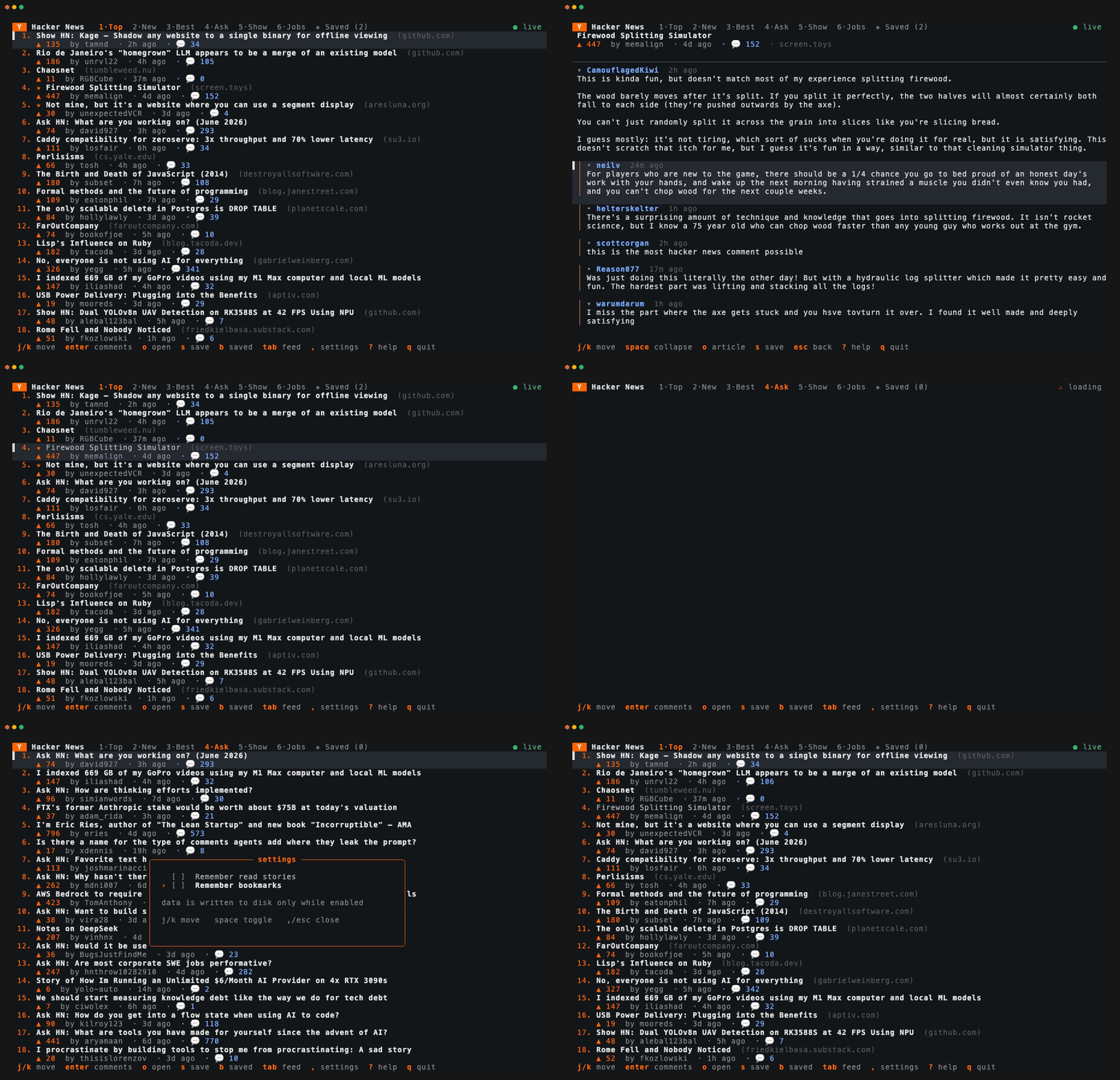
A fast, delightful terminal UI for browsing Hacker News, built with Ratatui.
Features
- Six feeds — Top, New, Best, Ask, Show, and Jobs, switchable instantly.
- Infinite scroll — the next batch of stories loads and appends automatically as you scroll toward the bottom, so you can keep reading without paging.
- Bookmarks — save stories with
sand revisit them in the★ Savedview (b); saved stories are marked with a star in every list. - In-app settings pane (
,) — opt in to remembering read-state and bookmarks across runs. Both are off by default: nothing is written to disk unless you turn it on. - Threaded comments with colored depth guides, collapsible subtrees, and an
OPbadge so you can follow the original poster. - Async, non-blocking UI — stories and whole comment trees are fetched concurrently in the background while the interface stays responsive, with a live loading spinner.
- Read-state tracking — visited stories dim so you can see where you've been.
- Open in browser — jump to the article or the HN discussion with one key.
- Smart HTML rendering — HN's markup and entities are cleaned into readable, word-wrapped text.
Running
cargo run --release
The first build compiles dependencies; subsequent runs are instant.
Installing
Homebrew (macOS / Linux):
brew install danfry1/tap/hacker-news-tui
Nix (flakes):
nix run github:danfry1/hacker-news-tui          # run without installing
nix profile install github:danfry1/hacker-news-tui
Cargo — from crates.io:
cargo install hacker-news-tui
Or grab a prebuilt binary from the Releases page — each tagged release ships archives (with SHA-256 checksums) for:
- Linux:
x86_64andaarch64 - macOS:
aarch64(Apple Silicon) - Windows:
x86_64
Intel Macs aren't shipped as a prebuilt binary; install with
cargo install hacker-news-tui instead.
The installed command is hacker-news-tui. For something shorter, add an alias
to your shell config (~/.zshrc, ~/.bashrc, …):
alias hnt='hacker-news-tui'
Maintainers cut a release by pushing a version tag:
git tag v0.1.0
git push origin v0.1.0
This triggers .github/workflows/release.yml, which builds every target and
attaches the archives to a GitHub Release for the tag.
Keyboard shortcuts
Stories
| Key | Action |
|---|---|
j / k, ↑ / ↓ |
Move selection |
g / G |
Jump to top / bottom |
enter |
Open comments |
o |
Open the article in your browser |
s |
Bookmark / unbookmark the story |
b |
View bookmarks (★ Saved) |
1–6, tab / shift+tab |
Switch feed |
r |
Refresh |
, |
Settings |
? |
Help |
q |
Quit |
Comments
| Key | Action |
|---|---|
j / k, ↑ / ↓ |
Move selection |
space / enter |
Collapse / expand a thread |
o |
Open the article |
s |
Bookmark / unbookmark |
esc / h / ← |
Back |
Settings (,) & Bookmarks (b)
In the settings pane, j/k move, space/enter toggle, ,/esc close.
In the bookmarks view, enter opens comments, o opens the article, s
removes a bookmark, and b/esc returns to the feed.
Persistence & privacy
Read-state and bookmarks can be remembered across runs, but only when you
enable them in the settings pane (,). Both are off by default, so a fresh
install writes nothing to disk; disabling them again removes the file entirely.
When enabled, state lives in a single JSON file:
| Platform | Location |
|---|---|
| macOS | ~/Library/Application Support/hacker-news-tui/state.json |
| Linux | $XDG_DATA_HOME/hacker-news-tui/state.json (or ~/.local/share/…) |
| Windows | %APPDATA%\hacker-news-tui\state.json |
Delete that file to clear everything. All file operations are best-effort and fail silently — losing local UI state never interrupts browsing.
Supply-chain security
This project is built with a deliberately small, auditable dependency surface:
Cargo.lockis committed, pinning every transitive crate to an exact version and checksum for reproducible builds.- Pure-Rust TLS via
rustls— no linkage to a system OpenSSL. Root certificates come from the OS trust store, so the app works behind corporate proxies that present a privately-issued root CA. - No avoidable dependencies — browser opening and HTML decoding are a few
lines of
stdinsrc/util.rsrather than extra crates.
To audit the locked dependency tree for known advisories:
cargo install cargo-audit   # one-time
cargo audit
Architecture
| File | Responsibility |
|---|---|
src/main.rs |
Terminal setup and the async event loop (input · fetch results · tick) |
src/api.rs |
Hacker News Firebase API client and data types |
src/app.rs |
Application state, input handling, async orchestration |
src/ui.rs |
All rendering — pure functions of the app state |
src/store.rs |
Best-effort persistence of settings, read-state, bookmarks |
src/util.rs |
Time/URL/HTML/wrapping helpers (unit-tested) |
Development
A justfile wraps the common tasks (or run the
underlying cargo commands directly):
just            # full gate: fmt-check + clippy + test (what CI runs)
just fmt        # apply formatting
just test       # run the test suite
just audit      # security-audit the locked dependencies (needs cargo-audit)
just run        # run the app
GitHub Actions (.github/workflows/ci.yml) runs formatting, Clippy (warnings as
errors), the test suite, and cargo audit on every push and pull request.
Data source
Uses the official Hacker News API. No API key required.
Core symbols most depended-on inside this repo
on_keyShape
Languages
Modules by API surface
For agents
$ claude mcp add hacker-news-tui \
  -- python -m otcore.mcp_server <graph>