github.com/dalance/pipecolor @v0.4.4
Chat with this repoWhat it actually does AI analysis from the code graph — generated when you open this
README
pipecolor
A terminal filter to colorize output



Description
pipecolor is a terminal filter to colorize output. You can customize the colorize rule by regular expression.
Demo

Install
Download from release page, and extract to the directory in PATH.
Alternatively you can install by cargo.
cargo install pipecolor
Put the colorize rule file to ~/.pipecolor.toml.
sample/pipecolor.toml in this repository is an example.
Usage
pipecolor can receive input through pipe, and colorize the output.
$ cat sample/access_log | pipecolor -c ./sample/pipecolor.toml

Filenames can be specified.
$ pipecolor -c ./sample/pipecolor.toml sample/maillog
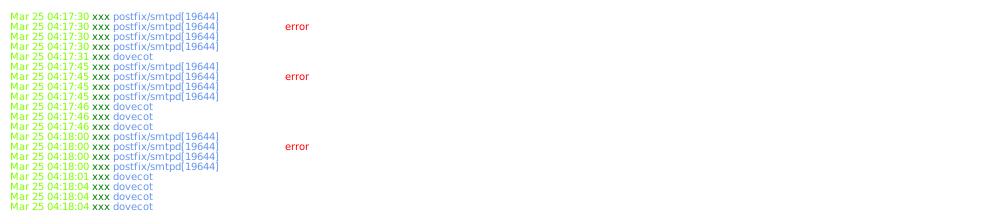
If output is redirected to a file, colorization is disabled automatically.
You can force to colorize by pipecolor --mode always.
Colorize rule
See the example rule sample/pipecolor.toml.
[[lines]]
    pat  = "^(.*?) .*? .*? \\[(.*?)\\] \".*?\" .*? .*? \".*?\" \"(.*?)\""
    colors = ["White", "LightGreen", "LightBlue", "Green"]
    [[lines.tokens]]
        pat   = "GET"
        colors = ["LightCyan"]
    [[lines.tokens]]
        pat   = "POST"
        colors = ["LightYellow"]
    [[lines.tokens]]
        pat   = "HEAD"
        colors = ["LightMagenta"]
lines.pat is a regular expression to specify colorize lines.
If the expression is matched, the matched line is colorize to colors specified by lines.colors.
lines.colors is an array of colors, the first color is used to colorize the whole line.
The rest colors are used to colorize the captured group in the expression.
In the example, the whole line is colorized to White, the first group captured by (.*?) is colorized to LightGreen.
lines.tokens specifies the special tokens to be colorized in the matched line.
If no token is required, tokens can be empty list.
[[lines]]
    pat  = "^(.*?) .*? .*? \\[(.*?)\\] \".*?\" .*? .*? \".*?\" \"(.*?)\""
    colors = ["White", "LightGreen", "LightBlue", "Green"]
    tokens = []
Available colors
The available colors are below.
- Black
- Blue
- Cyan
- Default
- Green
- LightBlack
- LightBlue
- LightCyan
- LightGreen
- LightMagenta
- LightRed
- LightWhite
- LightYellow
- Magenta
- Red
- White
- Yellow
Core symbols most depended-on inside this repo
colorizeShape
Languages
Modules by API surface
For agents
$ claude mcp add pipecolor \
  -- python -m otcore.mcp_server <graph>