github.com/cxbdasheng/dnet @v2.3.2
Chat with this repoWhat it actually does AI analysis from the code graph — generated when you open this
README
D-NET 动态网络解析管理系统
一款轻量级动态网络管理工具,支持多平台的 CDN、DNS 和 内网穿透自动化管理与监控。




主要功能
- 动态 CDN 管理 (DCDN): 支持阿里云(CDN、DCDN、ESA)、腾讯云(CDN、EdgeOne)、百度云(CDN、DRCDN)、Cloudflare
- 动态 DNS 管理 (DDNS): 根据 IP 变化自动更新 DNS 解析,支持 A / AAAA / CNAME / TXT 记录,支持阿里云、腾讯云、百度云、Cloudflare、华为云、Dnspod、NameSilo
- 内网穿透管理: 从外网访问内网服务(V3 版本规划中)
- Webhook 通知: 实时推送 IP 变更通知
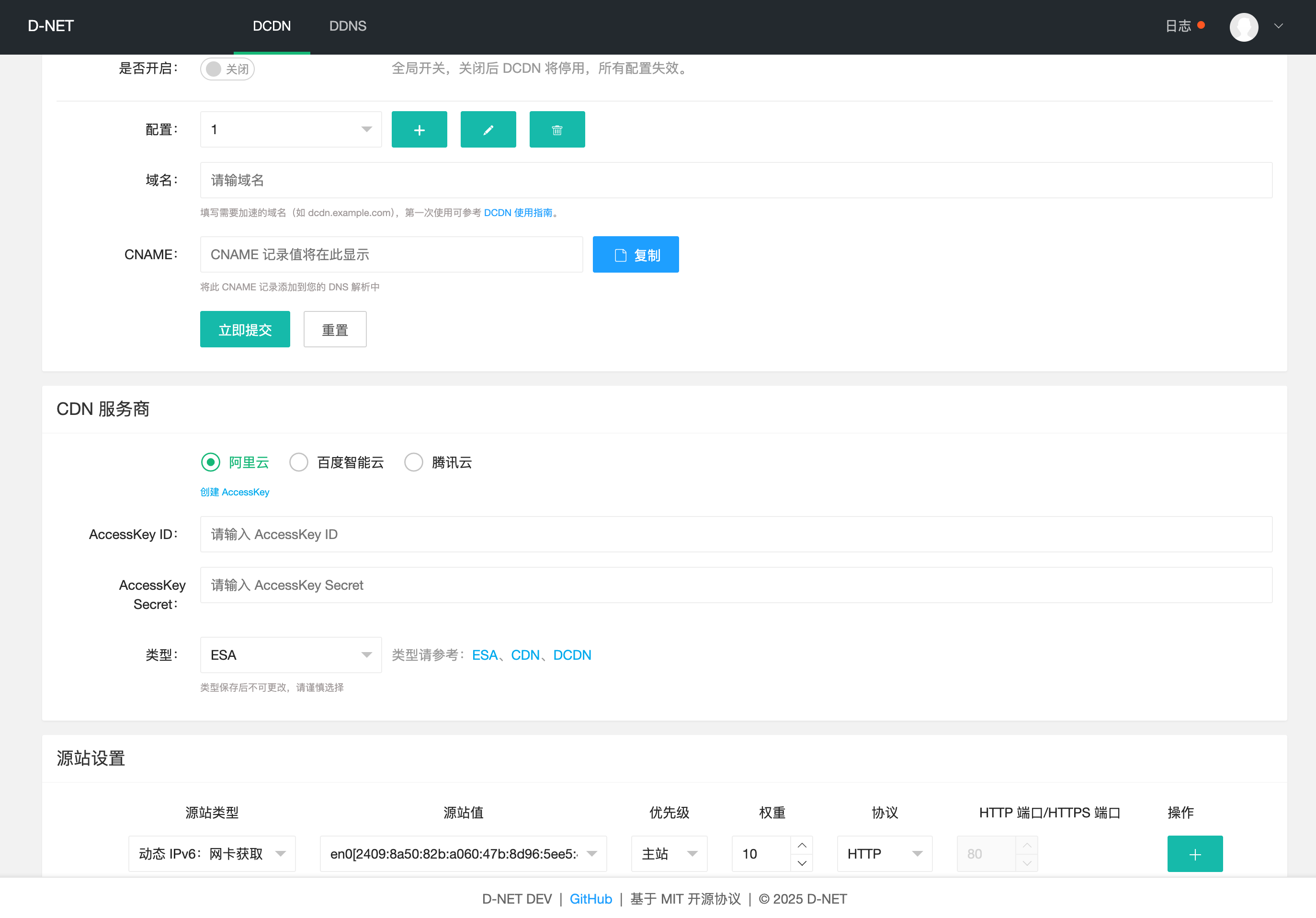
- Web 管理界面: 可视化配置和管理
界面
快速开始
方式一:使用二进制文件
1. 下载安装
从 Releases 页面下载适合您系统的版本并解压。
2. 安装为系统服务
Mac/Linux:
sudo ./dnet -s install
Windows(管理员权限):
.\dnet.exe -s install
3. 访问 Web 界面
浏览器访问 http://localhost:9877 进行配置。
服务管理
# 卸载服务
sudo ./dnet -s uninstall          # Mac/Linux
.\dnet.exe -s uninstall           # Windows (管理员)

# 重启服务
sudo ./dnet -s restart            # Mac/Linux
.\dnet.exe -s restart             # Windows (管理员)
高级选项
安装服务时可以指定以下参数:
| 参数 | 说明 | 示例 |
|---|---|---|
-l |
监听地址 | -l :9877 |
-f |
同步间隔时间(秒) | -f 600 |
-c |
自定义配置文件路径 | -c /path/to/config.yaml |
-u |
升级当前 D-NET 版本 | -u |
-noweb |
不启动 Web 服务 | -noweb |
-skipVerify |
跳过 HTTPS 证书验证 | -skipVerify |
-dns |
自定义 DNS 服务器 | -dns 8.8.8.8 |
-dcdnCacheTimes |
每隔 N 次强制同步一次 CDN 记录 | -dcdnCacheTimes 10 |
-ddnsCacheTimes |
每隔 N 次强制同步一次 DNS 记录 | -ddnsCacheTimes 10 |
-resetPassword |
重置密码 | -resetPassword newpass |
更多使用参数,请查看 Wiki 文档 - D‐NET 使用指南。
使用示例:
# 自定义同步间隔和配置文件路径
./dnet -s install -f 600 -c /path/to/config.yaml

# 重置密码
./dnet -resetPassword 123456
方式二:使用 Docker
Linux(推荐 Host 模式):
docker run -d --name dnet --net=host -v /opt/dnet:/root --restart=always cxbdasheng/dnet:latest
macOS / Windows(端口映射):
docker run -d --name dnet -p 9877:9877 -v /opt/dnet:/root --restart=always cxbdasheng/dnet:latest
说明: Host 模式支持 IPv6 地址检测(仅 Linux);端口映射无法直接获取宿主机的网卡信息,可能无法检测 IPv6。
常用命令:
# 重置密码
docker exec dnet ./dnet -resetPassword 123456 && docker restart dnet

# 查看日志
docker logs -f dnet
方式三:从源码构建
make build                              # 构建当前平台
goreleaser build --snapshot --clean     # 构建所有平台
go run main.go                          # 直接运行
Webhook 通知
支持的变量:
| 变量名 | 说明 | 示例值 |
|---|---|---|
#{serviceType} |
服务类型 | DCDN、DDNS |
#{serviceName} |
服务名称(域名) | ddns.example.com |
#{serviceStatus} |
更新结果 | 成功、失败、未改变 |
#{changeDetail} |
本次变更明细(旧值→新值) | A: 1.1.1.1 -> 2.2.2.2 |
#{timestamp} |
时间戳 | 20060102150405 |
#{datetime} |
日期时间 | 2006-01-02 15:04:05 |
#{hostname} |
主机名 |
请求方式: - RequestBody 为空 → 发送 GET 请求 - RequestBody 不为空 → 发送 POST 请求
配置示例:
钉钉机器人
- 钉钉群设置 -> 智能群助手 -> 添加机器人 -> 自定义
- 安全设置勾选
自定义关键词,关键词需包含在 RequestBody 中,如:D-NET - URL 中输入钉钉提供的
Webhook 地址 -
RequestBody 中输入
json
    {
      "msgtype": "markdown",
      "markdown": {
        "title": "D-NET 同步通知",
        "text": "#### D-NET 同步通知 \n - 服务类型:#{serviceType} \n - 服务名称:#{serviceName} \n - 更新结果:#{serviceStatus} \n - 变更明细:#{changeDetail} \n - 主机名称:#{hostname} \n - 通知时间:#{datetime} \n"
      }
    }
飞书
- 飞书电脑端 -> 群设置 -> 添加机器人 -> 自定义机器人
- 安全设置只勾选
自定义关键词,输入的关键字必须包含在 RequestBody 的 content 中,如:D-NET - URL 中输入飞书给你的
Webhook 地址 -
RequestBody 中输入
json
    {
      "msg_type": "post",
      "content": {
        "post": {
          "zh_cn": {
            "title": "D-NET 同步通知",
            "content": [
              [{"tag": "text", "text": "服务类型:#{serviceType}"}],
              [{"tag": "text", "text": "服务名称:#{serviceName}"}],
              [{"tag": "text", "text": "更新结果:#{serviceStatus}"}],
              [{"tag": "text", "text": "变更明细:#{changeDetail}"}],
              [{"tag": "text", "text": "主机名称:#{hostname}"}],
              [{"tag": "text", "text": "通知时间:#{datetime}"}]
            ]
          }
        }
      }
    }
Server酱
- 在 Server酱 获取
SendKey - URL 中输入
https://sctapi.ftqq.com/[SendKey].send?title=D-NET通知&desp=#{serviceName} - #{serviceStatus} - #{changeDetail} -
RequestBody 留空(发送 GET 请求)
pushplus 推送加
- 在 pushplus 获取 token
- URL 中输入
https://www.pushplus.plus/send -
RequestBody 中输入
json
    {
      "token": "your token",
      "title": "D-NET 同步通知",
      "content": "#### D-NET 同步通知 \n - 服务类型:#{serviceType} \n - 服务名称:#{serviceName} \n - 更新结果:#{serviceStatus} \n - 变更明细:#{changeDetail} \n - 主机名称:#{hostname} \n - 通知时间:#{datetime} \n"
    }
Discord
- Discord 任意客户端 -> 服务器 -> 频道设置 -> 整合 -> 查看 Webhook -> 新 Webhook -> 复制 Webhook 网址
- URL 中输入 Discord 复制的
Webhook 网址 -
RequestBody 中输入
json
    {
      "content": "D-NET 同步通知",
      "embeds": [
        {
          "description": "#### D-NET 同步通知 \n - 服务类型:#{serviceType} \n - 服务名称:#{serviceName} \n - 更新结果:#{serviceStatus} \n - 变更明细:#{changeDetail} \n - 主机名称:#{hostname} \n - 通知时间:#{datetime}",
          "color": 15258703,
          "author": {"name": "D-NET"},
          "footer": {"text": "D-NET #{serviceStatus}"}
        }
      ]
    }
微信
- 通过 微信 ClawBot 协议 推送消息到微信
- 需要先通过协议获取
$your_bot_token和$your_user_id,可参考 weixin-bot-api - URL 中输入
https://ilinkai.weixin.qq.com/ilink/bot/sendmessage - RequestBody 中输入
json { "msg": { "from_user_id": "", "to_user_id": "$your_user_id@im.wechat", "client_id": "dnet-#{timestamp}", "message_type": 2, "message_state": 2, "item_list": [ { "type": 1, "text_item": { "text": "📡 D-NET 同步通知\n 服务类型:#{serviceType}\n 服务名称:#{serviceName}\n 更新结果:#{serviceStatus}\n 变更明细:#{changeDetail}\n 主机名称:#{hostname}\n 通知时间:#{datetime}" } } ] }, "base_info": { "channel_version": "2.1.7" } } - Headers 中输入
Content-Type: application/json
    AuthorizationType: ilink_bot_token
    Authorization: Bearer $your_bot_token
    iLink-App-Id: bot
    iLink-App-ClientVersion: 131335
详细 Webhook 配置参考 Wiki 文档 - WebHook 配置指南。