github.com/crew102/reprexpy @v0.3.4
Chat with this repoWhat it actually does AI analysis from the code graph — generated when you open this
README
reprexpy
Render reproducible examples of Python code for posting to GitHub/Stack Overflow (port of R package
reprex)


reprexpy is a Python package that renders reproducible examples (also known as reprexes or minimal working examples (MWEs)) to a format suitable for posting to GitHub or Stack Overflow. It's a port of the R package reprex.
Installation
You can get the stable version from PyPI:
pip install reprexpy
Or the development version from GitHub:
pip install git+https://github.com/crew102/reprexpy.git
A basic example
Let's say you want to know if there's a way to flatten lists in Python without using list comprehension, so you create the following MWE to post to SO (MWE inspired by this SO question):
# i know that you can flatten a list in python using list comprehension:
l = [[1, 2, 3], [4, 5, 6], [7], [8, 9]]
[item for sublist in l for item in sublist]

# but i'd like to know if there's another way. i tried this but i got an error:
import functools
functools.reduce(lambda x, y: x.extend(y), l)
You'd like to include the outputs of running the above code into the example itself, to show people what you're seeing in your console:
# i know that you can flatten a list in python using list comprehension:
l = [[1, 2, 3], [4, 5, 6], [7], [8, 9]]
[item for sublist in l for item in sublist]
#> [1, 2, 3, 4, 5, 6, 7, 8, 9]

# but i'd like to know if there's another way. i tried this but i got an error:
import functools
functools.reduce(lambda x, y: x.extend(y), l)
#> Traceback (most recent call last):
#>  File "<stdin>", line 1, in <module>
#>  File "<stdin>", line 1, in <lambda>
#> AttributeError: 'NoneType' object has no attribute 'extend'
You could run the code in your console and copy/paste the outputs into your example. That can be a pain, though, especially if you have a lot of outputs to copy. An easier way is to use reprex():
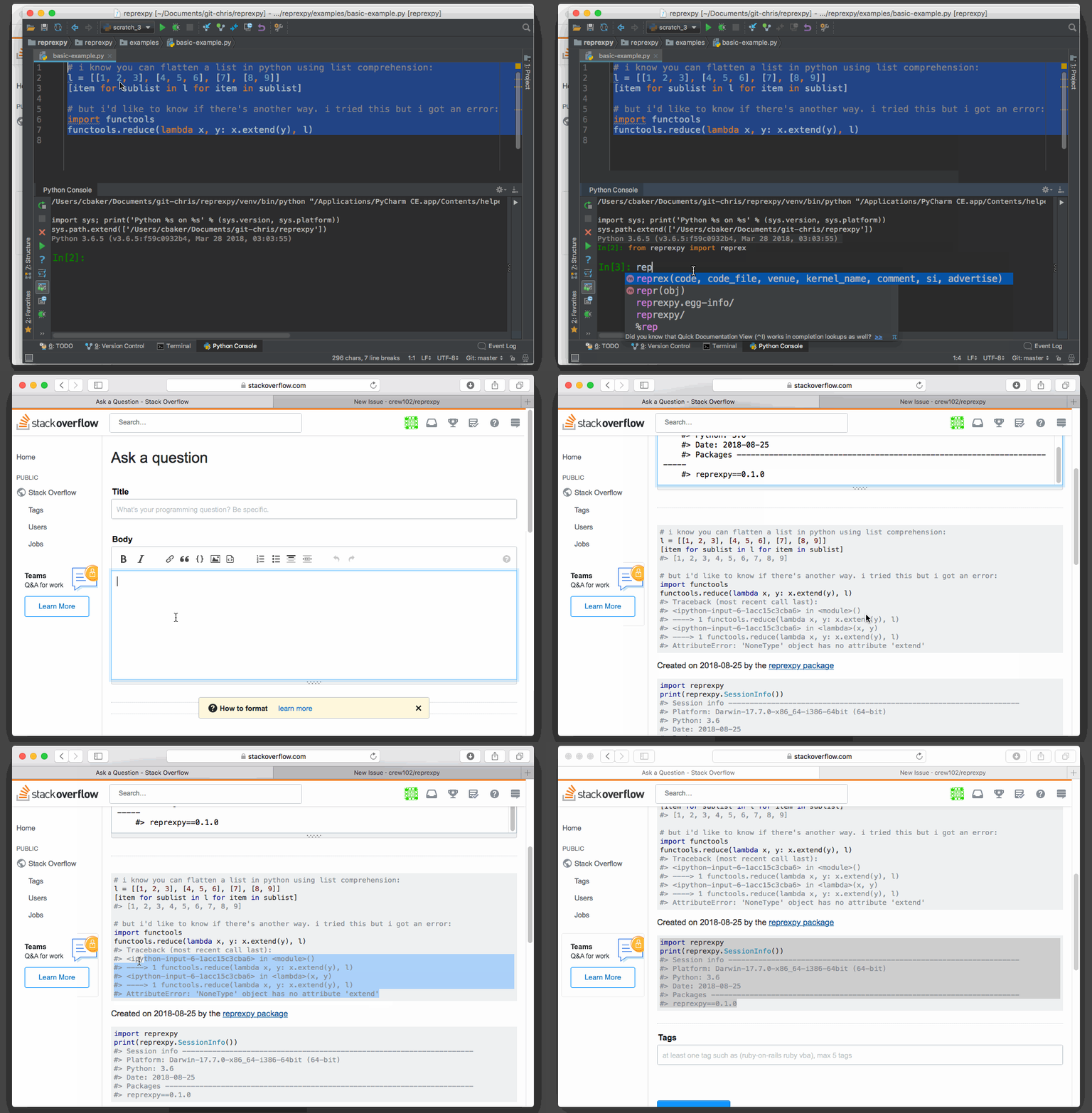
When you run reprex(), your MWE is run inside an IPython kernel. The outputs from running your code (including errors) are captured and displayed alongside the code itself. Details on the IPython session are also given at the end of your example by calling SessionInfo() (more on this later).
Including matplotlib plots
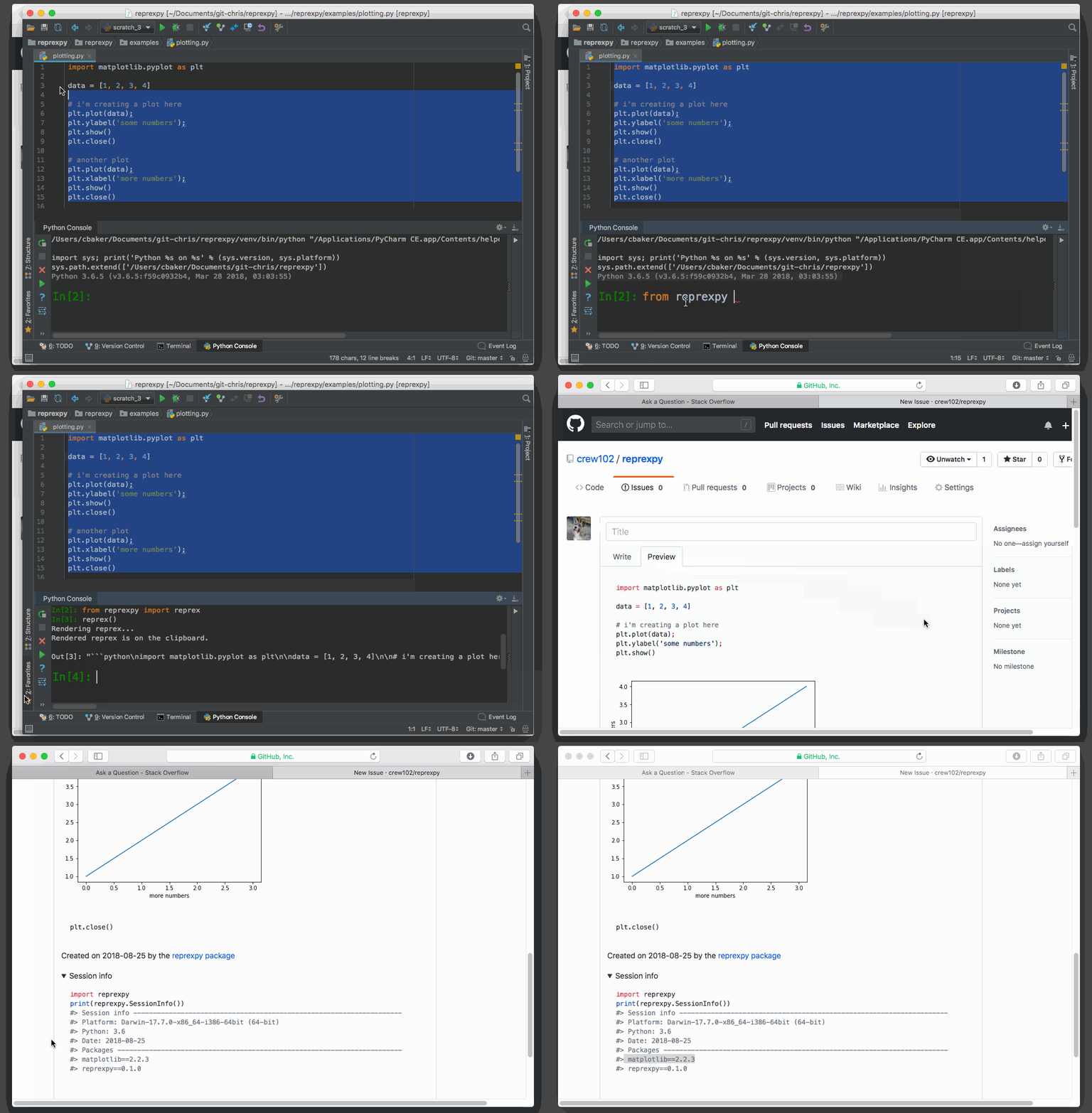
reprex() makes it easy to include matplotlib plots in your reprexes. It does this by uploading the plots to imgur and including inline links to them in your example. For example, let's say you have the following MWE that you want to post to GitHub:
import matplotlib.pyplot as plt

data = [1, 2, 3, 4]

# i'm creating a plot here
plt.plot(data);
plt.ylabel('some numbers');
plt.show()
plt.close()

# another plot
plt.plot(data);
plt.xlabel('more numbers');
plt.show()
plt.close()
You can prepare this reprex for posting to GitHub using reprex():
SessionInfo()
You may have noticed in the previous two examples that a section called "Session info" is added to the end of your reprex by default (note, this is no longer the case in version 0.2.0 and above). This section uses the SessionInfo() function to include details about the IPython kernel that was used to run your reprex, as well as the version numbers of relevant third-party packages used in your example. Note that you can call SessionInfo() outside of reprexes, so long as you're using an IPython kernel (e.g., when inside an IPython terminal or Jupyter notebook):
import pandas
import requests
import numpy

from reprexpy import SessionInfo
SessionInfo()
#> Session info --------------------------------------------------------------------
#> Date: 2018-08-27
#> Platform: Darwin-17.7.0-x86_64-i386-64bit (64-bit)
#> Python: 3.5
#> Packages ------------------------------------------------------------------------
#> numpy==1.15.0
#> pandas==0.23.4
#> reprexpy==0.1.0
#> requests==2.19.1
Render code examples for docstrings
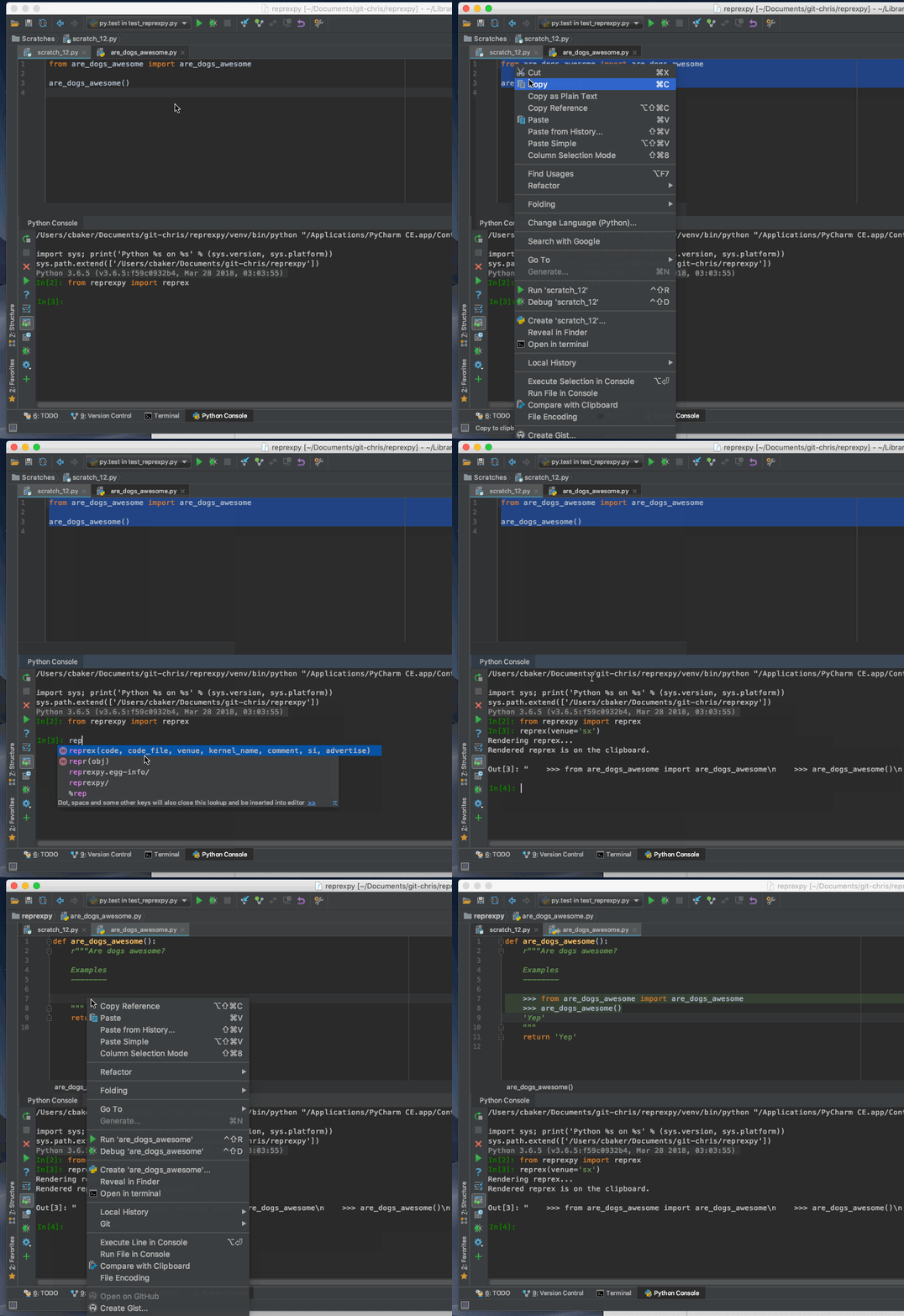
Creating code examples to insert into docstrings is a breeze with reprex(). For example, let's say you want to include an example for the following function:
def are_dogs_awesome():
    r"""Are dogs awesome?

    Examples
    --------


    """
    return 'Yep'
Just reprex() your example and paste the result into your docstring:
Core symbols most depended-on inside this repo
reprexShape
Languages
Modules by API surface
For agents
$ claude mcp add reprexpy \
  -- python -m otcore.mcp_server <graph>