hub / github.com/craigary/nobelium
github.com/craigary/nobelium @v1.3.0 sqlite
35 symbols
112 edges
41 files
0 documented · 0%
README

Nobelium
一个使用 NextJS + Notion API 实现的,部署在 Vercel 上的静态博客系统。为 Notion 和所有创作者设计。



[中文说明 / English]
演示地址:https://nobelium.vercel.app/
截图

亮点 ✨
🚀 秒开,设备全适配
- 快速的页面渲染和响应式设计
- 高效编译器的快速静态页面生成
🤖 自动,无需重新部署
- 部署在免费、高速的 Vercel 平台
- 支持增量式更新,更新文章后无需重复部署
🚙 全功能,完全不操心
- 评论、宽页面、搜索和标签
- 订阅、网站统计、Web Vital 分析…… 还有更多功能待你发现
🎨 美观,轻松自定义
- 丰富的配置项,更支持多语言
- 使用 Tailwind CSS,轻松实现二次开发
🕸 网址美观、搜索引擎优化
快速起步
- 给这个项目点个小星星 😉
- 将 这个 Notion 模板 制作副本,并分享这个页面给所有人
- Fork 这个项目
- 在
blog.config.js配置相关选项 - (可选) 用自己的图片替换
/public文件夹里的avatar.svg、favicon.svg和favicon.ico - 在 Vercel 上部署这个项目, 设定一下环境变量:
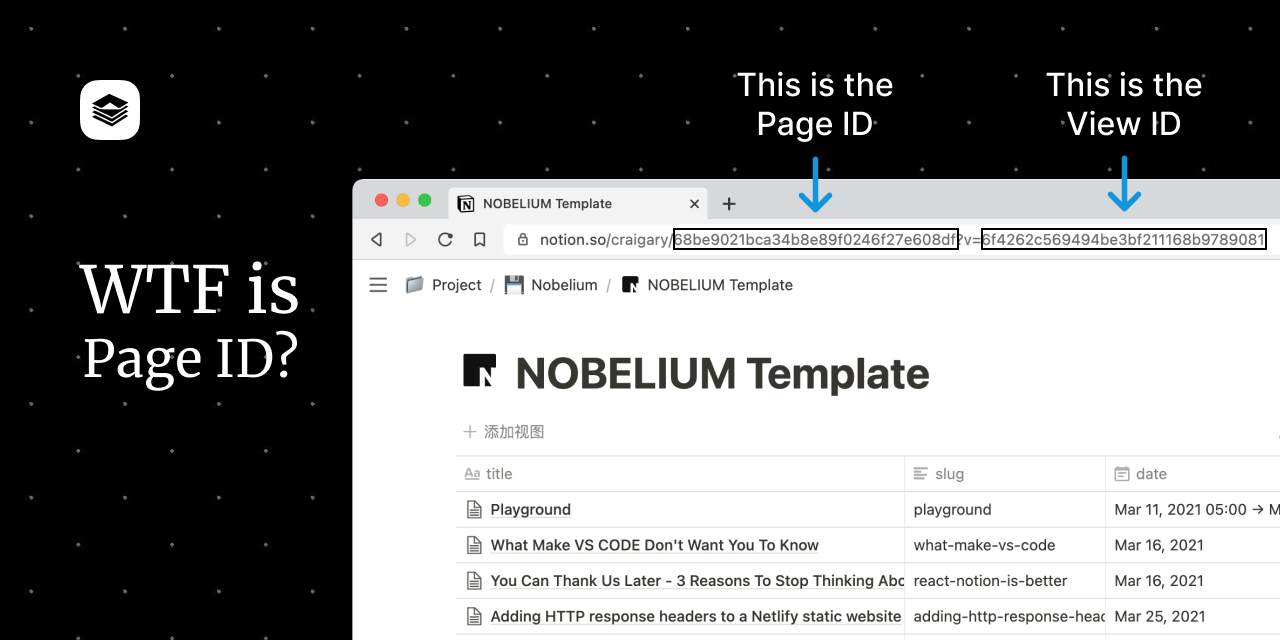
NOTION_PAGE_ID: 你刚刚分享出去的 Notion 页面网址中的页面 ID,通常是网址中工作区地址后的 32 位字符串NOTION_ACCESS_TOKEN(可选): 如果你决定不分享你的数据库,你可以使用 token 来让 Nobelium 从 Notion 数据库中抓取数据。你可以在你的浏览器 cookies 中找到它,名称是 `token_v2'。- Notion token 的有效期只有 180 天,请确保在 Vercel Dashboard 上手动更新,我们可能会在未来切换到官方 API 来解决这个问题。此外,如果数据库是非公开到,Notion 中的图片可能无法正常显示到网页上。
- 稍微等等就可以访问了! 简单吗?
等等,什么是 Page ID?
Roadmap
在这里看看我们的 Roadmap
- [x] 搜索引擎优化
- [x] 深色模式
- [x] Open Graph 支持
- [x] 切换到 react-notion-x
- [ ] 站点地图
- [ ] ...
技术细节
- 生成: Next.js SSG 和 Incremental Static Regeneration
- 页面渲染: React-notion-x
- 样式: Tailwind CSS 和
@tailwindcss/jitcompiler - 评论: Gitalk,更多评论系统还在路上
特别感谢
 Notion 中文社区
 |
 SilentDepth
 |
 Lee Rob
 |
 Spencer Woo
 |
贡献者
 Craig Hart
🎫 🔧 🎨 🐛
Craig Hart
🎫 🔧 🎨 🐛 |
 Reynard
🎨 🐛
Reynard
🎨 🐛 |
 Niin
🔧 🐛
Niin
🔧 🐛 |
 Ruter
🔧 🐛
Ruter
🔧 🐛 |
License
The MIT License.
Core symbols most depended-on inside this repo
getAllPostscalled by 8
lib/notion/getAllPosts.js
useLocale
called by 4
lib/locale.js
getAllTags
called by 3
lib/notion/getAllTags.js
generateRss
called by 1
lib/rss.js
getPostBlocks
called by 1
lib/notion/getPostBlocks.js
getPageProperties
called by 1
lib/notion/getPageProperties.js
getAllPageIds
called by 1
lib/notion/getAllPageIds.js
headers
called by 0
next.config.js
Shape
Languages
TypeScript100%
Modules by API surface
pages/tag/[tag].js3 symbols
pages/search.js2 symbols
pages/feed.js2 symbols
pages/_document.js2 symbols
lib/locale.js2 symbols
lib/gtag.js2 symbols
components/Gtag.js2 symbols
pages/index.js1 symbols
next.config.js1 symbols
lib/rss.js1 symbols
lib/notion/getPostBlocks.js1 symbols
lib/notion/getPageProperties.js1 symbols
Dependencies from manifests, versioned
autoprefixer10.2.5 · 1×
eslint7.25.0 · 1×
eslint-config-prettier8.3.0 · 1×
eslint-config-standard16.0.2 · 1×
eslint-plugin-import2.22.1 · 1×
eslint-plugin-node11.1.0 · 1×
eslint-plugin-promise5.1.0 · 1×
eslint-plugin-react7.23.2 · 1×
feed4.2.2 · 1×
gitalk1.7.2 · 1×
next10.2.0 · 1×
notion-client4.5.2 · 1×
For agents
$ claude mcp add nobelium \
  -- python -m otcore.mcp_server <graph>