github.com/codexu/note-gen @note-gen-v0.30.0 sqlite
README
NoteGen
Capture first, organize later.
<a href="https://notegen.top/en/">Documentation</a>
·
<a href="https://notegen.top/en/download">Download</a>
·
<a href="https://github.com/codexu/note-gen/discussions">Discussions</a>
<a href="https://github.com/codexu/note-gen/actions/workflows/release.yml"><img alt="Release workflow" src="https://img.shields.io/github/actions/workflow/status/codexu/note-gen/release.yml?branch=release&label=release&style=flat-square&logo=githubactions&logoColor=white"></a>
<a href="https://github.com/codexu/note-gen/blob/dev/LICENSE"><img alt="License" src="https://img.shields.io/github/license/codexu/note-gen?style=flat-square&color=0f766e"></a>
<img alt="Pricing: free" src="https://img.shields.io/badge/pricing-free-155eef?style=flat-square">
<img alt="Tauri 2" src="https://img.shields.io/badge/Tauri-2-ffc131?style=flat-square&logo=tauri&logoColor=111111">
<img alt="Next.js 15" src="https://img.shields.io/badge/Next.js-15-000000?style=flat-square&logo=nextdotjs&logoColor=white">
<img alt="React 19" src="https://img.shields.io/badge/React-19-61dafb?style=flat-square&logo=react&logoColor=111111">
<img alt="Tailwind CSS 4" src="https://img.shields.io/badge/Tailwind_CSS-4-06b6d4?style=flat-square&logo=tailwindcss&logoColor=white">
<a href="https://trendshift.io/repositories/12784" target="_blank"><img src="https://trendshift.io/api/badge/repositories/12784" alt="codexu%2Fnote-gen | Trendshift" style="width: 250px; height: 55px;" width="250" height="55"/></a>
<a href="https://hellogithub.com/repository/0163cb946dca44cc8905dbe34c2c987b" target="_blank"><img src="https://abroad.hellogithub.com/v1/widgets/recommend.svg?rid=0163cb946dca44cc8905dbe34c2c987b&claim_uid=YJ39kIMBz1TGAvc" alt="Featured|HelloGitHub" style="width: 250px; height: 54px;" width="250" height="54" /></a>
<a href="https://www.producthunt.com/products/notegen-2?embed=true&utm_source=badge-featured&utm_medium=badge&utm_source=badge-notegen-2" target="_blank"><img src="https://api.producthunt.com/widgets/embed-image/v1/featured.svg?post_id=956348&theme=light&t=1749194675492" alt="NoteGen - A cross-platform Markdown note-taking application | Product Hunt" style="width: 250px; height: 54px;" width="250" height="54" /></a>
Get Started
Capture first, organize later.
NoteGen is an open-source, cross-platform note app that helps you capture rough information first and turn it into structured writing later.
It works like a capture inbox, Markdown editor, and AI assistant in one app. Save scattered thoughts, voice recordings, screenshots, images, links, files, and todos in one place. When you are ready, let AI organize those raw records into clear notes, summaries, reports, articles, or reusable knowledge.
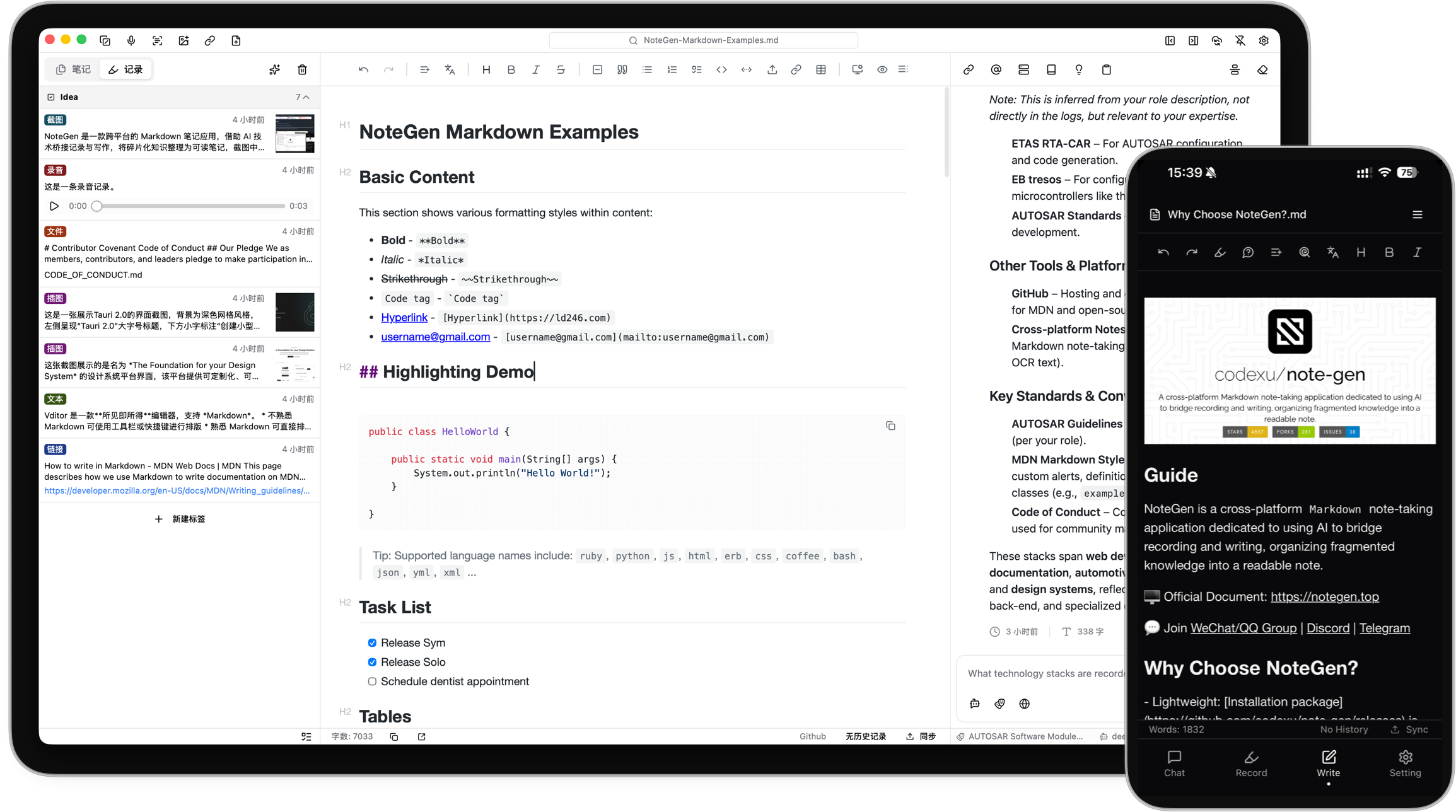
What Can NoteGen Do?
NoteGen is built around a simple idea: do not force yourself to write a perfect note at the moment an idea appears.
- 🧩 Capture anything quickly: text, voice, screenshots, images, links, files, and todos.
- 🧠 Turn messy records into organized notes: select records, choose a template, and generate structured Markdown.
- ✍️ Keep writing after AI helps: edit the result in a Markdown editor with tables, diagrams, math, outline, search, and export tools.
- 💬 Ask questions about your own material: chat with notes, records, and knowledge base content instead of starting from a blank prompt.
- 🖼️ Make images useful: save screenshots and images, run OCR or AI recognition, add descriptions, and reuse them in notes.
- 🔄 Work across devices: keep notes local as Markdown files and sync them through GitHub, Gitee, GitLab, Gitea, S3, or WebDAV.
Use NoteGen For
- Meeting notes and class notes: capture fragments during the session, then turn them into a readable summary.
- Reading and research: collect links, screenshots, documents, and quotes, then ask AI to organize the material.
- Weekly reports and work logs: generate reports from recent records by tag, time range, or template.
- Personal knowledge management: keep long-term notes as Markdown files and chat with your own knowledge base.
Typical Workflow
- Record first: save a thought, meeting snippet, screenshot, webpage, document, or task without deciding where it belongs.
- Organize later: filter records by tag, time, or type, then ask AI to turn selected records into a note, weekly report, draft, or summary.
- Write with control: polish the generated Markdown, keep useful references and images, and export or sync when needed.
- Reuse your knowledge: search, chat, translate, rewrite, or let the Agent help continue working with your notes.
Powerful When You Need It
NoteGen keeps the everyday experience focused on recording and writing, while still offering advanced tools for heavier workflows:
- Local-first Markdown storage and workspace-based file management.
- AI chat, inline completion, translation, rewriting, summaries, prompts, memories, and Agent mode.
- Knowledge base search with vector indexing and hybrid retrieval.
- Configurable AI providers and models for chat, embeddings, OCR/VLM, audio, and more.
- MCP support for connecting external AI tools.
- Cross-platform desktop and mobile apps built with Tauri.
Download
 |
 |
 |
 |
 |
|---|---|---|---|---|
| ✅ beta | ✅ beta | ✅ beta | 🛠️ alpha | 🛠️ alpha |
| Download | Download | Download | Download | TestFlight |
UpgradeLink offers application upgrade and download services
Contribute
Contributors
Thanks
Special thanks to our technology partners who make NoteGen better:
SiliconFlow - Providing free AI model services, powering NoteGen's intelligent features with high-quality AI capabilities.
UpgradeLink - Providing reliable installation and upgrade services, ensuring seamless software updates for users.

We also thank other partners for their service support



Extension points exported contracts — how you extend this code
QueryVariant (Interface)Core symbols most depended-on inside this repo
pushShape
Languages
Modules by API surface
Dependencies from manifests, versioned
For agents
$ claude mcp add note-gen \
  -- python -m otcore.mcp_server <graph>