github.com/cmlccie/awsipranges @v0.8.0
Chat with this repoWhat it actually does AI analysis from the code graph — generated when you open this
README
awsipranges
Quickly query the AWS IP Ranges





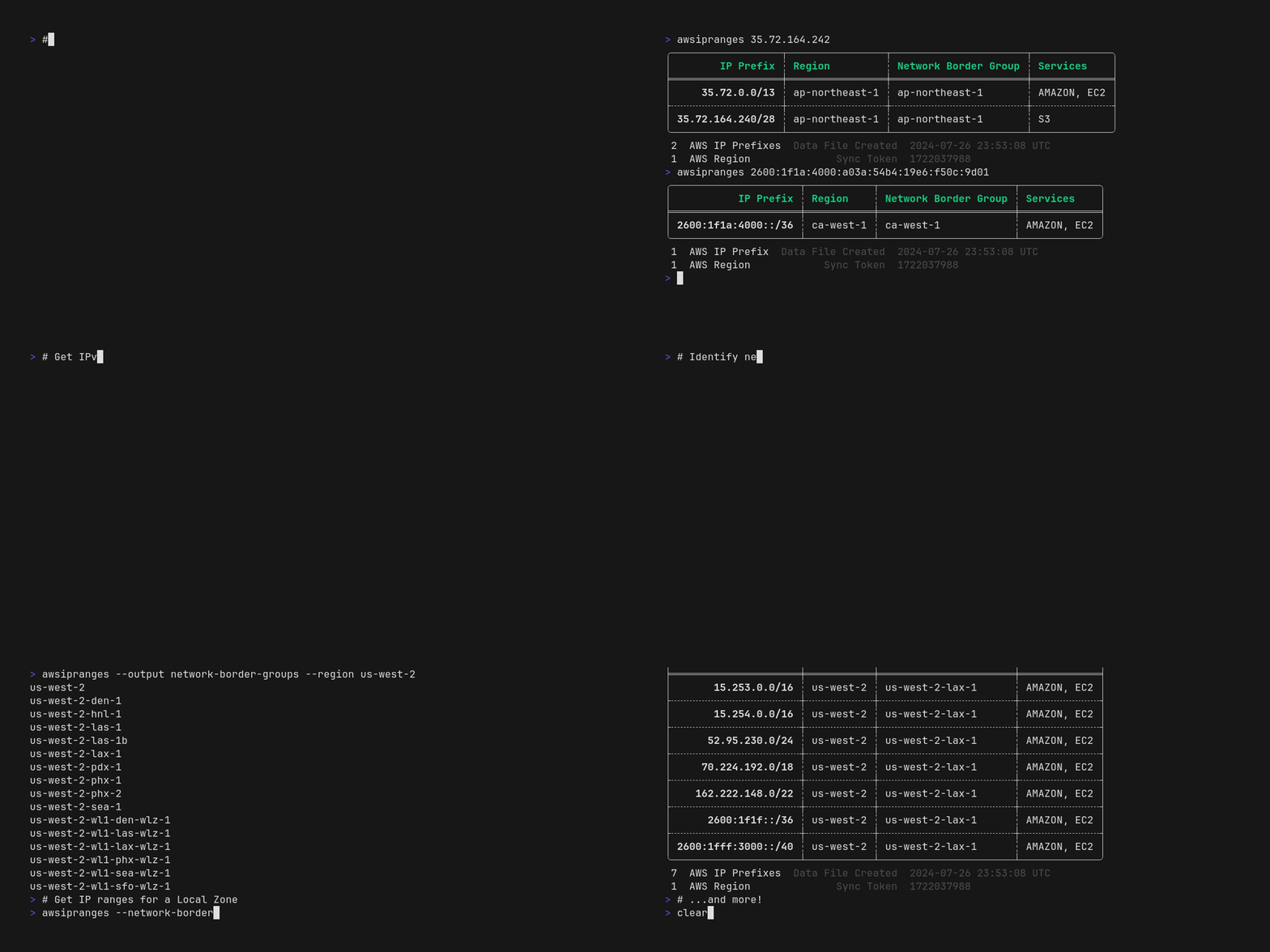
awsipranges allows you to search, filter, and use public AWS IP address ranges from the command line without writing complicated JSON parsing scripts or commands. This single-purpose CLI tool allows you to quickly answer questions like:
- Is some IPv4/IPv6
<address>a public AWS IP address? - What region is it in?
- What service(s) does it belong to?
- What supernets does it belong to?
- What are the supernets of
<some-cidr-block>? - What services publish their IP ranges in the
ip-ranges.jsonfile? - What IP ranges are used by
<some-supported-service>in<some-region>? - What Local / Wavelength Zones are attached to
<some-region>? - What are the IP ranges for
<some-local-zone>?
You could get answers to some of these ☝️ questions by filtering the JSON file, but awsipranges features make filtering more accessible. awsipranges parses and understands the structure of IPv4 and IPv6 CIDRs allowing you to work with IP ranges as they were meant to - as structured data - enabling you to output the results in human and machine friendly formats.
If you find this project useful, please consider giving it a star ⭐ on GitHub. Your support is greatly appreciated!
Features
- Retrieve & Cache:
ip-ranges.jsonto${HOME}/.aws/ip-ranges.json; refreshing the cache after 24 hours (by default). - Search: IP ranges for an IPv4/IPv6 address or CIDR (any prefix length) to view the AWS IP ranges that contain the provided address or CIDR.
- Filter: IP ranges by region, service, network border group, and IP version (IPv4/IPv6).
- Multiple Output Formats: Table, CIDR, and netmask output formats for easy integration with other tools.
- Save Results to CSV: Save your search and filter results to CSV for programmatic use or analysis in your favorite spreadsheet app.
- Rust Crate: This CLI tool's core functionality is also available as a library, allowing you to easily add it to your Rust utility or application.
Installation
You can build and install awsipranges from source or install pre-built binaries. awsipranges supports:
| OS | arm64 (AArch64) | amd64 (x86_64) |
|---|---|---|
| macOS | ✅ ⏬ Apple silicon | ✅ ⏬ Intel silicon |
| Linux | ✅ GNU (glibc) |
✅ Musl (libc) | ✅ ⏬ GNU (glibc)
✅ Musl (libc) | | Windows 10+ | | ✅ ⏬ MSVC |
✅ = Supported ⏬ = Pre-built binaries available
Following Rust Platform Support for supported targets and OS and library version dependencies.
Pre-Built Binaries
You can download and install pre-built binaries from the releases page or use the following installation scripts, which select and install the correct binary for your platform.
Homebrew
brew install cmlccie/tap/awsipranges
Shell Script
See the releases page for the latest {{version}}.
curl --proto '=https' --tlsv1.2 -LsSf https://github.com/cmlccie/awsipranges/releases/download/{{version}}/awsipranges-installer.sh | sh
PowerShell Script
See the releases page for the latest {{version}}.
powershell -c "irm https://github.com/cmlccie/awsipranges/releases/download/{{version}}/awsipranges-installer.ps1 | iex"
Build from source
To build and install awsipranges from source, you will need the Rust toolchain installed on your system. Then, you can use cargo install to download and build your desired version.
Crates.io
Install published releases of awsipranges from crates.io.
cargo install awsipranges
GitHub
Install the latest, potentially unreleased, awsipranges from the main branch on GitHub.
cargo install --git https://github.com/cmlccie/awsipranges.git
Issues and Enhancements
If you encounter any issues or bugs or have ideas for enhancements and new features, please report them on our GitHub Issues page. Your feedback is a gift and helps us improve the tool for everyone!
Acknowledgements
I appreciate the following teams and individuals without which this tool would not be possible or as quickly constructed:
- The AWS Networking team that publishes and maintains the AWS IP address ranges.
- Abhishek Chanda (@achanda) for publishing the excellent ipnetwork crate, which makes parsing and working with IPv4 and IPv6 prefixes a breeze.
- VHS - Straightforward and powerful terminal GIF recorder! I love how easy it is to make a demo tape! 😎
- Orhun Parmaksız (@orhun) for his excellent blog on Fully Automated Releases for Rust Projects.
Other Works
netrange- Use LUA scripts to download and filter IP ranges from multiple cloud providers.aws-ip-ranges- Provides the AWS IP range data as a const struct.
Why did I make this?
I frequently need to get answers from the AWS IP ranges. I published a similar Python library while working at AWS. Then, when learning Rust, I needed something to build! 😎 This tool has been helpful to me - perhaps it will be useful to you.
Core symbols most depended-on inside this repo
get_rc_str_from_setShape
Languages
Modules by API surface
For agents
$ claude mcp add awsipranges \
  -- python -m otcore.mcp_server <graph>