github.com/cloudnc/ngx-sub-form @v14.0.0
Chat with this repoWhat it actually does AI analysis from the code graph — generated when you open this
README
NgxSubForm

Utility library to improve the robustness of your Angular forms.
Whether you have simple and tiny forms or huge and complex ones, ngx-sub-form will help you build a solid base for them.
- ✅ Simple API: No angular module to setup, no
ControlValueAccessorby hand, no inheritance, no boilerplate. Only one function to create all your forms! - 🤖 Adds type safety to your forms
- ✂️ Lets you break down huge forms into smaller ones for simplicity and reusability
Please note one thing: If your goal is to generate forms dynamically (based on some JSON configuration for example) ngx-sub-form is not here for that!
Table of contents
- Basic API usage
- Setup
- Migration guide to the new API
- Principles
- Root forms
- Sub forms
- Remap
- Dealing with arrays
- Contribution
- Tell us about your experience with ngx-sub-form
Basic API usage
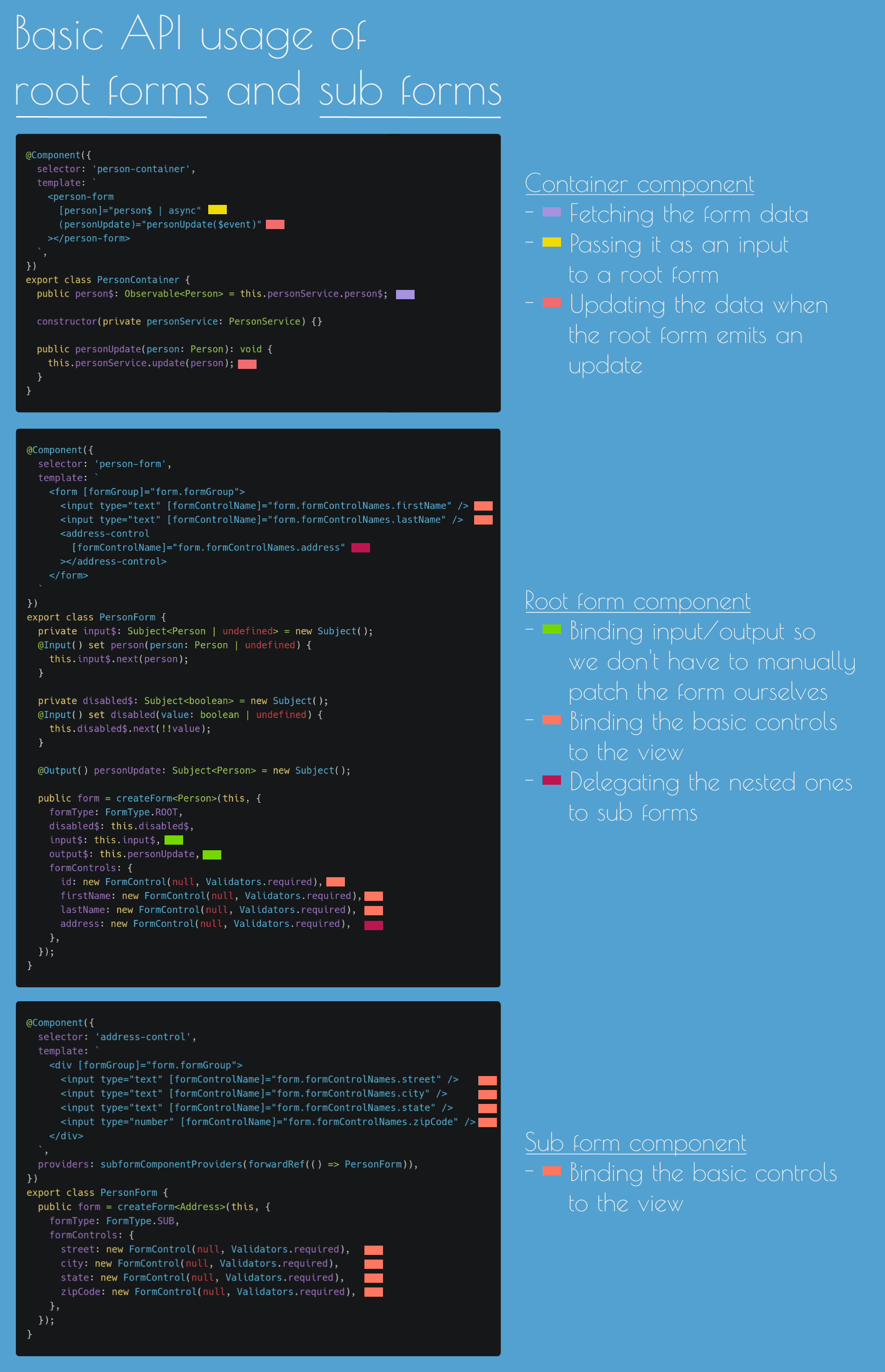
As a picture is often worth a 1000 words, let's take a quick overlook at the API before explaining in details further on:
Setup
ngx-sub-form is available on NPM:
npm i ngx-sub-form
Note about the versions:
@angular version |
ngx-sub-form version |
|---|---|
v <= 7 |
v <= 2.7.1 |
8.x |
4.x |
9.x <= v <= 12.x |
5.1.2 |
13.x |
5.2.0 (non breaking but new API available as well) |
14.x |
6.0.0 (Angular 14 upgrade only) |
14.x |
7.0.0 (deprecated API is now removed) |
15.x |
8.0.0 |
16.x |
9.0.0 |
17.x |
10.0.0 |
18.x |
11.0.0 |
19.x |
12.0.0 |
20.x |
13.0.0 |
21.x |
14.0.0 |
API
There's one function available to create all your forms: createForm.
This function takes as parameter a configuration object and returns an object ready to be used to use your form and all its new utilities. In this section we'll discover what configuration we can pass to createForm and what exactly we'll be getting back.
createForm configuration object:
| Key | Type | Optional or required | Root form | Sub form | What is it for? |
|---|---|---|---|---|---|
formType |
FormType |
Required | ✅ | ✅ | Defines the type of the form. Can either be FormType.ROOT or FormType.SUB |
disabled$ |
Observable<boolean> |
Required | ✅ | ❌ | When this observable emits true, the whole form (including the root form and all the sub forms) will be disabled |
input$ |
Observable<ControlInterface \| undefined> |
Required | ✅ | ❌ | A root form is a component in between the parent passing raw data and the form itself. This property is an observable that you must provide which will be used behind the scenes to update for you the form values |
output$ |
Subject<ControlInterface> |
Required | ✅ | ❌ | A root form is a component in between the parent passing raw data and the form itself. This property is an observable that you must provide which will be used behind the scenes to broadcast the form value to the parent when it changes |
manualSave$ |
Observable<void> |
Optional | ✅ | ❌ | By default a root form will automatically broadcast all the form updates (through the output$) as soon as there's a change. If you wish to "save" the form only when you click on a save button for example, you can create a subject on your side and pass it here. Whenever you call next on your subject, assuming the form is valid, it'll broadcast te form value to the parent (through the output$) |
outputFilterPredicate |
(currentInputValue: FormInterface, outputValue: FormInterface) => boolean |
Optional | ✅ | ❌ | The default behaviour is to compare the current transformed value of input$ with the current value of the form (deep check), and if these are equal, the value won't be passed to output$ in order to prevent the broadcast |
handleEmissionRate |
(obs$: Observable<FormInterface>) => Observable<FormInterface> |
Optional | ✅ | ❌ | If you want to control how frequently the form emits on the output$, you can customise the emission rate with this. Example: handleEmissionRate: formValue$ => formValue$.pipe(debounceTime(300)) |
emitInitialValueOnInit |
boolean |
Optional | ✅ | ✅ | Controls whether the form (root or sub) will emit the default values provided with the FormControls if they are valid. The default behavior is not to emit the default values |
Principles
As simple as forms can look when they only have a few fields, their complexity can increase quite quickly. In order to keep your code as simple as possible and isolate the different concepts, we do recommend to write forms in complete isolation from the rest of your app.
In order to do so, you can create some top level forms that we call "root forms". As one form can become bigger and bigger over time, we also help by letting you create "sub forms" (without the pain of dealing manually with a ControlValueAccessor!). Let's dig into their specifics, how they differ and how to use them.
Root forms
Root forms let you isolate a form from the rest of your app.
You can encapsulate them and (pretty much) never have to deal with patchValue or setValue to update the form nor subscribe to valueChanges to listen to the updates.
Instead, you'll be able to create a dedicated form component and pass data using an input, receive updates using an output. Just like you would with a dumb component.
Let's have a look with a very simple workflow:
- Imagine an application with a list of people and when you click on one of them you can edit the person details
- A smart component is aware of the currently selected person (our "container component")
- A root form component lets us display the data we retrieved in a form and also edit them
In this scenario, the smart component could look like the following:
@Component({
  selector: 'person-container',
  template: `
    <person-form [person]="person$ | async" (personUpdate)="personUpdate($event)"></person-form>
  `,
})
export class PersonContainer {
  public person$: Observable<Person> = this.personService.person$;

  constructor(private personService: PersonService) {}

  public personUpdate(person: Person): void {
    this.personService.update(person);
  }
}
This component is only responsible to get the correct data and manage updates (if any). It completely delegates to the root form:
- How the data will be displayed to the user as a form
- How the user will interact with them
Now let's talk about the actual root form:
@Component({
  selector: 'person-form',
  template: `
    <form [formGroup]="form.formGroup">
      <input type="text" [formControlName]="form.formControlNames.firstName" />
      <input type="text" [formControlName]="form.formControlNames.lastName" />
      <address-control [formControlName]="form.formControlNames.address"></address-control>
    </form>
  `,
})
export class PersonForm {
  private input$: Subject<Person | undefined> = new Subject();
  @Input() set person(person: Person | undefined) {
    this.input$.next(person);
  }

  private disabled$: Subject<boolean> = new Subject();
  @Input() set disabled(value: boolean | undefined) {
    this.disabled$.next(!!value);
  }

  @Output() personUpdate: Subject<Person> = new Subject();

  public form = createForm<Person>(this, {
    formType: FormType.ROOT,
    disabled$: this.disabled$,
    input$: this.input$,
    output$: this.personUpdate,
    formControls: {
      id: new FormControl(null, Validators.required),
      firstName: new FormControl(null, Validators.required),
      lastName: new FormControl(null, Validators.required),
      address: new FormControl(null, Validators.required),
    },
  });
}
We'll go through the example above bit by bit.
public form = createForm<Person>(this, {
  formType: FormType.ROOT,
  disabled$: this.disabled$,
  input$: this.input$,
  output$: this.personUpdate,
  formControls: {
    id: new FormControl(null, Validators.required),
    firstName: new FormControl(null, Validators.required),
    lastName: new FormControl(null, Validators.required),
    address: new FormControl(null, Validators.required),
  },
});
This is what we provide to create a form with ngx-sub-form:
- A type (either
FormType.ROOTorFormType.SUB) - A
disabled$stream to know whether we should disable the whole form or not (including all the sub forms as well) - An
input$stream which is the data we'll use to update the form - An
output$stream, which would usually be ourEventEmitterso that a parent component can listen to the form update through an output - The
formControls, which is exactly what you'd pass when creating aFormGroup
One thing to note: The createForm function takes a generic which will let you type our form. In this case, if you forgot to pass a property of the form in the formControls it'd be caught at build time by Typescript.
private input$: Subject<Person | undefined> = new Subject();
@Input() set person(person: Person | undefined) {
  this.input$.next(person);
}

private disabled$: Subject<boolean> = new Subject();
@Input() set disabled(value: boolean | undefined) {
  this.disabled$.next(!!value);
}
This is simply a way of binding an input to an observable. We do this because the createForm function requires us to pass an input$ stream and a disabled$ one. Hopefully Angular lets us one day access inputs as observables natively. In the meantime if you want to reduce this boilerplate even f
Extension points exported contracts — how you extend this code
FormArrayWrapper (Interface)Core symbols most depended-on inside this repo
createFormShape
Languages
Modules by API surface
For agents
$ claude mcp add ngx-sub-form \
  -- python -m otcore.mcp_server <graph>