github.com/cloudlena/s3manager
Chat with this repoBrowse by type
What it actually does AI analysis from the code graph — generated when you open this
README
S3 Manager

A Web GUI written in Go to manage S3 buckets from any provider.
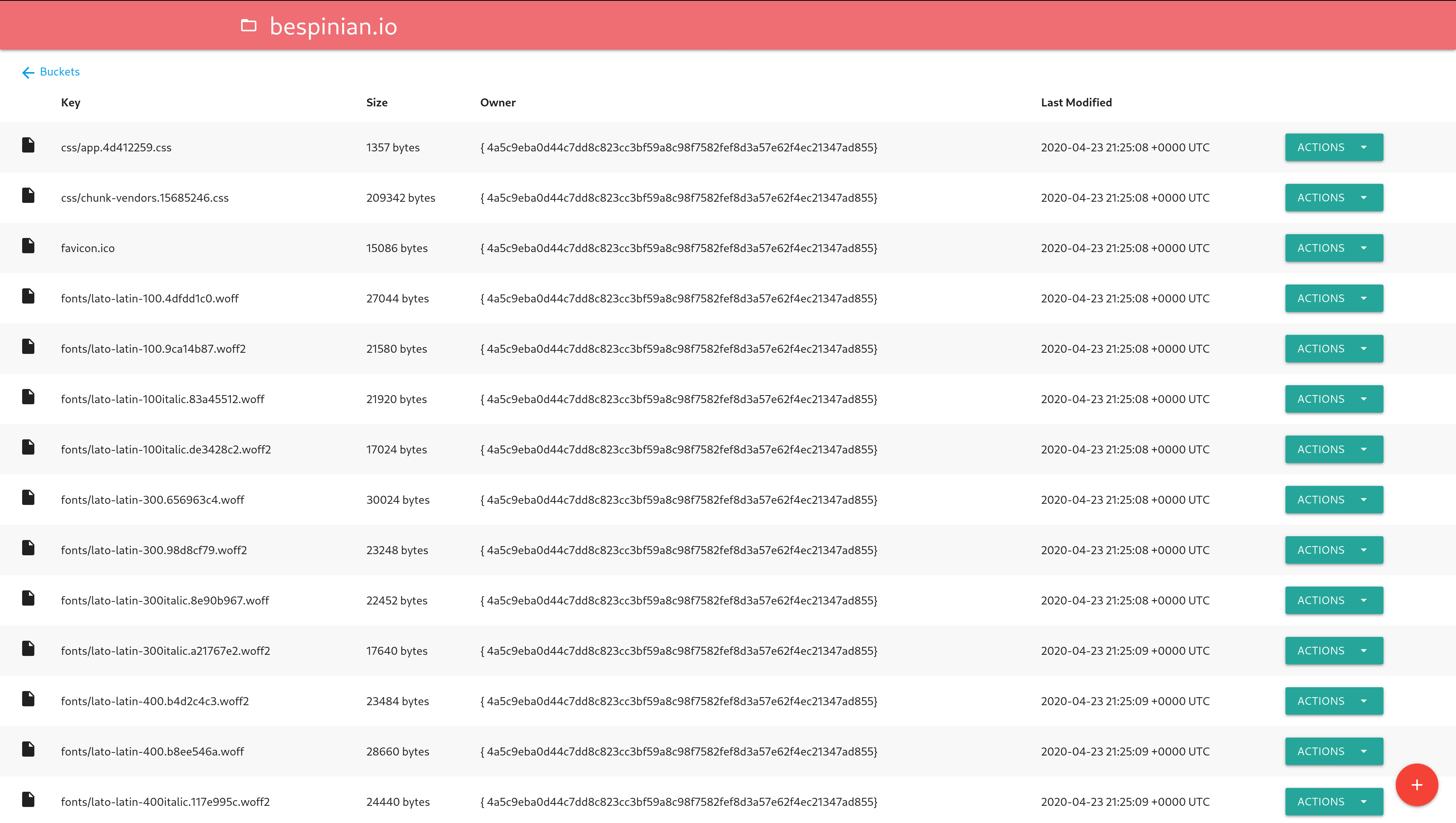
Features
- Manage several S3 accounts side by side and switch between them
- List, create and delete buckets
- View and edit a bucket's policy
- List a bucket's objects with search, sorting and pagination
- Upload single objects or whole folders to a bucket
- Download an object, or several selected ones as a ZIP archive
- Open an object in the browser (click its name or use the
Openaction) - Delete a single object or several selected ones
- Create a time-limited download link for an object
- Check whether an object is publicly accessible and copy its public link
- Show object metadata (including user metadata) and object versions
Usage
Configuration
The application is configured with environment variables.
S3 instances
Every S3 account the app should manage is configured with a numbered set of
variables, starting at 1_. The app stops looking at the first number that has
no NAME or no ENDPOINT, so the numbering must not have gaps. Each instance
appears in the app under its NAME and is reachable under /<NAME>/buckets
(or /<NUMBER>/buckets), so pick names that work in a URL:
1_NAME=production
1_ENDPOINT=s3.amazonaws.com
1_ACCESS_KEY_ID=XXX
1_SECRET_ACCESS_KEY=xxx

2_NAME=backups
2_ENDPOINT=minio.example.com:9000
2_ACCESS_KEY_ID=YYY
2_SECRET_ACCESS_KEY=yyy
A single instance may also be configured without a number (it is then named
Default), which is how earlier versions of the app were configured:
ENDPOINT=s3.amazonaws.com
ACCESS_KEY_ID=XXX
SECRET_ACCESS_KEY=xxx
The variables below are read per instance, either with a N_ prefix or, for a
single unnamed instance, without one. At least one instance must be configured.
NAME: The name the instance is shown and addressed under (required in the numbered form; a single unnamed instance is calledDefault)ENDPOINT: The endpoint of your S3 server (required, for examples3.amazonaws.com)REGION: The region of your S3 server (defaults to"")ACCESS_KEY_ID: Your S3 access key ID (required) (works only ifUSE_IAMisfalse)SECRET_ACCESS_KEY: Your S3 secret access key (required) (works only ifUSE_IAMisfalse)USE_IAM: Use IAM role instead of key pair (defaults tofalse)IAM_ENDPOINT: Endpoint for IAM role retrieving (Can be blank for AWS)USE_SSL: Whether your S3 server uses SSL or not (defaults totrue)SKIP_SSL_VERIFICATION: Whether the HTTP client should skip SSL verification (defaults tofalse)SIGNATURE_TYPE: The signature type to be used (defaults toV4; valid values areV2, V4, V4Streaming, Anonymous)
Application
These variables apply to the whole app and are never prefixed:
PORT: The port the app should listen on (defaults to8080)ALLOW_DELETE: Enable buttons to delete objects (defaults totrue)FORCE_DOWNLOAD: Add response headers for object downloading instead of opening in a new tab (defaults totrue; only affects theDownloadaction, notOpen)LIST_RECURSIVE: List all objects in buckets recursively (defaults tofalse)SHOW_VERSIONS: Show all object versions in bucket view and enable version-specific downloads (defaults tofalse; bucket must have versioning enabled)SHOW_METADATA: Show the object metadata action and enable the metadata endpoint (defaults totrue)TZ: IANA timezone used when displaying object Last Modified times (defaults to UTC; for exampleEurope/Berlin)BUCKET_NAME: Restrict the buckets view to a single named bucket (defaults to unset, showing all buckets)SSE_TYPE: Specified server side encryption (defaults blank) Valid values can beSSE,KMS,SSE-Call others values don't enable the SSESSE_KEY: The key needed for SSE method (only forKMSandSSE-C)TIMEOUT: The read and write timeout in seconds (default to600- 10 minutes)ROOT_URL: A root URL prefix if running behind a reverse proxy (defaults to unset)
Build and Run Locally
- Run
make build - Execute the created binary and visit http://localhost:8080
Run Container image
- Run
docker run -p 8080:8080 -e 'ENDPOINT=s3.amazonaws.com' -e 'ACCESS_KEY_ID=XXX' -e 'SECRET_ACCESS_KEY=xxx' cloudlena/s3manager
Deploy to Kubernetes
You can deploy S3 Manager to a Kubernetes cluster using the Helm chart.
Running behind a reverse proxy
If there are multiple S3 users/accounts in a site then multiple instances of the S3 manager can be run in Kubernetes and expose behind a single nginx reverse proxy ingress.
The s3manager can be run with a ROOT_URL environment variable set that accounts for the reverse proxy location.
If the nginx configuration block looks like:
    location /teamx/ {
        proxy_pass http://s3manager-teamx:8080/;
        auth_basic "teamx";
        auth_basic_user_file /conf/teamx-htpasswd;
    }
    location /teamy/ {
        proxy_pass http://s3manager-teamy:8080/;
        <other nginx settings>
    }
Then the instance behind the s3manager-teamx service has ROOT_URL=teamx and the instance behind s3manager-teamy has ROOT_URL=teamy.
Other nginx settings can be applied to each location.
The nginx instance can be hosted on some reachable address and reverse proxy to the different S3 accounts.
Development
Lint Code
- Run
make lint
Run Tests
- Run
make test
Build Container Image
The image is available on Docker Hub.
- Run
make build-image
Run Locally for Testing
There is an example docker-compose.yml file that spins up two S3 services and the S3 Manager configured for both of them. You can try it by issuing the following command:
$ docker-compose up
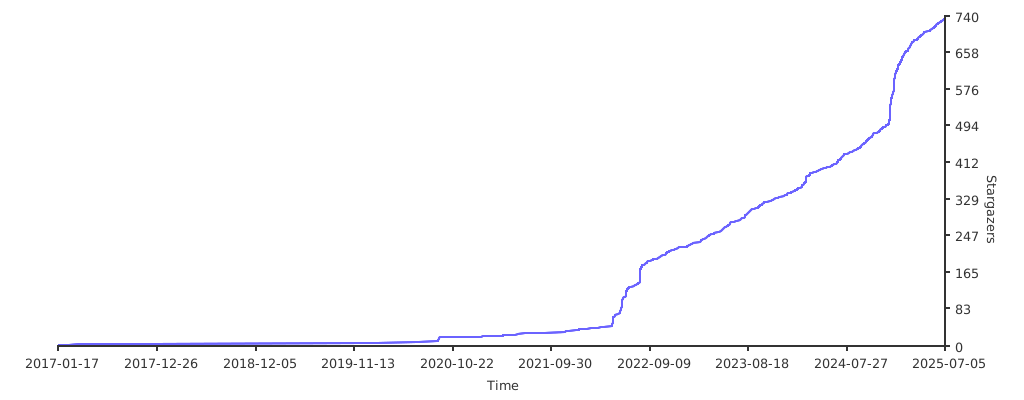
GitHub Stars
Extension points exported contracts — how you extend this code
—
browse all types & interfaces →
Core symbols most depended-on inside this repo
Shape
Languages
Modules by API surface
Dependencies from manifests, versioned
For agents
$ claude mcp add s3manager \
  -- python -m otcore.mcp_server <graph>