github.com/cloudlena/s3manager
Chat with this repoBrowse by type
What it actually does AI analysis from the code graph — generated when you open this
README
S3 Manager

A Web GUI written in Go to manage S3 buckets from any provider.
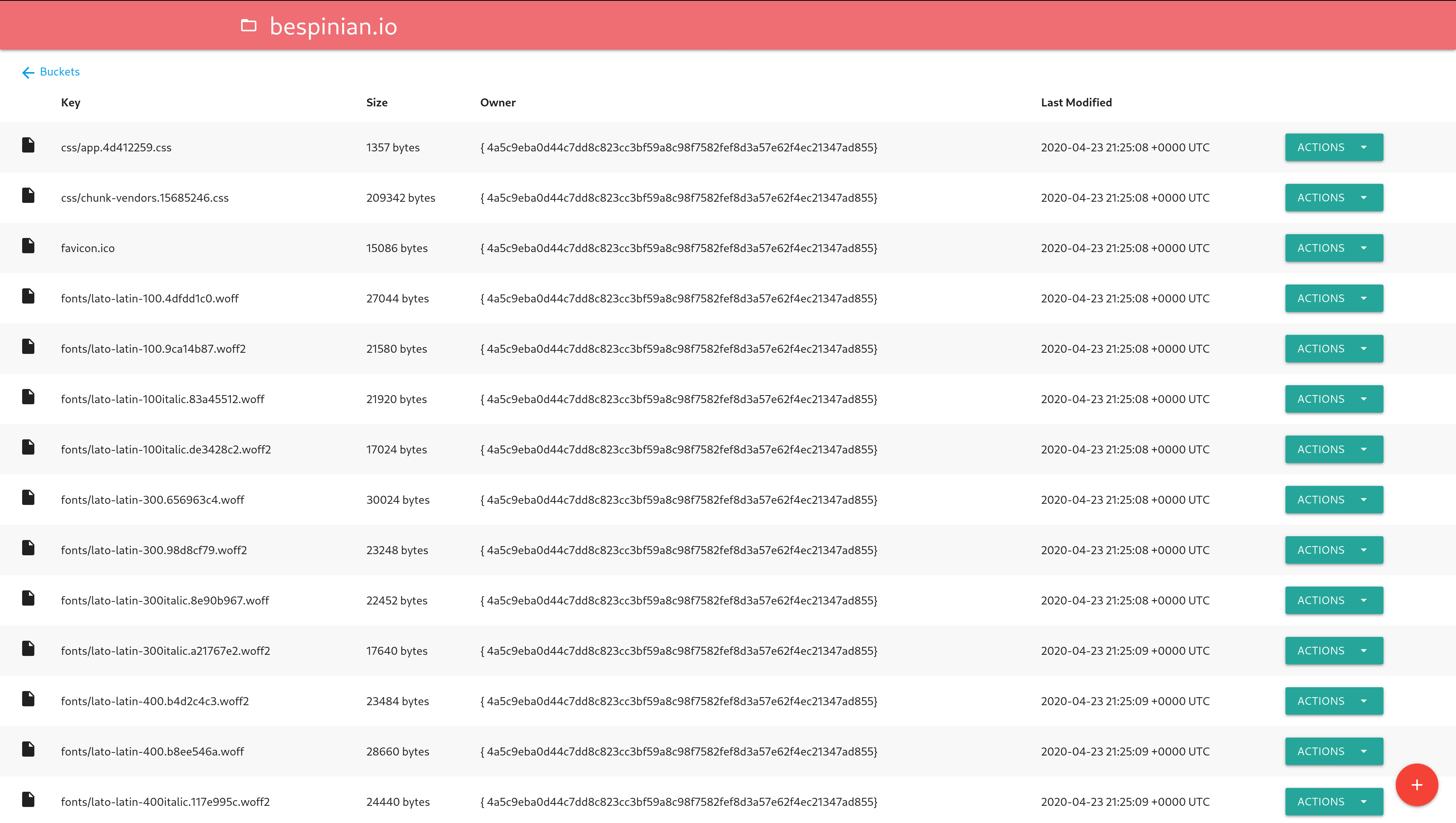
Features
- Manage several S3 accounts side by side and switch between them
- List, create and delete buckets
- View and edit a bucket's policy, including making a bucket publicly readable
- List a bucket's objects with search, sorting and pagination
- Upload single objects or whole folders to a bucket
- Download an object, or several selected ones as a ZIP archive
- Open an object in the browser (click its name or use the
Openaction) - Delete a single object or several selected ones
- Create a time-limited download link for an object
- Check whether an object is publicly accessible and copy its public link
- Show object metadata (including user metadata) and object versions
Usage
Configuration
The application is configured with environment variables.
S3 instances
Every S3 account the app should manage is configured with a numbered set of
variables, starting at S3_1_. The app stops looking at the first number that
has no NAME, so the numbering must not have gaps. Each instance appears in
the app under its NAME and is reachable under /<NAME>/buckets (or
/<NUMBER>/buckets), so pick names that work in a URL:
S3_1_NAME=production
S3_1_ENDPOINT=s3.amazonaws.com
S3_1_ACCESS_KEY_ID=XXX
S3_1_SECRET_ACCESS_KEY=xxx

S3_2_NAME=backups
S3_2_ENDPOINT=minio.example.com:9000
S3_2_ACCESS_KEY_ID=YYY
S3_2_SECRET_ACCESS_KEY=yyy
A single instance may also be configured without a number (it is then named
Default), which is how earlier versions of the app were configured:
ENDPOINT=s3.amazonaws.com
ACCESS_KEY_ID=XXX
SECRET_ACCESS_KEY=xxx
The variables below are read per instance, either with an S3_N_ prefix or,
for a single unnamed instance, without one. At least one instance must be
configured.
NAME: The name the instance is shown and addressed under (required in the numbered form; a single unnamed instance is calledDefault)ENDPOINT: The endpoint of your S3 server (defaults tos3.amazonaws.com)REGION: The region of your S3 server (defaults to"")ACCESS_KEY_ID: Your S3 access key ID (required unlessUSE_IAMistrueorSIGNATURE_TYPEisAnonymous)SECRET_ACCESS_KEY: Your S3 secret access key (required unlessUSE_IAMistrueorSIGNATURE_TYPEisAnonymous)USE_IAM: Use IAM role instead of key pair (defaults tofalse)IAM_ENDPOINT: Endpoint for IAM role retrieving (Can be blank for AWS)USE_SSL: Whether your S3 server uses SSL or not (defaults totrue)SKIP_SSL_VERIFICATION: Whether the HTTP client should skip SSL verification (defaults tofalse)SIGNATURE_TYPE: The signature type to be used (defaults toV4; valid values areV2, V4, V4Streaming, Anonymous).Anonymoussends unsigned requests, which is how public buckets are browsedBUCKET_LOOKUP: How buckets are addressed in requests (defaults toAuto; valid values areAuto, DNS, Path).DNSuses virtual-hosted–style addressing (bucket.endpoint),Pathuses path-style addressing (endpoint/bucket) andAutopicks virtual-hosted style for Amazon and Google endpoints and path style for all others. Set it toDNSif your provider answers withVirtual host domain is required while accessing a specific bucketPUBLIC_URL: A template for the public links of objects, for when they are served from a CDN or a custom domain (defaults to unset, which links to the object onENDPOINTfollowingBUCKET_LOOKUP).{key}is replaced by the object key and{bucket}by the bucket name, for examplehttps://cdn.example.com/{key}orhttps://files.example.com/{bucket}/{key};{key}is requiredBUCKETS: A comma-separated list of bucket names to show in addition to the ones the instance lists itself (defaults to unset), for example public buckets owned by someone else. They are shown even if the instance refuses to list its buckets, as it does for anonymous access
Application
These variables apply to the whole app and are never prefixed:
PORT: The port the app should listen on (defaults to8080)ALLOW_DELETE: Enable deleting objects, folders and empty buckets (defaults totrue)LIST_RECURSIVE: List all objects in buckets recursively (defaults tofalse)SHOW_VERSIONS: Show all object versions in bucket view and enable version-specific downloads (defaults tofalse; bucket must have versioning enabled)SHOW_METADATA: Show the object metadata action and enable the metadata endpoint (defaults totrue)TZ: IANA timezone used when displaying object Last Modified times (defaults to UTC; for exampleEurope/Berlin)BUCKET_NAME: Show only this bucket in the bucket list of every instance (defaults to unset, showing all buckets). It only filters the list: other buckets can still be opened by name or URL, so it is not an access restrictionSSE_TYPE: The server side encryption applied to uploaded objects (defaults to unset, which leaves it off; valid values areSSE,KMSandSSE-C)SSE_KEY: The key forKMS(a key ID) orSSE-C(exactly 32 bytes). WithSSE-Cthe key is also sent when reading objects, since they can't be read without it; download links and public links don't carry it and so don't work for such objectsTIMEOUT: The read and write timeout in seconds (defaults to600, i.e. 10 minutes)ROOT_URL: A root URL prefix if running behind a reverse proxy (defaults to unset)
Browsing large buckets
The default bucket view asks S3 for one page of objects at a time, so opening a bucket and stepping through it costs the same whether it holds ten objects or ten million. Because S3 can only list keys in ascending order and offers no search of its own, that page-at-a-time listing is possible only for the default view: it is sorted by name ascending and unsearched. Such a view has no total object count and no last page to jump to, since S3 never reports how much it did not return.
Sorting by another column, sorting descending, searching or choosing All items
per page needs the whole location in memory instead, and so does SHOW_VERSIONS.
Those listings stop after 10,000 objects and say so on the page — their counting,
sorting and searching then cover only that many. Narrow the listing down with a
search or by opening a folder to reach the rest.
Browsing public buckets
Public buckets, such as the datasets of the Registry of Open Data on AWS, can be browsed without an account by configuring an instance for anonymous access and naming the buckets to show:
SIGNATURE_TYPE=Anonymous
REGION=us-east-1
BUCKETS=noaa-ghcn-pds
Anonymous requests cannot look up the region of a bucket, so REGION has to
match it; a bucket in another region reports the region it is in. Any other
bucket can be opened by name with the folder button of the bucket list, even if
it isn't configured. Public buckets usually only allow reading, so uploading and
deleting fails on them.
Build and Run Locally
- Run
make build - Execute the created binary and visit http://localhost:8080
Run Container image
- Run
podman run -p 8080:8080 -e 'ENDPOINT=s3.amazonaws.com' -e 'ACCESS_KEY_ID=XXX' -e 'SECRET_ACCESS_KEY=xxx' docker.io/cloudlena/s3manager
Deploy to Kubernetes
You can deploy S3 Manager to a Kubernetes cluster using the Helm chart.
Running behind a reverse proxy
A single S3 Manager can manage several S3 accounts (see S3 instances), but everyone who can reach it can use all of them.
To give each team access to its own accounts only, run one S3 Manager per team and expose them behind a single nginx reverse proxy that authenticates each location.
Set the ROOT_URL environment variable of each S3 Manager to the location it is served under.
If the nginx configuration block looks like:
    location /teamx/ {
        proxy_pass http://s3manager-teamx:8080/;
        auth_basic "teamx";
        auth_basic_user_file /conf/teamx-htpasswd;
    }
    location /teamy/ {
        proxy_pass http://s3manager-teamy:8080/;
        <other nginx settings>
    }
Then the instance behind the s3manager-teamx service has ROOT_URL=teamx and the instance behind s3manager-teamy has ROOT_URL=teamy.
Other nginx settings can be applied to each location.
The nginx instance can be hosted on some reachable address and reverse proxy to the different S3 accounts.
Development
Lint Code
- Run
make lint
Run Tests
- Run
make test
Build Container Image
The image is available on Docker Hub.
- Run
make build-image
Run Locally for Testing
There is an example compose.yaml file that spins up two S3 services and the S3 Manager configured for both of them. You can try it by issuing the following command:
$ podman compose up
Star History
Extension points exported contracts — how you extend this code
—
browse all types & interfaces →
Core symbols most depended-on inside this repo
Shape
Languages
Modules by API surface
Dependencies from manifests, versioned
For agents
$ claude mcp add s3manager \
  -- python -m otcore.mcp_server <graph>