github.com/cliffano/nestor @3.2.0
Chat with this repoWhat it actually does AI analysis from the code graph — generated when you open this
README







Nestor
Nestor is a node.js Jenkins API and CLI.
Installation
npm install -g nestor
Usage
Trigger a build:
nestor build <job>
Trigger a parameterised build:
nestor build <job> ["param1=value1¶m2=value2"]
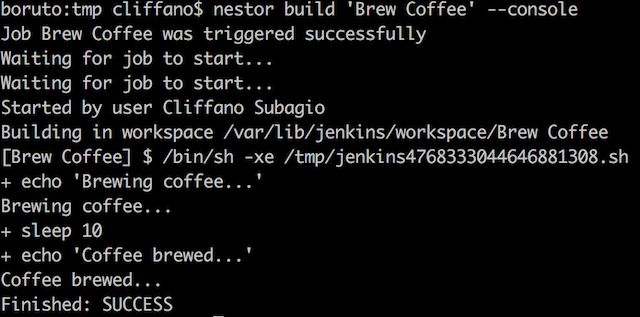
Trigger a build followed by console output:
nestor build --console <job>
Trigger a build, wait for 5 seconds, then display console output:
nestor build --pending 5000 --console <job>
Trigger a parameterised build followed by console output:
nestor build <job> ["param1=value1¶m2=value2"] --console
Display latest build console output:
nestor console <job>
Display console output of a particular build number:
nestor console <job> [build_number]
Stop currently running build:
nestor stop <job>
View status of all jobs:
nestor dashboard
View job status reports:
nestor job <job>
Enable a job:
nestor enable <job>
Disable a job:
nestor disable <job>
Create a new job with a specified config.xml:
nestor create <job> <path/to/config.xml>
Update an existing job with a specified config.xml:
nestor update <job> <path/to/config.xml>
Copy an existing job1 to a new job2:
nestor copy <job1> <job2>
Delete an existing job:
nestor delete <job>
Fetch the config.xml of an existing job: (experimental)
nestor config <job>
Create a new view with a specified config.xml: (experimental)
nestor create-view <view> <path/to/config.xml>
Update an existing view with a specified config.xml: (experimental)
nestor update-view <view> <path/to/config.xml>
Fetch the config.xml of an existing view: (experimental)
nestor fetch-view-config <view>
View queued jobs:
nestor queue
View executors' status (running builds):
nestor executor
Discover Jenkins instance running on a specified host:
nestor discover <host>
View Jenkins version number:
nestor ver
View builds feed of all jobs:
nestor feed
View builds feed of a job:
nestor --job <job> feed
Monitor build status and notify Ninja Blocks RGB LED device:
export NINJABLOCKS_TOKEN=<token_from_https://a.ninja.is/hacking>
nestor ninja
Note: <job> in the examples is a part of your Jenkins job URL after the first job/.
For example, if you use nested folders on Jenkins and your URL is /job/myproject/job/releases/job/master,
then you should pass myproject/job/releases/job/master as <job>.
Programmatically:
import Nestor from "nestor";
const nestor = new Nestor(
'http://user:pass@host:port/path'
);
// trigger a standard build
nestor.buildJob('job', '', function (err, result) {
});
// trigger a parameterised build
nestor.buildJob('job', 'param1=value1¶m2=value2', function (err, result) {
});
Check out lib/jenkins for other available methods.
NOTE: Starting from version 2.0.0, Nestor started using Swaggy Jenkins as an API client.
Configuration
Jenkins URL
Set Jenkins URL in JENKINS_URL environment variable (defaults to http://localhost:8080):
(*nix)
export JENKINS_URL=http://user:pass@host:port/path
(Windows)
set JENKINS_URL=http://user:pass@host:port/path
As an alternative to password, you can use Jenkins API token instead. Jenkins API token can be found on Jenkins user configuration page.
If http_proxy or https_proxy environment variable is set, then Nestor will automatically use it.
If you want authentication details to be prompted interactively:
JENKINS_URL=http://host:port/path nestor --interactive build job
Jenkins URL can also be specified as an arg:
nestor --url http://user:pass@host:port/path dashboard
SSL client certificate authentication
Set JENKINS_CERT and JENKINS_KEY
(*nix)
export JENKINS_CERT=certificate.pem
export JENKINS_KEY=key.pem
(Windows)
set JENKINS_CERT=certificate.pem
set JENKINS_KEY=key.pem
When you have both key and certificate in one file, currently you have to set both ENV variables to the same file
(*nix)
export JENKINS_CERT=combined.pem
export JENKINS_KEY=combined.pem
(Windows)
set JENKINS_CERT=combined.pem
set JENKINS_KEY=combined.pem
It is possible to specify a custom CA. Just set the JENKINS_CA env variable
(*nix)
export JENKINS_CA=custom.ca.pem
(Windows)
set JENKINS_CA=custom.ca.pem
Translation
To add a new language translation:
- Create a locale JSON file in conf/locales/ directory, with the locale's ISO 639-1 code as file name.
- Copy paste the content of the existing non-English locale file (anything other than en.json) and modify the translation values accordingly.
- Test by executing a command with LANG environment variable, e.g.
LANG=<code> nestor dashboard
Contribution
When opening an issue to report a bug, please provide the following information:
- node.js version:
node --version - npm version:
npm --version - Nestor version:
nestor --version - Jenkins version:
nestor ver
Thanks in advance for reporting an issue, opening a feature request, or even better, a pull request!
Colophon
Build reports:
- Code complexity report
- Unit tests report
- Test coverage report
- Integration tests report
- API Documentation
Articles:
- Nestor – A Faster And Simpler CLI For Jenkins
- Monitor Jenkins From The Terminal
- Using Node.js To Discover Jenkins On The Network
Videos:
- Jenkins World 2017: Bringing Jenkins Remote Access API To The Masses
- Evolution of nestor (Gource Vizualisation) by Landon Wilkins
Presentations:
Related Projects:
- nestor-buildlight - CLI for Jenkins build light notifier
- nestor-lifx - CLI for Jenkins LIFX notifier
- nestor-ninjablocks - CLI for Jenkins Ninja Blocks notifier
Core symbols most depended-on inside this repo
cbShape
Languages
Modules by API surface
For agents
$ claude mcp add nestor \
  -- python -m otcore.mcp_server <graph>