github.com/clayrisser/create-react-renderer @main
Chat with this repoBrowse by type
What it actually does AI analysis from the code graph — generated when you open this
README
create-react-renderer
learn to build a custom react renderer

Please ★ this repo if you found it useful ★ ★ ★
Built against react 19 and react-reconciler 0.33.
Watch the Video Below
DISCLAIMER: These definitions are not official. They are based on my own understanding of react renderers. They are not intended for understanding how to use react, but rather are for providing the context of understanding how a react renderer works.
The video and the slides were recorded against react 16, so some method names differ from the current code. The concepts are unchanged; see the notes below for what moved.
Built by BitSpur
BitSpur offers premium Node and React development and support services. Get in touch at bitspur.com.
Setup
make prepare # one time machine setup (asdf toolchain + pnpm install)
or, if you already have node and pnpm
pnpm install
Usage
make build  # typecheck every phase
make test   # run every phase's tests with coverage
make lint   # oxfmt --check + oxlint
make format # format with oxfmt
Run a phase's demo from inside the phase
cd phaseA
pnpm start
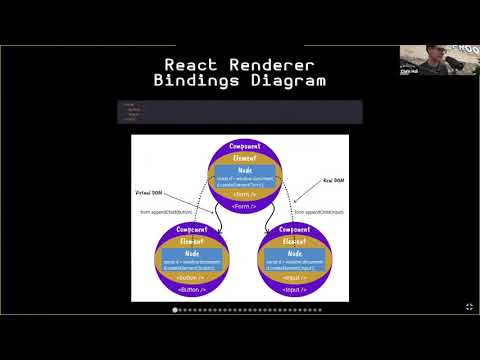
React Renderer Bindings Diagram
The diagram represents the following code
<Form>
  <Button />
  <Input />
</Form>

Definitions
Virtual DOM
A tree structure that represents the current rendered state. Every branch and leaf on the tree is either a component or element.
Reconciliation
Reconciliation is the process of determining which parts of the virtual dom need to be changed by diffing the current virtual dom tree with the new virtual dom tree.
Reconciler
The reconciler is the bindings to the react reconciliation lifecycle methods. This is NOT the react lifecycle hooks even though it is closely related to the react lifecycle hooks.
Fiber
A fiber is a virtual stack frame of work for the react reconciler. You can think of it as the low level api the reconciler is built on top of.
Node
A node is the interface of the renderer that the react renderer is binding to. For example
window.document would be the node used in a react renderer that binds to the dom.
Root Node
The root node is the node used in the top of the react virtual dom tree.
Element
You can think of an element as a react component that is directly bound to the reconciliation lifecycle methods. This is NOT the same thing as a react component, although it can be used like a react component. Because it is directly bound to the react reconciliation lifecycle methods it is more powerful, but also more complex. Elements form the foundation that all react components are built on top of.
`
,and
` are all examples of elements in the react dom renderer.
Base Element
The base element is the element all other elements inherit from.
Component
An encapsulation of components and/or elements.
Root Element
The root element is the element used in the top of the react virtual dom tree. This element is not created with JSX but is initialized during the initial render.
Root
This represents the root of the react virtual dom tree.
The modern host config (react-reconciler 0.33)
The reconciler api changed significantly since this tutorial was first recorded. The important differences baked into the phases are listed below.
No more prepareUpdate
prepareUpdate was removed. commitUpdate now receives the old and new props directly instead of
an update payload.
commitUpdate(
  instance: Instance,
  type: Type,
  oldProps: Props,
  newProps: Props,
  internalHandle: any,
): void {
  return instance.commitUpdate(newProps);
}
Update priorities replaced the deferred callbacks
scheduleDeferredCallback, cancelDeferredCallback, shouldDeprioritizeSubtree and now are gone.
The host config instead tracks an update priority for react.
setCurrentUpdatePriority(newPriority: number): void {
  currentUpdatePriority = newPriority;
},
getCurrentUpdatePriority(): number {
  return currentUpdatePriority;
},
resolveUpdatePriority(): number {
  if (currentUpdatePriority !== NoEventPriority) return currentUpdatePriority;
  return DefaultEventPriority;
},
Concurrent roots and synchronous rendering
React 19 only exposes concurrent roots, so a renderer that wants a synchronous render (like this
one) creates the container with ConcurrentRoot and drives the work to completion itself.
const root = reconciler.createContainer(
  rootElement,
  ConcurrentRoot,
  null, // hydration callbacks
  false, // strict mode
  null, // concurrent updates override
  "create_react_renderer_", // identifier prefix
  (error: Error) => {
    throw error; // onUncaughtError
  },
  (error: Error) => console.warn(error), // onCaughtError
  (error: Error) => console.warn(error), // onRecoverableError
  () => undefined, // onDefaultTransitionIndicator
);
reconciler.updateContainerSync(element, root, null, () => undefined);
reconciler.flushSyncWork();
Required plumbing
The host config must also implement microtask scheduling (supportsMicrotasks +
scheduleMicrotask), transition support (NotPendingTransition, HostTransitionContext,
shouldAttemptEagerTransition), the suspense commit hooks (maySuspendCommit, preloadInstance,
startSuspendingCommit, suspendInstance, waitForCommitToBeReady) and a handful of instance
hooks (getInstanceFromNode, getInstanceFromScope, detachDeletedInstance, ...). These exist as
logged stubs from phaseA so every phase renders under react 19.
Phases
Phase A
setup the reconciler
Phase B
create some custom elements
Phase C
bind some custom elements to reconciler
Phase D
setup node
Phase E
bind base element lifecycle methods
Phase F
bind critical element lifecycle methods to reconciler lifecycle methods
Phase G
create base elements
Phase H
create text bindings
Phase I
finish reconciler bindings
Phase J
add default props
Phase K
add options
Phase L
create components
Tips
Abstraction is your friend
Try to start small. Build your renderer in many layers of abstraction. This renderer uses the following layers of abstraction.
reconciler <- BaseElement <- elements <- components <- more components
Few elements, lots of components
Elements are hard to build and hard to debug. It's best to have a few broad and general elements and then build lots of specific components on top of the broad elements.
Start small, increment in small steps
Use typescript
This can catch lots of unnecessary bugs.
Test test test (unit test)
Build a solid foundation
Debugging
Understanding the react lifecycle can really help with debugging.
Ref debugging
You can get access to the node data from a ref. For example, the following will log the data
from the node used in the <Smart /> element. This is very helpful because the ref runs
before the entire render cycle is finished. This is helpful for debugging bugs that are
preventing rendering from finishing.
<Smart code="const hello = 'world'" ref={(ref: any) => console.log(ref.node)} />
This only works on element refs. Since elements are abstractions of your nodes, you can't see the value of nodes in component refs.
For example, the following would log undefined
<FunctionDeclaration name="hello" ref={(ref: any) => console.log(ref.node)} />
Extension points exported contracts — how you extend this code
browse all types & interfaces →
Core symbols most depended-on inside this repo
Shape
Languages
Modules by API surface
For agents
$ claude mcp add create-react-renderer \
  -- python -m otcore.mcp_server <graph>