github.com/classgraph/classgraph @classgraph-4.8.184
Chat with this repoWhat it actually does AI analysis from the code graph — generated when you open this
README
ClassGraph


ClassGraph is an uber-fast parallelized classpath scanner and module scanner for Java, Scala, Kotlin and other JVM languages.
| ClassGraph won a Duke's Choice Award (a recognition of the most useful and/or innovative software in the Java ecosystem) at Oracle Code One 2018, and a Google Open Source Peer Bonus award in 2022. Thanks to all the users who have reported bugs, requested features, offered suggestions, and submitted pull requests to help get ClassGraph to where it is today. |
|---|
-blue.svg)

-blue.svg)










| ClassGraph is stable and mature, and has a low bug report rate, despite being used by hundreds of projects. |
|---|
ClassGraph vs. Java Introspection
ClassGraph has the ability to "invert" the Java class and/or reflection API, or has the ability to index classes and resources. For example, the Java class and reflection API can tell you the superclass of a given class, or the interfaces implemented by a given class, or can give you the list of annotations on a class; ClassGraph can find all classes that extend a given class (all subclasses of a given class), or all classes that implement a given interface, or all classes that are annotated with a given annotation. The Java API can load the content of a resource file with a specific path in a specific ClassLoader, but ClassGraph can find and load all resources in all classloaders with paths matching a given pattern.
Examples
The following code prints the name of all classes in the package com.xyz or its subpackages, anywhere on the classpath or module path, that are annotated with an annotation of the form @com.xyz.Route("/pages/home.html"), along with the annotation parameter value. This is accomplished without loading or initializing any of the scanned classes.
String pkg = "com.xyz";
String routeAnnotation = pkg + ".Route";
try (ScanResult scanResult =
        new ClassGraph()
            .verbose()               // Log to stderr
            .enableAllInfo()         // Scan classes, methods, fields, annotations
            .acceptPackages(pkg)     // Scan com.xyz and subpackages (omit to scan all packages)
            .scan()) {               // Start the scan
    for (ClassInfo routeClassInfo : scanResult.getClassesWithAnnotation(routeAnnotation)) {
        AnnotationInfo routeAnnotationInfo = routeClassInfo.getAnnotationInfo(routeAnnotation);
        List<AnnotationParameterValue> routeParamVals = routeAnnotationInfo.getParameterValues();
        // @com.xyz.Route has one required parameter
        String route = (String) routeParamVals.get(0).getValue();
        System.out.println(routeClassInfo.getName() + " is annotated with route " + route);
    }
}
The following code finds all JSON files in META-INF/config in all ClassLoaders or modules, and calls the method readJson(String path, String content) with the path and content of each file.
try (ScanResult scanResult = new ClassGraph().acceptPathsNonRecursive("META-INF/config").scan()) {
    scanResult.getResourcesWithExtension("json")
              .forEachByteArray((Resource res, byte[] content) -> {
                  readJson(res.getPath(), new String(content, StandardCharsets.UTF_8));
              });
}
See the code examples page for more examples of how to use the ClassGraph API.
Capabilities
ClassGraph provides a number of important capabilities to the JVM ecosystem:
- ClassGraph has the ability to build a model in memory of the entire relatedness graph of all classes, annotations, interfaces, methods and fields that are visible to the JVM, and can even read type annotations. This graph of class metadata can be queried in a wide range of ways, enabling some degree of metaprogramming in JVM languages -- the ability to write code that analyzes or responds to the properties of other code.
- ClassGraph reads the classfile bytecode format directly, so it can read all information about classes without loading or initializing them.
- ClassGraph is fully compatible with the new JPMS module system (Project Jigsaw / JDK 9+), i.e. it can scan both the traditional classpath and the module path. However, the code is also fully backwards compatible with JDK 7 and JDK 8 (i.e. the code is compiled in Java 7 compatibility mode, and all interaction with the module system is implemented via reflection for backwards compatibility).
- ClassGraph scans the classpath or module path using carefully optimized multithreaded code for the shortest possible scan times, and it runs as close as possible to I/O bandwidth limits, even on a fast SSD.
- ClassGraph handles more classpath specification mechanisms found in the wild than any other classpath scanner, making code that depends upon ClassGraph maximally portable.
- ClassGraph can scan the classpath and module path either at runtime or at build time (e.g. to implement annotation processing for Android).
- ClassGraph can find classes that are duplicated or defined more than once in the classpath or module path, which can help find the cause of strange class resolution behaviors.
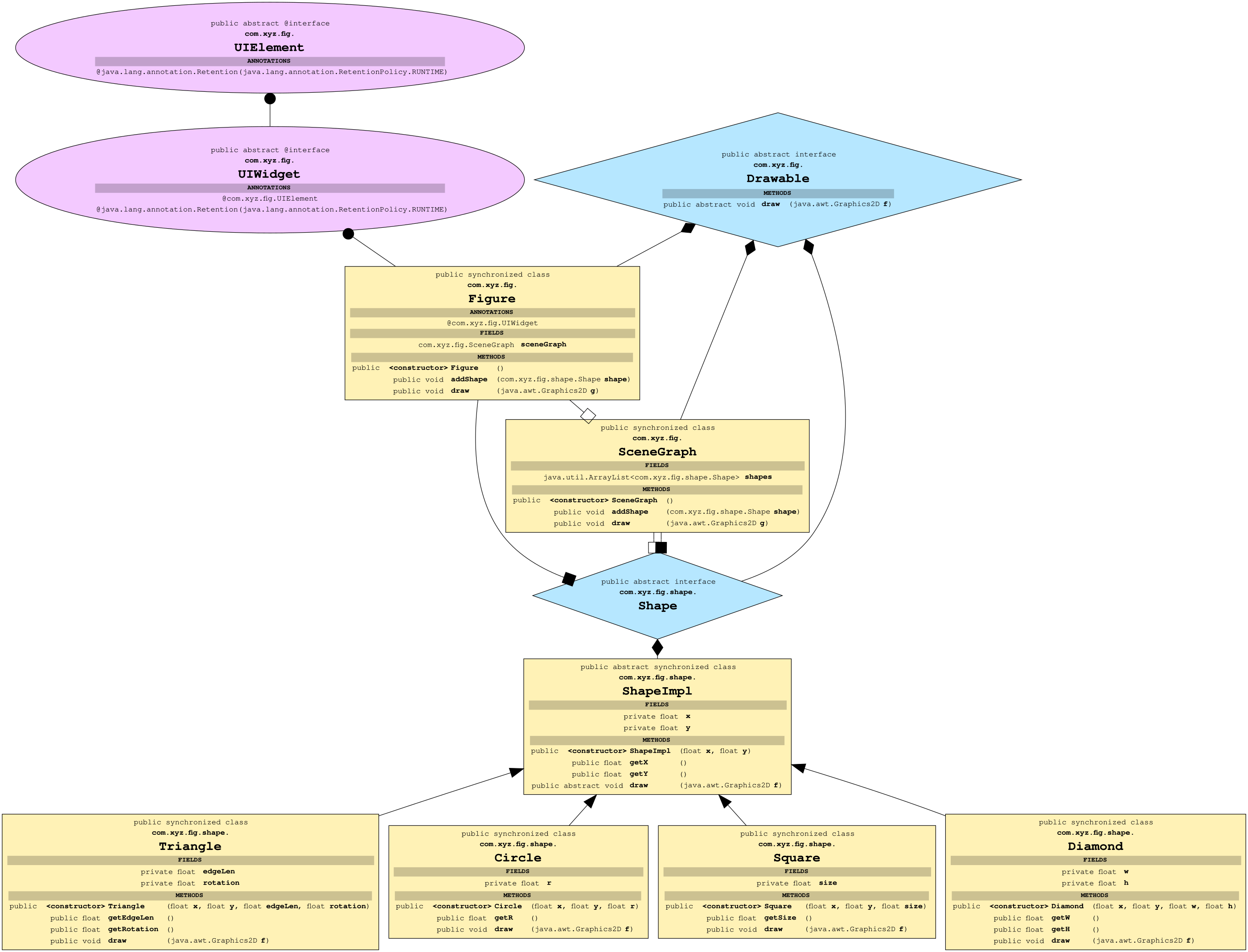
- ClassGraph can create GraphViz visualizations of the class graph structure, which can help with code understanding: (click to enlarge; see graph legend here)

Downloading
Maven dependency
Replace X.Y.Z below with the latest release number. (Alternatively, you could use LATEST in place of X.Y.Z instead if you just want to grab the latest version -- although be aware that that may lead to non-reproducible builds, since the ClassGraph version number could increase at any time. You could use dependency locking to address this.)
<dependency>
    <groupId>io.github.classgraph</groupId>
    <artifactId>classgraph</artifactId>
    <version>X.Y.Z</version>
</dependency>
See instructions for use as a module.
Running on JDK 16+
The JDK team decided to start enforcing strong encapsulation in JDK 16+. That will means that by default, ClassGraph will not be able to find the classpath of your project, if all of the following are true:
- You are running on JDK 16+
- You are using a legacy classloader (rather than the module system)
- Your classloader does not expose its classpath via a public field or method (i.e. the full classpath can only be determined by reflection of private fields or methods).
If your ClassGraph code works in JDK versions less than 16 but breaks in JDK 16+ (meaning that ClassGraph can no longer find your classes), you have probably run into this problem.
ClassGraph can use either of the following libraries to silently circumvent all of Java's security mechanisms (visibility/access checks, security manager restrictions, and strong encapsulation), in order to read the classpath from private fields and methods of classloaders.
- Narcissus by Luke Hutchison (@lukehutch), author of ClassGraph
- JVM-Driver by Roberto Gentili (@burningwave), author of Burningwave Core.
To clarify, you do only need to use Narcissus or JVM-driver if ClassGraph cannot find the classpath elements from your classloader, due to the enforcement of strong encapsulation, or if it is problematic that you are getting reflection access warnings on the console.
To use one of these libraries:
- Upgrade ClassGraph to the latest version
- Either:
- Add the Narcissus library to your project as an extra dependency (this includes a native library, and only Linux x86/x64, Windows x86/x64, and Mac OS X x64 are currently supported -- feel free to contribute native code builds for other platforms or architectures).
- Set
ClassGraph.CIRCUMVENT_ENCAPSULATION = CircumventEncapsulationMethod.NARCISSUS;before interacting with ClassGraph in any other way (this will load the Narcissus library as ClassGraph's reflection driver). - Or:
- Add the JVM-Driver library to your project as an extra dependency (this uses only Java code and works to bypass encapsulation without native code for all JDK versions between 8 and 18).
- Set
ClassGraph.CIRCUMVENT_ENCAPSULATION = CircumventEncapsulationMethod.JVM_DRIVER;before interacting with ClassGraph in any other way (this will load the JVM-Driver library as ClassGraph's reflection driver).
JDK 16's strong encapsulation is just the first step of trying to lock down Java's internals, so further restrictions are possible (e.g. it is likely that setAccessible(true) will fail in future JDK releases, even within a module, and probably the JNI API will be locked down soon, making Narcissus require a commandline flag to work). Therefore, please convince your upstream runtime environment maintainers to expose the full classpath from their classloader using a public method or field, otherwise ClassGraph may stop working for your runtime environment in the future.
Pre-built JARs
You can get pre-built JARs (usable on JRE 7 or newer) from Sonatype.
Building from source
ClassGraph must be built on JDK 8 or newer (due to the presence of @FunctionalInterface annotations on some interfaces), but is built using -target 1.7 for backwards compatibility with JRE 7.
The following commands will build the most recent version of ClassGraph from git master. The compiled package will then be in the "classgraph/target" directory.
git clone https://github.com/classgraph/classgraph.git
cd classgraph
export JAVA_HOME=/usr/java/default   # Or similar -- Maven needs JAVA_HOME
./mvnw -Dmaven.test.skip=true package
This will allow you to build a local SNAPSHOT jar in target/. Alternatively, use ./mvnw -Dmaven.test.skip=true install to build a SNAPSHOT jar and then copy it into your local repository, so that you can use it in your Maven p
Extension points exported contracts — how you extend this code
MyCloseable (Interface)Core symbols most depended-on inside this repo
getNameShape
Languages
Modules by API surface
Used by 4 indexed graphs manifest dependencies, hub-wide
For agents
$ claude mcp add classgraph \
  -- python -m otcore.mcp_server <graph>