github.com/ciscoriordan/kindling @v0.25.0
Chat with this repoWhat it actually does AI analysis from the code graph — generated when you open this
README
Kindling
The missing Kindle toolkit. Dictionaries, books, and comics. Single static Rust binary, no dependencies, cross-platform.



Amazon deprecated kindlegen in 2020, leaving no supported way to build Kindle MOBIs. The only remaining copy is buried inside Kindle Previewer 3's GUI, can't run headless, and can take 12+ hours (or run out of memory entirely) for large dictionaries due to x86-only Rosetta 2 emulation on Apple Silicon, superlinear inflection index computation, and a 32-bit Windows build that crashes on large files. Kindling builds the same dictionary in 6 seconds.
For comics, KCC exists but requires Python, PySide6/Qt, Pillow, 7z, mozjpeg, psutil, pymupdf, and more. Installation is painful across platforms, there's no headless mode for CI, and Python image processing is slow. Kindling replaces all of that with a single statically-linked native binary, compiled from Rust.
Kindling also publishes dictionaries to StarDict (kindling stardict), producing the four-file .ifo / .idx / .dict / .syn bundle that GoldenDict, GoldenDict-ng, KOReader, sdcv, and other non-Kindle dictionary readers consume. The same OPF or EPUB you pass to kindling build is the input, so one dictionary project can target Kindle, Linux/macOS/Windows desktops, Android, and Kobo/PocketBook e-readers from a single source. Headword lookup, inflection lookup, and case-insensitive matching all work without configuration; see StarDict export for format details and current cross-reference caveats.
Kindling was built by reverse-engineering Amazon's undocumented MOBI format, with help from the MobileRead wiki.
Pre-built binaries for Mac (Apple Silicon, Intel), Linux (x86_64), and Windows (x86_64): Releases
Features
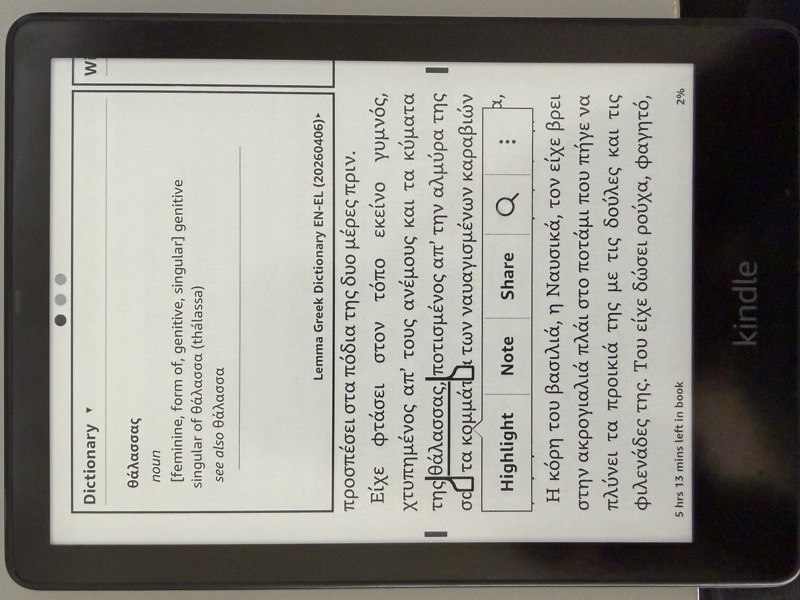
- Dictionaries: Full orth index with headword + inflection lookup, ORDT/SPL sort tables, generated CJK and Arabic collation tables, fontsignature
- Books: EPUB or OPF input, embedded images, KF8-only (.azw3) by default with legacy dual-format (MOBI7+KF8) available via
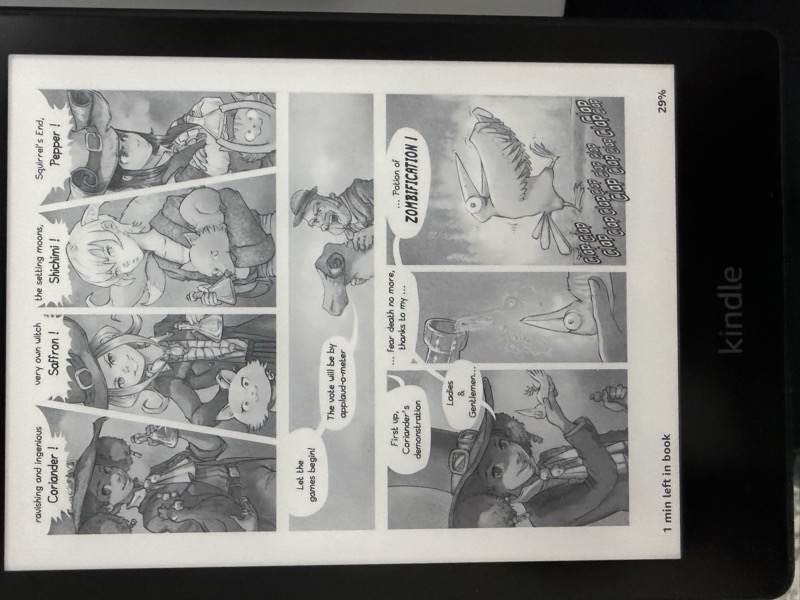
--legacy-mobi, HD image container, fixed-layout support - Comics: Image folder, CBZ, CBR, or EPUB input, device-specific resizing, spread splitting, margin cropping, auto-contrast, moire correction for color e-ink, manga RTL, webtoon with overlap fallback, Panel View, KF8-only (.azw3) by default, metadata overrides
- StarDict export:
kindling stardictbuilds a four-file StarDict bundle (.ifo/.idx/.dict/.syn) from the same OPF or EPUB dictionary input askindling build, for use with GoldenDict, GoldenDict-ng, KOReader, sdcv, and other non-Kindle dictionary readers (see StarDict export) - EPUB export:
kindling epub2andkindling epub3build a reflowable EPUB from the same OPF or EPUB input, conformant to EPUB 2.0.1 and EPUB 3.3 respectively (epubcheck-clean). EPUB2 is always a plain book; EPUB3 is a plain book by default and emits an EPUB Dictionaries and Glossaries layer (Search Key Map,dc:type=dictionary,epub:typesemantics) when the input is a dictionary (see EPUB export) - EPUB repair:
kindling repairapplies a small, byte-stable, idempotent set of structural fixes to an EPUB for cleaner Send-to-Kindle ingest (see Repair) - Metadata rewrite:
kindling rewrite-metadataupdates title, authors, publisher, description, language, ISBN, ASIN, publication date, tags, series, and cover image on an existing MOBI/AZW3 in place without rebuilding from source. Byte-stable on no-op, idempotent, refuses DRM files (see Rewrite metadata) - Structural dump:
kindling dumpprints the parsed structure of a MOBI/AZW3 (PalmDB, MOBI header, EXTH, INDX/ORDT tables, entry labels) as line-orientedsection.field = valueoutput, so two dumps can be compared withdiff(see Dump) - Lookup simulator:
kindling lookup <dict.mobi> <word>reproduces the on-device dictionary search against a built MOBI (accent/case folding for Latin and Greek, literal matching for CJK/Arabic, query-side case folding for Cyrillic) and reports which stored form resolves. It is a build-side regression check, not a hardware oracle (see Lookup simulator) - Build-time HTML self-check: every
buildruns a two-pass HTML balance check on the assembled MOBI text blob and on each individual PalmDB text record after splitting, catching regressions like dangling tags,<hr/corruption, and bold/italic state leaking across record boundaries (see Build-time self-check) - UTF-8 and tag-safe record splitter: text records end on HTML
<hr/>entry boundaries where possible, otherwise back off past any unclosed<tag and any incomplete UTF-8 multi-byte character, so multi-byte characters are never truncated and chunks never end mid-tag - Drop-in kindlegen replacement (same CLI flags, same status codes)
- Kindle Previewer compatible (EPUB source embedded by default)
- Usable as both a CLI (
kindling-cli) and a Rust library crate (kindling) with a public API for external consumers (seesrc/lib.rs) - Test suite with CI on every push (see Testing)
Installation
Download the latest release for your platform from Releases:
- Mac Apple Silicon -
kindling-cli-mac-apple-silicon - Mac Intel -
kindling-cli-mac-intel - Linux -
kindling-cli-linux - Windows -
kindling-cli-windows.exe
On Linux and BSD, install via AppMan (rootless, per-user):
appman -i kindling-cli
Or via AM (system-wide):
am -i kindling-cli
Or install via Cargo (builds from source, installs kindling-cli to ~/.cargo/bin):
cargo install kindling-mobi
Or build from source. Kindling uses Rust edition 2024 and requires Rust 1.85 or newer. Run from the repo root:
cargo build --release
The binary is written to target/release/kindling-cli.
As a library
Add the crate to your Cargo.toml (published as kindling-mobi; the library name is kindling):
[dependencies]
kindling-mobi = "0.20"
Then use kindling::.... Public API is defined in src/lib.rs.
Usage
Dictionaries
kindling-cli build input.opf -o output.mobi
kindling-cli build input.opf -o output.mobi --no-compress    # skip compression for fast dev builds
kindling-cli build input.opf -o output.mobi --headwords-only  # index headwords only (no inflections)
kindling-cli build input.opf -o output.mobi --no-kindle-limits  # skip per-letter HTML grouping
kindling-cli build input.opf -o output.mobi --no-validate     # skip KDP pre-flight validation
kindling-cli build input.opf -o output.mobi --fold-accents    # kindlegen-style accent folding (Latin default is exact, see below)
kindling-cli build input.opf -o output.mobi --strict-accents  # force exact accent match for any script
KINDLING_FOLD_ACCENTS=1 kindling-cli build input.opf -o output.mobi  # --fold-accents for wrappers that can't pass the flag (pyglossary/reader.dict)
kindling-cli lookup output.mobi rivière   # simulate the on-device lookup of a word
The input OPF must reference HTML files with <idx:entry>, <idx:orth>, and <idx:iform> markup following the Amazon Kindle Publishing Guidelines. Both headwords and inflected forms are indexed so that looking up any form on the Kindle finds the correct dictionary entry.
Latin-script dictionaries default to exact accent matching. Every character is its own symbol, so the index keeps ê distinct from e, while accent and case variants share a collation weight so accented headwords sort adjacent to their base. The Kindle firmware collates Latin dictionaries with its own accent-and-case-folding lookup, so the labels are pre-sorted in that folded order and the distinct symbols then let it return the exact form. This is confirmed end to end on real firmware: an unaccented or uppercase query resolves the accented, lowercase headword (riviere and RIVIÈRE both resolve rivière, meme and MÊME both resolve même, cafe resolves café), each to its own distinct entry, while a non-headword or a bare prefix correctly finds nothing. An unaccented query with no exact headword still falls back to its accented neighbour (issue #8). The folded sort also fixes accent-initial headwords like Polish świat, which a raw byte-order sort placed after z, where the firmware's collation never looks.
The fold lowercases and strips the diacritics of Latin-1 and all of Latin Extended-A, so é→e, à→a, ñ→n and ā→a, ł→l, ś→s all collate to their base letter. The firmware's lookup collation also decomposes eth (ð→d), slashed-o (ø→o), thorn (þ→t), the micro sign (µ→m), and the florin (ƒ→f), so kindling folds those five to their base too, confirmed by the same on-device lookups. The Latin-1 folds are not hand-guessed: the SPL1 spelling table inside the committed kindlegen collation blob is a codepoint-indexed map of each character to its base letter, and a test re-extracts it and asserts kindling's fold reproduces it, so the two cannot drift.
Pass --fold-accents to instead embed the kindlegen-derived ORDT/SPL folding blob, so meme also matches même accent-insensitively, matching kindlegen; the labels are still folded-sorted so accent-initial headwords resolve. The same fold orders the labels in both modes, since the firmware collates a Latin dictionary the same folded way whether or not the blob is embedded. --strict-accents forces the exact collation for any script, including Greek and Cyrillic. Both flags have environment-variable forms, KINDLING_FOLD_ACCENTS=1 and KINDLING_STRICT_ACCENTS=1, which are the only way to reach them when kindling runs under a wrapper that controls the command line (for example pyglossary's Mobi writer, used by reader.dict). Greek and Cyrillic dictionaries keep the folding default, since their scripts already sort the way the firmware collates them; none of this affects book builds.
Cyrillic dictionaries additionally get generated lookup aliases (issue #17): every indexed form with a combining stress mark (acute U+0301 or grave U+0300, as in пробормота́в) also gets its bare spelling as an extra index entry, and every form with uppercase letters gets a lowercased alias, so an all-caps abbreviation like ФСБ is found without the manual lowercase-variant workaround dictionaries needed under kindlegen. Aliases point at the same entry, dedupe against forms the source already ships, and are skipped under --strict-accents.
Japanese, Chinese, Korean, and the Arabic-script languages (<DictionaryInLanguage> of ja, zh, ko, ar, fa, ur, ps, ug, sd, or ckb) instead get per-dictionary generated ORDT collation tables, using a per-character encoding. Persian, Urdu, Pashto, Uyghur, Sindhi, and Central Kurdish reuse the same all-literal table as Arabic, each with its own neutral-primary MOBI locale. Each headword character becomes one label element: kana are collation symbols in an embedded ORDT table (so hiragana and katakana fold together, and ヴ collates as ウ), and every other character (kanji, Hangul, Arabic letters) is stored as a literal Unicode code point. The Japanese prolonged sound mark ー is special: it folds onto the preceding vowel (so ローゼマイン collates with a long o), exactly as kindlegen and the firmware's query normalization do; a raw ー never resolves on device. The firmware encodes a tapped word the same way, so the query matches the stored label. The kana tables are embedded only for dictionaries that actually contain kana; the all-literal scripts get the minimal table kindlegen emits, and the MOBI-header locale is the neutral primary LCID the firmware's normalization expects. This whole path is verified on a physical Kindle. The earlier 0.16.0/0.17.0 releases used a one-symbol-per-byte encoding reverse-engineered from kindlegen's output on toy dictionaries; that form only appears for tiny inputs and never matched on device, which is why issue #11 got worse before it got better. --strict-accents has no effect on generated-ORDT builds.
Supported dictionary languages
Languages exercised by the test suite, with their index layout and how far each has been verified:
| Language | Code | Flag | Index collation | Verified |
|---|---|---|---|---|
| Greek | el |
 |
UTF-16BE + accent-folding blob | On device (production dictionaries) and structural tests |
| English | en |
 |
Exact pe |
Extension points exported contracts — how you extend this code
Core symbols most depended-on inside this repo
Shape
Languages
Modules by API surface
For agents
$ claude mcp add kindling \
  -- python -m otcore.mcp_server <graph>