github.com/chriskiehl/Gooey @1.0.8.1 sqlite
README
Gooey
Turn (almost) any Python 2 or 3 Console Program into a GUI application with one line
<img src="https://github.com/chriskiehl/GooeyImages/raw/images/readme-images/1-0-4-title-card.png" />
Support this project

Table of Contents
- Gooey
- Table of contents
- Latest Update
- Quick Start
- What It Is
- Why Is It
- Who is this for
- How does it work
- Internationalization
- Global Configuration
- Layout Customization
- Run Modes
- Menus
- Input Validation
- Using Dynamic Values
- Showing Progress
- Customizing Icons
- Packaging
- Screenshots
- Contributing
- Image Credits
Quick Start
Installation instructions
The easiest way to install Gooey is via pip
pip install Gooey
Alternatively, you can install Gooey by cloning the project to your local directory
git clone https://github.com/chriskiehl/Gooey.git
run setup.py
python setup.py install
NOTE: Python 2 users must manually install WxPython! Unfortunately, this cannot be done as part of the pip installation and should be manually downloaded from the wxPython website.
Usage
Gooey is attached to your code via a simple decorator on whichever method has your argparse declarations (usually main).
from gooey import Gooey

@Gooey      <--- all it takes! :)
def main():
  parser = ArgumentParser(...)
  # rest of code
Different styling and functionality can be configured by passing arguments into the decorator.
# options
@Gooey(advanced=Boolean,          # toggle whether to show advanced config or not
       language=language_string,  # Translations configurable via json
       auto_start=True,           # skip config screens all together
       target=executable_cmd,     # Explicitly set the subprocess executable arguments
       program_name='name',       # Defaults to script name
       program_description,       # Defaults to ArgParse Description
       default_size=(610, 530),   # starting size of the GUI
       required_cols=1,           # number of columns in the "Required" section
       optional_cols=2,           # number of columns in the "Optional" section
       dump_build_config=False,   # Dump the JSON Gooey uses to configure itself
       load_build_config=None,    # Loads a JSON Gooey-generated configuration
       monospace_display=False)   # Uses a mono-spaced font in the output screen
)
def main():
  parser = ArgumentParser(...)
  # rest of code
See: How does it Work section for details on each option.
Gooey will do its best to choose sensible widget defaults to display in the GUI. However, if more fine tuning is desired, you can use the drop-in replacement GooeyParser in place of ArgumentParser. This lets you control which widget displays in the GUI. See: GooeyParser
from gooey import Gooey, GooeyParser

@Gooey
def main():
  parser = GooeyParser(description="My Cool GUI Program!")
  parser.add_argument('Filename', widget="FileChooser")
  parser.add_argument('Date', widget="DateChooser")
  ...
Examples
Gooey downloaded and installed? Great! Wanna see it in action? Head over the the Examples Repository to download a few ready-to-go example scripts. They'll give you a quick tour of all Gooey's various layouts, widgets, and features.
What is it?
Gooey converts your Console Applications into end-user-friendly GUI applications. It lets you focus on building robust, configurable programs in a familiar way, all without having to worry about how it will be presented to and interacted with by your average user.
Why?
Because as much as we love the command prompt, the rest of the world looks at it like an ugly relic from the early '80s. On top of that, more often than not programs need to do more than just one thing, and that means giving options, which previously meant either building a GUI, or trying to explain how to supply arguments to a Console Application. Gooey was made to (hopefully) solve those problems. It makes programs easy to use, and pretty to look at!
Who is this for?
If you're building utilities for yourself, other programmers, or something which produces a result that you want to capture and pipe over to another console application (e.g. *nix philosophy utils), Gooey probably isn't the tool for you. However, if you're building 'run and done,' around-the-office-style scripts, things that shovel bits from point A to point B, or simply something that's targeted at a non-programmer, Gooey is the perfect tool for the job. It lets you build as complex of an application as your heart desires all while getting the GUI side for free.
How does it work?
Gooey is attached to your code via a simple decorator on whichever method has your argparse declarations.
@Gooey
def my_run_func():
  parser = ArgumentParser(...)
  # rest of code
At run-time, it parses your Python script for all references to ArgumentParser. (The older optparse is currently not supported.) These references are then extracted, assigned a component type based on the 'action' they provide, and finally used to assemble the GUI.
Mappings:
Gooey does its best to choose sensible defaults based on the options it finds. Currently, ArgumentParser._actions are mapped to the following WX components.
| Parser Action | Widget | Example |
|---|---|---|
| store | TextCtrl |  |
| store_const | CheckBox |  |
| store_true | CheckBox | |
| store_False | CheckBox | |
| version | CheckBox | |
| append | TextCtrl | |
| count | DropDown |  |
| Mutually Exclusive Group | RadioGroup |  |
| choice | DropDown |  |
GooeyParser
If the above defaults aren't cutting it, you can control the exact widget type by using the drop-in ArgumentParser replacement GooeyParser. This gives you the additional keyword argument widget, to which you can supply the name of the component you want to display. Best part? You don't have to change any of your argparse code to use it. Drop it in, and you're good to go.
Example:
from argparse import ArgumentParser
....

def main():
    parser = ArgumentParser(description="My Cool Gooey App!")
    parser.add_argument('filename', help="name of the file to process")
Given then above, Gooey would select a normal TextField as the widget type like this:
<img src="https://github.com/chriskiehl/GooeyImages/raw/images/readme-images/f5393e20-07c5-11e5-88e9-c153fc3ecfaa.PNG">
However, by dropping in GooeyParser and supplying a widget name, you can display a much more user friendly FileChooser
from gooey import GooeyParser
....

def main():
    parser = GooeyParser(description="My Cool Gooey App!")
    parser.add_argument('filename', help="name of the file to process", widget='FileChooser')

Custom Widgets:
| Widget | Example |
|---|---|
| DirChooser, FileChooser, MultiFileChooser, FileSaver, MultiFileSaver |

| | DateChooser/TimeChooser |

Please note that for both of these widgets the values passed to the application will always be in ISO format while localized values may appear in some parts of the GUI depending on end-user settings.
| | PasswordField |

|
| Listbox |  |
| BlockCheckbox |
|
| BlockCheckbox | 
The default InlineCheck box can look less than ideal if a large help text block is present. BlockCheckbox moves the text block to the normal position and provides a short-form block_label for display next to the control. Use gooey_options.checkbox_label to control the label text |
| ColourChooser |
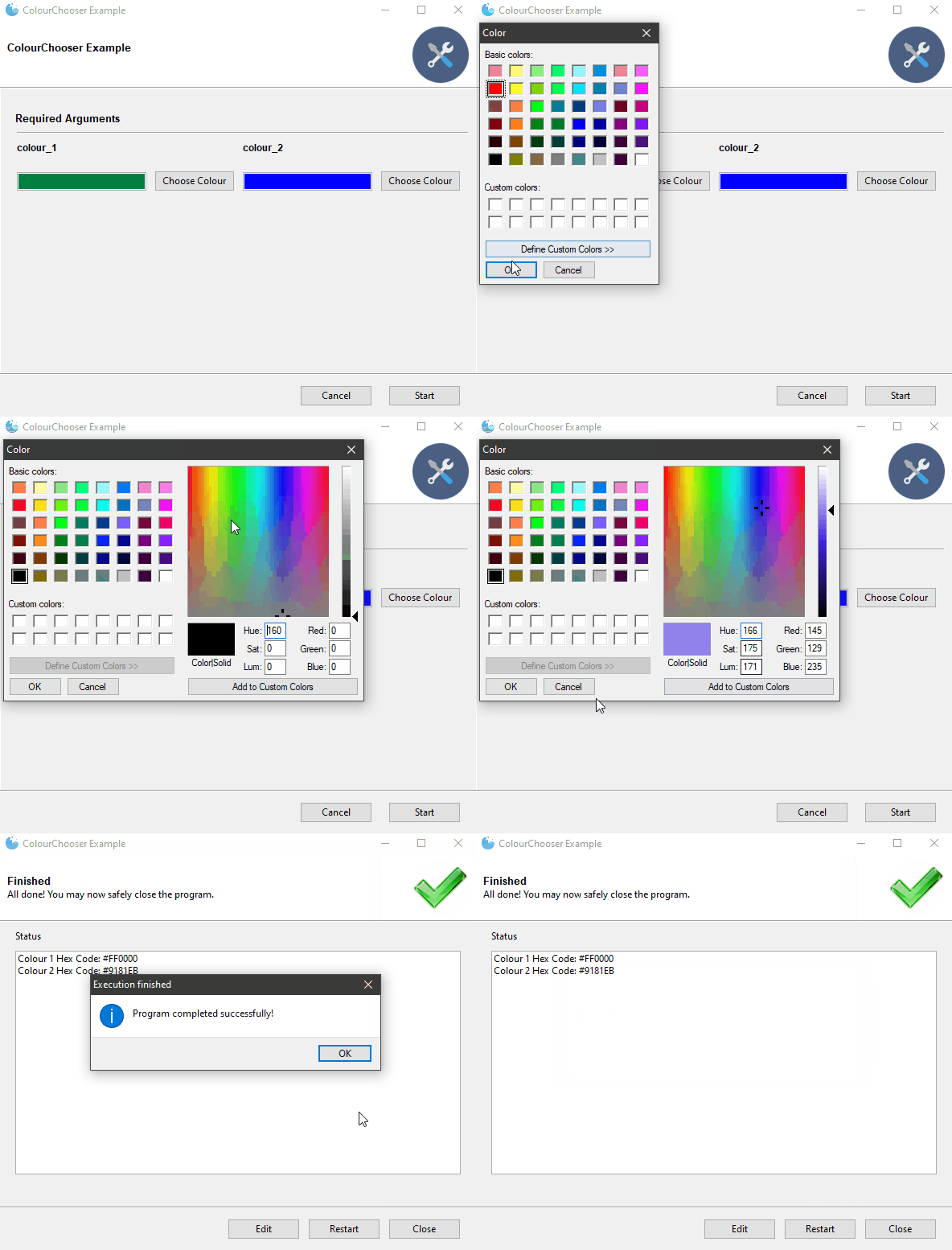
| | FilterableDropdown |
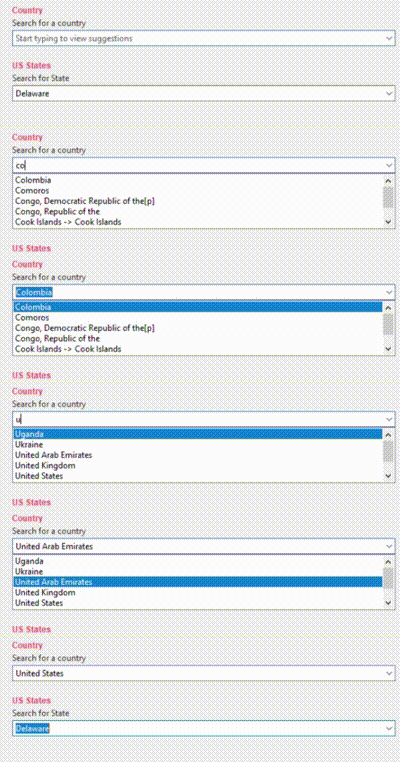
| | IntegerField |

| | DecimalField |

| | Slider |

|
Internationalization

Gooey is international ready and easily ported to your host language. Languages are controlled via an argument to the Gooey decorator.
@Gooey(language='russian')
def main():
    ...
All program text is stored externally in json files. So adding new language support is as easy as pasting a few key/value pairs in the gooey/languages/ directory.
Thanks to some awesome contributers, Gooey currently comes pre-stocked with over 18 different translations!
Want to add another one? Submit a pull request!
Global Configuration
Just about everything in Gooey's overall look and feel can be customized by passing arguments to the decorator.
| Parameter | Summary |
|---|---|
| encoding | Text encoding to use when displaying characters (default: 'utf-8') |
| use_legacy_titles | Rewrites the default argparse group name from "Positional" to "Required". This is primarily for retaining backward compatibility with previous versions of Gooey (which had poor support/awareness o |
Core symbols most depended-on inside this repo
add_argumentShape
Languages
Modules by API surface
Dependencies from manifests, versioned
For agents
$ claude mcp add Gooey \
  -- python -m otcore.mcp_server <graph>