github.com/chengyangkj/Ros_Qt5_Gui_App @v1.0.7-rc9
Chat with this repoBrowse by type
What it actually does AI analysis from the code graph — generated when you open this
README
ROS Qt5 GUI App
A lightweight ROS1/ROS2 mobile robot human-machine interaction software










📖 Introduction
This project is developed based on Qt5 and built with CMake, enabling the use of a single codebase in both ROS1/ROS2 systems. During compilation, the software automatically detects the ROS1/ROS2 environment variables and builds accordingly, achieving isolation between ROS communication and interface.
All features are self-implemented through custom drawing, making it easy to run on low-performance edge devices. The project has integrated CI to ensure compatibility across multiple ROS versions and system versions.
✨ Features
- ROS1 Communication Support - Basic features implemented, continuously optimized
- ROS2 Communication Support - Stable and long-term support maintenance
- ROSBridge Communication Support - Supports WebSocket connection and automatic reconnection
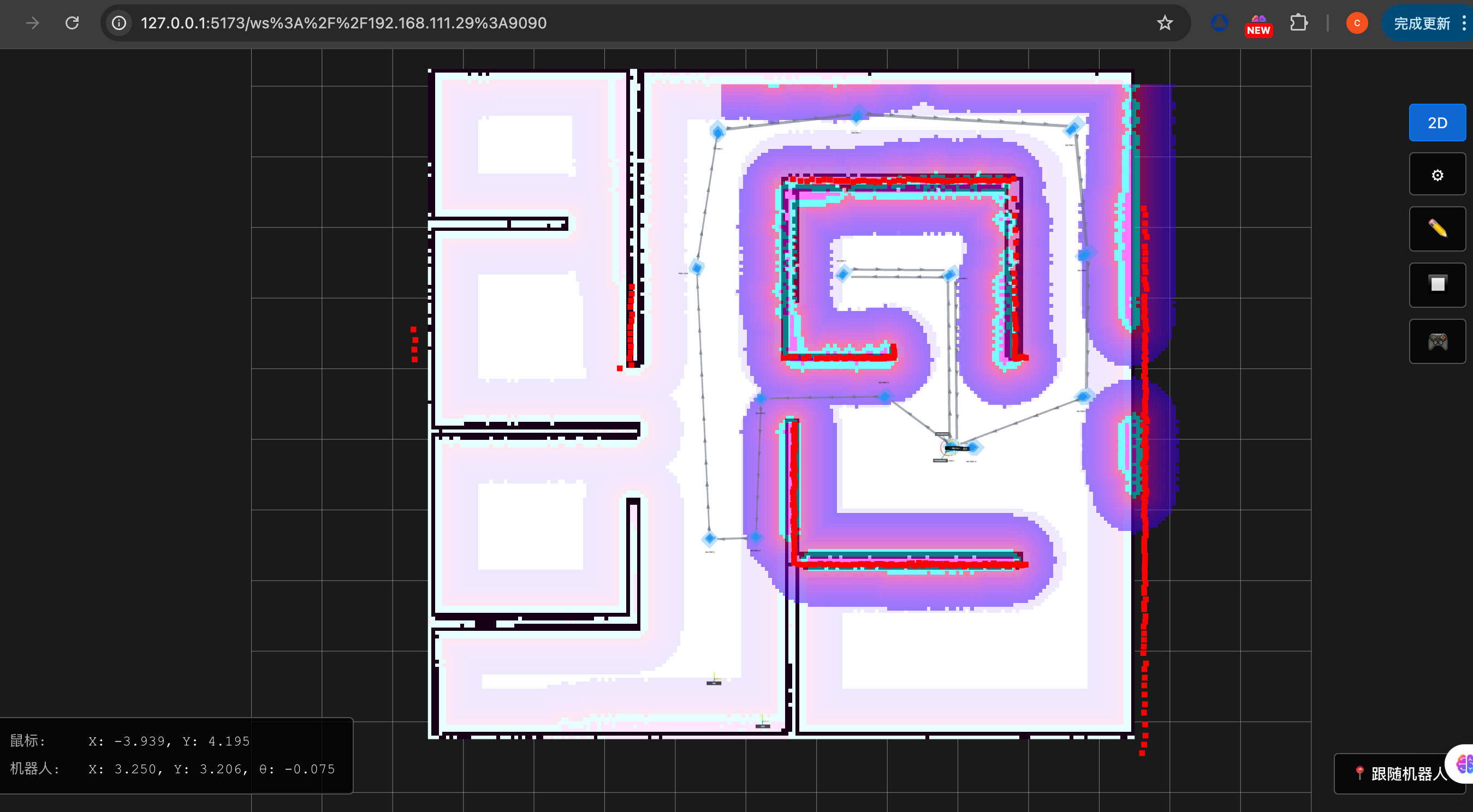
- Global/Local Map Display - Supports OccupancyGrid maps
- Real-time Robot Position Display - Based on TF transforms
- Robot Speed Dashboard - Real-time linear and angular velocity display
- Manual Robot Control - Supports velocity control
- Robot Relocation - Supports 2D Pose Estimate
- Single/Multi-point Navigation - Supports navigation goal setting
- Global/Local Path Display - Real-time planned path display
- Topological Point Editing - Visual editing of topological points
- Battery Level Display - Subscribes to BatteryState topic
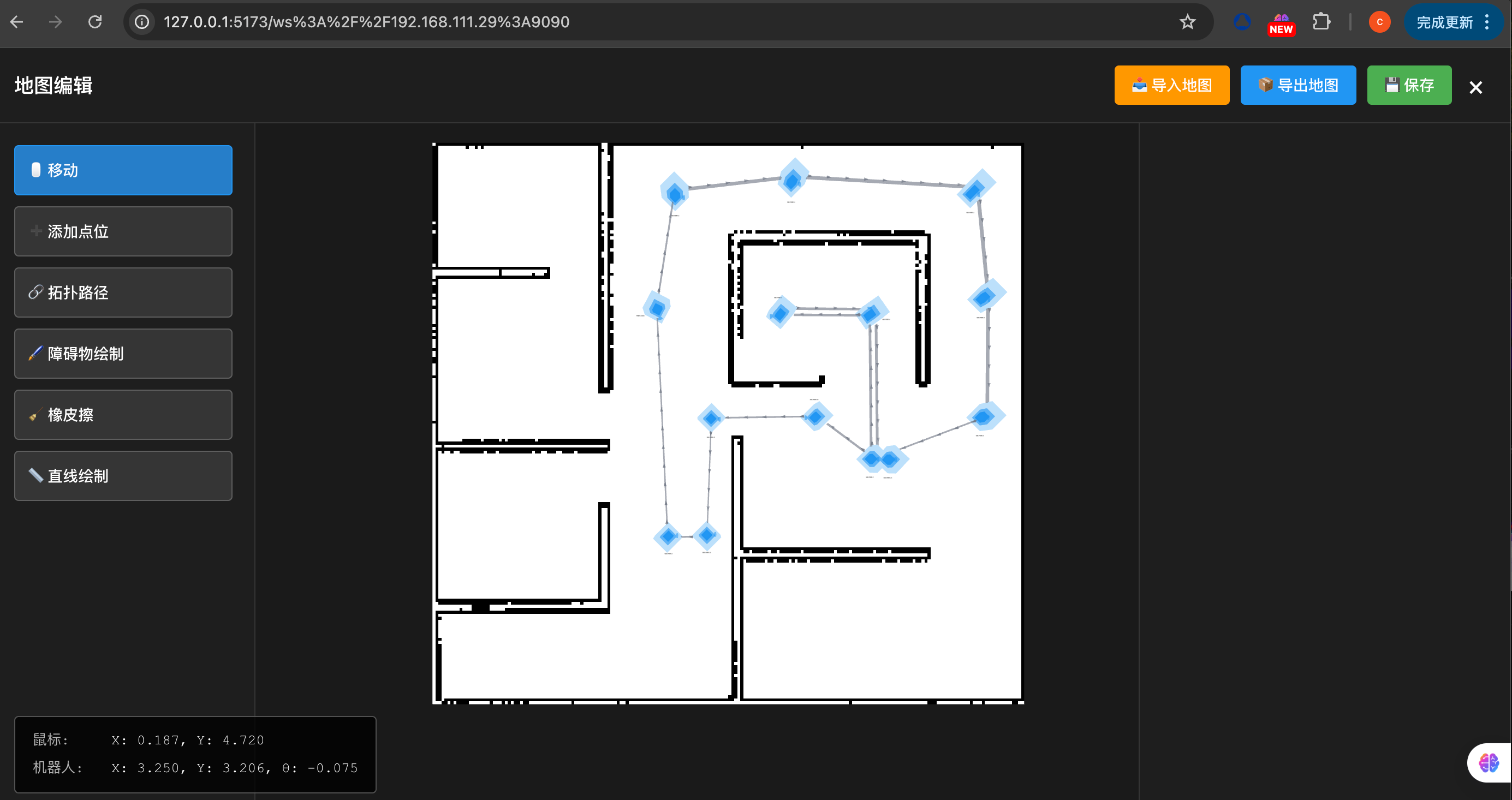
- Map Obstacle Editing - Supports map editing
- Topological Path Editing - Visual editing of topological paths
- Map Load/Save - Supports map file management
- Camera Image Display - Supports multiple image streams
- Robot Footprint Display - Subscribes to footprint topic
- LiDAR Display - Supports LaserScan visualization
🖼️ Interface Preview


🚀 Quick Start
Requirements
- Operating System: Ubuntu 18.04+ / Windows 10+
- ROS Environment: ROS1 (Melodic/Noetic) or ROS2 (Foxy/Galactic/Humble)
- Qt5: Qt5.12+ (Qt5 Core, Widgets, SVG)
- CMake: 3.16+
- Compiler: GCC 7+ / MSVC 2019+
🚀 Build and Usage
💡 Tip: Click the tabs below to switch between different platform build and usage instructions
🐧 Linux Platform
Install Dependencies
sudo apt-get update
sudo apt-get install -y \
  qtbase5-dev \
  qtbase5-private-dev \
  libqt5svg5-dev \
  qtbase5-dev-tools \
  libeigen3-dev \
  libgtest-dev \
  libsdl2-dev \
  libsdl2-image-dev
CMake Upgrade
Systems with Ubuntu 20.04 and below come with an outdated CMake version that needs to be upgraded to 3.16+. Ubuntu 22.04 and above can skip this step.
wget https://cmake.org/files/v3.16/cmake-3.16.4-Linux-x86_64.sh -O cmake-install.sh
chmod +x cmake-install.sh
sudo ./cmake-install.sh --prefix=/usr/local --skip-license
Build from Source
# Clone repository
git clone https://github.com/chengyangkj/Ros_Qt5_Gui_App.git
cd Ros_Qt5_Gui_App
Method 1: Manual CMake Build
# Create build directory
mkdir build && cd build

# Configure and build
cmake ..
make -j$(nproc)
Method 2: Use build.sh Script
./build.sh
Method 3: Use Gitee Mirror for Accelerated Build
Replaces third-party library sources with Gitee mirror for faster compilation:
./build_cn.sh
Or manually specify mirrors:
mkdir build && cd build
cmake .. \
  -DCMAKE_BUILD_TYPE=Release \
  -Ddockwidget_GIT_REPOSITORY=https://gitee.com/kqz2007/qt-advanced-docking-system_github.git \
  -Dnlohmann_json_GIT_REPOSITORY=https://gitee.com/athtan/json.git \
  -Dyaml-cpp_GIT_REPOSITORY=https://gitee.com/dragonet_220/yaml-cpp.git \
  -Dwebsocketpp_GIT_REPOSITORY=https://gitee.com/open-source-software_1/websocketpp.git
make -j$(nproc)
Run
Method 1: Using Startup Script (Recommended)
After building, the startup script will be automatically copied to the build directory:
cd build
./start.sh
The startup script will automatically set library file paths and launch the program.
Method 2: Manual Run
cd build
export LD_LIBRARY_PATH=$LD_LIBRARY_PATH:./lib
./ros_qt5_gui_app
Method 3: Run After Installation {#method-3-run-after-installation}
cd build
make install

cd ../install/bin
./start.sh
🪟 Windows Platform
Install Dependencies
Windows platform recommends using vcpkg to manage dependencies. The project includes a vcpkg.json manifest file that automatically installs all dependencies.
Install dependencies using vcpkg:
- Install vcpkg (if not already installed):
git clone https://github.com/microsoft/vcpkg.git
cd vcpkg
.\bootstrap-vcpkg.bat
- Set environment variable (optional, recommended):
$env:VCPKG_ROOT = "C:\path\to\vcpkg"
[Environment]::SetEnvironmentVariable("VCPKG_ROOT", "C:\path\to\vcpkg", "User")
- Install project dependencies:
cd Ros_Qt5_Gui_App
vcpkg install --triplet x64-windows
Note: The first installation of large dependencies like Qt5 will take a long time (30-60 minutes) as they need to be compiled from source. Subsequent builds will use cache and be much faster.
Build from Source
# Clone repository
git clone https://github.com/chengyangkj/Ros_Qt5_Gui_App.git
cd Ros_Qt5_Gui_App
Method 1: Manual CMake Build
# Create build directory
mkdir build
cd build

# Configure CMake (specify vcpkg toolchain)
cmake .. `
  -DCMAKE_TOOLCHAIN_FILE="$env:VCPKG_ROOT\scripts\buildsystems\vcpkg.cmake" `
  -DCMAKE_BUILD_TYPE=Release `
  -DBUILD_WITH_TEST=OFF

# Build
cmake --build . --config Release --parallel

# Install
cmake --install . --config Release
Method 2: Use Gitee Mirror for Accelerated Build
Replaces third-party library sources with Gitee mirror for faster compilation:
# Create build directory
mkdir build
cd build

# Configure CMake with Gitee mirror for acceleration
cmake .. `
  -DCMAKE_TOOLCHAIN_FILE="$env:VCPKG_ROOT\scripts\buildsystems\vcpkg.cmake" `
  -DCMAKE_BUILD_TYPE=Release `
  -DBUILD_WITH_TEST=OFF `
  -Ddockwidget_GIT_REPOSITORY=https://gitee.com/kqz2007/qt-advanced-docking-system_github.git `
  -Dnlohmann_json_GIT_REPOSITORY=https://gitee.com/athtan/json.git `
  -Dyaml-cpp_GIT_REPOSITORY=https://gitee.com/dragonet_220/yaml-cpp.git `
  -Dwebsocketpp_GIT_REPOSITORY=https://gitee.com/open-source-software_1/websocketpp.git

# Build
cmake --build . --config Release --parallel

# Install
cmake --install . --config Release
Run
Method 1: Using Startup Script (Recommended)
After building, the startup script will be automatically copied to the build directory:
cd build
.\start.bat
The startup script will automatically set library file paths and launch the program.
Method 2: Manual Run
cd build
.\ros_qt5_gui_app.exe
Method 3: Run After Installation {#method-3-run-after-installation-windows}
cd build
cmake --install . --config Release

cd ..\install\bin
.\start.bat
📥 Release Binary Distribution
Download the binary package for your system version from the release page:
- Linux: Download
.tar.gzpackage, extract and refer to Linux Method 3: Run After Installation to run the program - Windows: Download
.zippackage, extract and refer to Windows Method 3: Run After Installation to run the program
Configuration
Before first run, please ensure:
- ROS Environment Configured: Make sure ROS setup.bash/setup.bat has been sourced
- Topic Configuration: Check if topic names in the configuration interface match your ROS system
- Channel Selection: Select the correct communication channel (ROS1/ROS2/ROSBridge) in the configuration interface
For detailed configuration instructions, please refer to User Guide
📚 Documentation
- User Guide - Feature usage tutorials
- Development Guide - Development environment setup and code structure
- FAQ - FAQ and troubleshooting
🏗️ Project Structure
Ros_Qt5_Gui_App/
├── src/                    # Source code directory
│   ├── core/              # Core module (main program entry)
│   ├── mainwindow/        # Main window and interface
│   ├── common/            # Common libraries
│   ├── basic/             # Basic data structures
│   ├── channel/           # Communication channels (ROS1/ROS2/ROSBridge)
│   └── plugin/            # Plugin system
├── install/               # Installation scripts
│   ├── linux/bin/        # Linux startup scripts
│   └── windows/bin/       # Windows startup scripts
├── doc/                   # Documentation directory
├── cmake/                 # CMake modules
└── CMakeLists.txt        # Main CMake configuration file
🤝 Contributing
Welcome to submit Issues and Pull Requests!
If you have any ideas or suggestions, feel free to submit them to 🌟 Wishlist/Requirements. They might be implemented someday!
Contributing Guide
- Fork this repository
- Create a feature branch (
git checkout -b feature/AmazingFeature) - Commit your changes (
git commit -m 'Add some AmazingFeature') - Push to the branch (
git push origin feature/AmazingFeature) - Open a Pull Request
📊 Star History
<img alt="Star History Chart" src="https://api.star-history.com/svg?repos=chengyangkj/Ros_Qt5_Gui_App&type=Timeline" width="75%" />
📱 Related Projects
ROS1/ROS2 Cross-platform Mobile Robot HMI Software Based on Flutter

For details, visit ROS_Flutter_Gui_App
ROS1/ROS2 Web GUI Application Based on React
Supports map editing
For details, visit ROS_Web_Gui_App
🔗 Related Links
| Branch | Supported Platforms | Description |
|---|---|---|
| master | Win10 Ubuntu | ROS + QWidget + QGraphicsView custom visualization interface display |
| qml_hmi | Win10 Ubuntu | ROS + QML + C++ hybrid programming, QML self-drawn map, lidar and other visualization demos |
| simple | Win10 Ubuntu | ROS + QWidget + Librviz visualization display, CSDN blog "ROS Human-Machine Interaction Software Development" course implementation version |
| rviz_tree | Win10 Ubuntu | ROS + QWidget + Librviz native layer API management, no need to manually create layers |
| ros_qt_demo | Win10 Ubuntu | Original package created using catkin_create_qt_pkg, CMakeLists.txt configured for Qt5, can be directly compiled and run |
| ros2_qt_demo | ROS2 | Qt demo package running on ROS2 platform, CMakeLists.txt configured for Qt5, can be built u |
Core symbols most depended-on inside this repo
Shape
Languages
Modules by API surface
For agents
$ claude mcp add Ros_Qt5_Gui_App \
  -- python -m otcore.mcp_server <graph>