github.com/cheeaun/phanpy @2026.06.23.05dcc55
Chat with this repoBrowse by type
What it actually does AI analysis from the code graph — generated when you open this
README

Phanpy
Minimalistic opinionated Mastodon web client.

🗣️ Pronunciation: /fænpi/ (FAN-pee) 🔊 Listen
This is an alternative web client for Mastodon.
- 🏢 Production: https://phanpy.social
productionbranch- break less often
- slower fixes unless critical
- 🏗️ Development: https://dev.phanpy.social
mainbranch- may see new cool stuff sooner
- may break more often
- may be fixed much faster too




🐘 Follow @phanpy on Mastodon for updates ✨
Everything is designed and engineered following my taste and vision. This is a personal side project for me to learn about Mastodon and experiment with new UI/UX ideas.
Features
- 👪 Multiple accounts
- 🪟 Compose window pop-out/in
- 🌗 Light/dark/auto theme
- 🔔 Grouped notifications
- 🪺 Nested comments thread
- 📬 Unsent draft recovery
- 🎠 Boosts Carousel™️
- ⚡ Shortcuts™️ with view modes like multi-column or tab bar
-
️⃣ Multi-hashtag timeline
Design decisions
- Status actions (reply, boost, favourite, bookmark, etc) are hidden by default.
They only appear in individual status page. This is to reduce clutter and distraction. It may result in lower engagement, but we're not chasing numbers here. - Boost is represented with the rocket icon.
The green double arrow icon (retweet for Twitter) doesn't look right for the term "boost". Green rocket looks weird, so I use purple.
- Short usernames (@username) are displayed in timelines, instead of the full account username (@username@instance).
Despite the guideline mentioned that "Decentralization must be transparent to the user", I don't think we should shove it to the face every single time. There are also some screen-reader-related accessibility concerns with the full username, though this web app is unfortunately not accessible yet. - No autoplay for video/GIF/whatever in timeline.
The timeline is already a huge mess with lots of people, brands, news and media trying to grab your attention. Let's not make it worse. (Current exception now would be animated emojis.) - Hash-based URLs.
This web app is not meant to be a full-fledged replacement to Mastodon's existing front-end. There's no SEO, database, serverless or any long-running servers. I could be wrong one day.
Subtle UI implementations
User name display

- On the timeline, the user name is displayed as
[NAME] @[username]. - For the
@[username], always exclude the instance domain name. - If the
[NAME]looks the same as the@[username], then the@[username]is excluded as well.
Boosts Carousel

- From the fetched posts (e.g. 20 posts per fetch), if number of boosts are more than quarter of total posts or more than 3 consecutive boosts, boosts carousel UI will be triggered.
- If number of boosts are more than 3 quarters of total posts, boosts carousel UI will be slotted at the end of total posts fetched (per "page").
- Else, boosts carousel UI will be slotted in between the posts.
Thread number badge (e.g. Thread 1/X)

- Check every post for
inReplyToIdfrom cache or additional API requests, until the root post is found. - If root post is found, badge will show the index number of the post in the thread.
- Limit up to 3 API requests as the root post may be very old or the thread is super long.
- If index number couldn't be found, badge will fallback to showing
Threadwithout the number.
Hashtag stuffing collapsing

- First paragraph of post content with more than 3 hashtags will be collapsed to max 3 lines.
- Subsequent paragraphs after first paragraph with more than 3 hashtags will be collapsed to 1 line.
- Adjacent paragraphs with more than 1 hashtag after collapsed paragraphs will be collapsed to 1 line.
- If there are text around or between the hashtags, they will not be collapsed.
- Collapsed hashtags will be appended with
...at the end. - They are also slightly faded out to reduce visual noise.
- Opening the post view will reveal the hashtags uncollapsed.
Filtered posts
- "Hide completely"-filtered posts will be hidden, with no UI to reveal it.
- "Hide with a warning"-filtered posts will be partially hidden, showing the filter name and author name.
- Content can be partially revealed by hovering over the post, with tooltip showing the post text.
- Clicking it will open the Post page.
- Long-pressing or right-clicking it will "peek" the post with a bottom sheet UI.
- On boosts carousel, they are sorted to the end of the carousel.
Development
Prerequisites: Node.js 22+
npm install- Install dependenciesnpm run dev- Start development server andmessages:extract(clean+watch) in parallelnpm run build- Build for productionnpm run preview- Preview the production buildnpm run fetch-instances- Fetch instances list from joinmastodon.org/servers, save it tosrc/data/instances.jsonnpm run sourcemap- Runsource-map-exploreron the production buildnpm run messages:extract- Extract messages from source files and update the locale message catalogsnpm run git:po-filter- Configuregitto usepo-filterfor diffing.pofiles
Tech stack
- Vite - Build tool
- Preact - UI library
- Valtio - State management
- React Router - Routing
- masto.js - Mastodon API client
- Iconify - Icon library
- MingCute icons
- Lingui - Internationalization
- Vanilla CSS - Yes, I'm old school.
Some of these may change in the future. The front-end world is ever-changing.
Internationalization
All translations are available as gettext .po files in the src/locales folder. The default language is English (en). CLDR Plural Rules are used for pluralization. RTL (right-to-left) languages are also supported with proper text direction, icon rendering and layout.
On page load, default language is detected via these methods, in order (first match is used):
- URL parameter
lange.g./?lang=zh-Hant localStoragekeylang- Browser's
navigator.language
Users can change the language in the settings, which sets the localStorage key lang.
Guide for translators
*Inspired by Translate WordPress Handbook:
- Don’t translate literally, translate organically.
- Try to keep the same level of formality (or informality)
- Don’t use slang or audience-specific terms
- Be attentive to placeholders for variables. Many strings have placesholders e.g.
{account}(variable),<0>{name}</0>(tag with variable) and#(number placeholder). - Ellipsis (…) is intentional. Don't remove it.
- Nielsen Norman Group: "Include Ellipses in Command Text to Indicate When More Information Is Required"
- Apple Human Interface Guidelines: "Append an ellipsis to a menu item’s label when the action requires more information before it can complete. The ellipsis character (…) signals that people need to input information or make additional choices, typically within another view."
- Windows App Development: "Ellipses mean incompleteness."
- Date timestamps, date ranges, numbers, language names and text segmentation are handled by the ECMAScript Internationalization API.
Intl.DateTimeFormat- e.g. "8 Aug", "08/08/2024"Intl.RelativeTimeFormat- e.g. "2 days ago", "in 2 days"Intl.NumberFormat- e.g. "1,000", "10K"Intl.DisplayNames- e.g. "English" (en) in Traditional Chinese (zh-Hant) is "英文"Intl.ListFormat- e.g. "A, B, and C"Intl.Locale(with polyfill for older browsers)Intl.Segmenter(with polyfill for older browsers)
Technical notes
- IDs for strings are auto-generated instead of explicitly defined. Some of the benefits are avoiding the "naming things" problem and avoiding duplicates.
- Explicit IDs might be introduced in the future when requirements and priorities change. The library (Lingui) allows both.
- Please report issues if certain strings are translated differently based on context, culture or region.
- There are no strings for push notifications. The language is set on the instance server.
- Native HTML date pickers, e.g.
<input type="month">will always follow the system's locale and not the user's set locale. - "ALT" in ALT badge is not translated. It serves as a a recognizable standard across languages.
- Custom emoji names are not localized, therefore searches don't work for non-English languages.
- GIPHY API supports a list of languages for searches.
- Unicode Right-to-left mark (RLM) (
U+200F,‏) may need to be used for mixed RTL/LTR text, especially for<title>element (document.title). - On development, there's an additional
pseudo-LOCALElocale, used for pseudolocalization. It's for testing and won't show up on production. - When building for production, English (
en) catalog messages are not bundled separatedly. Other locales are bundled as separate files and loaded on demand. This ensures thatenis always available as fallback.
Volunteer translations

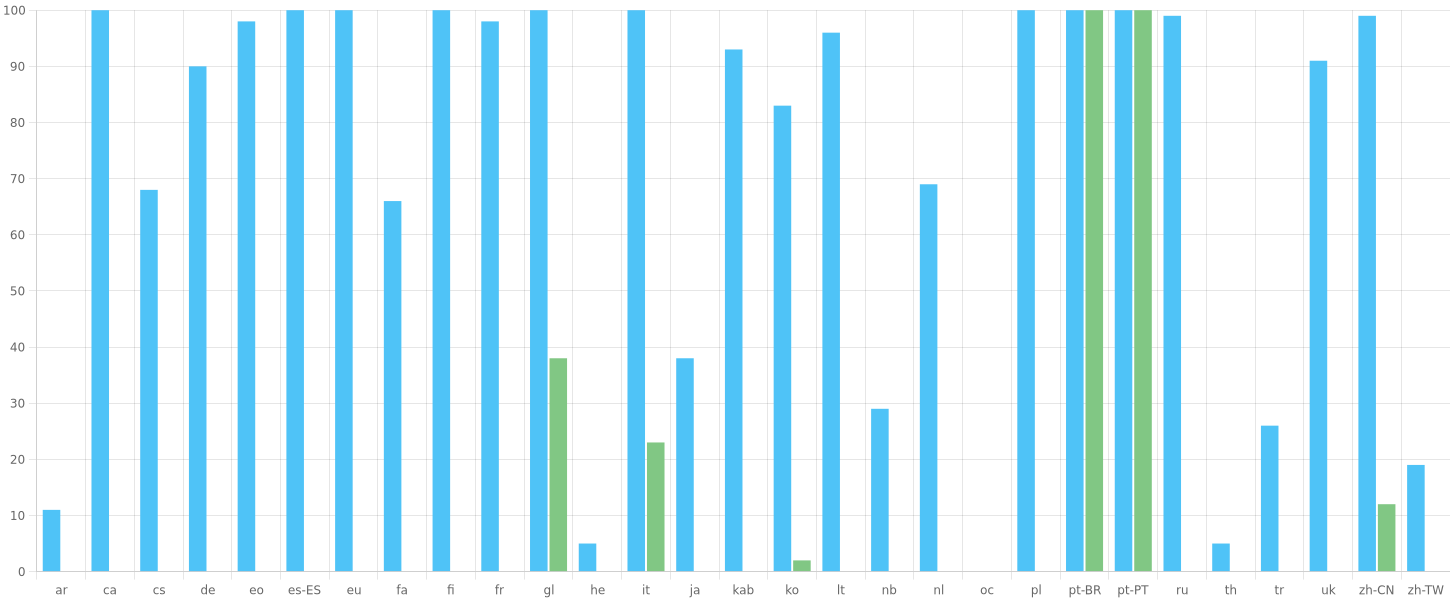
Translations are managed on Crowdin. You can help by volunteering translations.
Read the intro documentation to get started.
Self-hosting
This is a pure static web app. You can host it anywhere you want.
Two ways (choose one):
Easy way
❌ NOT recommended.
Go to Releases and download the latest phanpy-dist.zip or phanpy-dist.tar.gz. It's pre-built so don't need to run any install/build commands. Extract it. Serve the folder of extracted files.
[!IMPORTANT] Text translations connect to an external service (
translang.phanpy.social).
Custom-build way
✅ Recommended.
Requires Node.js.
Download or git clone this repository. Use production branch for stable releases, main for latest. Build it by running npm run build (after npm install). Serve the dist folder.
[!IMPORTANT] Text translations connect to an external service (
translang.phanpy.social). This can be configured with environment variables if you want to self-host your own instance.
Customization can be done by passing environment variables to the build command. Examples:
```bash PHANPY_CLI
Core symbols most depended-on inside this repo
Shape
Languages
Modules by API surface
For agents
$ claude mcp add phanpy \
  -- python -m otcore.mcp_server <graph>