github.com/charmbracelet/log @v2.0.0 sqlite
README
Log
  <img src="https://user-images.githubusercontent.com/25087/219742757-c8afe0d9-608a-4845-a555-ef59c0af9ebc.png" width="359" />


<a href="https://github.com/charmbracelet/log/releases"><img src="https://img.shields.io/github/release/charmbracelet/log.svg" alt="Latest Release"></a>
<a href="https://pkg.go.dev/github.com/charmbracelet/log?tab=doc"><img src="https://godoc.org/github.com/golang/gddo?status.svg" alt="Go Docs"></a>
<a href="https://github.com/charmbracelet/log/actions"><img src="https://github.com/charmbracelet/log/workflows/build/badge.svg" alt="Build Status"></a>
<a href="https://codecov.io/gh/charmbracelet/log"><img alt="Codecov branch" src="https://img.shields.io/codecov/c/github/charmbracelet/log/main.svg"></a>
<a href="https://goreportcard.com/report/github.com/charmbracelet/log"><img alt="Go Report Card" src="https://goreportcard.com/badge/github.com/charmbracelet/log"></a>
A minimal and colorful Go logging library. 🪵
<img src="https://vhs.charm.sh/vhs-1wBImk2iSIuiiD7Ib9rufi.gif" alt="Made with VHS" />
It provides a leveled structured human readable logger with a small API. Unlike
standard log, the Charm logger provides customizable colorful human
readable logging with batteries included.
- Uses Lip Gloss to style and colorize the output.
- Colorful, human readable format.
- Ability to customize the time stamp format.
- Skips caller frames and marks function as helpers.
- Leveled logging.
- Text, JSON, and Logfmt formatters.
- Store and retrieve logger in and from context.
- Slog handler.
- Standard log adapter.
Usage
Use go get to download the dependency.
go get github.com/charmbracelet/log@latest
Then, import it in your Go files:
import "github.com/charmbracelet/log"
The Charm logger comes with a global package-wise logger with timestamps turned
on, and the logging level set to info.
log.Debug("Cookie 🍪") // won't print anything
log.Info("Hello World!")
<img width="400" src="https://vhs.charm.sh/vhs-4AeLaEuO3tDbECR1qe9Jvp.gif" alt="Made with VHS" />
All logging levels accept optional key/value pairs to be printed along with a message.
err := fmt.Errorf("too much sugar")
log.Error("failed to bake cookies", "err", err)
<img width="600" src="https://vhs.charm.sh/vhs-65KIpGw4FTESK0IzkDB9VQ.gif" alt="Made with VHS">
You can use log.Print() to print messages without a level prefix.
log.Print("Baking 101")
// 2023/01/04 10:04:06 Baking 101
New loggers
Use New() to create new loggers.
logger := log.New(os.Stderr)
if butter {
    logger.Warn("chewy!", "butter", true)
}
<img width="300" src="https://vhs.charm.sh/vhs-3QQdzOW4Zc0bN2tOhAest9.gif">
Levels
Log offers multiple levels to filter your logs on. Available levels are:
log.DebugLevel
log.InfoLevel
log.WarnLevel
log.ErrorLevel
log.FatalLevel
Use log.SetLevel() to set the log level. You can also create a new logger with
a specific log level using log.Options{Level: }.
Use the corresponding function to log a message:
err := errors.New("Baking error 101")
log.Debug(err)
log.Info(err)
log.Warn(err)
log.Error(err)
log.Fatal(err) // this calls os.Exit(1)
log.Print(err) // prints regardless of log level
Or use the formatter variant:
format := "%s %d"
log.Debugf(format, "chocolate", 10)
log.Warnf(format, "adding more", 5)
log.Errorf(format, "increasing temp", 420)
log.Fatalf(format, "too hot!", 500) // this calls os.Exit(1)
log.Printf(format, "baking cookies") // prints regardless of log level

// Use these in conjunction with `With(...)` to add more context
log.With("err", err).Errorf("unable to start %s", "oven")
Structured
All the functions above take a message and key-value pairs of anything. The message can also be of type any.
ingredients := []string{"flour", "butter", "sugar", "chocolate"}
log.Debug("Available ingredients", "ingredients", ingredients)
// DEBUG Available ingredients ingredients="[flour butter sugar chocolate]"
Options
You can customize the logger with options. Use log.NewWithOptions() and
log.Options{} to customize your new logger.
logger := log.NewWithOptions(os.Stderr, log.Options{
    ReportCaller: true,
    ReportTimestamp: true,
    TimeFormat: time.Kitchen,
    Prefix: "Baking 🍪 ",
})
logger.Info("Starting oven!", "degree", 375)
time.Sleep(10 * time.Minute)
logger.Info("Finished baking")
<img width="700" src="https://vhs.charm.sh/vhs-6oSCJcQ5EmFKKELcskJhLo.gif">
You can also use logger setters to customize the logger.
logger := log.New(os.Stderr)
logger.SetReportTimestamp(false)
logger.SetReportCaller(false)
logger.SetLevel(log.DebugLevel)
Use log.SetFormatter() or log.Options{Formatter: } to change the output
format. Available options are:
log.TextFormatter(default)log.JSONFormatterlog.LogfmtFormatter
Note styling only affects the
TextFormatter. Styling is disabled if the output is not a TTY.
For a list of available options, refer to options.go.
Styles
You can customize the logger styles using Lipgloss. The styles are defined at a global level in styles.go.
// Override the default error level style.
styles := log.DefaultStyles()
styles.Levels[log.ErrorLevel] = lipgloss.NewStyle().
    SetString("ERROR!!").
    Padding(0, 1, 0, 1).
    Background(lipgloss.Color("204")).
    Foreground(lipgloss.Color("0"))
// Add a custom style for key `err`
styles.Keys["err"] = lipgloss.NewStyle().Foreground(lipgloss.Color("204"))
styles.Values["err"] = lipgloss.NewStyle().Bold(true)
logger := log.New(os.Stderr)
logger.SetStyles(styles)
logger.Error("Whoops!", "err", "kitchen on fire")
<img width="400" src="https://vhs.charm.sh/vhs-4LXsGvzyH4RdjJaTF4a9MG.gif">
Sub-logger
Create sub-loggers with their specific fields.
logger := log.NewWithOptions(os.Stderr, log.Options{
    Prefix: "Baking 🍪 "
})
batch2 := logger.With("batch", 2, "chocolateChips", true)
batch2.Debug("Preparing batch 2...")
batch2.Debug("Adding chocolate chips")
<img width="700" src="https://vhs.charm.sh/vhs-1JgP5ZRL0oXVspeg50CczR.gif">
Format Messages
You can use fmt.Sprintf() to format messages.
for item := 1; i <= 100; i++ {
    log.Info(fmt.Sprintf("Baking %d/100...", item))
}
<img width="500" src="https://vhs.charm.sh/vhs-4nX5I7qHT09aJ2gU7OaGV5.gif">
Or arguments:
for temp := 375; temp <= 400; temp++ {
    log.Info("Increasing temperature", "degree", fmt.Sprintf("%d°F", temp))
}
<img width="700" src="https://vhs.charm.sh/vhs-79YvXcDOsqgHte3bv42UTr.gif">
Helper Functions
Skip caller frames in helper functions. Similar to what you can do with
testing.TB().Helper().
func startOven(degree int) {
    log.Helper()
    log.Info("Starting oven", "degree", degree)
}

log.SetReportCaller(true)
startOven(400) // INFO <cookies/oven.go:123> Starting oven degree=400
<img width="700" src="https://vhs.charm.sh/vhs-6CeQGIV8Ovgr8GD0N6NgTq.gif">
This will use the caller function (startOven) line number instead of the
logging function (log.Info) to report the source location.
Slog Handler
You can use Log as an log/slog handler. Just
pass a logger instance to Slog and you're good to go.
handler := log.New(os.Stderr)
logger := slog.New(handler)
logger.Error("meow?")
Standard Log Adapter
Some Go libraries, especially the ones in the standard library, will only accept
the standard logger interface. For instance, the HTTP Server from
net/http will only take a *log.Logger for its ErrorLog field.
For this, you can use the standard log adapter, which simply wraps the logger in
a *log.Logger interface.
logger := log.NewWithOptions(os.Stderr, log.Options{Prefix: "http"})
stdlog := logger.StandardLog(log.StandardLogOptions{
    ForceLevel: log.ErrorLevel,
})
s := &http.Server{
    Addr:     ":8080",
    Handler:  handler,
    ErrorLog: stdlog,
}
stdlog.Printf("Failed to make bake request, %s", fmt.Errorf("temperature is too low"))
// ERROR http: Failed to make bake request, temperature is too low
Gum
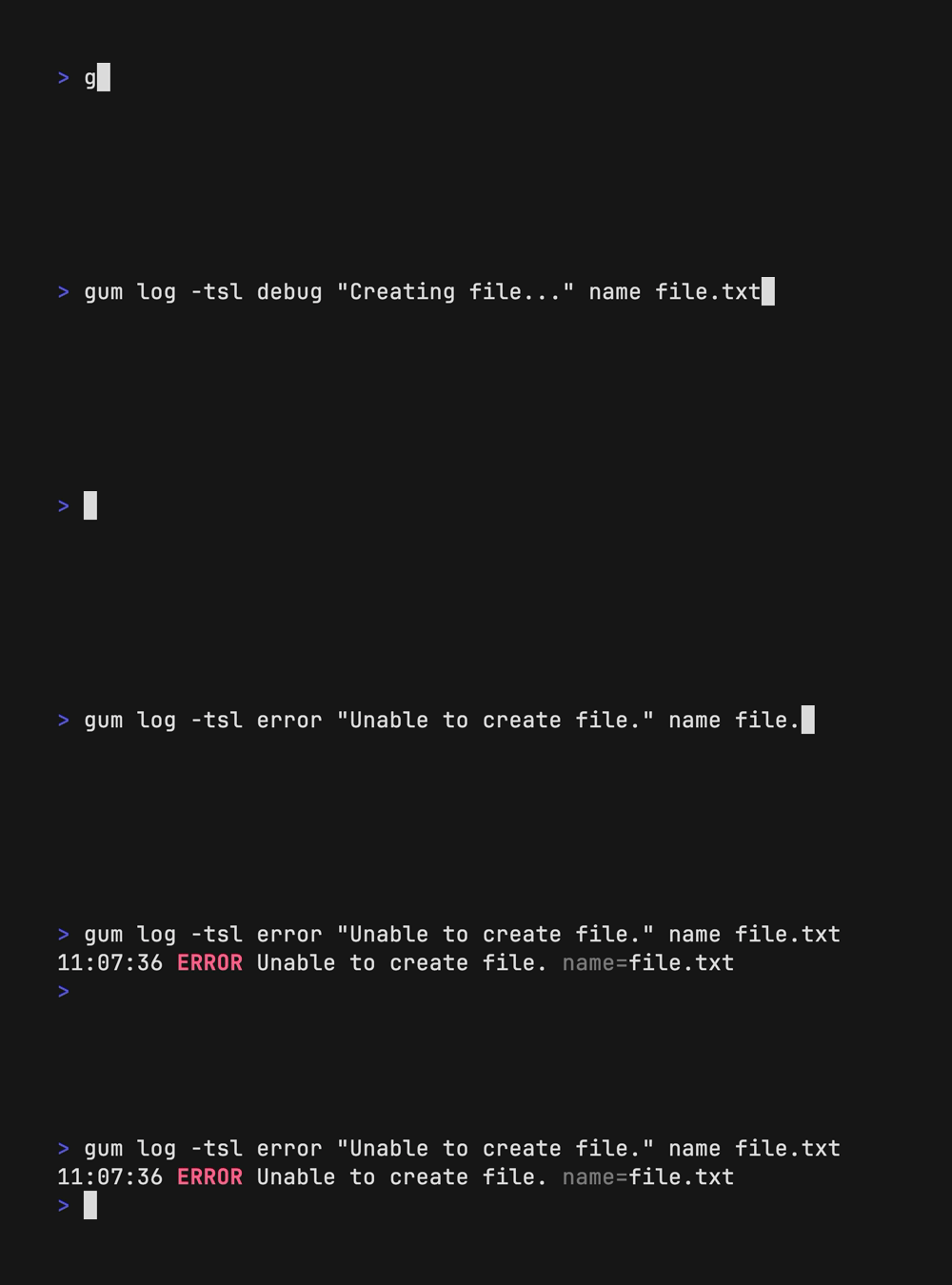
Log integrates with Gum to log messages to output. Use gum log [flags]
[message] to handle logging in your shell scripts. See
charmbracelet/gum for more
information.
License
Part of Charm.

Charm热爱开源 • Charm loves open source • نحنُ نحب المصادر المفتوحة