github.com/cginternals/globjects @v1.1.0
Chat with this repoBrowse by type
What it actually does AI analysis from the code graph — generated when you open this
README

globjects is an MIT licensed, cross-platform C++ wrapper for OpenGL API objects.
See what's new in globjects-1.0.0.
globjects provides object-oriented interfaces to the OpenGL API (3.0 and higher). It reduces the amount of OpenGL code required for rendering and facilitates coherent OpenGL use by means of an additional abstraction layer to glbinding and GLM. Common rendering tasks and processes are automated and missing features of specific OpenGL drivers are partially simulated or even emulated at run-time.
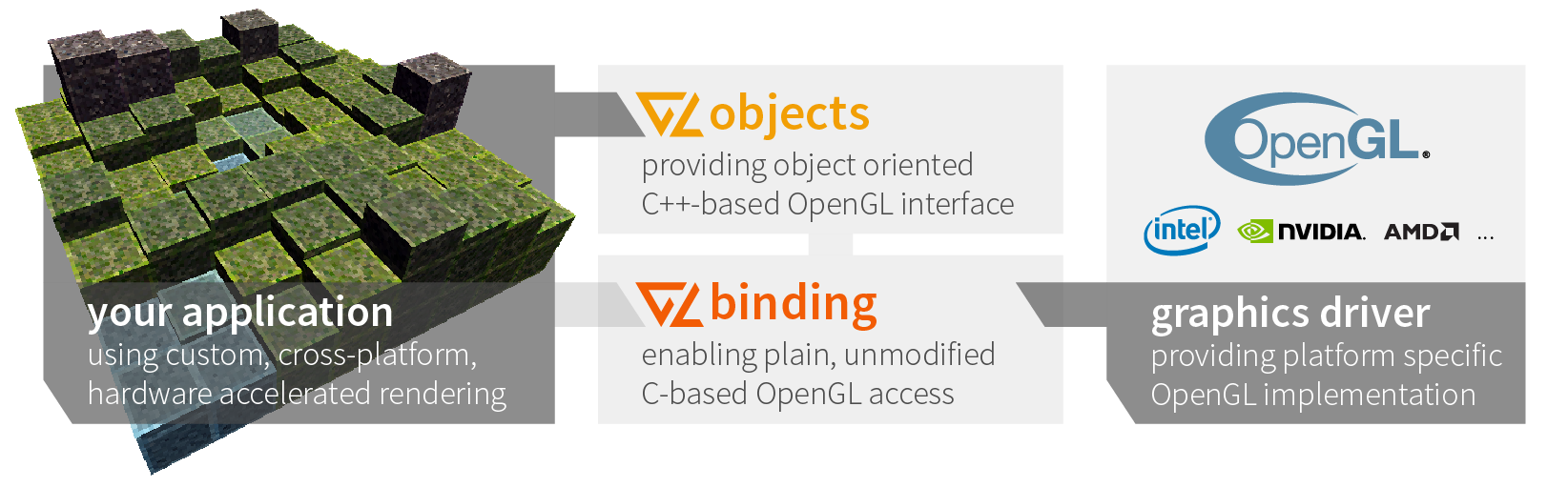
The following code snippet shows an exemplary use of the OpenGL API:
// OpenGL API

auto program = glCreateProgram();
auto vertexShader = glCreateShader(GL_VERTEX_SHADER);
auto fragmentShader = glCreateShader(GL_FRAGMENT_SHADER);

glShaderSource(vertexShader, 1, &vertexShaderSource, nullptr);
glShaderSource(fragmentShader, 1, &fragmentShaderSource, nullptr);

glCompileShader(vertexShader);
glCompileShader(fragmentShader);

glAttachShader(program, vertexShader);
glAttachShader(program, fragmentShader);

glLinkProgram(program);

glUseProgram(program);
glUniform2f(glGetUniformLocation(program, "extent"), 1.0f, 0.5f);
Using globjects, this can be reduced to the following code:
// globjects API

auto program = new Program();

program->attach(
  Shader::fromString(GL_VERTEX_SHADER, vertexShaderSource),
  Shader::fromString(GL_FRAGMENT_SHADER, fragmentShaderSource)
);

program->setUniform("extent", glm::vec2(1.0f, 0.5f)));
If enabled, this code checks (1) for GL errors (glGetError) after each call, (2) shaders for compilation errors, and (3) the program for linker errors.
Professional Support
CG Internals offers computer graphics R&D as well as reliable technology and innovative concepts to support your computer graphics visions. We provide trainings and can help you integrate and customize globjects in your next project.
Visit Professional Support and Services for more details.
Resources
Installation and Development
Context Management
Wrapped OpenGL Objects and Code Snippets
- Global Functions
- Buffer
- Texture
- State
- Error
- Debug Message
- Framebuffer
- Named String
- Program
- Program Pipeline
- Query
- Renderbuffer
- Sampler
- Shader
- Sync
- Transform Feedback
- Uniform
- Uniform Block
- Vertex Array
- Vertex Attribute Binding
Additional Feature Documentation and Code Snippets
Project Health
| Service | System | Compiler | Status |
|---|---|---|---|
| Travis-CI | Ubuntu 14.04 | GCC 4.8, Clang 3.5 |  |
| Travis-CI | OS X | Clang ? | upcoming |
| Coverity | Ubuntu 14.04 | GCC 5.4 |  |
| Jenkins |
| Ubuntu 14.04
| GCC 4.8
GCC 4.9
GCC 5.4
Clang 3.8
|
| | Jenkins
| Windows 10
| MSVC 2013 Update 5
MSVC 2015 Update 1
|
|
Please note that our OS X build node is currently broken (physically). However, globjects is maintained for OS X as well and there are many people using it on OS X on a regular basis.
Install Instructions
globjects is available for different platforms using different distribution channels. You can either download the source and manually compile it or use one of the pre-compiled releases of this repository. For systems providing package managers, we generally strive for packages in these package managers.
Windows
The various globjects packages can be installed either by downloading an installer, e.g., the latest x64 installer for Microsoft Visual Studio 2015, or downloading and extracting one of the precompiled archives, e.g. runtime, examples, and dev. Alternatively, download the source code and commence building from source.
Ubuntu
globjects is provided on Ubuntu using PPAs. For Ubuntu 16.04 (xenial), 15.10 (wily), and 15.04 (vivid) use the current PPA, for Ubuntu 14.04 (trusty) use the backports PPA. Using the current PPA as example, the following lines install globjects including the GLFW examples:
> sudo apt-add repository ppa:cginternals/ppa
> sudo apt-get update
> sudo apt-get install libglobjects-examples-glfw
> # start example
> /usr/share/globjects/computeshader
To use globjects as dependency, install the development package:
> sudo apt-get install libglobjects-dev libglobjects-dbg
Alternatively, download the source code and commence building from source.
OS X
The package manager on OS X we depend on is homebrew. The package there is called globjects. To install globjects using homebrew, execute the following line:
> brew install globjects
Alternatively, download the source code and commence building from source.
Debian-based Systems
There is currently no precompiled package maintained. Please download the source code and commence building from source.
Build Instructions
Prerequisites and Dependencies
The only mandatory run-time dependencies of globjects are the STL of the used compiler, glbinding, and an OpenGL driver library, dynamically linked with your application. However, compiling globjects requires the following required and optional dependencies: * CMake 3.0 or higher for building globjects from source (mandatory for any build from source) * git for version control and script supporting tasks * glbinding as OpenGL API binding * GLM for OpenGL math and data structures (0.9.5 or above) * GLFW 3.0 or higher for examples * cpplocate for the examples * Qt5 5.0 or higher for the qt-based example * Doxygen 1.8 or higher for generating the documentation on your system * graphviz for generating diagrams (optional)
Compile Instructions
For compilation, a C++11 compliant compiler, e.g., GCC 4.8, Clang 3.3, MSVC 2013 Update 3, is required.
First, download the source code as archive or via git:
> git clone https://github.com/cginternals/globjects.git
> cd globjects
Then, depending on the version of globjects you want to build, choose the appropriate tag or branch, e.g., for the 1.0.0 release:
> git fetch --tags
> git checkout v1.0.0
The actual compilation can be done using CMake and your favorite compiler and IDE.
For building globjects CMake via command line can be used (should work on all systems):
First create a build directory (we do not recommend in-source builds):
> mkdir build
> cd build
Configure globjects with your prefered or default generator, e.g., for Visual Studio 2015 in x64 use (note: some IDEs have integrated support for CMake projects, e.g., Qt Creator, and allow you to skip the manual project configuration):
> cmake .. -G "Visual Studio 14 2015 Win64"
In order to compile the project, either use you favorite Editor/IDE with the created project or use CMake as follows:
> cmake --build .
Tips for Linking
We suggest using the build system of globjects for a smooth integration: CMake For it, globjects provides a find configuration script that should be installed into your system or at least accessible by CMake. In the projects CMakeLists.txt, add one of the following lines:
find_package(globjects QUIET) # if you want to check for existance
find_package(globjects REQUIRED) # if it is really required in your project
Finally, just link globjects to your own library or executable:
target_link_libraries(${target} ... PUBLIC globjects::globjects)
Initialize Contexts
globjects can handle multiple OpenGL contexts. For each context, you have to initialize the globjects state. Further, you have to tell globjects which context is active on a per-thread basis.
#include <globjects/globjects.h>

// manage contexts
init();

// set explicit context active
setContext(contextID);

// set current context active
setCurrentContext();
You can also use glbinding to automatically sync OpenGL active contexts and their glbinding and globjects counterparts:
glbinding::Binding::addContextSwitchCallback([](glbinding::ContextHandle handle) {
    setContext(handle);
}
The only additional thing to do is telling glbinding when a context is switched (per thread).
glbinding::Binding::useContext(handle);
Wrapped OpenGL Objects
Global Functions
Some often used functions are wrapped to ease the interface as proposed by the OpenGL API.
// somehow similar to glbinding

std::string extensions = getString(GL_EXTENSIONS);
int numExtensions = getInteger(GL_NUM_EXTENSIONS);

if (isCoreProfile())
{
    return renderer(); // returns the GL_RENDERER string
}
Buffer
A buffer in means of OpenGL can be used for vertex attributes, indices, uniform data, atomic counters, texture data, and shader storage data.
auto buffer = new Buffer();

// Using buffer data
buffer->setData({{ 0, 1, 2, 3, 4}}, GL_STATIC_DRAW);

// Using buffer storage
buffer->setStorage({{ 0, 1, 2, 3, 4}}, GL_MAP_READ_BIT | GL_MAP_PERSISTENT_BIT);

buffer->setSubData({{ 4, 3, 2 }}, 0);
buffer->bindBase(GL_SHADER_STORAGE_BUFFER, 0);
Texture
Texture supports both traditional interfaces and bindless support.
auto texture1 = new Texture(GL_TEXTURE_2D); // type has to be fix during lifetime
texture1->setParameter(GL_TEXTURE_MIN_FILTER, GL_LINEAR);
texture1->setParameter(GL_TEXTURE_MAG_FILTER, GL_LINEAR);
texture1->setParameter(GL_TEXTURE_WRAP_S, GL_CLAMP_TO_EDGE);
texture1->setParameter(GL_TEXTURE_WRAP_T, GL_CLAMP_TO_EDGE);

texture1->image2D(0, GL_RGBA8, glm::ivec2(512), 0, GL_RGBA, GL_UNSIGNED_BYTE, nullptr);
texture1->clearImage(0, GL_RGBA, GL_UNSIGNED_BYTE, glm::ivec4(255, 255, 255, 255));
texture1->generateMipMap();

auto texture2 = Texture::createDefault(); // creates a default-configured 2D texture

auto handle = texture2->textureHandle(); // for bindless texturing
texture2->bindActive(0); // For traditional texturing
State
OpenGL state is wrapped as States, StateSettings and Capabilities, where the latter two are mainly used internally. ```cpp auto currentState = State::currentState(); // full current state; usable for resetting
auto state1 = new State(State::ImmediateMode); // all changes are applied immediately state1->enable(GL_RASTERIZER_DISCARD); // Configuring a Capability state1->primitiveRestartIndex(static_cast(-1)); // Configuring a StateSetting
auto state2 = new State(State::DeferredMode); // changes has to be applied ex
Core symbols most depended-on inside this repo
Shape
Languages
Modules by API surface
For agents
$ claude mcp add globjects \
  -- python -m otcore.mcp_server <graph>