github.com/cgiffard/Behaviour-Assertion-Sheets @v0.1.1
Chat with this repoWhat it actually does AI analysis from the code graph — generated when you open this
README
Behaviour Assertion Sheets 

(For a friendlier overview, see http://bas.cgiffard.com/)
Behaviour Assertion Sheets (Bas, pronounced 'base') are a way to describe how a web page fits together, make assertions about its structure and content, and be notified when these expectations are not met. It's a bit like selenium, if you've ever used that. An easier DSL for client-side integration testing.
You could:
- Use BAS to monitor the Apple Developer site to tell you when WWDC tickets are on sale, or your local postal service to tell you when a package has been delivered
- Scan your site for common accessibility pitfalls, such as missing alt tags on images, poor heading order, or even check for hard-to-read copy with the inbuilt readability tests!
- Monitor for service availability and downtime
- Integration testing and integrity verification (plug Bas into jenkins or travis!)
- Use BAS inside of an existing test framework like Mocha to verify output, or even as reporting middleware inside your express application
Anybody who has ever used CSS can use Bas - the [syntax is easy and familiar.] (#sheet-syntax)
Installing
This first implementation of Bas is built with node.js, so you'll need it and npm first. Then just use npm to install Bas:
npm install -g bas
Installing globally (-g) makes a CLI tool available
for working with Bas sheets. If you don't install globally you can still use Bas
via the node.js API.
Sheet Syntax
As mentioned earlier, the Bas syntax looks very similar to (and nearly even parses as) CSS. Here are the major components:
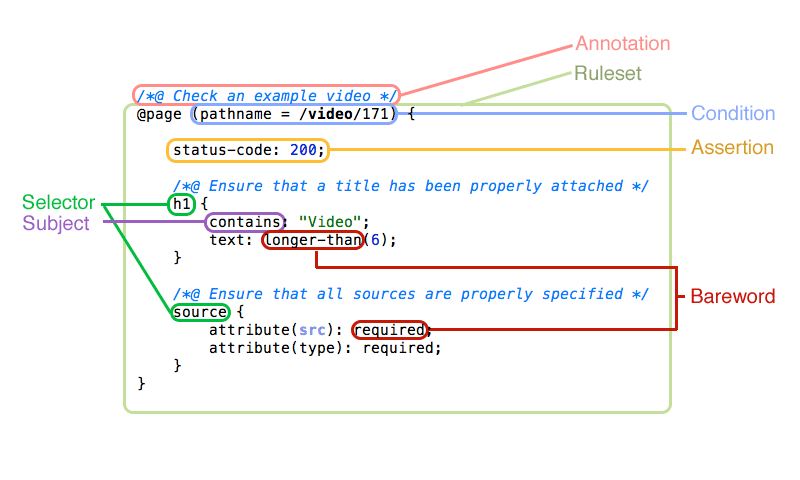
(You can work this out yourself and just want to skip to the goods? Jump to syntax example.)
Rulesets
Rulesets are the highest-level construct in Bas. Everything falls inside a ruleset.
There are two kinds of rulesets - page specific rulesets denoted by the tag @page,
and rulesets that execute against every page unconditionally, denoted by the
tag @all.
Syntactically these are based on the 'at-rules' of CSS (such as @font-face,
@media, etc.)
Rulesets cannot be nested.
An example rulset:
@all {
    ...
}
Annotations
Annotations are an extension of CSS comments, that are prepended with an @ symbol.
Bas knows to associate these with rulesets and selectors that follow, and displays
them in assertion failure traces so you know where they came from!
You may add as many annotations as you like to a single element. Every annotation
that precedes a block, regardless of whether assertions or regular comments (just
normal CSS comments without an @) are interspersed within them, is associated
with that block.
An example annotation:
/*@ Here's my annotation! */
Conditions
A condition is appended to a page-specific ruleset (@page) and determines based
on the response information, URL of the page, and other environment variables,
whether the current page should be evaluated against this ruleset.
Conditions are additive and exclusive - each has to be true for the page to be
considered for testing against a given ruleset. You may add as many conditions
as you like to a @page ruleset.
Conditions are composed of a parentheses-wrapped set of three elements, each space
separated. On the left-hand side, a test - a reference to a function which
returns an environment variable or extracts an aspect of the current page or
server response.
The middle is an operator, which defines how the comparison takes place. An example
of an operator might be = or >= or !=~. A full list of operators can be
found in the syntax glossary.
The rightmost component is the assertion value - a string, number, or regular expression which is compared to the test according to the rules of the operator.
An example condition:
@page (status-code = 301) { ... }
Multiple conditions may be combined like so:
@page (status-code = 301) (content-type != text/html) { ... }
Remember that adding more conditions will make the match more exclusive, as every single one must succeed for the ruleset to be evaluated.
Selector
A selector groups a block of assertions together, and executes them against every node in a page that matches the selector string.
The selector string is formatted exactly like a regular CSS selector - tags, IDs, classes, pseudoclasses, and attribute syntax are all the same.
The assertions wrapped within a selector block are only executed should the
selector match at least one node - with one exception: the special required
assertion subject which executes regardless of whether a
selector matches.
There's a caveat to this too, though: should a selector containing the required
assertion subject be nested inside another selector block which does not match
any nodes, it will not be executed. This allows syntax like the following:
    h2 {
        h1 { required: true; }
    }
In this case, the heading 1 is required if one or more second-level headings are present.
Nesting selectors
Selector blocks can be nested. If a selector block is nested within another, it will only be executed should the parent selector match.
Scoping in Selectors
When selector blocks are nested, special scoping variables may be used.
$this
The scoping variable $this maps to the parent selector block's selector string.
Therefore, consider the following example:
#content {
    $this b {
        /* Hey! */
    }
}
The inner selector $this b will map to #content b.
$node
The $node scope is similar to $this — however it is even more restrictive,
only searching within the exact node (or nodes) which was/were selected.
#content header {
    $node h3 {

    }
}
In the above example, $node h3 is equivalent to a scoped search for h3 within
each individual element matching #content header.
Value Interpolation In Selectors
Selectors may contain values interpolated from test results executed in their parent context.
For example, lets say you want to make sure that any element with an
aria-describedby attribute has a matching element ID somewhere on the page.
/* ARIA attributes */
$this [aria-describedby] {
    /*@ WCAG (1.3.1 A, 4.1.1 A, 4.1.2 A) There must be a tag with a matching ID
        for the aria-describedby attribute */

    [id=$(attribute(aria-describedby))$] {
        count: 1;
        required: true;
    }
}
The $(...)$ construct instructs Bas to execute the string
attribute(aria-describedby) as a test, and return the result, interpolating it
into the selector.
Therefore, the final interpolated selector might look like:
[id=image-header]
Assertions
An assertion is very similar to a declaration in CSS. Fundamentally, it is a
semicolon delimited key-value pair, that unlike CSS, defines an expectation
rather than assigning a value.
The left-hand side of the assertion is known as the subject of the assertion, and refers to a test - a function that returns a value based on the content of the current page/request.
This value is then compared against the right-hand side of the assertion - which
can contain any number of match requirements, separated by commas and/or spaces.
These requirements are evaluated separately, and should any single one of them
fail (return a falsy value) the assertion will be considered failed.
Match requirements for an assertion can be strings, numbers, regular expressions, negated regular expressions (prepended with !) or barewords.
An example of an assertion in use:
attribute(style): contains("font-family");
Assertion Subject
The left-hand side of every assertion is known as an assertion subject, and
refers to a test function that returns a value from the current page or response
information. A list of these functions can be found in the [syntax glossary.]
(#tests)
An example of an assertion subject in use might be:
title: /github/i;
In this case, the assertion subject is title. It refers to a test function called
title which extracts the current document title. This is returned for the regex
comparison on the right hand side of the assertion.
Some tests take arguments. This is how an assertion with test arguments is represented:
attribute(role): "main";
Subject Transformations
The value of an assertion test function can be subsequently transformed by special functions known as transform functions.
These can be chained against the value of an assertion test using the delimiter ..
Purely for illustrative purposes, here's an example of using transform functions (fictitious... for now) to rot-13 text from a node before validating the assertion:
h1 {
    text.rot13: /* some match here... */
}
Multiple transforms can be applied:
h1 {
    text.rot13.rot13: /* text is back to normal! */
}
And arguments can be provided to transform functions, just like to the subject test itself.
h1 {
    text.rot(13): /* some match here... */
    text.rot(13).rot(13): /* some match here... */
}
A more realistic use-case can be found in the text-statistics functions. If you want to check the flesch-kincaid reading ease of a given node, you could use:
h1 {
    text.flesch-kincaid-reading-ease: gte(80);
}
You could check the reading-ease of the alt-text on an image, too:
img {
    attribute(alt).flesch-kincaid-reading-ease: gte(80);
}
Barewords
The right-hand side of the assertion, as well as regular expression, numeric, and string matches, can contain special keywords known as barewords (for their lack of enclosing quotation marks.)
These keywords refer to a special function that by design has no access to the document - just the value returned by the assertion subject, and any optional arguments it is given.
If the result of this function is falsy, then the assertion is considered failed.
A full list of barewords can be found in the syntax glossary.
An example of barewords in use:
attribute(user-id): exists, longer-than(1), gte(1);
Bas Example
    @page (title =~ /github/i) (domain = github.com) {

        status-code: 200;

        img[src*="akamai"] {
            required: true;
            attribute(alt): true;
            count: 3;
        }

        /*@ Require a heading 1 to be present if there's a heading 2 */
        h2 {
            h1 {
                required: true;
            }
        }
    }

    @all {
        status-code: lt(500);
    }
This example provides a fairly broad look at what Bas can do and how it works.
Let's break this example down bit by bit.
Given a page from the domain github.com, with a document title that matches the
regular expression /github/i:
- Bas will check that the status code of the page matches the asserted
200 OK. - Bas will select all images with
akamaisomewhere in the in thesrcattribute, and:- Assert that at least one appears on the page
- Assert that each has an
altattribute - Assert that exactly three should appear on the page if the selector matches
- Bas will select every heading 2 (h2) on the page
- If there's at least one heading two on the page, Bas will select every heading 1 (h1), and: * Assert that if a heading 2 is present, at least one heading 1 should also be present on the page.
Then, on every page tested, Bas will check to see whether the status code of the response was less than 500.
Syntax Glossary
Operators
Operators are used in ruleset conditions, like (title !=~ /github/i).
A full list follows:
=true ifa == b!=true ifa !== b=~true if the regular expressionamatchesb!=~true if the regular expressionadoes not matchb>true ifa > bwhere bothaandbare considered floats<true ifa < bwhere bothaandbare considered floats>=true ifa >= bwhere bothaandbare considered floats<=true ifa <= bwhere bothaandbare considered floats
Tests
Tests without arguments may be used in ruleset conditions, like
(title !=~ /github/i), or as assertion subjects with or without arguments, like
attribute(role): "navigation".
Tests can also be added programatically. [See the API documentation for details.] (#bas-nodejs-api)
- title Returns the title of the document.
- url Returns the complete URL used to request the document.
- domain Returns the domain from the URL used to request the document.
- protocol Returns the domain from the URL used to request the document. HTTP if unspecified.
- port Returns the port from the URL used to request the document. 80 if unspecified.
- path Returns the path from the URL used to request the document. (Includes querystring)
- pathname Returns the path name from the URL used to request the document. (Does not include querystring)
- query ( [query parameter] )
Returns the entire query string from the URL used to request the document if
the 'query parameter' attribute is not passed to the test. If the
query
    parameter
attribute is present, the individual value for the specified query parameter will be returned, or null if the parameter does not exist. - status-code Returns the HTTP response status code the current document was served with.
- content-length
Returns the
Content-Lengthheader with which the current document was served. - content-type
Returns the
Content-Typeheader with which the current document was served. - header (
Core symbols most depended-on inside this repo
logShape
Languages
Modules by API surface
For agents
$ claude mcp add Behaviour-Assertion-Sheets \
  -- python -m otcore.mcp_server <graph>