github.com/casey/just @1.55.1
Chat with this repoWhat it actually does AI analysis from the code graph — generated when you open this
README
↖️ 目录
just





just 为您提供一种保存和运行项目特有命令的便捷方式。
本指南同时也可以以 书 的形式提供在线阅读。
命令,在此也称为配方,存储在一个名为 justfile 的文件中,其语法受 make 启发:
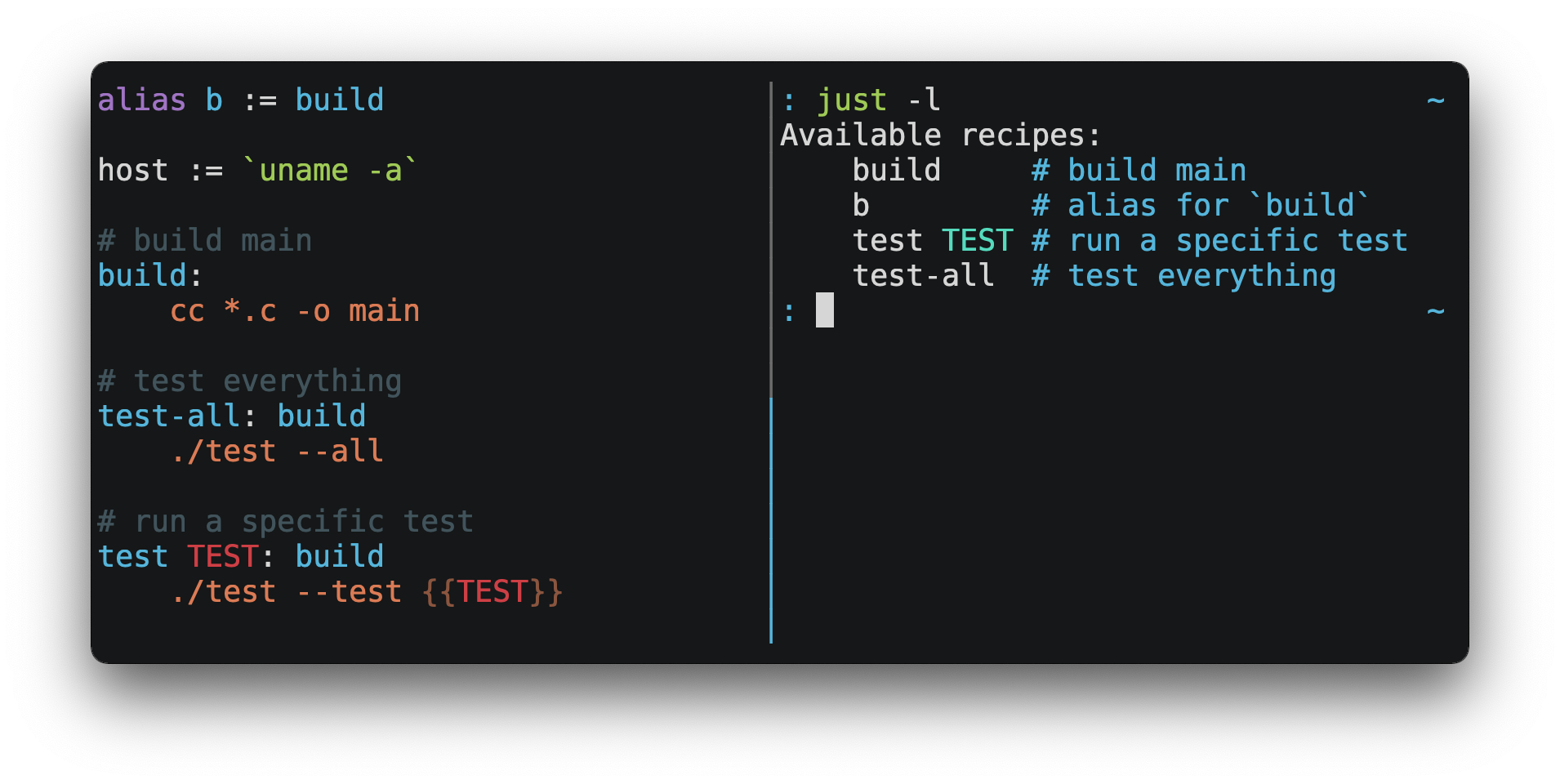
然后你可以用 just RECIPE 运行它们:
$ just test-all
cc *.c -o main
./test --all
Yay, all your tests passed!
just 有很多很棒的特性,而且相比 make 有很多改进:
-
just是一个命令运行器,而不是一个构建系统,所以它避免了许多make的复杂性和特异性。不需要.PHONY配方! -
支持 Linux、MacOS 和 Windows,而且无需额外的依赖。(尽管如果你的系统没有
sh,你需要 选择一个不同的 Shell)。 -
错误具体且富有参考价值,语法错误将会与产生它们的上下文一起被报告。
-
配方可以接受 命令行参数。
-
错误会尽可能被静态地解决。未知的配方和循环依赖关系会在运行之前被报告。
-
just可以 加载.env文件,简化环境变量注入。 -
配方可以在 命令行中列出。
-
命令行自动补全脚本 支持大多数流行的 Shell。
-
配方可以用 任意语言 编写,如 Python 或 NodeJS。
-
just可以从任何子目录中调用,而不仅仅是包含justfile的目录。 -
不仅如此,还有 更多!
如果你在使用 just 方面需要帮助,请随时创建一个 Issue 或在 Discord 上与我联系。我们随时欢迎功能请求和错误报告!
安装
预备知识
just 应该可以在任何有合适的 sh 的系统上运行,包括 Linux、MacOS 和 BSD。
在 Windows 上,just 可以使用 Git for Windows、GitHub Desktop 或 Cygwin 所提供的 sh。
如果你不愿意安装 sh,也可以使用 shell 设置来指定你要使用的 Shell。
比如 PowerShell:
# 使用 PowerShell 替代 sh:
set shell := ["powershell.exe", "-c"]

hello:
  Write-Host "Hello, world!"
…或者 cmd.exe:
# 使用 cmd.exe 替代 sh:
set shell := ["cmd.exe", "/c"]

list:
  dir
你也可以使用命令行参数来设置 Shell。例如,若要使用 PowerShell 也可以用 --shell powershell.exe --shell-arg -c 启动just。
(PowerShell 默认安装在 Windows 7 SP1 和 Windows Server 2008 R2 S1 及更高版本上,而 cmd.exe 相当麻烦,所以 PowerShell 被推荐给大多数 Windows 用户)
安装包
| 操作系统 | 包管理器 | 安装包 | 命令 |
|---|---|---|---|
| Various | Cargo | just | cargo install just |
| Microsoft Windows | Scoop | just | scoop install just |
| Various | Homebrew | just | brew install just |
| macOS | MacPorts | just | port install just |
| Arch Linux | pacman | just | pacman -S just |
| Various | Nix | just | nix-env -iA nixpkgs.just |
| NixOS | Nix | just | nix-env -iA nixos.just |
| Solus | eopkg | just | eopkg install just |
| Void Linux | XBPS | just | xbps-install -S just |
| FreeBSD | pkg | just | pkg install just |
| Alpine Linux | apk-tools | just | apk add just |
| Fedora Linux | DNF | just | dnf install just |
| Gentoo Linux | Portage | guru/sys-devel/just |
eselect repository enable guru
emerge --sync guru
emerge sys-devel/just
|
| Various | Conda | just | conda install -c conda-forge just |
| Microsoft Windows | Chocolatey | just | choco install just |
| Various | Snap | just | snap install --edge --classic just |
| Various | asdf | just |
asdf plugin add just
asdf install just <version>
|
| Various | PyPI | rust-just |
pipx install rust-just
|
| Various | npm | rust-just |
npm install -g rust-just
|
| Debian and Ubuntu derivatives | MPR | just |
git clone 'https://mpr.makedeb.org/just'
cd just
makedeb -si
|
| Debian and Ubuntu derivatives | Prebuilt-MPR | just |
You must have the Prebuilt-MPR set up on your system in order to run this command.
sudo apt install just
|

预制二进制文件
Linux、MacOS 和 Windows 的预制二进制文件可以在 发布页 上找到。
你也可以在 Linux、MacOS 或 Windows 上使用下面的命令来下载最新的版本,只需将 DEST 替换为你想安装 just 的目录即可:
curl --proto '=https' --tlsv1.2 -sSf https://just.systems/install.sh | bash -s -- --to DEST
例如,安装 just 到 ~/bin 目录:
# 创建 ~/bin
mkdir -p ~/bin

# 下载并解压 just 到 ~/bin/just
curl --proto '=https' --tlsv1.2 -sSf https://just.systems/install.sh | bash -s -- --to ~/bin

# 在 Shell 搜索可执行文件的路径中添加`~/bin`
# 这一行应该被添加到你的 Shell 初始化文件中,e.g. `~/.bashrc` 或者 `~/.zshrc`:
export PATH="$PATH:$HOME/bin"

# 现在 just 应该就可以执行了
just --help
GitHub Actions
- uses: extractions/setup-just@v1
  with:
    just-version: 0.8 # optional semver specification, otherwise latest
- uses: taiki-e/install-action@just
发布 RSS 订阅
Node.js 安装
just-install 可用于在 Node.js 应用程序中自动安装 just。
just 是一个很赞的比 npm 脚本更强大的替代品。如果你想在 Node.js 应用程序的依赖中包含 just,可以通过 just-install,它将在本机安装一个针对特定平台的二进制文件作为 npm install 安装结果的一部分。这样就不需要每个开发者使用上述提到的步骤独立安装 just。安装后,just 命令将在 npm 脚本或 npx 中工作。这对那些想让项目的设置过程尽可能简单的团队来说是很有用的。
想了解更多信息, 请查看 just-install 说明文件。
向后兼容性
随着 1.0 版本的发布,just 突出对向后兼容性和稳定性的强烈承诺。
未来的版本将不会引入向后不兼容的变化,不会使现有的 justfile 停止工作,或破坏命令行界面的正常调用。
然而,这并不排除修复全面的错误,即使这样做可能会破坏依赖其行为的 justfiles。
永远不会有一个 just 2.0。任何理想的向后兼容的变化都是在每个 justfile 的基础上选择性加入的,所以用户可以在他们的闲暇时间进行迁移。
还没有准备好稳定化的功能将在 --unstable 标志后被选择性启用。由 --unstable 启用的功能可能会在任何时候以不兼容的方式发生变化。
编辑器支持
justfile 的语法与 make 非常接近,你可以让你的编辑器对 just 使用 make 语法高亮。
Vim 和 Neovim
vim-just
vim-just 插件可以为 vim 提供 justfile 语法高亮显示。
你可以用你喜欢的软件包管理器安装它,如 Plug:
call plug#begin()

Plug 'NoahTheDuke/vim-just'

call plug#end()
或者使用 Vim 的内置包支持:
mkdir -p ~/.vim/pack/vendor/start
cd ~/.vim/pack/vendor/start
git clone https://github.com/NoahTheDuke/vim-just.git
tree-sitter-just
tree-sitter-just 是一个针对 Neovim 的 Nvim Treesitter 插件。
Makefile 语法高亮
Vim 内置的 makefile 语法高亮对 justfile 来说并不完美,但总比没有好。你可以把以下内容放在 ~/.vim/filetype.vim 中:
if exists("did_load_filetypes")
  finish
endif

augroup filetypedetect
  au BufNewFile,BufRead justfile setf make
augroup END
或者在单个 justfile 中添加以下内容,以在每个文件的基础上启用 make 模式:
# vim: set ft=make :
Emacs
just-mode 可以为 justfile 提供语法高亮和自动缩进。它可以在 MELPA 上通过 just-mode 获得。
justl 提供了执行和列出配方的命令。
你可以在一个单独的 justfile 中添加以下内容,以便对每个文件启用 make 模式:
# Local Variables:
# mode: makefile
# End:
Visual Studio Code
VS Code 的一个插件可以在 这里 找到。
不再维护的 VS Code 插件有 skellock/vscode-just 和 sclu1034/vscode-just。
JetBrains IDEs
由 linux_china 为 JetBrains IDEs 提供的插件可 由此获得。
Kakoune
Kakoune 已经内置支持 justfile 语法高亮,这要感谢 TeddyDD。
Sublime Text
由 nk9 提供的 Just 包 支持 just 语法高亮,同时还有其它工具,这些可以在 PackageControl 上找到。
其它编辑器
欢迎给我发送必要的命令,以便在你选择的编辑器中实现语法高亮,这样我就可以把它们放在这里。
快速开始
参见 安装部分 了解如何在你的电脑上安装 just。试着运行 just --version 以确保它被正确安装。
关于语法的概述,请查看这个 速查表。
一旦 just 安装完毕并开始工作,在你的项目根目录创建一个名为 justfile 的文件,内容如下:
recipe-name:
  echo 'This is a recipe!'

# 这是一行注释
another-recipe:
  @echo 'This is another recipe.'
当你调用 just 时,它会在当前目录和父目录寻找文件 justfile,所以你可以从你项目的任何子目录中调用它。
搜索 justfile 是不分大小写的,所以任何大小写,如 Justfile、JUSTFILE 或 JuStFiLe 都可以工作。just 也会寻找名字为 .justfile 的文件,以便你打算隐藏一个 justfile。
运行 just 时未传参数,则运行 justfile 中的第一个配方:
$ just
echo 'This is a recipe!'
This is a recipe!
通过一个或多个参数指定要运行的配方:
$ just another-recipe
This is another recipe.
`j