github.com/cabinetai/cabinet @v0.5.0
Chat with this repoWhat it actually does AI analysis from the code graph — generated when you open this
README

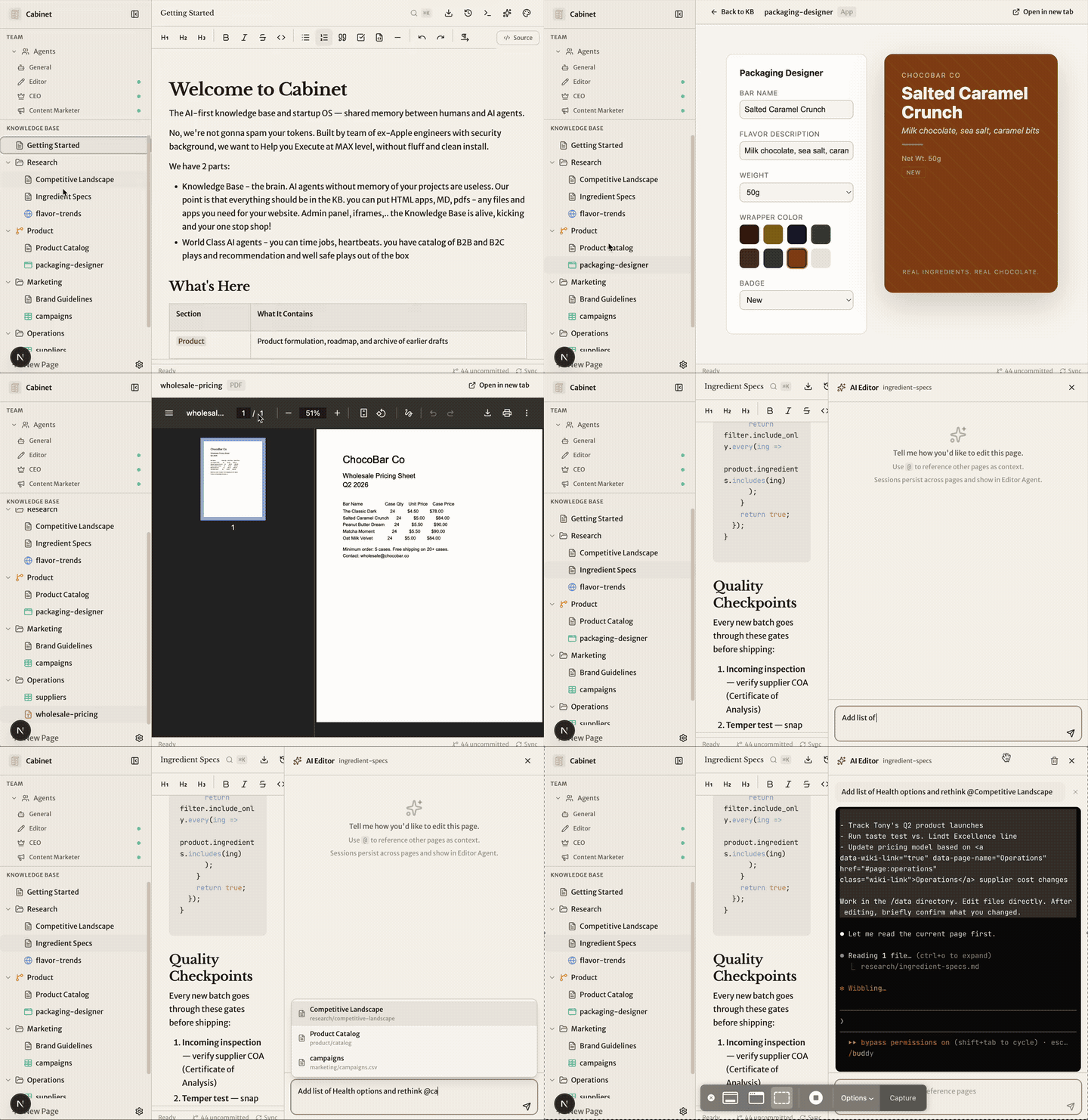
🗄️ Cabinet
Your knowledge base. Your AI team.
🗂️ Files on disk • 📁 AI workspaces • 🧠 Agents with memory
The AI-first startup OS where everything lives as markdown files on disk. No database. No vendor lock-in. Self-hosted. Your data never leaves your machine.
Built by Hila Shmuel, former Engineering Manager at Apple — now building Cabinet in public, with the open-source community.
@HilaShmuel • runcabinet.com • hi@runcabinet.com




From zero to AI team in 2 minutes
npx create-cabinet@latest
cd cabinet
npm run dev:all
Open http://localhost:4000. The onboarding wizard builds your custom AI team in 5 questions.
Install, update, uninstall
Cabinet runs entirely through npx — no global install needed. The CLI is the cabinetai package; create-cabinet is a thin wrapper around it.
Install / create
npx create-cabinet@latest          # create a cabinet and start it
npx cabinetai create my-startup    # just create, don't start
npx cabinetai run                  # start Cabinet in the current dir
On first run, Cabinet downloads the app to ~/.cabinet/app/v{version}/ and installs its dependencies there. Your cabinet directory is just a folder of markdown files — put it anywhere.
Update
npx cabinetai update # check for and install a newer app version
The CLI compares your installed app version against cabinet-release.json from the latest GitHub Release.
Uninstall / remove
npx cabinetai uninstall            # remove cached app versions only
npx cabinetai uninstall --all      # also remove global state + telemetry data
npx cabinetai uninstall --yes      # skip the confirmation prompt
npx cabinetai remove               # alias for uninstall
The command prints a summary of what will be deleted and asks for confirmation before doing anything. Your cabinet directories and their data are never touched — those you'd delete manually.
--all additionally removes the platform-specific telemetry directory:
- macOS:
~/Library/Application Support/cabinet-telemetry/ - Windows:
%APPDATA%\cabinet-telemetry\ - Linux:
$XDG_CONFIG_HOME/cabinet/(falls back to~/.config/cabinet/)
To wipe Cabinet completely, run uninstall --all and then rm -rf your cabinet directories yourself.
See docs/CABINETAI.md for the full CLI reference.
The problem
Every time you start a new Claude session, it forgets everything. Your project context, your decisions, your research — gone. Scattered docs in Notion. AI sessions with no memory. Manual copy-paste between tools.
The solution
One knowledge base. AI agents that remember everything. Scheduled jobs that compound. Your team grows while you sleep.
If it feels like enterprise workflow software, it's wrong. If it feels like watching a team work, it's right.
Philosophy
Cabinet is built around a few principles that we think matter deeply for the future of AI + data tools:
- Yours — Your data stays yours: local, visible, and portable. It’s not trapped inside a particular AI provider’s system with no clean way to get it out. You stay in control of your information.
- Git everything — Memory should have history. You should be able to inspect changes, revert mistakes, audit how knowledge evolves, and treat your AI system like the important infrastructure it is.
- BYOAI — Bring your own AI. Cabinet should work with Claude, Codex, OpenCode, local models, and whatever comes next, without forcing your knowledge into a single provider’s ecosystem.
- KISS — Keep it simple, stupid. AI tools should be understandable, inspectable, and hackable. We prefer plain files, clear behavior, and systems that developers can actually reason about.
- Security — We care deeply about security. If AI is going to work with your documents, research, plans, and internal context, the system should minimize surprise, reduce unnecessary exposure, and make trust a design requirement rather than an afterthought.
- Self-hosted — If AI is going to hold your context, plans, research, and operating memory, it should run in an environment you control.
Everything you need. Nothing you don't.
| Feature | What it does |
|---|---|
| WYSIWYG + Markdown | Rich text editing with Tiptap. Tables, code blocks, slash commands. |
| AI Agents | Each has goals, skills, scheduled jobs. Watch them work like a real team. |
| Skills | Browse and install from skills.sh or any GitHub repo. Attach per agent, or @-mention in the composer to scope to a single task. |
| Scheduled Jobs | Cron-based agent automation. Reddit scout every 6 hours. Weekly reports on Monday. |
| Embedded HTML Apps | Drop an index.html in any folder — it renders as an iframe. Full-screen mode. |
| Web Terminal | Interactive local AI CLI terminal in the browser. Kept for direct sessions, debugging, and future terminal-native features such as tmux-style Cabinet workflows. |
| File-Based Everything | No database. Markdown on disk. Your data is always yours, always portable. |
| Git-Backed History | Every save auto-commits. Full diff viewer. Restore any page to any point in time. |
| Missions & Tasks | Break goals into missions. Track progress with Kanban boards. |
| Internal Chat | Built-in team channels. Agents and humans communicate. |
| Full-Text Search | Cmd+K instant search across all pages. Fuzzy matching. |
| PDF & CSV Viewers | First-class support for PDFs and spreadsheets. |
| Dark/Light Mode | Theme toggle. Dark mode by default. |
Ship HTML apps inside your knowledge base
This is the biggest difference between Cabinet and tools like Obsidian or Notion. Drop an index.html in any directory — it renders as an embedded app. Full-screen mode with sidebar auto-collapse. AI-generated apps written directly into your KB. Version controlled via git. No build step.
Not another note-taking app
| Feature | Cabinet | Obsidian | Notion |
|---|---|---|---|
| AI agent orchestration | Yes | No | No |
| Scheduled cron jobs | Yes | No | No |
| Embedded HTML apps | Yes | No | No |
| Web terminal | Yes | No | No |
| Self-hosted, files on disk | Yes | Yes | No |
| No database / no lock-in | Yes | Yes | No |
| Git-backed version history | Yes | Via plugin | No |
| WYSIWYG + Markdown | Yes | Yes | Yes |
Hire your AI team in 5 questions
Cabinet ships with 20 pre-built agent templates. Each has a role, recurring jobs, recommended skills, and a workspace in the knowledge base.
| Department | Agents |
|---|---|
| Leadership | CEO, COO, CFO, CTO |
| Product | Product Manager, UX Designer |
| Marketing | Content Marketer, SEO Specialist, Social Media, Growth Marketer, Copywriter |
| Engineering | Editor, QA Agent, DevOps Engineer |
| Sales & Support | Sales Agent, Customer Success |
| Analytics | Data Analyst |
| Operations | People Ops, Legal Advisor, Researcher |
How it works
- Install & Run — One command. Next.js + daemon start.
- Answer 5 Questions — Cabinet builds your custom AI team.
- Watch Your Team Work — Agents create missions, write content, scout Reddit, file reports.
- Knowledge Compounds — Every agent run, every edit adds to the KB. Context builds over time.
AI Runtime Today
Cabinet no longer treats the browser terminal as the only way to run AI work.
- Tasks, jobs, and heartbeats now run through a provider adapter layer with persisted conversations and transcript-driven live views.
- Per-run overrides can choose provider, model, and reasoning effort, while personas and jobs can still inherit defaults.
- Current defaults are structured local adapters:
claude_localfor Claude Code andcodex_localfor Codex CLI. - The web terminal is staying as a first-class interactive surface for direct CLI sessions and future terminal-native features such as Cabinet-managed tmux-like workspaces.
Architecture
cabinet/
  src/
    app/api/         -> Next.js API routes
    components/      -> React components (sidebar, editor, agents, jobs, terminal)
    stores/          -> Zustand state management
    lib/             -> Storage, markdown, git, agents, jobs
  server/
    cabinet-daemon.ts -> WebSocket + job scheduler + structured adapters + agent executor
    pty/              -> PTY session module (spawn, Claude lifecycle, ansi)
  data/
    .agents/.library/ -> 20 pre-built agent templates
    getting-started/  -> Default KB page
Tech stack: Next.js 16, TypeScript, Tailwind CSS, shadcn/ui, Tiptap, Zustand, xterm.js, node-cron
Requirements
- Node.js 22+ (LTS). The repo ships an
.nvmrc— runnvm useto auto-switch. Node 20 still works but produces anEBADENGINEwarning from a transitivechevrotain@12pulled in by mermaid. - At least one supported CLI provider:
- Claude Code CLI (
npm install -g @anthropic-ai/claude-code) - Codex CLI (
npm install -g @openai/codexorbrew install --cask codex) - Source mode: macOS, Linux, or Windows
- Electron desktop packaging: macOS and Windows
Configuration
cp .env.example .env.local
| Variable | Default | Description |
|---|---|---|
KB_PASSWORD |
(empty) | Password to protect the UI. Leave empty for no auth. The auth cookie is PBKDF2(password, per-install salt) with login rate-limiting; changing the password logs everyone out once. |
CABINET_AUTH_SALT |
(auto) | Per-install auth salt, auto-generated into .cabinet.env on first run. Set only to pin a value; changing it forces a one-time re-login. |
CABINET_LOGIN_PBKDF2_ITERS |
600000 |
PBKDF2 iteration count for the auth token. Lower only for constrained hardware. |
CABINET_LOGIN_MAX_ATTEMPTS / _WINDOW_MS / _LOCKOUT_MS / CABINET_LOGIN_GLOBAL_MAX |
10 / 900000 / 900000 / 60 |
Login rate-limit tuning (per-client + global failed-attempt buckets). |
DOMAIN |
localhost |
Domain for the app. |
Authentication
Setting KB_PASSWORD turns on a single password gate for the whole UI/API
(leave it empty for no auth). The session cookie is PBKDF2-HMAC-SHA256 over a
per-install salt that's auto-generated into .cabinet.env on first run, the
login endpoint is rate-limited against brute force, and the gate verifies in
constant time. Changing the password (or salt/iterations) logs everyone out
once. Full details, threat model, and tuning: docs/AUTH.md.
Commands
npm run dev          # Next.js dev server (port 4000 by default)
npm run dev:daemon   # Unified daemon: structured runs, terminal sessions, WebSockets, scheduler (port 4100 by default)
npm run dev:all      # Both servers
npm run electron:start   # Launch Electron desktop against the local dev servers
npm run build        # Production build
npm run start        # Production mode (both servers)
npm run electron:make:win  # Build a portable Windows zip
Ready to build your AI team?
Cabinet is free, open source, and self-hosted. Your data never leaves your machine.
npx create-cabinet my-startup

Changelog
See CHANGELOG.md for breaking changes, or follow the full release history on the documentation site.
Privacy
Cabinet sends anonymous usage telemetry by default (event counts, versions, platform — never file contents, paths, prompts, or secrets).
To turn it off, pick one:
export CABINET_TELEMETRY_DISABLED=1 # env var (any shell session)
…or open Settings → Privacy a
Extension points exported contracts — how you extend this code
TerminalExitedViewProps (Interface)Core symbols most depended-on inside this repo
cnShape
Languages
Modules by API surface
For agents
$ claude mcp add cabinet \
  -- python -m otcore.mcp_server <graph>