github.com/buzz/volctl @v1.0.0
Chat with this repoWhat it actually does AI analysis from the code graph — generated when you open this
README
volctl
Per-application volume control and OSD for Linux desktops.
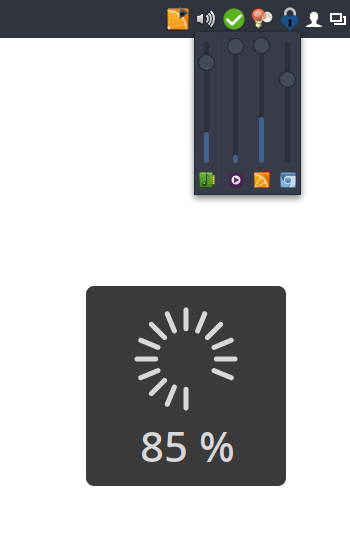
I couldn't find a simple tray icon that allows to control multiple applications easily from the task bar. So I wrote my own.
Bug reports and patches welcome!
It's not meant to be a replacement for a full-featured mixer application. If you're looking for that check out the excellent pavucontrol.
Features
- Runs on virtually every desktop environment (via SNI)
- Control main volumes as well as individual applications
- Mute individual applications
- Shows application icons and names
- Per-application VU meter
- Click to open the mixer popup; right-click to open pavucontrol (or custom mixer application)
- Mouse-wheel support
- On-screen volume display (OSD)
- Supports X11 and Wayland
Installation
Arch Linux
Available in AUR: volctl
Cargo
Install from source using Cargo:
cargo install --git https://github.com/buzz/volctl.git
Install the GSettings schema manually.
Manual installation
- Clone this repository and build in release mode:
sh
   cargo build --release
- Copy the binary to a location in your
$PATH:
sh
   cp target/release/volctl ~/.local/bin/
Install the GSettings schema manually.
GSettings schema installation
volctl uses GSettings to store preferences. The schema file must be installed for the settings to work. Copy the schema XML and compile the schemas:
PREFIX="${HOME}/.local"
mkdir -p "$PREFIX/share/glib-2.0/schemas/"
curl -fsSL https://raw.githubusercontent.com/buzz/volctl/main/data/apps.volctl.gschema.xml \
  -o "$PREFIX/share/glib-2.0/schemas/apps.volctl.gschema.xml"
glib-compile-schemas "$PREFIX/share/glib-2.0/schemas/"
Development
Run from source
cargo run
Linting and formatting
cargo clippy
cargo fmt
Rust Rewrite
This is a Rust rewrite of the original Python version. The Python
implementation is still available on the legacy-python
branch.
License
GNU General Public License v3.0 or later
Extension points exported contracts — how you extend this code
SurfaceBackend (Interface)Core symbols most depended-on inside this repo
newShape
Languages
Modules by API surface
For agents
$ claude mcp add volctl \
  -- python -m otcore.mcp_server <graph>