github.com/burkeholland/nativescript-statusbar @5.0.0
Chat with this repoWhat it actually does AI analysis from the code graph — generated when you open this
README
NativeScript Status Bar
A NativeScript plugin to change the style of the status bar.
Usage
npm install nativescript-statusbar --save
Then in your NativeScript project .xml file, add the namespace for the plugin. I'm calling it "x" here, but you can name it anything you want.
iOS only supports a list of settings (default, light, dark, opaque), not a specific color. Android will support any hex background color, but you cannot change the text color on the status bar.
<Page xmlns="http://schemas.nativescript.org/tns.xsd"
      xmlns:x="nativescript-statusbar">


      <x:StatusBar ios:barStyle="light" barColor="#00A7DC" />
</Page>
Those settings, combined with an ActionBar that has background-color: #00C0F5 will give you...
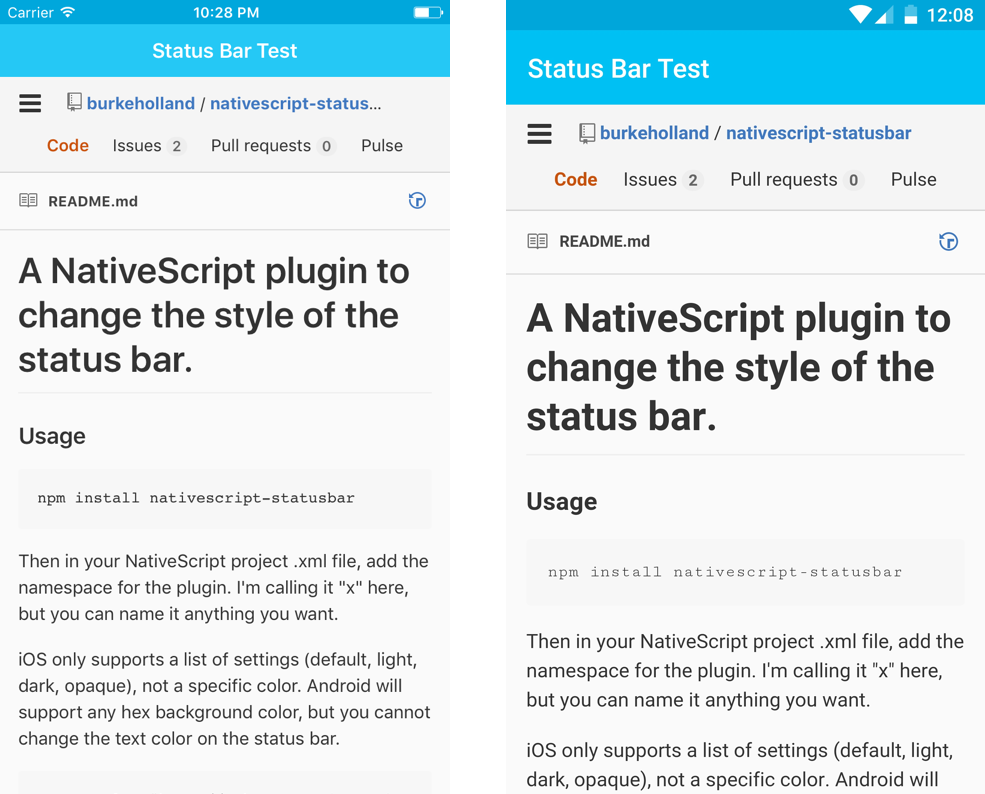
Note The StatusBar plugin will not set the color of the StatusBar on iOS if you don't have an ActionBar as well. If you want to set the color of the StatusBar in NativeScript without having an ActionBar, you can set it to the page background color by setting backgroundSpanUnderStatusBar="true". Otherwise you will have a white StatusBar no matter what you do.
Webpack
To use the NativeScript status bar plugin with webpack, you must add the following line of code to your app’s app/bundle-config.js file.
global.registerModule("nativescript-statusbar", function() { return require("nativescript-statusbar"); });
Development workflow
If you would like to contribute to this plugin in order to enabled the repositories code for development follow this steps:
- Fork the repository locally
- Open the repository in your favorite terminal
- Navigate to the src code that contains the plugin's code
cd /src - Execute the npm script
nmp run build.wrappersornpm run build.wrappers.watch - When running the Vanila NativeScript demo app execute:
npm run demo.androidornpm run demo.ios - When running the Angular NativeScript demo app execute:
npm run demo.angular.androidornpm run demo.angular.ios
Extension points exported contracts — how you extend this code
Core symbols most depended-on inside this repo
Shape
Languages
Modules by API surface
For agents
$ claude mcp add nativescript-statusbar \
  -- python -m otcore.mcp_server <graph>