github.com/bterwijn/memory_graph @main
Chat with this repoBrowse by type
What it actually does AI analysis from the code graph — generated when you open this
README
Installation
Install (or upgrade) memory_graph using pip:
pip install --upgrade memory_graph
Additionally Graphviz needs to be installed.
Highlights
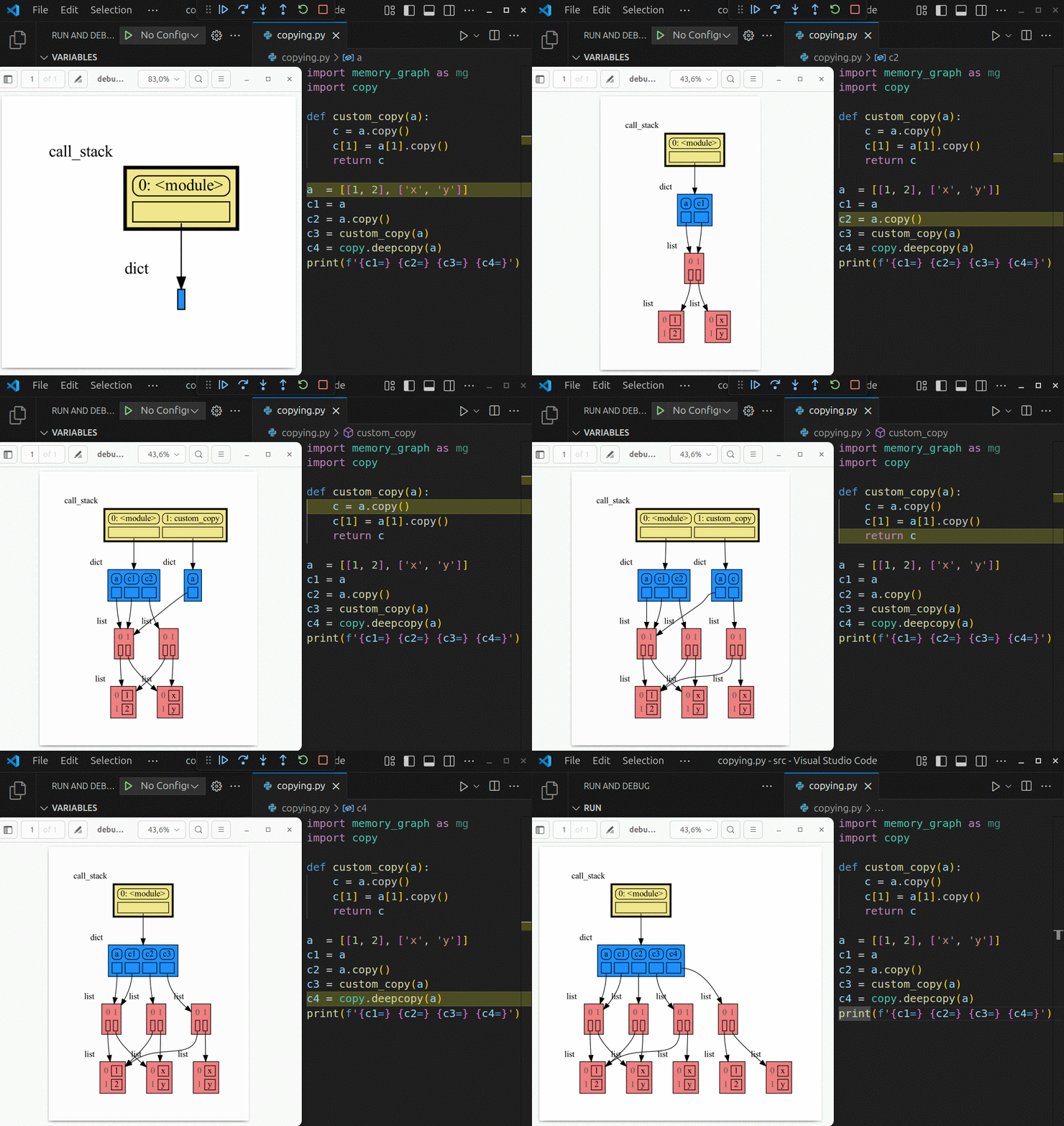 Run a live demo in the 👉 Memory Graph Web Debugger 👈 now, no installation required!
- learn the right mental model to think about Python data (references, mutability, shallow vs deep copy)
- visualize the structure of your data to more easily understand and debug any data structure
- understand function calls, variable scope, and the complete program state through call stack visualization
An example Binary Tree data structure:
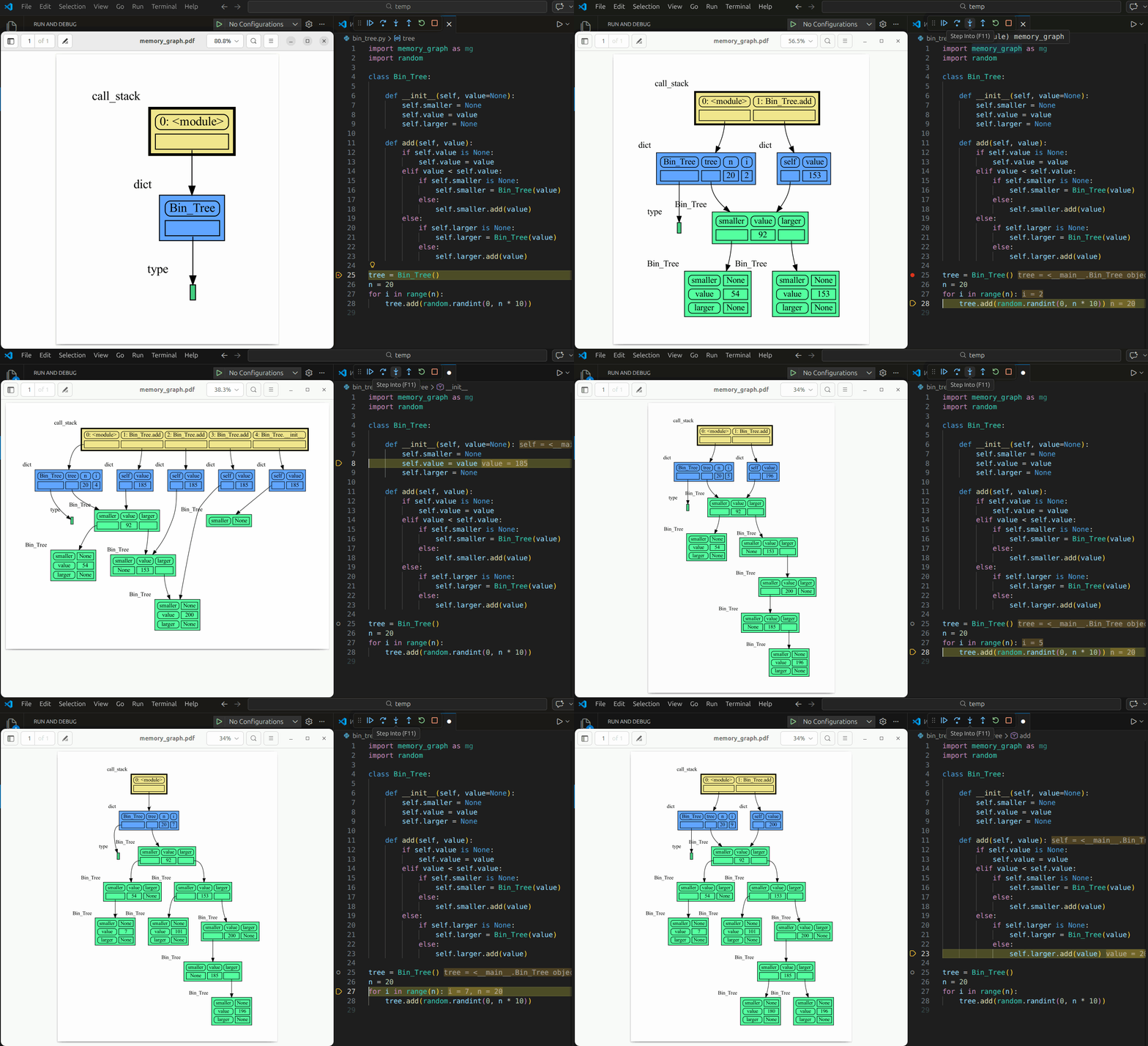 Or see it in the Memory Graph Web Debugger.
Videos
| Quick Intro (3:49) | Mutability (17:29) |
Memory Graph
For program understanding and debugging, the memory_graph package can visualize your data, supporting many different data types, including but not limited to:
import memory_graph as mg

class My_Class:

    def __init__(self, x, y):
        self.x = x
        self.y = y

data = [ range(1, 2), (3, 4), {5, 6}, {7:'seven', 8:'eight'},  My_Class(9, 10) ]
mg.show(data)
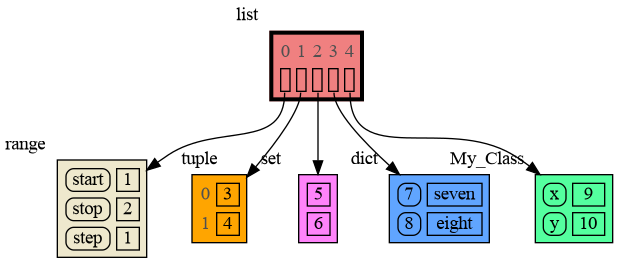
Instead of showing the graph on screen you can also render it to an output file (see Graphviz Output Formats) using for example:
mg.render(data, "my_graph.pdf")
mg.render(data, "my_graph.svg")
mg.render(data, "my_graph.png")
mg.render(data, "my_graph.gv") # Graphviz DOT file
mg.render(data) # renders to default: 'memory_graph.pdf'
Sharing Values, Aliasing
In Python, assigning a list from variable a to variable b causes both variables to reference the same list value and thus share it. Consequently, any change applied through one variable will impact the other. This behavior can lead to elusive bugs if a programmer incorrectly assumes that list a and b are independent.
| 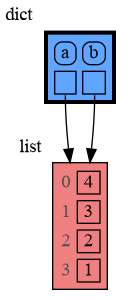 a graph showing `a` and `b` share the list |
The fact that a and b share the list can not be verified by printing the lists. It can be verified by comparing the identity of both variables using the id() function or by using the is comparison operator as shown in the program output below, but this quickly becomes impractical for larger programs.
a: 4, 3, 2, 1
b: 4, 3, 2, 1
ids: 126432214913216 126432214913216
identical?: True
A better way to understand what values are shared is to draw a graph using memory_graph.
Topics
Author
Bas Terwijn
Inspiration
Inspired by Python Tutor.
The main differences are that by running memory_graph locally we support Python Tutor’s unsupported features so that it scales to full multi-file programs in many environments and IDEs instead of just code snippets in a webbrowser, and by mirroring the data’s hierarchy we improve graph readability for larger graphs.
Social Media
Supported by

Python Data Model
Learn the right mental model to think about Python data. The Python Data Model makes a distiction between immutable and mutable types:
- immutable: bool, int, float, complex, str, tuple, frozenset, frozendict, bytes
- mutable: list, set, dict, classes, ... (most other types)
Immutable Type
In the code below variable a and b both reference the same tuple value (4, 3, 2). A tuple is an immutable type and therefore when we change variable b its value cannot be mutated in place, and thus an automatic copy is made and a and b each reference their own value afterwards.
import memory_graph as mg

a = (4, 3, 2)
b = a
mg.render(locals(), 'immutable1.png')

b += (1,)
mg.render(locals(), 'immutable2.png')
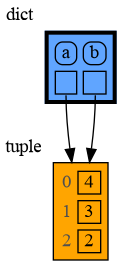 |
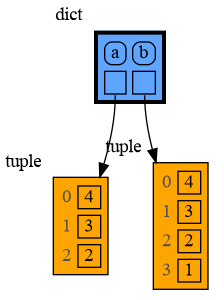 |
|---|---|
| immutable1.png | immutable2.png |
Mutable Type
With mutable types the result is different. In the code below variable a and b both reference the same list value [4, 3, 2]. A list is a mutable type and therefore when we change variable b its value can be mutated in place and thus a and b both reference the same new value afterwards. Thus changing b also changes a and vice versa. Sometimes we want this but other times we don't and then we will have to make a copy ourselfs so that a and b are independent.
import memory_graph as mg

a = [4, 3, 2]
b = a
mg.render(locals(), 'mutable1.png')

b += [1]  # equivalent to:  b.append(1)
mg.render(locals(), 'mutable2.png')
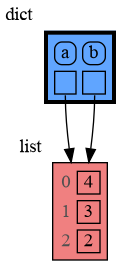 |
 |
|---|---|
| mutable1.png | mutable2.png |
One practical reason why Python makes the distinction between mutable and immutable types is that a value of a mutable type can be large, making it inefficient to copy each time we change it. Values of immutable type generally don't need to change as much, or are small, making copying less of a concern.
Copying Values of Mutable Type
Python offers three different "copy" options that we will demonstrate using a nested list:
import memory_graph as mg
import copy

a = [ [1, 2], ['x', 'y'] ]  # a nested list (a list containing lists)

# three different ways to make a "copy" of 'a':
c1 = a
c2 = copy.copy(a)  # for list equivalent to:  a.copy() a[:] list(a)
c3 = copy.deepcopy(a)

mg.show(locals())
c1is an assignment, nothing is copied, all the values are sharedc2is a shallow copy, only the first value is copied, all the underlying values are sharedc3is a deep copy, all the values are copied, nothing is shared

Or see it in the Memory Graph Web Debugger.
Custom Copy
We can write our own custom copy function or method in case the three standard "copy" options don't do what we want. For example, in the code below the custom_copy() method of My_Class copies the digits but shares the letters between two objects.
import memory_graph as mg
import copy

class My_Class:

    def __init__(self):
        self.digits = [1, 2]
        self.letters = ['x', 'y']

    def custom_copy(self):
        """ Copies 'digits' but shares 'letters'. """
        c = copy.copy(self)
        c.digits = copy.copy(self.digits)
        return c

a = My_Class()
b = a.custom_copy()

mg.show(locals())
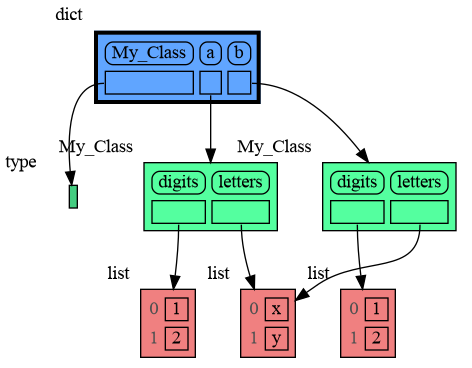
Or see it in the Memory Graph Web Debugger.
Name Rebinding
When a and b share a mutable value, then changing the value of b changes the value of a and vice versa. However, reassigning b does not change a. When you reassign b, you only rebind the name b to another value without affecting any other variable.
In the example below, also note the difference between expressions:
- b += [300]: that changes both b and a
- c = c + [600]: that first creates a new value c + [600] and then assigns this new value to c without affecting b
This shows that x += y is not the same as x = x + y for a value x of mutable type.
import memory_graph as mg

a = [100, 200]
b = a
mg.render(locals(), 'rebinding1.png')

b += [300]      # changes the value of 'b' and 'a'
b = [400, 500]  # rebinds 'b' to a new value, 'a' is unaffected
c = b
mg.render(locals(), 'rebinding2.png')

c = c + [600]   # rebinds 'c' to new value 'c + [600]', `b` is unaffected
mg.render(locals(), 'rebinding3.png')
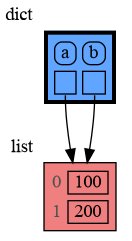 |
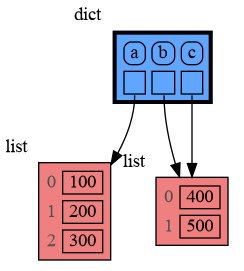 |
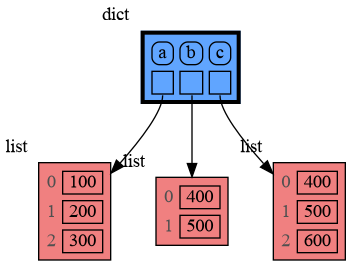 |
|---|---|---|
| rebinding1.png | rebinding2.png | rebinding3.png |
Or see it in the Memory Graph Web Debugger.
Copying Values of Immutable Type ##
Because a value of immutable type will be copied automatically when it is changed, there is no need to copy it beforehand. Therefore, a shallow or deep copy of a value of immutable type will result in just an assignment to save on the time needed to make the copy and the space (=memory) needed to store the values.
import memory_graph as mg
import copy

a = ( (1, 2), ('x', 'y') ) # a nested tuple

# three different ways to make a "copy" of 'a':
c1 = a
c2 = copy.copy(a)
c3 = copy.deepcopy(a)

mg.show(locals())

Copying a Mix of Mutable and Immutable Values
When copying a mix of values of mutable and immutable type, to save on time and space, a deep copy will try to copy as few values of immutable type as possible in order to copy each value of mutable type.
import memory_graph as mg
import copy

a = ( [1, 2], ('x', 'y') ) # mix of mutable and immutable values

# three different ways to make a "copy" of 'a':
c1 = a
c2 = copy.copy(a)
c3 = copy.deepcopy(a)

mg.show(locals())

Call Stack
The mg.stack() function retrieves the entire call stack, including the local variables for each function on the stack. This enables us to understand function calls, variable scope, and the complete program state through call stack visualization. By examining the graph, we can see whether local variables from different function calls share data. For instance, consider the function add_one() which adds the value 1 to each of its parameters a, b, and c.
import memory_graph as mg

def add_one(a, b, c):
    a += [1]
    b += (1,)
    c += [1]
    mg.show(mg.stack())

a = [4, 3, 2]
b = (4, 3, 2)
c = [4, 3, 2]
add_one(a, b, c.copy())

print(f"a:{a} b:{b} c:{c}")
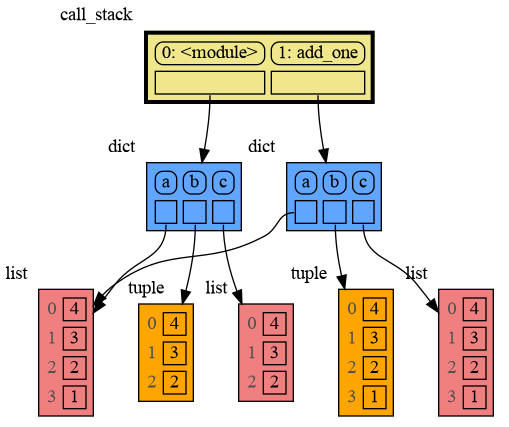
Or see it in the Memory Graph Web Debugger.
In the printed output we see that only a is changed as a result of the function call:
a:[4, 3, 2, 1] b:(4, 3, 2) c:[4, 3, 2]
This is because b is of immutable type 'tuple' so its value gets copied automatically when it is changed. And because the function is called with a copy of
Core symbols most depended-on inside this repo
Shape
Languages
Modules by API surface
For agents
$ claude mcp add memory_graph \
  -- python -m otcore.mcp_server <graph>