github.com/bshall/ZeroSpeech @v0.1
Chat with this repoWhat it actually does AI analysis from the code graph — generated when you open this
README
VQ-VAE for Acoustic Unit Discovery and Voice Conversion
Train and evaluate models for the ZeroSpeech challenges. Voice conversion samples can be found here. Pretrained weights for the 2019 english and surprise models can be found here.
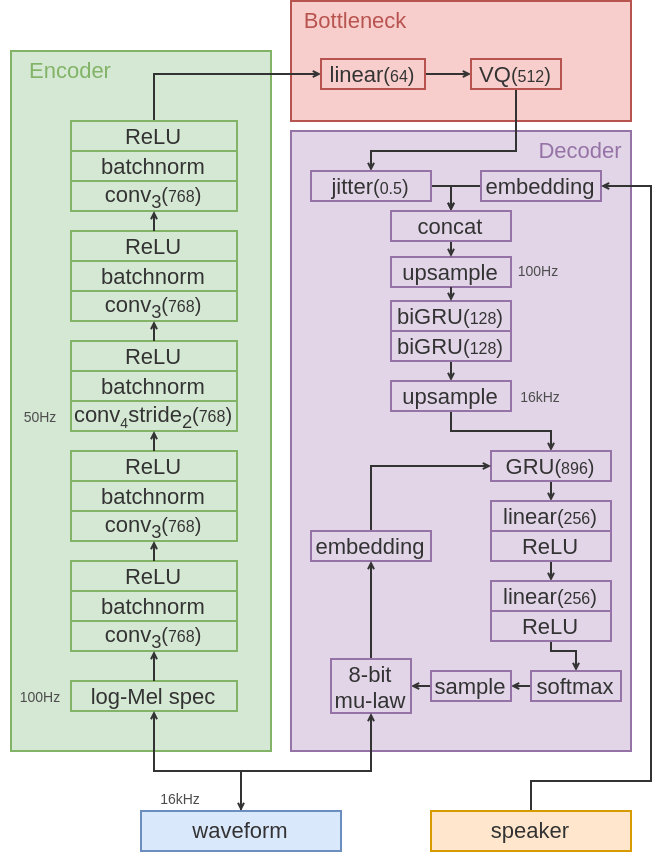
Quick Start
Requirements
-
Ensure you have Python 3 and PyTorch 1.4 or greater.
-
Install NVIDIA/apex for mixed precision training.
-
Install pip dependencies:
pip install requirements.txt -
For evaluation install bootphon/zerospeech2020.
Training
-
Download and extract the ZeroSpeech2020 datasets.
-
Preprocess audio and extract train/test log-Mel spectrograms:
python preprocess.py in_dir=/path/to/dataset dataset=[2019/english or 2019/surprise]Note:in_dirmust be the path to the2019folder. Fordatasetchoose between2019/englishor2019/surprise. Other datasets will be added in the future.e.g. python preprecess.py in_dir=../datasets/2020/2019 dataset=2019/english -
Train the model:
python train.py checkpoint_dir=path/to/checkpoint_dir dataset=[2019/english or 2019/surprise]e.g. python train.py checkpoint_dir=checkpoints/2019english dataset=2019/english
Evaluation
Voice conversion
python convert.py checkpoint=path/to/checkpoint in_dir=path/to/wavs out_dir=path/to/out_dir synthesis_list=path/to/synthesis_list dataset=[2019/english or 2019/surprise]
Note: the synthesis list is a json file:
[
        [
            "english/test/S002_0379088085",
            "V002",
            "V002_0379088085"
        ]
   ]
containing a list of items with a) the path (relative to in_dir) of the source wav files;
b) the target speaker (see datasets/2019/english/speakers.json for a list of options);
and c) the target file name.
e.g. python convert.py checkpoint=checkpoints/2019english/model.ckpt-500000.pt in_dir=../datasets/2020/2019 out_dir=submission/2019/english/test synthesis_list=datasets/2019/english/synthesis.json dataset=2019/english
ABX Score
-
Encode test data for evaluation:
python encode.py checkpoint=path/to/checkpoint out_dir=path/to/out_dir dataset=[2019/english or 2019/surprise]e.g. python encode.py checkpoint=checkpoints/2019english/model.ckpt-500000.pt out_dir=submission/2019/english/test dataset=2019/english -
Run ABX evaluation script (see bootphon/zerospeech2020).
For example, the ABX score for the pretrained english model (available here) is:
{
    "2019": {
        "english": {
            "scores": {
                "abx": 14.043611615570672,
                "bitrate": 412.2387509949519
            },
            "details_bitrate": {
                "test": 412.2387509949519
            },
            "details_abx": {
                "test": {
                    "cosine": 14.043611615570672,
                    "KL": 50.0,
                    "levenshtein": 35.927825062038984
                }
            }
        }
    }
}
Core symbols most depended-on inside this repo
preemphasisShape
Languages
Modules by API surface
For agents
$ claude mcp add ZeroSpeech \
  -- python -m otcore.mcp_server <graph>