github.com/brettwooldridge/HikariCP @HikariCP-7.1.0 sqlite
README
 HikariCP It's Faster.Hi·ka·ri [hi·ka·'lē] (Origin: Japanese): light; ray.
[![][Build Status img]][Build Status]
[![][Coverage Status img]][Coverage Status]
[![][license img]][license]

Fast, simple, reliable. HikariCP is a "zero-overhead" production ready JDBC connection pool. At roughly 165Kb, the library is very light. Read about how we do it here.
"Simplicity is prerequisite for reliability."
- Dr. Edsger Dijkstra
[!IMPORTANT] In order to avoid a rare condition where the pool goes to zero and does not recover it is necessary to configure TCP keepalive. Some JDBC drivers support this via properties, for example
tcpKeepAlive=trueon PostgreSQL, but in any case it can also be configured at the OS-level. See Setting OS TCP Keepalive and/or TCP keepalive for a better PostgreSQL experience.
Index
- Artifacts
- JMH Benchmarks
- Analyses
- Spike Demand Pool Comparison
- You're probably doing it wrong
- WIX Engineering Analysis
- Failure: Pools behaving badly
- Frequently used
- Infrequently used
- Initialization
Artifacts
Java 11+ maven artifact:
<dependency>
   <groupId>com.zaxxer</groupId>
   <artifactId>HikariCP</artifactId>
   <version>7.1.0</version>
</dependency>
Java 8 maven artifact (deprecated):
<dependency>
   <groupId>com.zaxxer</groupId>
   <artifactId>HikariCP</artifactId>
   <version>4.0.3</version>
</dependency>
Java 7 maven artifact (deprecated):
<dependency>
   <groupId>com.zaxxer</groupId>
   <artifactId>HikariCP-java7</artifactId>
   <version>2.4.13</version>
</dependency>
Java 6 maven artifact (deprecated):
<dependency>
   <groupId>com.zaxxer</groupId>
   <artifactId>HikariCP-java6</artifactId>
   <version>2.3.13</version>
</dependency>
:checkered_flag: JMH Benchmarks
Microbenchmarks were created to isolate and measure the overhead of pools using the JMH microbenchmark framework. You can checkout the HikariCP benchmark project for details and review/run the benchmarks yourself.

- One Connection Cycle is defined as single
DataSource.getConnection()/Connection.close(). - One Statement Cycle is defined as single
Connection.prepareStatement(),Statement.execute(),Statement.close().
1 Versions: HikariCP 2.6.0, commons-dbcp2 2.1.1, Tomcat 8.0.24, Vibur 16.1, c3p0 0.9.5.2, Java 8u111
2 Intel Core i7-3770 CPU @ 3.40GHz
3 Uncontended benchmark: 32 threads/32 connections, Contended benchmark: 32 threads, 16 connections
4 Apache Tomcat fails to complete the Statement benchmark when the Tomcat StatementFinalizer is used due to excessive garbage collection times
5 Apache DBCP fails to complete the Statement benchmark due to excessive garbage collection times
:microscope: Analyses
Spike Demand Pool Comparison
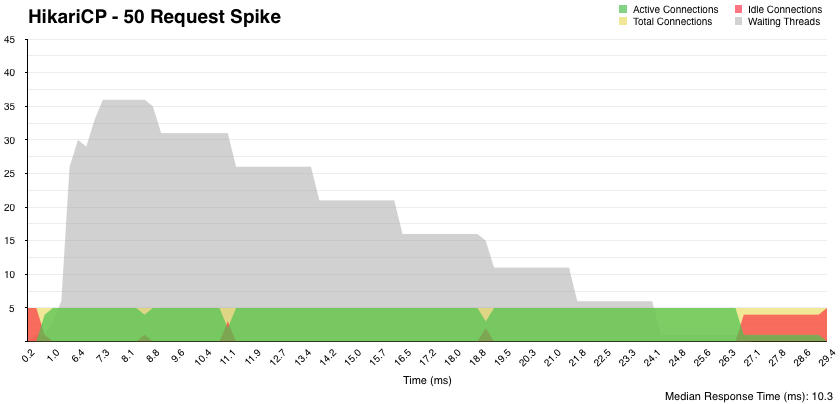 Analysis of HikariCP v2.6, in comparison to other pools, in relation to a unique "spike demand" load.
The customer's environment imposed a high cost of new connection acquisition, and a requirement for a dynamically-sized pool, but yet a need for responsiveness to request spikes. Read about the spike demand handling here.
You're [probably] doing it wrong
 AKA "What you probably didn't know about connection pool sizing". Watch a video from the Oracle Real-world Performance group, and learn about why database connections do not need to be so numerous as they often are. In fact, too many connections have a clear and demonstrable negative impact on performance; a 50x difference in the case of the Oracle demonstration. Read on to find out.
WIX Engineering Analysis
 We'd like to thank the guys over at WIX for the unsolicited and deep write-up about HikariCP on their engineering blog. Take a look if you have time.
Failure: Pools behaving badly
Read our interesting "Database down" pool challenge.
"Imitation Is The Sincerest Form Of Plagiarism" - anonymous
Open source software like HikariCP, like any product, competes in the free market. We get it. We understand that product advancements, once public, are often co-opted. And we understand that ideas can arise from the zeitgeist; simultaneously and independently. But the timeline of innovation, particularly in open source projects, is also clear and we want our users to understand the direction of flow of innovation in our space. It could be demoralizing to see the result of hundreds of hours of thought and research co-opted so easily, and perhaps that is inherent in a free marketplace, but we are not demoralized. We are motivated; to widen the gap.
:family: User Testimonials


If you like this project, consider leaving a word for us on social media:


:gear: Configuration (knobs, baby!)
HikariCP comes with sane defaults that perform well in most deployments without additional tweaking. Every property is optional, except for the "essentials" marked below.
📎 HikariCP uses milliseconds for all time values.
🚨 HikariCP relies on accurate timers for both performance and reliability. It is imperative that your server is synchronized with a time-source such as an NTP server. Especially if your server is running within a virtual machine. Why? Read more here. Do not rely on hypervisor settings to "synchronize" the clock of the virtual machine. Configure time-source synchronization inside the virtual machine. If you come asking for support on an issue that turns out to be caused by lack time synchronization, you will be taunted publicly on Twitter.
Essentials
🔤dataSourceClassName
This is the name of the DataSource class provided by the JDBC driver. Consult the
documentation for your specific JDBC driver to get this class name, or see the table below.
Note XA data sources are not supported. XA requires a real transaction manager like
bitronix. Note that you do not need this property if you are using
jdbcUrl for "old-school" DriverManager-based JDBC driver configuration.
Default: none
- or -
🔤jdbcUrl
This property directs HikariCP to use "DriverManager-based" configuration. We feel that DataSource-based
configuration (above) is superior for a variety of reasons (see below), but for many deployments there is
little significant difference. When using this property with "old" drivers, you may also need to set
the driverClassName property, but try it first without. Note that if this property is used, you may
still use DataSource properties to configure your driver and is in fact recommended over driver parameters
specified in the URL itself.
Default: none
🔤username
This property sets the default authentication username used when obtaining Connections from
the underlying driver. Note that for DataSources this works in a very deterministic fashion by
calling DataSource.getConnection(*username*, password) on the underlying DataSource. However,
for Driver-based configurations, every driver is different. In the case of Driver-based, HikariCP
will use this username property to set a user property in the Properties passed to the
driver's DriverManager.getConnection(jdbcUrl, props) call. If this is not what you need,
skip this method entirely and call addDataSourceProperty("username", ...), for example.
Default: none
🔤password
This property sets the default authentication password used when obtaining Connections from
the underlying driver. Note that for DataSources this works in a very deterministic fashion by
calling DataSource.getConnection(username, *password*) on the underlying DataSource. However,
for Driver-based configurations, every driver is different. In the case of Driver-based, HikariCP
will use this password property to set a password property in the Properties passed to the
driver's DriverManager.getConnection(jdbcUrl, props) call. If this is not what you need,
skip this method entirely and call addDataSourceProperty("pass", ...), for example.
Default: none
Frequently used
✅autoCommit
This property controls the default auto-commit behavior of connections returned from the pool. It is a boolean value. Default: true
⏳connectionTimeout
This property controls the maximum number of milliseconds that a client (that's you) will wait for a connection from the pool. If this time is exceeded without a connection becoming available, a SQLException will be thrown. Lowest acceptable connection timeout is 250 ms. Default: 30000 (30 seconds)
⏳idleTimeout
This property controls the maximum amount of time that a connection is allowed to sit idle in the
pool. This setting only applies when minimumIdle is defined to be less than maximumPoolSize.
Idle connections will not be retired once the pool reaches minimumIdle connections. Whether a
connection is retired as idle or not is subject to a maximum variation of +30 seconds, and average
variation of +15 seconds. A connection will never be retired as idle before this timeout. A value
of 0 means that idle connections are never removed from the pool. The minimum allowed value is 10000ms
(10 seconds).
Default: 600000 (10 minutes)
⏳keepaliveTime
This property controls how frequently HikariCP will attempt to keep a connection alive, in order to prevent
it from being timed out by the database or network infrastructure. This value must be less than the
maxLifetime value. A "keepalive" will only occur on an idle connection. When the time arrives for a "keepalive"
against a given connection, that connection will be removed from the pool, "pinged", and then
Extension points exported contracts — how you extend this code
IMetricsTracker (Interface)Core symbols most depended-on inside this repo
setDataSourceClassNameShape
Languages
Modules by API surface
Used by 19 indexed graphs manifest dependencies, hub-wide
Dependencies from manifests, versioned
Datastores touched
For agents
$ claude mcp add HikariCP \
  -- python -m otcore.mcp_server <graph>