hub / github.com/brentvatne/react-native-debug-stylesheet
github.com/brentvatne/react-native-debug-stylesheet @0.1.1
Chat with this repo
2 symbols
3 edges
1 files
0 documented · 0%
What it actually does AI analysis from the code graph — generated when you open this
loading…
README
react-native-debug-stylesheet
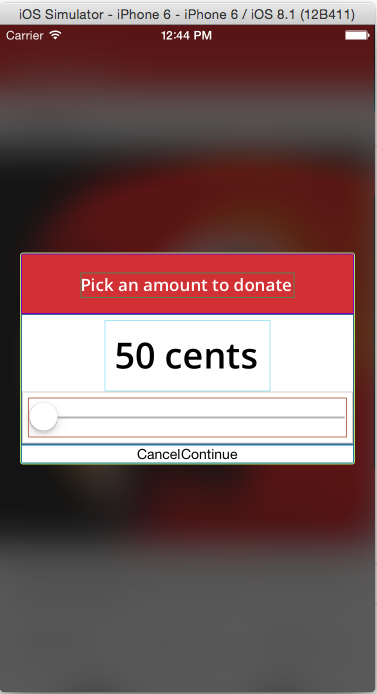
When you want to debug layout problems, use this instead of the normal
StyleSheet to get coloured borders (or backgrounds) around views that
are affected by the stylesheet.
Add it to your project
- Run
npm install react-native-debug-stylesheet --save - When you want to debug a layout problem, do something like this:
var { PixelRatio, StyleSheet } = require('react-native');
// Drop this in to override the above StyleSheet var and use the
// DebugStyleSheet class instead.
var StyleSheet = require('react-native-debug-stylesheet');

// Business as usual
StyleSheet.create({
  // ....
});
If you prefer to use coloured backgrounds, then do this:
var StyleSheet = require('react-native-debug-stylesheet').Backgrounds;
Customize
If you'd rather make your own debug stylesheet than use the default border/background color options, you can do this easily too.
var { createDebugStylesheet, randomHexColor } = require('react-native-debug-stylesheet');

var doubleHeaderFontSize = function(styleClass, cssProperty, cssValue) {
  if (cssValue && styleClass.match(/header/)) {
    return cssValue * 2;
  }
  return cssValue;
}

var StyleSheet = createDebugStylesheet({
  backgroundColor: randomHexColor, fontSize: doubleHeaderFontSize,
  borderColor: randomHexColor, borderWidth: 0.5,
});
MIT Licensed
Core symbols most depended-on inside this repo
createDebugStylesheetcalled by 2
index.js
randomHexColor
called by 0
index.js
Shape
Languages
TypeScript100%
Modules by API surface
index.js2 symbols
For agents
$ claude mcp add react-native-debug-stylesheet \
  -- python -m otcore.mcp_server <graph>