github.com/bpmnServer/bpmn-server @main
Chat with this repoBrowse by type
What it actually does AI analysis from the code graph — generated when you open this
README
bpmnServer
bpmn-server is a BPMN-based workflow engine that integrates easily into your Node.js app. It supports built-in state persistence, variable management, and concurrency across clusters—ideal for long-running processes, durable services, and scheduled tasks.
This repository holds the engine (bpmn-server), its web application (bpmn-web), its REST client (bpmn-client), the documentation and the sample application: see This repository.
Why BPMN Server?
Business processes are rarely just a sequence of API calls. Approvals can wait for days, timers must survive restarts, and teams need to understand what happened when something goes wrong. Hardcoding all of this into an application makes workflows difficult to change and test.
BPMN Server brings visual workflow design and durable execution into your Node.js application.
- Model the flow, not the plumbing. Use BPMN 2.0 to describe tasks, approvals, decisions, timers, and exceptions.
- Run long-lived processes reliably. Persist state and resume workflows across application restarts.
- Connect to your systems. Invoke application services and external REST APIs through delegates and OpenAPI connectors.
- Test before deploying. Verify models, automate scenarios with Gherkin, and inspect execution decisions when tests fail.
- Work with AI agents. Let AI-assisted tools create, validate, and test models using the server's integration interfaces.
- Choose how to deploy. Embed the engine in a Node.js app or run it separately from the web host.
Open source under the MIT license, BPMN Server is for developers who want BPMN capabilities without adopting a large workflow platform.
Getting started
Choose how you want to start (Choose Your Journey):
| Journey | For | Start with |
|---|---|---|
| A. Online demo | Trying it with nothing installed | bpmn.omniworkflow.com |
| B. Build an application | A workflow application of your own, on bpmn-web | Build an application |
| C. Integrate an existing application | An application that keeps its own UI and users, and runs its processes here | Integrate an existing application |
| D. Embed the engine | Running processes from your own Node.js code | Embedding the engine |
The tutorials take one leave request from installing to automated testing, in nine steps: security, the employee's and the manager's tasks, the results, Node.js, the REST APIs, connectors and Gherkin tests.
See it in action
The videos: one for each tutorial, and the features one at a time, such as testing a model (record scenarios, add checks, see what breaks when the model changes) and a connector to GitHub.
Architecture at a glance
BPMN Server combines a workflow engine with optional web-based modeling, task management, REST APIs, connectors, and testing tools. Your application hosts the engine or connects to it as a separate service. See the Architecture guide for the component diagram and deployment options.
Quick Start
Create an application
npx bpmn-server init my-app --memory   # first trial; no external MongoDB
cd my-app
npm start                        # http://localhost:3000
Open your browser to http://localhost:3000. Sign in as admin, with the password the server prints when it first starts.
init installs the application dependencies, including bpmn-server, bpmn-web, and bpmn-mcp;
npx bpmn-server init --help lists its options, and --minimal creates a one-model Hello application
instead. For a persistent MongoDB installation, use npx bpmn-server init my-app --mongo mongodb://localhost:27017/my-app, start MongoDB if needed, and run npm run setup before npm start.
my-app/
  package.json      deps: bpmn-server, bpmn-web; scripts: start, dev, setup, cli, verify
  .env              generated keys, the database URL, what is served
  index.ts          starts bpmn-web with the settings, delegate and connectors below
  settings/         config.ts: only the settings you override; bpmn-web supplies the defaults
  processes/        the models: Hello, Buy Used Car, Leave Application, employee-onboarding, Business Rules, GitHub repository
  connectors/       the services service tasks call (appServices.ts), and element templates (*.json)
  delegates/        the app delegate (on bpmn-web's WebAppDelegate): services, data objects, events
Install on a server
On a new Linux server (Ubuntu 22.04 or 24.04), one line installs everything (Node.js, MongoDB, the application,
nginx, a service; HTTPS with --domain) and prints the address and a generated admin password:
curl -fsSL https://raw.githubusercontent.com/bpmnServer/bpmn-server/main/deploy/install.sh | sudo bash
It also works as a cloud server's launch script (AWS Lightsail's "Add launch script"). See deploy/.
Call it from another application (bpmn-client)
npm install bpmn-client
npx bpmn-client-setup            # writes .env: set API_KEY to the server's, HOST and PORT to where it runs
npx bpmn-client-cli              # a console on the server: start processes, list and invoke items
import 'dotenv/config';
import { BPMNClient2 } from 'bpmn-client';

const client = new BPMNClient2(process.env.HOST, process.env.PORT, process.env.API_KEY);
const instance = await client.engine.start('Hello', { name: 'Ada' });
See bpmn-client for its API.
Programmatic Usage Example
import { BPMNServer, Logger } from 'bpmn-server';
import { configuration } from './configuration.js';

const server = await BPMNServer.create(configuration, new Logger({ toConsole: false }));

const result = await server.engine.start('invoice', { amount: 1200 });
console.log('Process started with instance id:', result.instance.id);
See Embedding the engine, the Engine API and the API reference.
Modeling
bpmn-server provides a modeling tool based on bpmn.io with a customized property panel, eliminating the need to manually edit BPMN files.
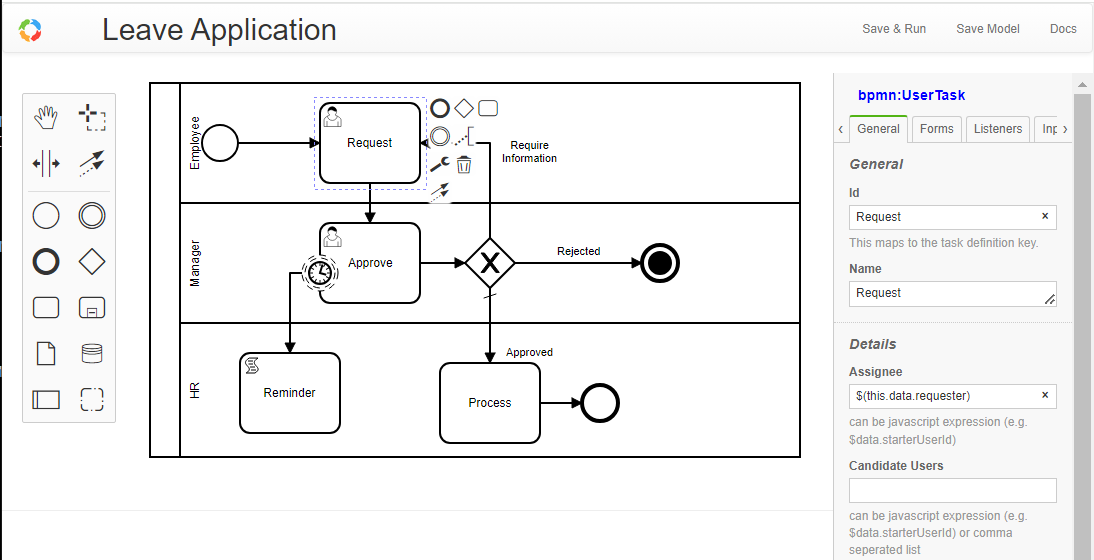
You can also import BPMN models from other tools.
Each model is defined in a BPMN XML file and consists of various elements. An element can be a node (such as events, tasks, or gateways) or a flow.
Models are managed by bpmn-server and can be queried using the Model API.
All BPMN 2.0 elements are supported. See Modeling Support
Execution
bpmn-server is primarily an execution engine for BPMN models.
Each time a model is started, an instance is created. For every element that is executed, an item is generated.
Execution follows the BPMN model logic and supports extensions such as scripting and application context access.
During execution, both Model Listeners and Application Listeners are invoked.
Access the execution engine via the Engine API.
Datastore
Execution data, including instances and their items, are persisted to a datastore: MongoDB (the default), SQLite, or memory, through one storage port that you can also implement yourself.
You can query this data through the Data API.
Users and Security
Every call to the engine says which user it acts for, and the engine applies the model's rules to that user.
- Model designers assign tasks with
assignee,candidateUsersandcandidateGroups, as names or expressions ($(this.data.requester)). A task in a lane is also offered to the group with the lane's name. - bpmn-web signs users in and keeps their groups. A new server makes its administrator,
admin, on its first start, with a password it makes up and prints once where it runs. - Another application keeps its own users: it calls the APIs with a key, and names the user and their groups on each call to the task API.
- Embedded, your code passes the user (
SecureUser) to each call.
REQUIRE_AUTHENTICATION and ENFORCE_SECURITY are on in a new application.
Demo Web Application
Explore the bpmn-web application.
Features include:
- Persistent modeling tool (based on
bpmn.io) - Property panel supporting all
bpmn-serverfeatures - Execution with input forms for defined fields
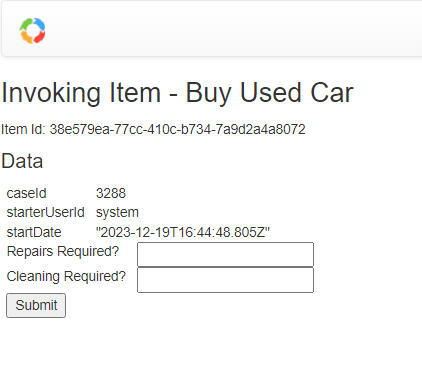
- Task and workflow lists
- Instance detail view
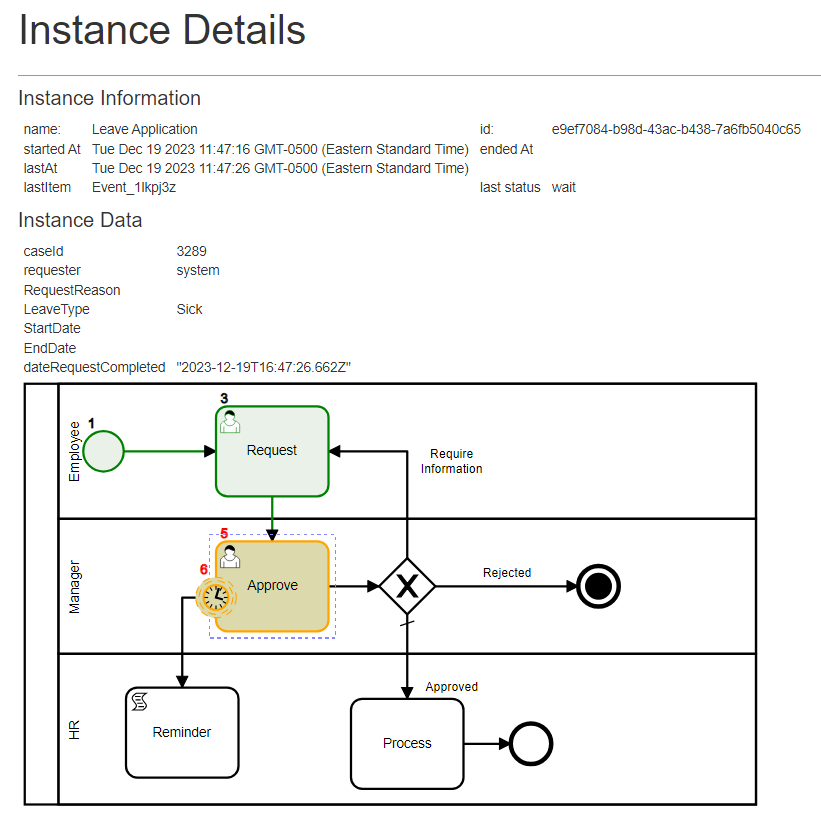
- Model specification viewer
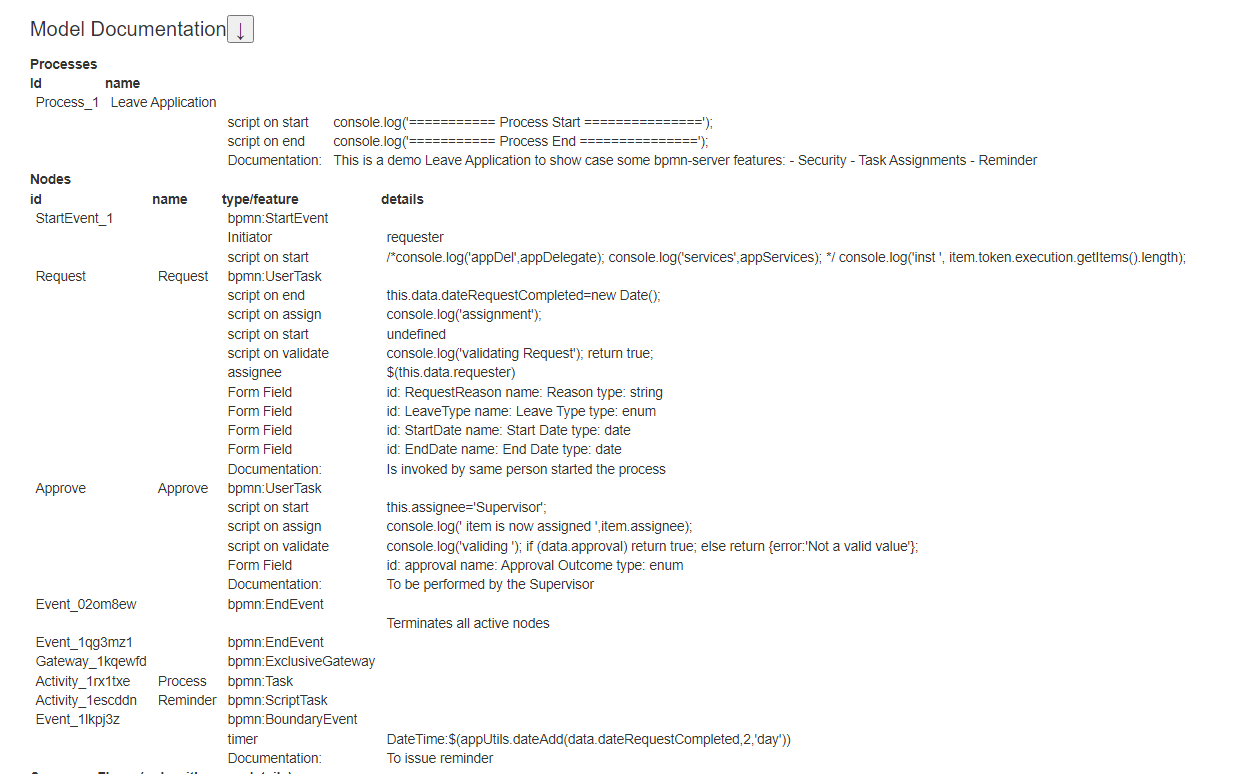
Live Demo
A live demo is available at: https://bpmn.omniworkflow.com
Installation options
For the quickest local trial, use Create an application with --memory. For durable storage, initialize against MongoDB and run npm run setup before starting the application. For an Ubuntu server, use the native installer. For a container-based installation, follow the guided Docker setup below.
Docker Installation
The supported Docker image is bpmnserver/bpmn-server:latest. The older ralphhanna/bpmn-web and ralphhanna/bpmn-server images are no longer updated.
For a guided installation on Linux, macOS, or WSL:
mkdir -p bpmn-server && cd bpmn-server
curl -fLO https://raw.githubusercontent.com/bpmnServer/bpmn-server/main/docker/docker-compose.yml
curl -fLO https://raw.githubusercontent.com/bpmnServer/bpmn-server/main/docker/setup.sh
sh setup.sh
The setup asks for a port, memory or persistent MongoDB, and a published or locally built image. It generates private API and admin keys in .env, then starts the application. Memory mode is for trials: users and workflow instances are lost on restart.
For Windows without WSL, or for updates and troubleshooting, see the Docker installation guide and Docker scripts. Do not use the old bpmn-web Compose image.
Command Line Interface
Use bpmn-server via CLI for common operations.
In your application:
npm run cli

server started..
Commands:
  q     quit
  s     start process
  lo    list outstanding items
  li    list items
  l     list instances for a process
  di    display instance information
  i     invoke task
  sgl   signal task
  msg   message task
  d     delete instances
  lm    list models
  lme   list model elements
  ck    check locked instances
  re    recover hung processes
  lu    list users
  spw   set user password
  ?     show this help menu
npx bpmn-server verify processes/ checks the models without running them.
Updating to Latest Release
npm update bpmn-server bpmn-web
Application Integration
bpmn-server is designed to be embedded into your application. See customization guide
Documentation
The documentation site, and its site map of every page.
- Getting started: Choose your journey, Installation, Settings, What's new in 3.6
- Tutorials: 1 to 9, and the videos
- Concepts: Invoking workflows, Execution, Data, Scripting, Security
- Modeling: Model editor, Checking models, Testing and debugging models, Connectors, Decisions (DMN), Examples
- Development: Embedding the engine, Engine API, [API reference](https://bpmnserver.github.io/bp
Extension points exported contracts — how you extend this code
browse all types & interfaces →
Core symbols most depended-on inside this repo
Shape
Languages
Modules by API surface
Datastores touched
For agents
$ claude mcp add bpmn-server \
  -- python -m otcore.mcp_server <graph>