github.com/bozbez/win-capture-audio @main
Chat with this repoBrowse by type
What it actually does AI analysis from the code graph — generated when you open this
README
win-capture-audio
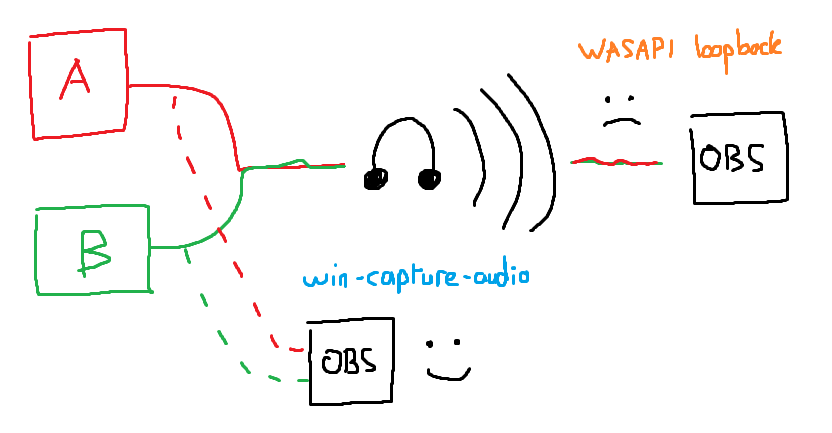
An OBS plugin similar to OBS's win-capture/game-capture that allows for audio capture from a specific application, rather than the system's audio as a whole. This eliminates the need for third-party software or hardware audio mixing tools that introduce complexity, and in the case of software tools, introduce mandatory latency.
Internally it uses ActivateAudioInterfaceAsync with AUDIOCLIENT_PROCESS_LOOPBACK_PARAMS. This initialization structure is only officially available on Windows 11, however it appears to work additionally on relatively recent versions of Windows 10.
This plugin is in a BETA state, expect issues - https://discord.gg/4D5Yk5gFnM for support and updates.
An updated version of Windows 10 2004 (released 2020-05-27) or later is required.
Want to support the development of the plugin? https://ko-fi.com/bozbez
Installation and Usage
- Head over to the Releases page and download the latest installer (or zip if you are using a portable installation)
- Run the setup wizard, selecting your root OBS folder (
obs-studio/, notobs-studio/obs-plugins/) when asked (or extract the zip to the portable OBS root directory) - Launch OBS and check out the newly available "Application Audio Output Capture" source
Troubleshooting
-
Application Audio Output Capture source not showing up after install: this means that either your OBS is out-of-date (check that it is at least 27.1.x) or you have installed the plugin to the wrong location. To re-install, first uninstall via "Add or remove programs" in the Windows settings, and then run the installer again. Make sure to select the top-level
obs-studio/folder in (probably)C:/Program Files/. -
Application Audio Output Capture source not picking up any audio: this happens when your Windows is too old and does not have support for the API. Note that even if you have a more recent major version such as
20H2you will still need the latest updates for the plugin to work. If you are on a very old version you might need more than one update for this to work, and the second update might not show up for a few days after the first update.
Core symbols most depended-on inside this repo
Shape
Languages
Modules by API surface
For agents
$ claude mcp add win-capture-audio \
  -- python -m otcore.mcp_server <graph>