github.com/bosun-ai/swiftide @v0.32.1
Chat with this repoWhat it actually does AI analysis from the code graph — generated when you open this
README
Table of Contents
- What is Swiftide?
- High level features
- Latest updates on our blog :fire:
- Examples
- Vision
- Features
- In detail
- Getting Started
- Prerequisites
- Installation
- Usage and concepts
- Indexing
- Querying
- Contributing
- Core Team Members
- License



Swiftide
Fast, streaming indexing, query, and agentic LLM applications in Rust
<a href="https://swiftide.rs"><strong>Read more on swiftide.rs »</strong></a>


<a href="https://docs.rs/swiftide/latest/swiftide/">API Docs</a>
·
<a href="https://github.com/bosun-ai/swiftide/issues/new?labels=bug&template=bug_report.md">Report Bug</a>
·
<a href="https://github.com/bosun-ai/swiftide/issues/new?labels=enhancement&template=feature_request.md">Request Feature</a>
·
<a href="https://discord.gg/3jjXYen9UY">Discord</a>
What is Swiftide?
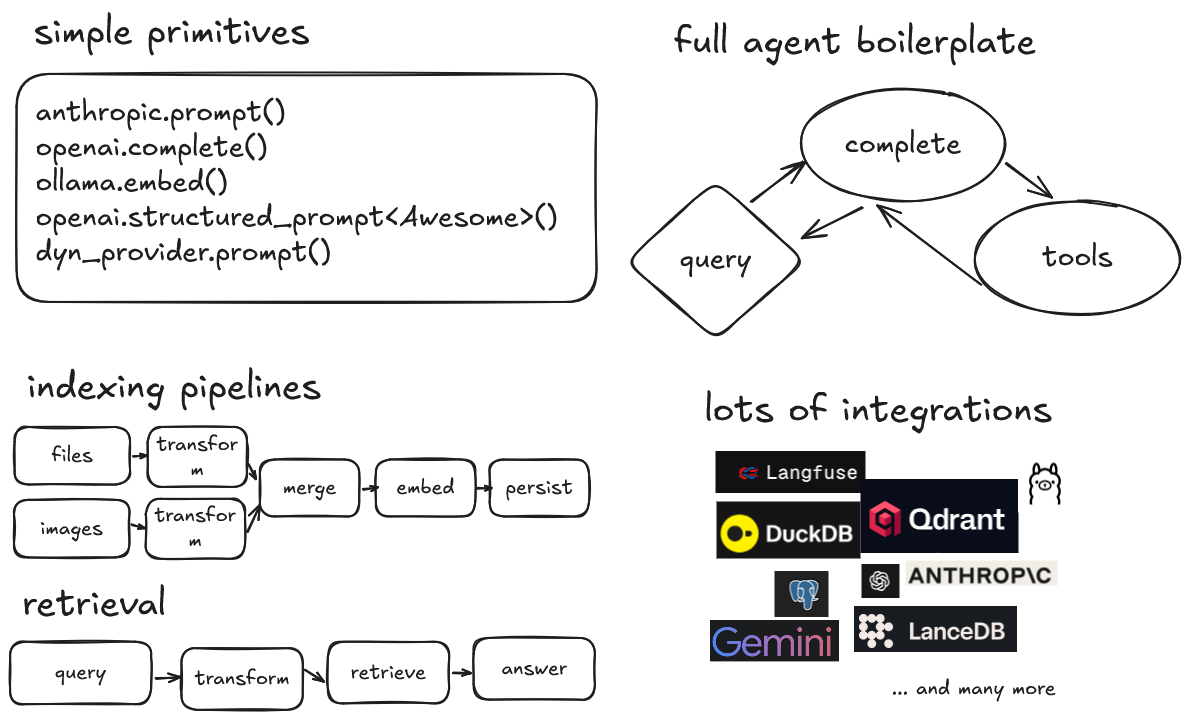
Swiftide is a Rust library for building LLM applications. From performing a simple prompt completion, to building fast, streaming indexing and querying pipelines, to building agents that can use tools and call other agents.
High level features
- Simple primitives for common LLM tasks
- Build fast, streaming indexing and querying pipelines
- Easily build agents, mix and match with previously built pipelines
- A modular and extendable API, with minimal abstractions
- Integrations with popular LLMs and storage providers
- Ready to use pipeline transformations or bring your own
- Build graph like workflows with Tasks
-
Langfuse support
Part of the bosun.ai project. An upcoming platform for autonomous code improvement.
We <3 feedback: project ideas, suggestions, and complaints are very welcome. Feel free to open an issue or contact us on discord.
[!CAUTION] Swiftide is under heavy development and can have breaking changes. Documentation might fall short of all features, and despite our efforts be slightly outdated. We recommend to always keep an eye on our github and api documentation. If you found an issue or have any kind of feedback we'd love to hear from you.
Latest updates on our blog :fire:
- Swiftide 0.31 - Tasks, Langfuse, Multi-Modal, and more
- Swiftide 0.27 - Easy human-in-the-loop flows for agentic AI
- Swiftide 0.26 - Streaming agents
- Releasing kwaak with kwaak
- Swiftide 0.16 - AI Agents in Rust
- Rust in LLM based tools for performance
- Evaluate Swiftide pipelines with Ragas (2024-09-15)
- Release - Swiftide 0.12 (2024-09-13)
- Local code intel with Ollama, FastEmbed and OpenTelemetry (2024-09-04)
More on our blog
Examples
Indexing a local code project, chunking into smaller pieces, enriching the nodes with metadata, and persisting into Qdrant:
indexing::Pipeline::from_loader(FileLoader::new(".").with_extensions(&["rs"]))
        .with_default_llm_client(openai_client.clone())
        .filter_cached(Redis::try_from_url(
            redis_url,
            "swiftide-examples",
        )?)
        .then_chunk(ChunkCode::try_for_language_and_chunk_size(
            "rust",
            10..2048,
        )?)
        .then(MetadataQACode::default())
        .then(move |node| my_own_thing(node))
        .then_in_batch(Embed::new(openai_client.clone()))
        .then_store_with(
            Qdrant::builder()
                .batch_size(50)
                .vector_size(1536)
                .build()?,
        )
        .run()
        .await?;
Querying for an example on how to use the query pipeline:
query::Pipeline::default()
    .then_transform_query(GenerateSubquestions::from_client(
        openai_client.clone(),
    ))
    .then_transform_query(Embed::from_client(
        openai_client.clone(),
    ))
    .then_retrieve(qdrant.clone())
    .then_answer(Simple::from_client(openai_client.clone()))
    .query("How can I use the query pipeline in Swiftide?")
    .await?;
Running an agent that can search code:
#[swiftide::tool(
    description = "Searches code",
    param(name = "code_query", description = "The code query")
)]
async fn search_code(
    context: &dyn AgentContext,
    code_query: &str,
) -> Result<ToolOutput, ToolError> {
    let command_output = context
        .executor()
        .exec_cmd(&Command::shell(format!("rg '{code_query}'")))
        .await?;

    Ok(command_output.into())
}

agents::Agent::builder()
    .llm(&openai)
    .tools(vec![search_code()])
    .build()?
    .query("In what file can I find an example of a swiftide agent?")
    .await?;
Agents loop over LLM calls, tool calls, and lifecycle hooks until a final answer is reached.
You can find more detailed examples in /examples
Vision
Our goal is to create a fast, extendable platform for building LLM applications in Rust, to further the development of automated AI applications, with an easy-to-use and easy-to-extend api.
Features
- Simple primitives for common LLM tasks
- Fast, modular streaming indexing pipeline with async, parallel processing
- Experimental query pipeline
- Experimental agent framework
- A variety of loaders, transformers, semantic chunkers, embedders, and more
- Bring your own transformers by extending straightforward traits or use a closure
- Splitting and merging pipelines
- Jinja-like templating for prompts
- Store into multiple backends
- Integrations with OpenAI, Groq, Gemini, Anthropic, Redis, Qdrant, Ollama, FastEmbed-rs, Fluvio, LanceDB, and Treesitter
- Evaluate pipelines with RAGAS
- Sparse vector support for hybrid search
tracingsupported for logging and tracing, see /examples and thetracingcrate for more information.- Tracing layer for exporting to Langfuse
In detail
| Feature | Details |
|---|---|
| Supported Large Language Model providers | OpenAI (and Azure) |
Anthropic
Gemini
OpenRouter
AWS Bedrock - Anthropic and Titan
Groq - All models
Ollama - All models | | Agents | All the boiler plate for autonomous agents so you don't have to | | Tasks | Build graph like workflows with tasks, combining all the above to build complex applications | | Loading data | Files
Scraping
Fluvio
Parquet
Kafka
Other pipelines and streams | | Example and pre-build transformers and metadata generation | Generate Question and answerers for both text and code (Hyde)
Summaries, titles and queries via an LLM
Extract definitions and references with tree-sitter | | Splitting and chunking | Markdown
Text (text_splitter)
Code (with tree-sitter) | | Storage | Qdrant
Redis
LanceDB
Postgres
Duckdb | | Query pipeline | Similarity and hybrid search, query and response transformations, and evaluation |
Getting Started
Prerequisites
Make sure you have the rust toolchain installed. rustup Is the recommended approach.
To use OpenAI, an API key is required. Note that by default async_openai uses the OPENAI_API_KEY environment variables.
Other integrations might have their own requirements.
Installation
- Set up a new Rust project
- Add swiftide
sh
   cargo add swiftide
- Enable the features of integrations you would like to use in your
Cargo.toml - Write a pipeline (see our examples and documentation)
Usage and concepts
Before building your streams, you need to enable and configure any integrations required. See /examples.
We have a lot of examples, please refer to /examples and the Documentation
[!NOTE] No integrations are enabled by default as some are code heavy. We recommend you to cherry-pick the integrations you need. By convention flags have the same name as the integration they represent.
Indexing
An indexing stream starts with a Loader that emits Nodes. For instance, with the Fileloader each file is a Node.
You can then slice and dice, augment, and filter nodes. Each different kind of step in the pipeline requires different traits. This enables extension.
Nodes are generic over their inner type. This is a transition in progress, but when you BYO, feel free to slice and dice. The inner type can change midway through the pipeline.
- from_loader
(impl Loader)starting point of the stream, creates and emits Nodes - filter_cached
(impl NodeCache)filters cached nodes - then
(impl Transformer)transforms the node and puts it on the stream - then_in_batch
(impl BatchTransformer)transforms multiple nodes and puts them on the stream - then_chunk
(impl ChunkerTransformer)transforms a single node and emits multiple nodes - then_store_with
(impl Storage)stores the nodes in a storage backend, this can be chained
Additionally, several generic transformers are implemented. They take implementers of SimplePrompt and EmbedModel to do their things.
[!WARNING] Due to the performance, chunking before adding metadata gives rate limit errors on OpenAI very fast, especially with faster models like gpt-5-nano. Be aware. The
async-openaicrate provides an exmponential backoff strategy. If that is still a problem, there is also a decorator that supports streaming inswiftide_core/indexing_decorators.
Querying
A query stream starts with a search strategy. In the query pipeline a Query goes through several stages. Transformers and retrievers work together to get the right context into a prompt, before generating an answer. Transformers and Retrievers operate on different stages of the Query via a generic statemachine. Additionally, the search strategy is generic over the pipeline and Retrievers need to implement specifically for each strategy.
That sounds
Extension points exported contracts — how you extend this code
Core symbols most depended-on inside this repo
Shape
Languages
Modules by API surface
Datastores touched
For agents
$ claude mcp add swiftide \
  -- python -m otcore.mcp_server <graph>