github.com/bookorbit/bookorbit @v2.1.0
Chat with this repoWhat it actually does AI analysis from the code graph — generated when you open this
README
BookOrbit
A self-hosted library management and reading platform for ebooks, PDFs, audiobooks, and comics.








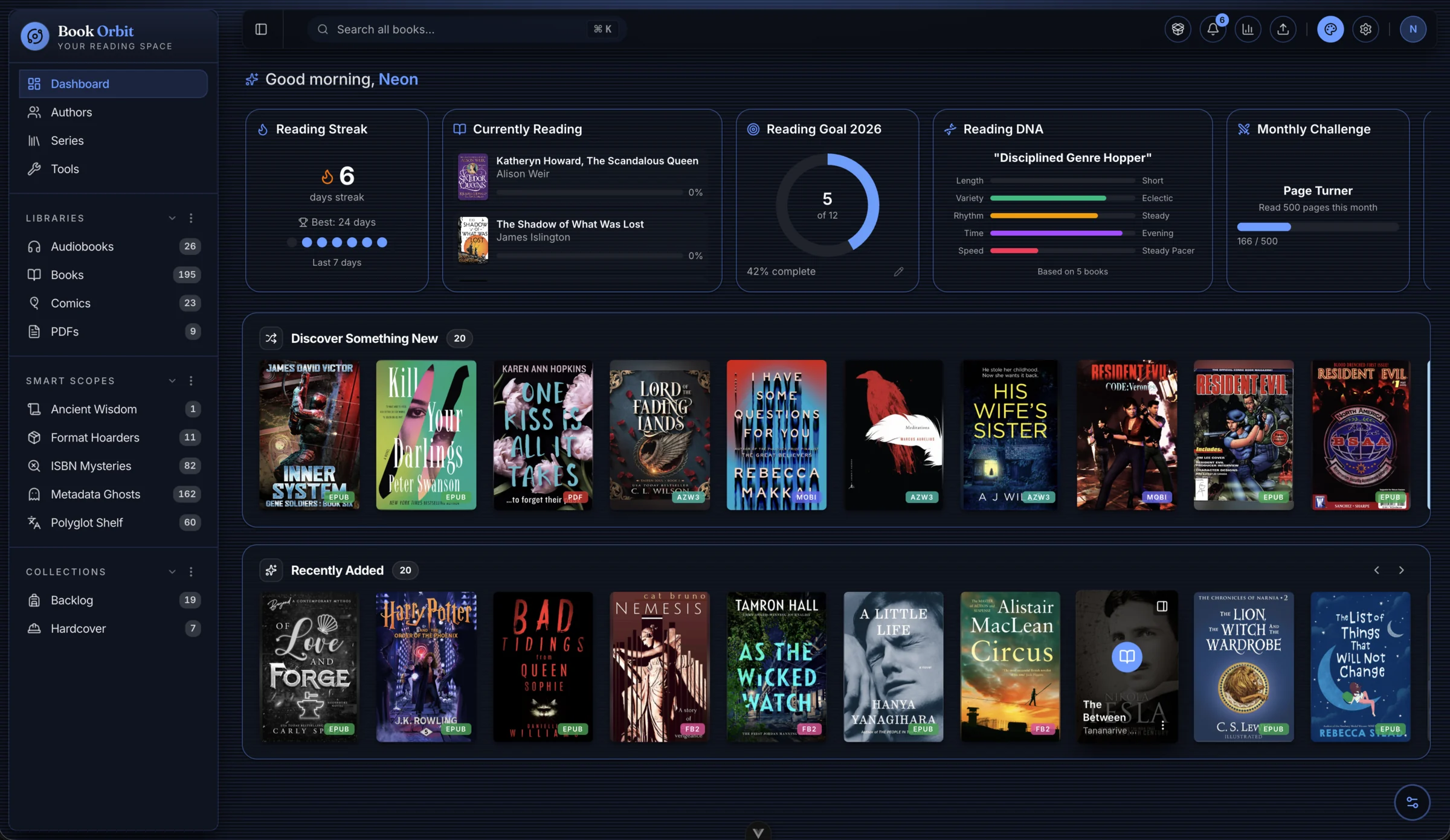
What is BookOrbit?
BookOrbit is a self-hosted digital library and reading platform. Organize and read your books, sync progress and annotations seamlessly across Kobo, KOReader, and the web reader, enrich your collection with metadata from multiple providers, and push reading data to Hardcover automatically. Supports multiple users with OIDC/SSO, detailed reading statistics, OPDS, customizable dashboard widgets, Send-to-Kindle delivery, and Smart Scopes - all running on infrastructure you control.

Live Demo
Want to try BookOrbit before installing? Explore the live instance instantly: no account required!

Experience the interface, built-in readers, and dashboard first-hand.
Note: The demo includes a sample library of public domain books. Some administrative features are limited in the public demo. Self-hosting BookOrbit provides the full experience.
Features
Reading Experience & Sync
- Built-in Web Readers: Native support for eBooks (EPUB, MOBI, AZW3), PDFs, Comics (CBZ, CBR), and Audiobooks (M4B, MP3) with no extra plugins required.
- Three-Way Sync (Kobo + KOReader + BookOrbit): Progress and annotations flow bidirectionally between Kobo devices, KOReader, and the BookOrbit web reader. Pick up on any surface where you left off on another - including highlights and deletes.
- KOReader Plugin: Native on-device catalog browser with search, download, and status/rating management, alongside full progress and annotation sync.
- Annotations & Highlights: Highlights from the web reader, KOReader, and Kobo merge into a unified searchable hub - filterable by color, style, and source, exportable as Markdown, CSV, or JSON.
- Hardcover Sync: Automatically pushes status, progress, reading dates, and ratings to Hardcover on configurable triggers. Pull read history back from Hardcover to backfill blank BookOrbit entries.
- Achievements & Reading Goals: Yearly goals, daily streaks, monthly challenges, and 50+ achievements across five categories. Reading DNA profiles your reading style from your actual session history.
- Reading Statistics: Track your daily reading time, view heatmaps, maintain streaks, and monitor library health.
Library Management
- Multiple Libraries: Isolate content with per-library folders, custom scan rules, and format priorities.
- Rich Metadata Providers: Fetch robust metadata from Google Books, Amazon, Goodreads, Open Library, Audible, ComicVine, and more.
- Smart Scopes & Collections: Organize your collection using curated lists and dynamic, rule-based saved filters.
Platform & Delivery
- Multi-User & SSO: Granular per-user permissions and isolated reading data, with native support for Authentik, Keycloak, and Authelia via OIDC.
- Content Delivery: OPDS support for compatible apps, Send-to-Kindle via email, and browser drag-and-drop uploads.
- Automated Ingestion: Configure a Book Dock drop folder for hands-free importing.
Quick Start (Docker)
mkdir bookorbit && cd bookorbit
mkdir -p books data/app data/postgres
curl -fsSLo .env https://raw.githubusercontent.com/bookorbit/bookorbit/main/.env.example
curl -fsSLo docker-compose.yml https://raw.githubusercontent.com/bookorbit/bookorbit/main/docker-compose.yml
Edit .env and set these required values:
APP_URL=http://your-server-ip:3000   # the URL you'll open in your browser
BOOKS_HOST_PATH=./books              # folder on your server where your book files live

POSTGRES_PASSWORD=         # database password           - openssl rand -hex 24
JWT_SECRET=                # signs login tokens          - openssl rand -hex 32
SETUP_BOOTSTRAP_TOKEN=     # one-time setup wizard token - openssl rand -hex 16
Then start:
docker compose up -d
Open http://your-server-ip:3000 and complete setup using your SETUP_BOOTSTRAP_TOKEN.
For the full installation guide including reverse proxy setup, file permissions on NAS, external databases, and environment variable reference, see bookorbit.app/installation.
KOReader Plugin
The BookOrbit plugin for KOReader adds progress sync, two-way annotation sync, and a native catalog browser: navigate, search, and download books from your library without leaving the device.
- In BookOrbit, go to Settings > Integrations > KOReader and click Download Plugin.
- Unzip
bookorbit.koplugin.zip. - Copy
bookorbit.koplugintokoreader/plugins/on the device. - Restart KOReader and open a book.
- Use Tools > BookOrbit Sync to connect.
The download is pre-configured with your server URL and credentials; no manual entry on the device. For full setup and sync options, see bookorbit.app/koreader-plugin.
Documentation and Contributing
Full documentation is at bookorbit.app - covering libraries, metadata, readers, Kobo sync, OPDS, users and permissions, OIDC setup, and more.
For local development, see docs/DEVELOPMENT.md. To contribute, see docs/CONTRIBUTING.md for the full workflow: branch naming, test expectations, PR checklist, and commit format.
Support
- Questions and discussion: GitHub Discussions
- Bug reports: GitHub Issues
- Feature requests: GitHub Issues
License
BookOrbit is licensed under the GNU Affero General Public License v3.0.
Extension points exported contracts — how you extend this code
IAchievementEvaluator (Interface)Core symbols most depended-on inside this repo
mapShape
Languages
Modules by API surface
Datastores touched
For agents
$ claude mcp add bookorbit \
  -- python -m otcore.mcp_server <graph>